
7.10 数据注解特性--NotMapped
NotMapped特性可以应用到领域类的属性中,Code-First默认的约定,是为所有带有get,和set属性选择器的属性创建数据列。。
NotManpped特性打破了这个约定,你可以使用NotMapped特性到某个属性上面,然后Code-First就不会为这个属性就不会在数据表中创建列了。
我们看一下下面的代码:
using System;
using System.Collections.Generic;
using System.ComponentModel.DataAnnotations;
using System.ComponentModel.DataAnnotations.Schema;
using System.Linq;
using System.Text;
using System.Threading.Tasks;

namespace EF2
{
    [Table("StudentMaster",Schema="WaHaHa")]
   public class Student
    {
        [Key]
        [Column(Order=)]
        public int StudentKey1 { get; set; }

        [Key]
        [Column(Order=)]
        public int StudentKey2 { get; set; }

        [MaxLength()]
        [ConcurrencyCheck]
        [Required]
        [Column(,TypeName="nvarchar")]
        public string StudentName { get; set; }

        [NotMapped()]
        public int? Age { get; set; }

        public int StandardRefId { get; set; }

        [ForeignKey("StandardRefId")]
        public virtual Standard Standard { get; set; }

    }
}
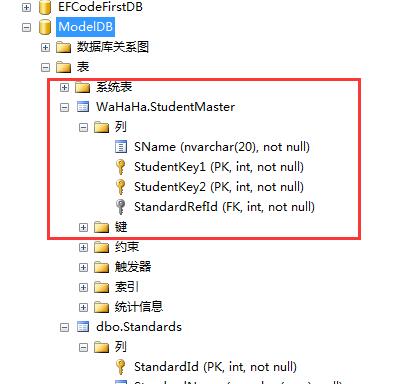
注意到没有,这个表里面没有Age列。
但是如果属性,只有Get属性访问器,或者只有set属性访问器,那么Ef Code-First就不会为它创建数据列了。
请看:
using System;
using System.Collections.Generic;
using System.ComponentModel.DataAnnotations;
using System.ComponentModel.DataAnnotations.Schema;
using System.Linq;
using System.Text;
using System.Threading.Tasks;

namespace EF2
{
    [Table("StudentMaster",Schema="WaHaHa")]
   public class Student
    {
        [Key]
        [Column(Order=)]
        public int StudentKey1 { get; set; }

        [Key]
        [Column(Order=)]
        public int StudentKey2 { get; set; }

        [MaxLength()]
        [ConcurrencyCheck]
        [Required]
        [Column(,TypeName="nvarchar")]
        public string StudentName { get; set; }

        [NotMapped()]
        public int? Age { get; set; }

        public int StandardRefId { get; set; }

        public string FirstName
        {
            get { return FirstName; }
        }

        public int myAge;
        public int MyAge
        {
            set { value = myAge; }
        }

        [ForeignKey("StandardRefId")]
        public virtual Standard Standard { get; set; }

    }
}
得到的数据库还是这个:

7.10 数据注解特性--NotMapped的更多相关文章
- 数据注解特性--NotMapped
NotMapped特性可以应用到领域类的属性中,Code-First默认的约定,是为所有带有get,和set属性选择器的属性创建数据列.. NotManpped特性打破了这个约定,你可以使用NotMa ...
- 9.10 翻译系列:EF数据注解特性之StringLength【EF 6 Code-First系列】
原文链接:https://www.entityframeworktutorial.net/code-first/stringlength-dataannotations-attribute-in-co ...
- 9.9 翻译系列:数据注解特性之--MaxLength 【EF 6 Code-First系列】
原文链接:https://www.entityframeworktutorial.net/code-first/maxlength-minlength-dataannotations-attribut ...
- 9.7 翻译系列:EF数据注解特性之--InverseProperty【EF 6 Code-First系列】
原文链接:https://www.entityframeworktutorial.net/code-first/inverseproperty-dataannotations-attribute-in ...
- 9.3 翻译系列:数据注解特性之Key【EF 6 Code-First 系列】
原文链接:http://www.entityframeworktutorial.net/code-first/key-dataannotations-attribute-in-code-first.a ...
- 9.2 翻译系列:数据注解特性之---Column【EF 6 Code First系列】
原文链接:http://www.entityframeworktutorial.net/code-first/column-dataannotations-attribute-in-code-firs ...
- 9.翻译系列:EF 6以及EF Core中的数据注解特性(EF 6 Code-First系列)
原文地址:http://www.entityframeworktutorial.net/code-first/dataannotation-in-code-first.aspx EF 6 Code-F ...
- 9.1 翻译系列:数据注解特性之----Table【EF 6 Code-First 系列】
原文地址:http://www.entityframeworktutorial.net/code-first/table-dataannotations-attribute-in-code-first ...
- 9.8 翻译系列:数据注解特性之--Required 【EF 6 Code-First系列】
原文链接:https://www.entityframeworktutorial.net/code-first/required-attribute-dataannotations-in-code-f ...
随机推荐
- CSS 基础语法
注:CSS对大小写不敏感,但是如果涉及到与HTML文档一起工作的时候,class和id名称对大小写是敏感的 一.color color:#ff0000; color:#f00; //缩写 color: ...
- HTTP method POST is not supported by this URL
修改提交页面的提交方式,修改method为get(在index页面中html标签 method="get") 示例代码修改后的代码: <form action="s ...
- 利用SSH Filesystem实现远程文件系统
远程文件系统的访问有很多种不同的实现方式,一些常见的连接方式比其它特定情况下的更有用.最著名的一个例子就是微软的通用互联网文件系统(CIFS),它可以容许微软Windows"映射网 ...
- Box-sizing:小身材,大拳头!
国庆回来,很久没写博客了.一来是自己毫无时间,二是最近开发任务特别紧,三是节后综合症,脑子一片空白没有找到写作的原材料.今天,在加完班回来的22点,忙里偷闲,分享一下最近学到的一个小知识点如题.标题的 ...
- AnguarJS 第一天----Hello World
AngularJS是什么? AngularJS是目前很火的前端JS框架之一, AngularJS的开发团队将其描述为一种构建动态Web应用的结构化框架.它是完全使用JavaScript编写的客户端技术 ...
- Ubuntu 16 安装JDK1.8
检查是否JDK已被安装: 上图表示没有安装,创建文件夹: 下载JDK: http://www.oracle.com/technetwork/java/javase/downloads/jdk8-dow ...
- VS2013的 Browser Link 引起的问题
环境:vs2013 问题:在调用一个WebApi的时候出现了错误: 于是我用Fiddler 4直接调用这个WebApi,状态码是200(正常的),JSon里却提示在位置9409处文本非法, 以Text ...
- Eclipse 调试技巧
条件断点 顾名思义,是指当发生某种情况或者触发某种条件的情况下命中断点.常用的情形就是for循环中某个变量为xx值的时候命中断点类似的. 做法1:在debug视图中,BreakPoint View将所 ...
- Eclipse 常用快捷键 (动画讲解)
Eclipse有强大的编辑功能, 工欲善其事,必先利其器, 掌握Eclipse快捷键,可以大大提高工作效率. 编辑相关快捷键 注释 Ctrl + / 快速修复 Ctrl + ...
- 【Win10应用开发】自定义桌面壁纸
调用通用的API来设置桌面壁纸,是一件既简单又有趣的事情,结合XAML可以生成图像的特性,你甚至可以做一个应用,让用户用他所拍的照片做成一张自定义壁纸,然后作为桌面壁纸. 这个API是通用的,应用运行 ...