
【Azure Developer】使用 adal4j(Azure Active Directory authentication library for Java)如何来获取Token呢
问题描述
使用中国区的Azure,在获取Token时候,参考了 adal4j的代码,在官方文档中,发现了如下的片段代码:
ExecutorService service = Executors.newFixedThreadPool(1);

AuthenticationContext context = new AuthenticationContext(AUTHORITY, false, service);

Future<AuthenticationResult> future = context.acquireToken(

    "https://graph.windows.net", YOUR_TENANT_ID, username, password,

    null);

AuthenticationResult result = future.get();

System.out.println("Access Token - " + result.getAccessToken());

System.out.println("Refresh Token - " + result.getRefreshToken());

System.out.println("ID Token - " + result.getIdToken());
以上代码中,有一些参数很不明确:
1)AUTHORITY, 是什么意思呢?
2)acquireTokne方法中的 https://graph.windows.net 是指向global azure的资源,如果是中国区azure的资源,那么resource url是多少呢?
3)YOUR_TENANT_ID,它的值是什么呢?
问题解答
第一个问题:AUTHORITY, 是什么意思,它的值是什么呢?
AUTHORITY,表示认证的主体,它是一个URL,表示可以从该主体中获取到认证Token。 它的格式为:https://<authority host>/<tenant id> ,所以在使用Azure的过程中,根据Azure环境的不同,Host 有以下四个值。
- AzureChina :The host of the Azure Active Directory authority for tenants in the Azure China Cloud. AZURE_CHINA = "login.chinacloudapi.cn"
- AzureGermany: The host of the Azure Active Directory authority for tenants in the Azure German Cloud. AZURE_GERMANY = "login.microsoftonline.de"
- AzureGovernment: The host of the Azure Active Directory authority for tenants in the Azure US Government Cloud. AZURE_GOVERNMENT = "login.microsoftonline.us"
- AzurePublicCloud: The host of the Azure Active Directory authority for tenants in the Azure Public Cloud. AZURE_PUBLIC_CLOUD = "login.microsoftonline.com"
所以,这里我们需要使用的值为:String AUTHORITY = "https://login.chinacloudapi.cn/<tenant id >";
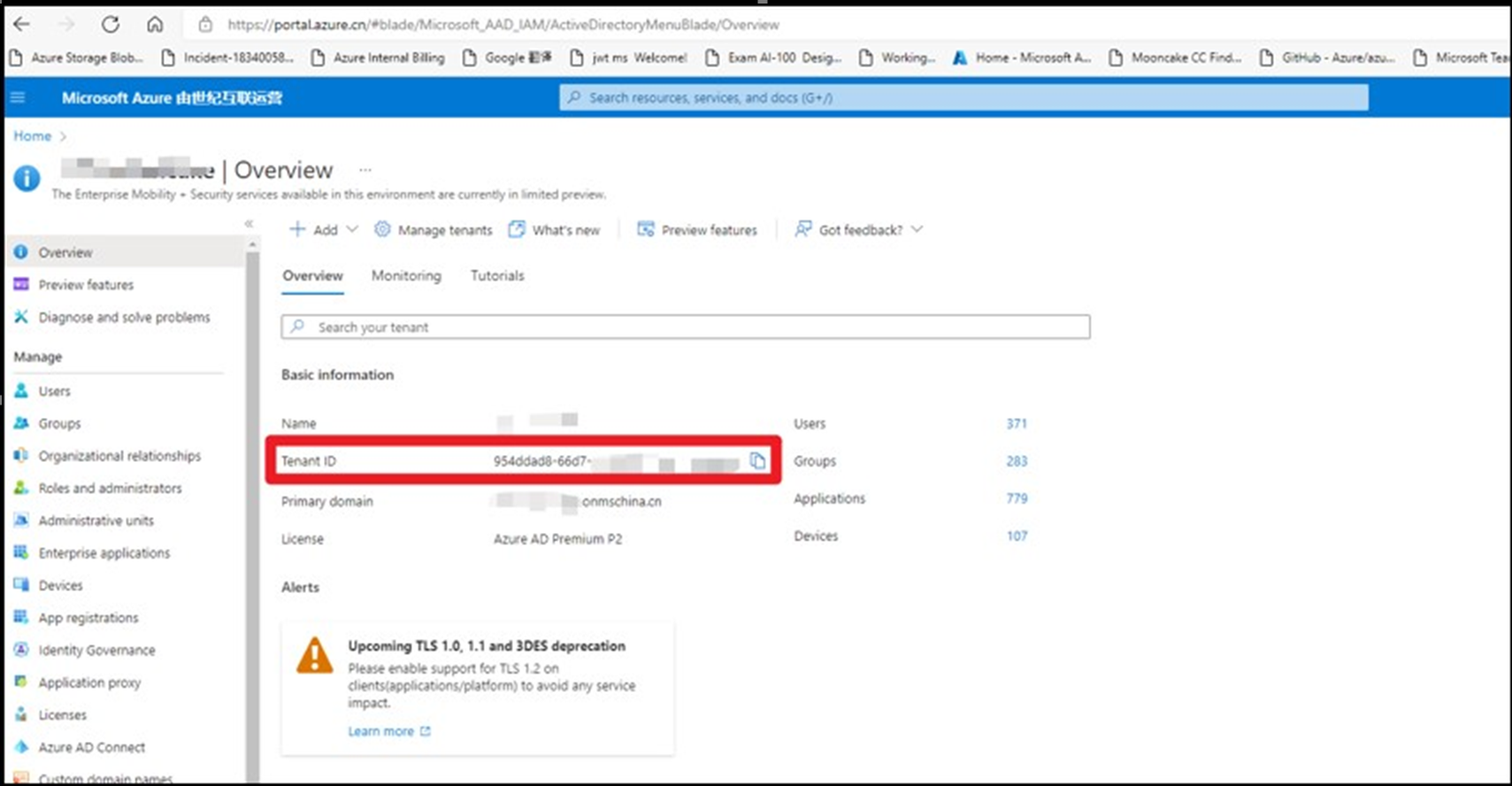
那么如何来获取Tenant ID呢?
登录到Azure门户 --> 进入AAD中,在Overview页面查看Tenant ID (https://portal.azure.cn/#blade/Microsoft_AAD_IAM/ActiveDirectoryMenuBlade/Overview)
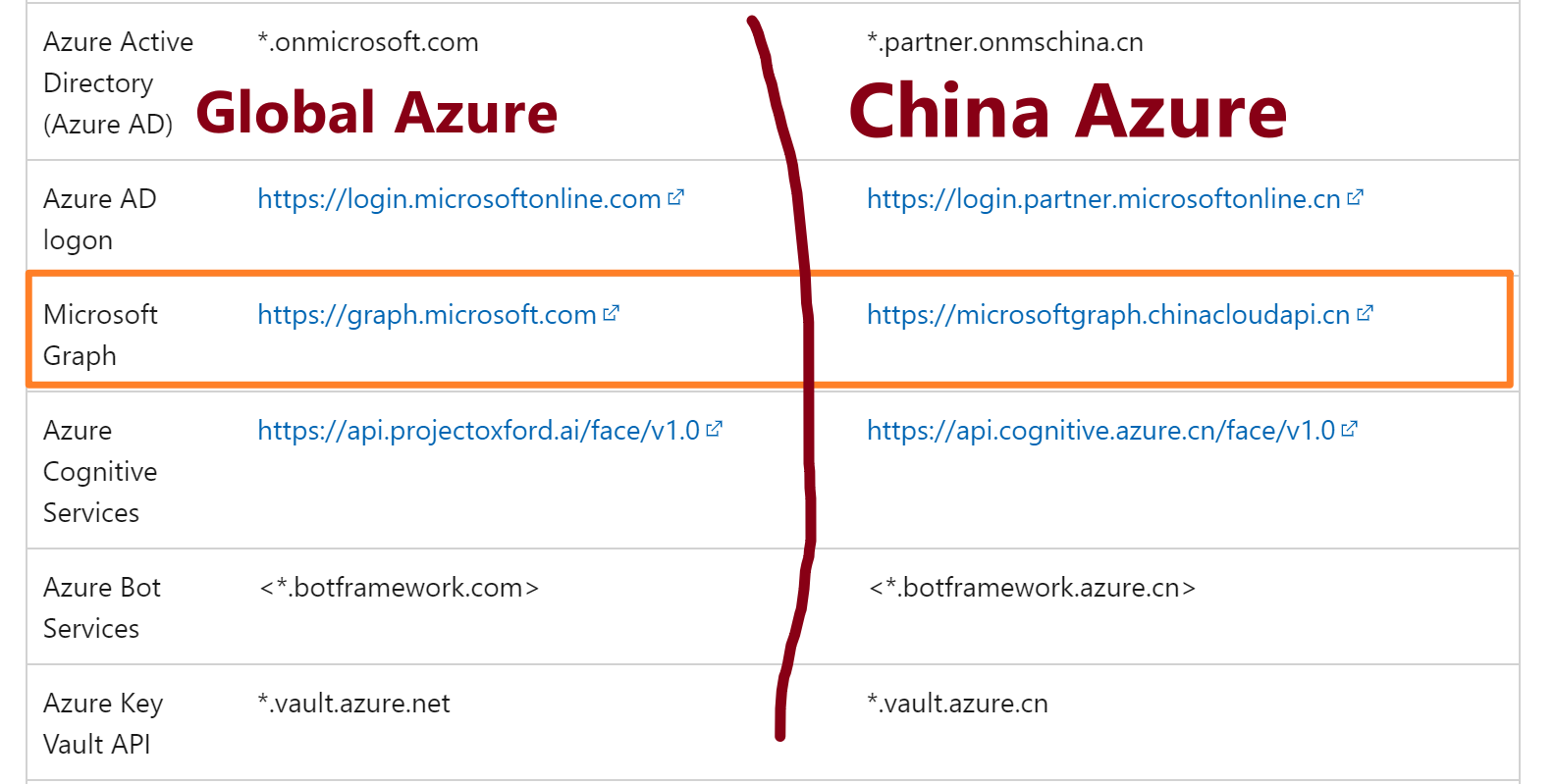
第二个问题:acquireTokne方法中的 https://graph.windows.net 是指向global azure的资源,如果是中国区azure的资源,那么resource url是多少呢?
根据中国区Azure的开发文档,并没有查找到对应于 graph.windows.net的中国区Graph 终结点。但是,中国区Graph 的终结点为:microsoftgraph.chinacloudapi.cn,所以,以上示例中应该使用的值应是:
第三个问题:YOUR_TENANT_ID,它的值是什么呢?
在对比了adal4j的源代码后,在acquireToken方法定义中,发现YOUR_TENANT_ID所对应的值应该是 clientId ()。所以,官网参考文档中的YOUR_TENANT_ID存在误导情景。需要修改为YOUR_CLIENT_ID。
ADAL4J中acquireToken源码(acquireToken有多个重载,但此处只列举出代码中使用的这个重载)
    /**

     * Acquires a security token from the authority using a Refresh Token

     * previously received.

     *

     * @param clientId

     *            Name or ID of the client requesting the token.

     * @param resource

     *            Identifier of the target resource that is the recipient of the

     *            requested token. If null, token is requested for the same

     *            resource refresh token was originally issued for. If passed,

     *            resource should match the original resource used to acquire

     *            refresh token unless token service supports refresh token for

     *            multiple resources.

     * @param username

     *            Username of the managed or federated user.

     * @param password

     *            Password of the managed or federated user.

     * @param callback

     *            optional callback object for non-blocking execution.

     * @return A {@link Future} object representing the

     *         {@link AuthenticationResult} of the call. It contains Access

     *         Token, Refresh Token and the Access Token's expiration time.

     */

    public Future<AuthenticationResult> acquireToken(final String resource,

            final String clientId, final String username,

            final String password, final AuthenticationCallback callback) {

        if (StringHelper.isBlank(resource)) {

            throw new IllegalArgumentException("resource is null or empty");

        }

        if (StringHelper.isBlank(clientId)) {

            throw new IllegalArgumentException("clientId is null or empty");

        }

        if (StringHelper.isBlank(username)) {

            throw new IllegalArgumentException("username is null or empty");

        }

        if (StringHelper.isBlank(password)) {

            throw new IllegalArgumentException("password is null or empty");

        }

        return this.acquireToken(new AdalAuthorizatonGrant(

                new ResourceOwnerPasswordCredentialsGrant(username, new Secret(

                        password)), resource), new ClientAuthenticationPost(

                ClientAuthenticationMethod.NONE, new ClientID(clientId)),

                callback);

    }
所以,这里指定的Client ID 其实是,AAD中所注册的一个应用(服务主体),而这个主体可以根据需求授予不同的权限,acquireToken就是根据用户验证成功后,生成这个主题所拥有的权限JWT令牌(Token),获取到Token后,就拥有了访问Azure中资源API的授权.
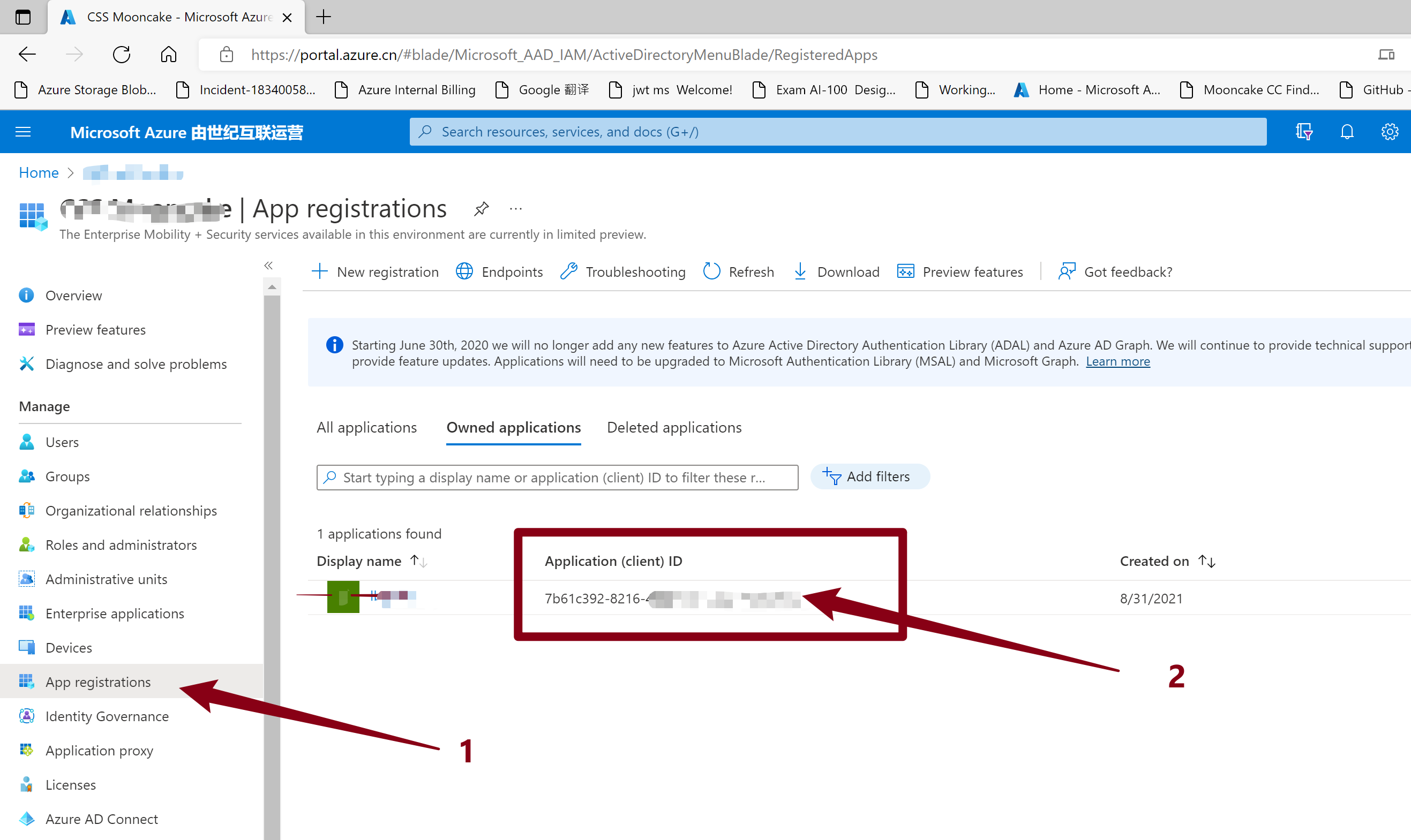
如何来获取这个Client ID呢?
- 进入AAD, 选择注册应用( App Registrations:https://portal.azure.cn/#blade/Microsoft_AAD_IAM/ActiveDirectoryMenuBlade/RegisteredApps)
- 并在Onwed Applications 中选择,进入详细页面或就是当前页面,获取Application(Client) ID
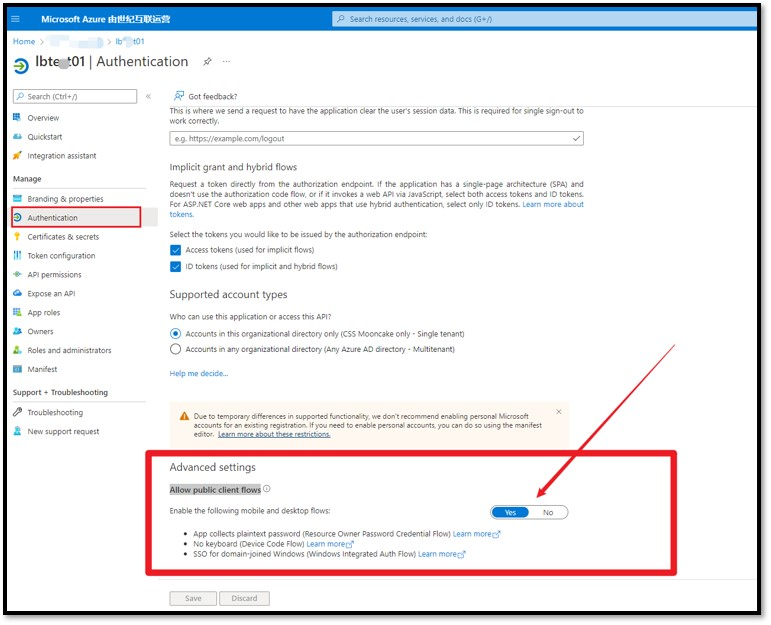
特别注意:这个App必须开启 “Allow public client flows“ 才能成功获取到 Token。 默认情况下,这里选择的是No。 如果不开启这一步,将会收到错误消息:"error_description":"AADSTS7000218: The request body must contain the following parameter: 'client_assertion' or 'client_secret'.
开启方式为:点击这个App的名称,进入详细页面,选择Authentication,滑动到最底部,选择“Allow public client flows”。
完成参考实例代码
1:在POM.XML文件中添加adal4j依赖
    <dependency>

      <groupId>com.microsoft.azure</groupId>

      <artifactId>adal4j</artifactId>

      <version>1.2.0</version>

  </dependency>
2:示例代码
package com.example;

import java.net.MalformedURLException;

import java.util.concurrent.ExecutionException;

import java.util.concurrent.ExecutorService;

import java.util.concurrent.Executors;

import java.util.concurrent.Future;

import com.microsoft.aad.adal4j.AuthenticationContext;

import com.microsoft.aad.adal4j.AuthenticationResult;

/**

 * Hello world!

 *

 */

public class App {

    public static void main(String[] args) throws InterruptedException, ExecutionException, MalformedURLException {

        System.out.println("Hello World!");

        ExecutorService service = Executors.newFixedThreadPool(1);

        String AUTHORITY = "https://login.chinacloudapi.cn/<tenant id >"; // AzureAuthority

        String YOUR_Client_ID="7b61c392-xxxx-xxxx-xxxx-xxxxxxxxxxx";

        String username = "xxxx@xxxx.xxx.onmschina.cn";

        String password = "xxxxxxxxxxx";

        AuthenticationContext context = new AuthenticationContext(AUTHORITY, false, service);

        Future<AuthenticationResult> future = context.acquireToken("https://microsoftgraph.chinacloudapi.cn/", YOUR_Client_ID,

                username, password, null);

        AuthenticationResult result = future.get();

        System.out.println("Access Token - " + result.getAccessToken());

        System.out.println("Refresh Token - " + result.getRefreshToken());

        System.out.println("ID Token - " + result.getIdToken());

    }

}
(PS: 使用的 username, password就是登录Azure的用户名和密码)
测试结果:
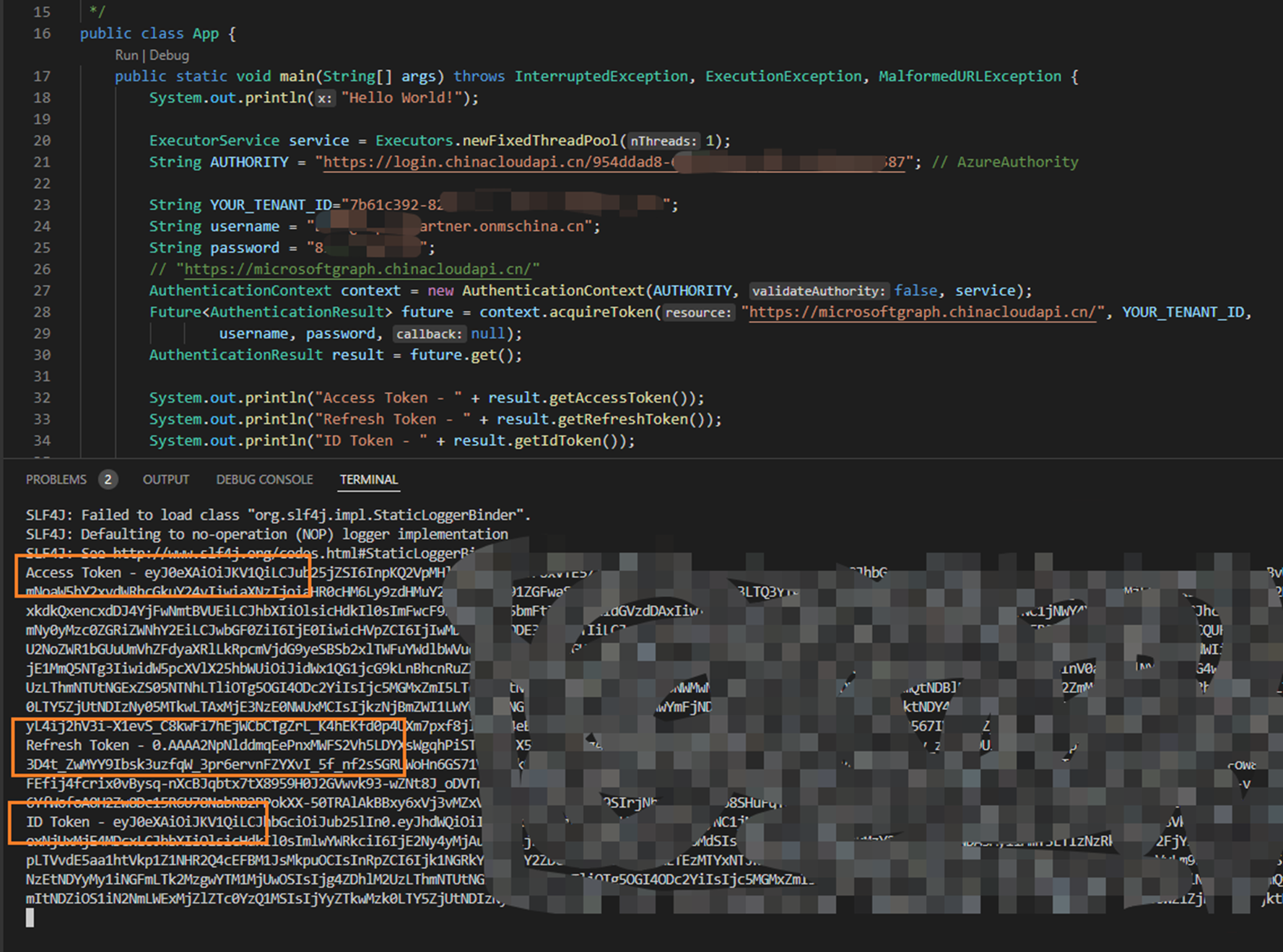
获取Token成功。
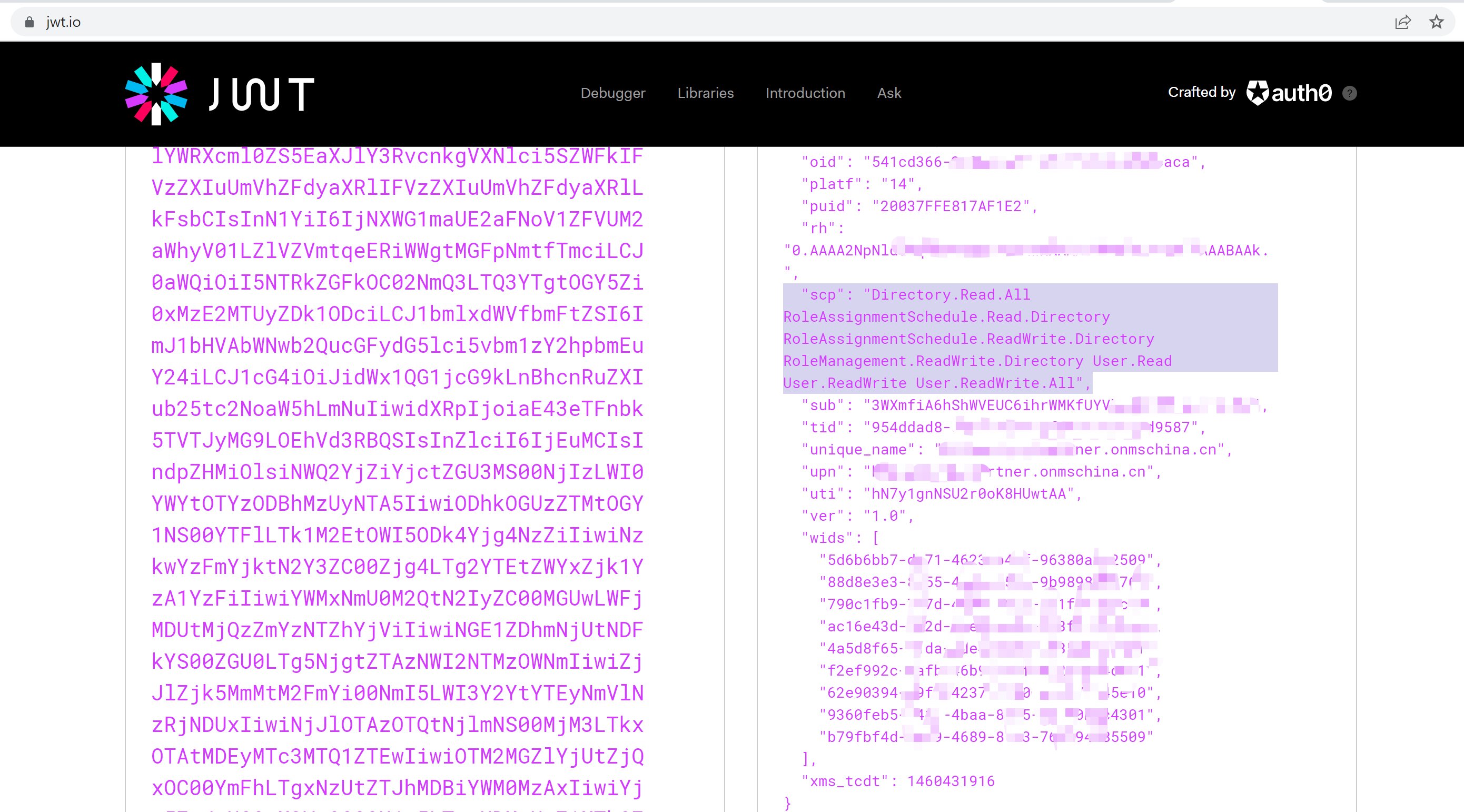
可以通过一个公用网站 jwt.io 来解析Token: https://jwt.io/, 它可以解析出Token内容,让我们可读。
参考资料
Azure China developer guide:https://docs.microsoft.com/en-us/azure/china/resources-developer-guide#check-endpoints-in-azure
Azure Active Directory libraries for Java: https://docs.microsoft.com/en-us/java/api/overview/azure/activedirectory?view=azure-java-stable#client-library
【Azure Developer】使用 adal4j(Azure Active Directory authentication library for Java)如何来获取Token呢的更多相关文章
- Enabling Active Directory Authentication for VMWare Server running on Linux《转载》
Enabling Active Directory Authentication for VMWare Server running on Linux Version 0.2 - Adam Breid ...
- Weblogic中配置Active Directory Authentication Provider
其要点或者容易出错的关键点是:(<>及其中说明代表需要替换的内容) Host: ads.yourdomain.com Host填AD服务器的域名或IP ...
- 【Azure Developer】通过Azure提供的Azue Java JDK 查询虚拟机的CPU使用率和内存使用率
问题描述 在Azure上创建虚拟机(VM)后,在门户上可以查看监控指标(Metrics),如CPU Usage,Memory,Disk I/O等.那如何通过Java 代码获取到这些指标呢? 关于VM ...
- 【Azure Developer】解决Azure Key Vault管理Storage的示例代码在中国区Azure遇见的各种认证/授权问题 - C# Example Code
问题描述 使用Azure密钥保管库(Key Vault)来托管存储账号(Storage Account)密钥的示例中,从Github中下载的示例代码在中国区Azure运行时候会遇见各种认证和授权问题, ...
- Active Directory Authentication in ASP.NET MVC 5 with Forms Authentication and Group-Based Authorization
I know that blog post title is sure a mouth-full, but it describes the whole problem I was trying to ...
- SQL Server ->> 使用Azure Active Directory Authentication连接到Azure SQL Database
SQL Server 2016以后支持Azure AD集成验证,这当中有些数据驱动必须在高版本才可以使用,支持的包括sqlcmd,SSDT,JDBC,ODBC,SSMS等. 对于SSIS来讲,我们需要 ...
- 【Azure Developer】使用 Azure Python SDK时,遇见 The resource principal named https://management.azure.com was not found in the tenant China Azure问题的解决办法
问题描述 在使用Python SDK时候,登录到China Azure (Mooncake)并访问AlertsManagement资源时候,时常遇见 EnvironmentCredential: A ...
- 【Azure Developer】在Azure Resource Graph Explorer中查看当前订阅下的所有资源信息列表并导出(如VM的名称,IP地址内网/公网,OS,区域等)
问题描述 通过Azure的Resource Graph Explorer(https://portal.azure.cn/#blade/HubsExtension/ArgQueryBlade),可以查 ...
- 【Azure Developer】使用Azure PubSub服务示例代码时候遇见了.NET 6.0的代码转换问题
问题描述 当本地环境中安装.NET 6.0后,用指令 dotnet new web 或 dotnet new console 生成的项目,使用的都是新模板生成的Program.cs文件.里面去掉了n ...
随机推荐
- 如何获取 topic 主题的列表?
bin/kafka-topics.sh --list --zookeeper localhost:2181
- SpringDataJdbc整合MyBatis方式
由于官方文档springdatajdbc整合mybatis过于简述,导致死磕了一段时间, SpringDataJdbc整合Mybatis的官方文档:https://docs.spring.io/spr ...
- LVS集群和Keepalived高可用实战
第四十章LVS集群和Keepalived高可用实战 一.ARP协议 1.概念 地址解析协议,即ARP(AddressResolutionProtocol),是根据IP地址获取物理MAC地址的一个TCP ...
- 学习 Haproxy (六)
HAProxy HAProxy是免费 高效 可靠的高可用及负载均衡解决方案,该软件非常适合于处理高负载站点的七层数据请求,HAProxy的工作模式使其可以非常容易且安全地集成到我们现有的站点架构中.使 ...
- Tomcat警告之“资源添加到Web应用程序[]的缓存中,因为在清除过期缓存条目后可用空间仍不足 - 请考虑增加缓存的最大空间”
原因 缓存不够,可以将其缓存调大 解决办法: 在 /conf/context.xml 的 前添加以下内容: <Resources cachingAllowed="true" ...
- Kali Linux 下安装配置MongoDB数据库 ubuntu 下安装配置MongoDB源码安装数据库
Kali Linux 下安装配置MongoDB数据库 1.下载mongodb.tgz 压缩包: 2.解压到:tar -zxvf mongodb.tgz /usr/local/mongodb 3.创 ...
- python中类变量和实例变量的区别
类变量:可在类的所有实例之间共享的值(也就是说,它们不是单独分配给每个实例的).实例变量:实例化之后,每个实例单独拥有的变量. class student(): age = 0 name = 'stu ...
- 使用jenkins实现前端自动化打包部署(Linux版本)
我们这边好多小组觉得每次测试人员叫我们开发打包部署到某某个测试环境人工操作比较麻烦,因为他们想做到只专注于开发,不管这些琐碎的事.于是有个组长问我前端能不能用Jenkins去执行这一个固定的流程,因为 ...
- 一个html标签到底包含了多少信息(1)
先来看一段代码: var dom = document.querySelector('body'); for(var i in dom){ console.log(i,dom[i]) } 可以看到很多 ...
- token的工作原理及其功能
一.前言 登录模块是我们在前端项目中一定会有的模块,模块中有一个重要的部分是用户登录验证,对于验证用户是否登录过,我们直接处理办法是检查缓存中是否存在token值,若存在则用户可直接登录,反之,用户需 ...