
FreeMarker整合Spring 3(转)
开发环境:
System:Windows
WebBrowser:IE6+、Firefox3+
JavaEE Server:tomcat5.0.2.8、tomcat6
IDE:eclipse、MyEclipse 8
开发依赖库:
JavaEE5、Spring 3.0.0.M4、FreeMarker 2.3.16
Email:hoojo_@126.com
Blog:http://blog.csdn.net/IBM_hoojo
1、 新建WebProject,工程名称是SpringFreemarker;然后手动添加jar包,需要的jar包如下:
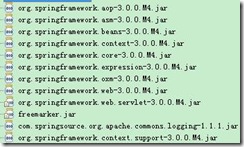
SpringFramework jar包下载地址:
FreeMarker library下载地址:
当然你也可以去官方下载
2、 在web.xml中添加如下配置:
<!-- 加载Spring容器配置 -->
<listener>
<listener-class>org.springframework.web.context.ContextLoaderListener</listener-class>
</listener>
<!-- 设置Spring容器加载配置文件路径 -->
<context-param>
<param-name>contextConfigLocation</param-name>
<param-value>classpath*:applicationContext-*.xml</param-value>
</context-param>
<servlet>
<servlet-name>dispatcher</servlet-name>
<servlet-class>org.springframework.web.servlet.DispatcherServlet</servlet-class>
<init-param>
<param-name>contextConfigLocation</param-name>
<param-value>/WEB-INF/dispatcher.xml</param-value>
</init-param>
<load-on-startup>1</load-on-startup>
</servlet>
<servlet-mapping>
<servlet-name>dispatcher</servlet-name>
<url-pattern>*.do</url-pattern>
</servlet-mapping>
上面分别是添加Spring的监听器、以及配置Spring的配置文件、还有SpringMVC的控制器;
3、 在WEB-INF中添加文件dispatcher.xml,和web.xml中的对应。内容如下:
<?xml version="1.0" encoding="UTF-8"?>
<beans xmlns="http://www.springframework.org/schema/beans"
xmlns:mvc="http://www.springframework.org/schema/mvc" xmlns:context="http://www.springframework.org/schema/context"
xmlns:util="http://www.springframework.org/schema/util" xmlns:xsi="http://www.w3.org/2001/XMLSchema-instance"
xsi:schemaLocation="http://www.springframework.org/schema/beans >
http://www.springframework.org/schema/beans/spring-beans-3.0.xsd
http://www.springframework.org/schema/mvc
http://www.springframework.org/schema/mvc/spring-mvc-3.0.xsd
http://www.springframework.org/schema/context
http://www.springframework.org/schema/context/spring-context-3.0.xsd
http://www.springframework.org/schema/util
http://www.springframework.org/schema/util/spring-util-3.0.xsd"
<context:component-scan base-package="com.hoo" />
<!-- annotation的方法映射适配器
<bean id="handlerAdapter" class="org.springframework.web.servlet.mvc.annotation.AnnotationMethodHandlerAdapter"/>
-->
<!-- annotation默认的方法映射适配器 -->
<bean id="handlerMapping" class="org.springframework.web.servlet.mvc.annotation.DefaultAnnotationHandlerMapping"/>
<bean class="org.springframework.web.servlet.view.InternalResourceViewResolver">
<property name="viewClass" value="org.springframework.web.servlet.view.JstlView"/>
</bean>
</beans>
上面是SpringMVC的基本配置
4、 在src中添加applicationContext-beans.xml,内容如下:
<?xml version="1.0" encoding="UTF-8"?>
<beans xmlns="http://www.springframework.org/schema/beans"
xmlns:xsi="http://www.w3.org/2001/XMLSchema-instance"
xmlns:aop="http://www.springframework.org/schema/aop"
xmlns:tx="http://www.springframework.org/schema/tx"
xmlns:util="http://www.springframework.org/schema/util"
xmlns:context="http://www.springframework.org/schema/context"
xsi:schemaLocation="http://www.springframework.org/schema/beans >
http://www.springframework.org/schema/beans/spring-beans-3.0.xsd
http://www.springframework.org/schema/aop
http://www.springframework.org/schema/aop/spring-aop-3.0.xsd
http://www.springframework.org/schema/tx
http://www.springframework.org/schema/tx/spring-tx-3.0.xsd
http://www.springframework.org/schema/util
http://www.springframework.org/schema/util/spring-util-3.0.xsd
http://www.springframework.org/schema/context
http://www.springframework.org/schema/context/spring-context-3.0.xsd"
</beans>
里面可以添加一些bean的配置
5、 在src目录添加freemarker.properties配置文件,这个文件是freemarker一些常用的转换,内容如下:
tag_syntax=auto_detect
template_update_delay=2
default_encoding=UTF-8
output_encoding=UTF-8
locale=zh_CN
date_format=yyyy-MM-dd
time_format=HH:mm:ss
datetime_format=yyyy-MM-dd HH:mm:ss
6、 在dispatcher.xml中添加freemarker的配置,配置如下:
<!-- 设置freeMarker的配置文件路径 -->
<bean id="freemarkerConfiguration" class="org.springframework.beans.factory.config.PropertiesFactoryBean">
<property name="location" value="classpath:freemarker.properties"/>
</bean>
<!-- 配置freeMarker的模板路径 -->
<bean id="freemarkerConfig" class="org.springframework.web.servlet.view.freemarker.FreeMarkerConfigurer">
<!--property name="freemarkerSettings" ref="freemarkerConfiguration"/-->
<property name="templateLoaderPath">
<value>/WEB-INF/ftl/</value>
</property>
<property name="freemarkerVariables">
<map>
<entry key="xml_escape" value-ref="fmXmlEscape" />
</map>
</property>
</bean>
<bean id="fmXmlEscape" class="freemarker.template.utility.XmlEscape"/>
<!-- 配置freeMarker视图解析器 -->
<bean id="viewResolver" class="org.springframework.web.servlet.view.freemarker.FreeMarkerViewResolver">
<property name="viewClass" value="org.springframework.web.servlet.view.freemarker.FreeMarkerView"/>
<property name="viewNames" value="*.ftl"/>
<property name="contentType" value="text/html; charset=utf-8"/>
<property name="cache" value="true" />
<property name="prefix" value="" />
<property name="suffix" value="" />
<property name="order" value="2"/>
</bean>
上面最关键的就是freeMarker的视图解析器viewResolver的配置,viewClass是使用哪个视图解析器,这里是类路径;其他的和jsp的视图解析器都很类似。
7、 下面在WEB-INF中添加2个ftl模板,在WEB-INF添加ftl,然后添加hello.ftl/hi.ftl,内容分别是:
hello.ftl
<html>
<body>
<h1>say hello ${name}</h1><br/>
${(1 == 1)?string("yes", "no")}
</body>
</html>
hi.ftl
<html>
<body>
<h1>say hello ${name}</h1><br/>
${(1 != 1)?string("yes", "no")}
</body>
</html>
8、 添加Controller控制器,代码如下:
package com.hoo.controller;
import org.springframework.stereotype.Controller;
import org.springframework.ui.ModelMap;
import org.springframework.web.bind.annotation.RequestMapping;
/**
* <b>function:</b> FreeMarker示例控制器
* @author hoojo
* @createDate 2011-3-3 下午04:50:10
* @file HelloWorldController.java
* @package com.hoo.controller
* @project SpringFreemarker
* @version 1.0
*/
@Controller
@RequestMapping("/freeMarker")
public class HelloWorldController {
@RequestMapping("/hello")
public String sayHello(ModelMap map) {
System.out.println("say Hello ……");
map.addAttribute("name", " World!");
return "/hello.ftl";
}
@RequestMapping("/hi")
public String sayHi(ModelMap map) {
System.out.println("say hi ……");
map.put("name", "jojo");
return "/hi.ftl";
}
@RequestMapping("/jsp")
public String jspRequest(ModelMap map) {
System.out.println("jspRequest ……");
map.put("name", "jsp");
return "/temp.jsp";
}
}
9、 添加index.jsp的测试链接或temp.jsp的内容:
index.jsp
<body>
<a href="freeMarker/hello.do">say hello</a><br/>
<a href="freeMarker/hi.do">say hi</a><br/>
<a href="freeMarker/jsp.do">jspRequest</a>
</body>
temp.jsp
<body>
<h3>${name }</h3>
</body>
如果运行无错误,并输出正确的结果就整合成功!~.~
http://www.cnblogs.com/hoojo/archive/2011/04/19/2020551.html
FreeMarker整合Spring 3(转)的更多相关文章
- spring源码分析之freemarker整合
FreeMarker是一款模板引擎: 即一种基于模板和要改变的数据, 并用来生成输出文本(HTML网页.电子邮件.配置文件.源代码等)的通用工具. 它不是面向最终用户的,而是一个Java类库,是一款程 ...
- 【FreeMarker】Spring MVC与FreeMarker整合(二)
前一篇介绍了FreeMarker的基本使用,本例介绍Spring MVC与FreeMarker整合 不熟悉项目搭建,可参考 [FreeMarker]FreeMarker快速入门(一) 整合 1.新建S ...
- SpringMVC+spring-security+sitemesh+hibernate+freemarker整合-转
http://www.oschina.net/code/snippet_170632_46774 代码分享 当前位置: 代码分享 » Java » Web编程 搜 索 SpringMVC+spr ...
- sonne_game网站开发03 spring-mvc+freemarker整合
今天的任务就是在spring+mybatis+springmvc的基础上,将freemarker整合进来. freemarker是什么? freemarker是一种模板引擎.它的目的是基于模板和数据, ...
- SpringMVC和Freemarker整合,带自定义标签的使用方法
SpringMVC和Freemarker整合,带自定义标签的使用方法. [参考来源:http://www.360doc.com/content/14/1225/14/1007797_435663342 ...
- springMVC与freemarker整合
准备好的环境:Maven工程整合好了ssm,即spring+springMVC+mybatis.接下来准备将springMVC与freemarker整合,以html文件为模板. 一,加入freemar ...
- spring-mvc+freemarker整合(sonne_game网站开发03)
今天的任务就是在spring+mybatis+springmvc的基础上,将freemarker整合进来. freemarker是什么? freemarker是一种模板引擎.它的目的是基于模板和数据, ...
- 【Java EE 学习 81】【CXF框架】【CXF整合Spring】
一.CXF简介 CXF是Apache公司下的项目,CXF=Celtix+Xfire:它支持soap1.1.soap1.2,而且能够和spring进行快速无缝整合. 另外jax-ws是Sun公司发布的一 ...
- Mybatis整合Spring
根据官方的说法,在ibatis3,也就是Mybatis3问世之前,Spring3的开发工作就已经完成了,所以Spring3中还是没有对Mybatis3的支持.因此由Mybatis社区自己开发了一个My ...
随机推荐
- EF 打造冲不掉的标签
应用场景: 在用EF的Datebase Fitst模式开发时,实体都是有T4文件根据数据库来生成,并且是每次保存都会重新生成,如果我们在有T4生成的实体类上加上验证标签,那么以保存就会丢失, 解决方案 ...
- hdu4003(树形dp)
题目链接:http://acm.hdu.edu.cn/showproblem.php?pid=4003 题意:给定一棵n个节点的树,遍历每条数边都需要费用cost,现在给定k个机器人,要求用这个k个机 ...
- Cocos2d-x Tiled地图编辑器(一)基本使用
Tiled地图编辑器支持普通视角地图和45度角地图, 它生成的地图数据文件cocos2d-x完美的支持,Tiled地图编辑器是一个以普通使用为目标地图编辑器,它使用简单而且能够轻松地在不同的游戏引擎中 ...
- javaScript滚动新闻
<!DOCTYPE HTML> <html> <head> <meta http-equiv="Content-Type" content ...
- evnetlet hub
hub 是 Eventlet's event loop的主要部分,用于分配I/O 事件 和调度绿色线程. Eventlet 有多种hub实现,现支持一下几种: epoll poll selects p ...
- 采用Bash脚本性能监控过程
为一个Linux过程监控,采用Bash脚本. 采用ps命令的过程监控,使用周期加上连续监测的睡眠时间. 使用方法: psmonitor.sh -p [pid] -d [interval] -n [st ...
- Windows Phone开发(44):推送通知第二集——磁贴通知
原文:Windows Phone开发(44):推送通知第二集--磁贴通知 前面我们说了第一个类型--Toast通知,这玩意儿不知大家是不是觉得很新鲜,以前玩.NET编程应该没接触过吧? 其实这东西绝对 ...
- 线程锁的概念函数EnterCriticalSection和LeaveCriticalSection的使用方法
线程锁的概念函数EnterCriticalSection和LeaveCriticalSection的使用方法 注:使用结构CRITICAL_SECTION 需增加头文件#include “afxmt. ...
- Android build-tools升级到23.0.0_rc1无法解决编译后的问题
背景 作为项目要改变android studio,它采取了.他们主动向我,结果下载了最新的build-tools 23.0.0_rc1,然后,当我再次使用eclipse不了了.git reset了n次 ...
- Linux/Unix使用valgrind内存泄漏检测
c\c++程序设计.内存管理是一个比较头疼的问题.相信它会导致内存泄漏.除了外部养成良好的编程习惯(使用智能指针),使用该工具还可以帮助检测内存泄漏,valgrind这是Unix\Linux在一个很好 ...