
.NetCore 分页控件实现原理处理以及条件分页处理
说明
自定义一个类继承TagHelper,注意自定义类的 必须以TagHelper结尾,这个有点类是属性 Attribute的写法
protected TagHelper();

        //

        // 摘要:

        //     When a set of Microsoft.AspNetCore.Razor.TagHelpers.ITagHelpers are executed,

        //     their Microsoft.AspNetCore.Razor.TagHelpers.TagHelper.Init(Microsoft.AspNetCore.Razor.TagHelpers.TagHelperContext)'s

        //     are first invoked in the specified Microsoft.AspNetCore.Razor.TagHelpers.TagHelper.Order;

        //     then their Microsoft.AspNetCore.Razor.TagHelpers.TagHelper.ProcessAsync(Microsoft.AspNetCore.Razor.TagHelpers.TagHelperContext,Microsoft.AspNetCore.Razor.TagHelpers.TagHelperOutput)'s

        //     are invoked in the specified Microsoft.AspNetCore.Razor.TagHelpers.TagHelper.Order.

        //     Lower values are executed first.

        //

        // 备注:

        //     Default order is 0.

        public virtual int Order { get; }

        //

        // 摘要:

        //     Initializes the Microsoft.AspNetCore.Razor.TagHelpers.ITagHelper with the given

        //     context. Additions to Microsoft.AspNetCore.Razor.TagHelpers.TagHelperContext.Items

        //     should be done within this method to ensure they're added prior to executing

        //     the children.

        //

        // 参数:

        //   context:

        //     Contains information associated with the current HTML tag.

        //

        // 备注:

        //     When more than one Microsoft.AspNetCore.Razor.TagHelpers.ITagHelper runs on the

        //     same element, TagHelperOutput.GetChildContentAsync may be invoked prior to Microsoft.AspNetCore.Razor.TagHelpers.TagHelper.ProcessAsync(Microsoft.AspNetCore.Razor.TagHelpers.TagHelperContext,Microsoft.AspNetCore.Razor.TagHelpers.TagHelperOutput).

        public virtual void Init(TagHelperContext context);

        //

        // 摘要:

        //     Synchronously executes the Microsoft.AspNetCore.Razor.TagHelpers.TagHelper with

        //     the given context and output.

        //

        // 参数:

        //   context:

        //     Contains information associated with the current HTML tag.

        //

        //   output:

        //     A stateful HTML element used to generate an HTML tag.

        public virtual void Process(TagHelperContext context, TagHelperOutput output);

        //

        // 摘要:

        //     Asynchronously executes the Microsoft.AspNetCore.Razor.TagHelpers.TagHelper with

        //     the given context and output.

        //

        // 参数:

        //   context:

        //     Contains information associated with the current HTML tag.

        //

        //   output:

        //     A stateful HTML element used to generate an HTML tag.

        //

        // 返回结果:

        //     A System.Threading.Tasks.Task that on completion updates the output.

        //

        // 备注:

        //     By default this calls into Microsoft.AspNetCore.Razor.TagHelpers.TagHelper.Process(Microsoft.AspNetCore.Razor.TagHelpers.TagHelperContext,Microsoft.AspNetCore.Razor.TagHelpers.TagHelperOutput).

        public virtual Task ProcessAsync(TagHelperContext context, TagHelperOutput output);
重写一个 ProcessAsync 这里我以异步为例子
首先说明下分页需要的重要参数 定义一个分页参数类
 public class PagerOptions

    {

        /// <summary>

        /// 每页数据条数

        /// </summary>

        public int PageSize { get; set; }

        /// <summary>

        /// 当前页码

        /// </summary>

        public int CurrentPageIndex { get; set; }

        /// <summary>

        /// 数据总条数

        /// </summary>

        public int ItemTotal { get; set; }

        /// <summary>

        /// 总页数

        /// </summary>

        public int PageTotal

        {

            get

            {

                return ItemTotal % PageSize >  ? ItemTotal / PageSize +  : ItemTotal / PageSize;

            }

        }

        /// <summary>

        /// 显示的页面个数(只显示5个页码)

        /// </summary>

        public int EveryCount { get; set; }

        /// <summary>

        /// 允许选择页码

        /// </summary>

        public bool IsSelectPageSize { get; set; }

        /// <summary>

        /// 每页数据条数范围

        /// </summary>

        public int[] SelectPageSize { get; set; }

        /// <summary>

        /// 是否显示转到页码

        /// </summary>

        public bool IsGoPage { get; set; }

        /// <summary>

        /// 分页访问地址

        /// </summary>

        public string PageUri { get; set; }

    }
PagerOptions
 public class PagerTagHelper : TagHelper

    {

        public PagerOptions PagerOption { get; set; }

        public override Task ProcessAsync(TagHelperContext context, TagHelperOutput output)

        {

            output.TagName = "div";

            if (PagerOption.PageSize <= )

            {

                PagerOption.PageSize = ;

            }

            if (PagerOption.CurrentPageIndex <= )

            {

                PagerOption.CurrentPageIndex = ;

            }

            if (PagerOption.CurrentPageIndex > PagerOption.PageTotal)

            {

                PagerOption.CurrentPageIndex = PagerOption.PageTotal;

            }

            if (PagerOption.PageTotal <= )

            {

                return Task.CompletedTask;

            }

            string ax = PagerOption.PageUri;

            //接下来就是拼写html样式而已

            return base.ProcessAsync(context, output);

        }

    }
PagerTagHelper
样式具体没有实现值说下原理,添加以上类注意对命名空间的引用,不然是无法编写服务器标签的
找到_ViewImports.cshtml文件 中添加
@addTagHelper "ExpressUser.PagerTagHelper,ExpressUser"

@addTagHelper "ExpressUser.PagerOptions,ExpressUser"
然后在页面上编写pager服务器标签 这是是pager 对应的是类 PagerTagHelper 参数类型 PagerOptions 在 PagerTagHelper 中的变量是 PagerOption 所以这里对应 pager-option

其实就这样简单,当然在代码中可以这样使用 ,如果点击分页按钮要保持查询条件分页,这里就需要获取条件了,这就你是什么方式的请求的了
这里分页我以Get为例子
处理下这个对象
public abstract IQueryCollection Query { get; set; }
或者
public abstract IFormCollection Form { get; set; }
 var list = Request.Query.ToList();

            string querystring = string.Empty;

            foreach (var item in list)

            {

                querystring += "&" + item.Key + "=" + item.Value;

            }

            ViewBag.PagerOption = new PagerOptions()

            {

                ItemTotal = ,

                PageUri = Request.Path + (string.IsNullOrEmpty(querystring) ? "" : "?" + querystring.Substring())

            };
赋值PagerUri 就行了
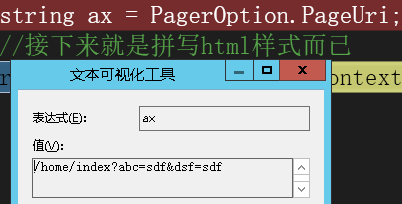
下面在回到PagerTagHelper中访问看下
.NetCore 分页控件实现原理处理以及条件分页处理的更多相关文章
- jquery 分页控件(二)
上一章主要是关于分页控件的原理,代码也没有重构.在这一章会附上小插件的下载链接,插件主要就是重构逻辑部分,具体可以下载源文件看下,源代码也有注释.为了测试这个插件是能用的,我弄了个简单的asp.net ...
- jquery 分页控件2
jquery 分页控件(二) 上一章主要是关于分页控件的原理,代码也没有重构.在这一章会附上小插件的下载链接,插件主要就是重构逻辑部分,具体可以下载源文件看下,源代码也有注释.为了测试这个插件是能用的 ...
- uinty3d使用ugui封装一个分页控件
我们在显示数据时有的数据比较多,手机内存有限,我们不可能分配很多的控件来显示这些数据,分页是一个不错的选择.比如玩家交易行.我们现在封装一个自己简单的分页控件来显示玩家交易行. 分页控件的原理其实很简 ...
- 在DevExpress程序中使用Winform分页控件直接录入数据并保存
一般情况下,我们都倾向于使用一个组织比较好的独立界面来录入或者展示相关的数据,这样处理比较规范,也方便显示比较复杂的数据.不过在一些情况下,我们也可能需要直接在GridView表格上直接录入或者修改数 ...
- 基于jquery扩展漂亮的分页控件(ajax)
分页控件式大家在熟悉不过的控件,很多情况下都需要使用到分页控件来完成列表数据加载操作,在很多分页控件中有的编写麻烦,有的应用扩展比较复杂,有的分页控件样式比较丑陋,有的分页控件用户体验操作比较简单等等 ...
- 日积月累系列之分页控件(js源码)
最近开发了一款分页控件,分享给大家. 主要功能和界面介绍 cform分页控件支持服务端分页.客户端分页.数据过滤.数据排序等功能. 源码介绍 cform-pager分页控件主要由三部分组成:css.s ...
- winform 自定义分页控件 及DataGridview数据绑定
分页效果如上图所示,用到的控件均为基本控件 ,其方法如下 右击项目-添加-新建项 选择用户控件 然后在用户控件中拖入所需要的Label,Button,Text 用户控件全部代码: using Syst ...
- 自定义WPF分页控件
一.分页控件功能说明 实现如上图所示的分页控件,需要实现一下几个功能: 可以设置每页能够展示的最大列数(例如每页8列.每页16列等等). 加载的数组总数量超过设置的每页列数后,需分页展示. 可以直接点 ...
- .NetCore 实现分页控件(URL分页)实战
上一篇文章介绍了分页控件的具体实现方式,接下来我们就来做一个分页控件 后台数据处理就过度的介绍,下面针对URL分页中的下面几点做说明: 1.搜索条件的状态保持 2.点击分页需要带上搜索条件 3.页码的 ...
随机推荐
- Flash 解题报告
Flash Description 给你一颗树,需要把每个点染色,每个点染色时间为\(t_i\),要求同时染色的点的集合为树的独立集,最小化染色结束时间之和. 其实题面蛮有趣的♂ HINT \(n\l ...
- 在c语言中嵌入汇编语句,对于我来说相当难。
今天早上在csdn论坛上看到一个帖子http://topic.csdn.net/u/20120917/14/82f42e17-977a-4824-95bd-7b79db15d283.html:“C语言 ...
- Redis数据类型和常用命令
Redis相较于其它的数据库虽然简单,但是要熟记所有命令的用法也并非易事.一个简单的技巧是通过要操作的数据类型来将这些命令进行结构化. 数据类型和对应命令 所有存储于redis中的数据都对应于一个键值 ...
- HTML培训课程-------Day02(表格和框架)
表格 在网页中表格是一种经常使用到得设计结构,就像表格的内容中可以包含任何的数据,如文字.图像.表单.超链接.表格等等,所有在HTML中可以使用的数据,都可以被设置在表格中,所以有关表格设置的标记与属 ...
- pyspider框架的599证书问题
使用PySpider 框架出现错误 HTTP 599: SSL certificate problem: unable to get local issuer certificate,如下 HTTP ...
- DNA序列编码中Hairpin的定义和计算
DNA序列编码中Hairpin的定义和计算 觉得有用的话,欢迎一起讨论相互学习~Follow Me 参考文献 [1] 张凯. DNA计算核酸编码优化及算法设计[D]. 2008. [2] Shin, ...
- bzoj千题计划253:bzoj2154: Crash的数字表格
http://www.lydsy.com/JudgeOnline/problem.php?id=2154 #include<cstdio> #include<algorithm> ...
- git 查看一个分支是否被合并过
1.查看该分支的提交历史 git log 分支名 2.git log master |grep comitid 如果包含,就证明已经合并过 3.git branch -d 分支名,如果报错,就是没合并 ...
- 深入分析Java Web技术内幕
深入web请求过程 发起一个http请求的过程就是建立一个socket通信的过程 HTTPClient是一个开源的实现了http请求的工具包 深入分析java I/O的工作机制 深入分析java We ...
- 使用JavaScript缓存图片
在JS中,为了让图片缓存起来,客户端JS定义了一个API,首先利用Image()构造函数来创建一个屏幕外图片对象,之后将该对象的src属性设置 期望的URL,由于图片元素并没有添加到文档中,因此它是不 ...