
vue axios拦截器 + 自编写插件 实现全局 loading 效果;
项目需求:用自定义的 .gif 图标实现全局 loading 效果;为避免在每个页面手动添加,且简单高效的实现,经查阅资料,最终采用了 vue axios拦截器 + 自编写 loading 插件;下面直接贴上代码~
在公用模块定义loading文件,含 index.js,loading.vue文件,文件结构如下:
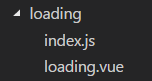
注:loading.vue 与 index.js 之间的传值通过props实现,代码如下:
loading.vue
<template>
  <div class="load-model" v-show="showLoading">
    <img src="../images/loading.gif" alt="loading...">
  </div>
</template>

<script>
export default {
  data(){
    return {

    }
  },
  props:{
    showLoading:false
  }
}
</script>

<style scoped>
.load-model{
  position: fixed;
  top: 0;
  left: 0;
  width: 100%;
  height: 100%;
  display: flex;
  justify-content: center;
  align-items: center;
  /*background:rgba(255,255,255,0.8);*/
   /* background:rgba(0,0,0,0.6); */
}
.load-model > img{
  width: 12rem;
  height: 12rem;
  margin-top: -5rem;
}
</style>
index.js
let loadTemp = require('./loading.vue').default; // cli3.0以后引入vue模板需要default

let Load = {}; // 定义插件对象
Load.install = (Vue,options) => { // Vue的install方法,用于定义vue插件
  // 如果存在loading 不重复创建DOM
  if(document.getElementsByClassName('.load-model').length) return;

  let lTemp = Vue.extend(loadTemp);

  // 实例化VUE实例
  let $vm = new lTemp();

  // 此处使用$mount来手动开启编译,用$el来访问元素,并插入到body中
  let tpl = $vm.$mount().$el;
  document.body.appendChild(tpl);

  Vue.prototype.$loading = { // 在Vue的原型上添加实例方法,以全局调用
    show(options){
      if(options == "loading"){
        $vm.showLoading = true;
      }
    },
    hide(){
      $vm.showLoading = false;
    }
  }
}

// 导出Load
export default Load;
插件写完后在main.js 中全局调用:
import Loading from './common/loading'

Vue.use(Loading)
这样的话我们就可以在所需要调用的页面调用如下方法:
this.$loading.show("loading"); // 触发 loading 事件
this.$loading.hide(); // 关闭 loading 事件
这样的添加只适用于项目小然后页面比较少的情况下,在大项目下或页面较多的情况下,这样维护起来很繁琐且麻烦,由此我们借用 axios 拦截器,保证统一在一个地方触发与关闭,如下为 axios 拦截器的代码:
开启 loading 效果的代码为:Vue.prototype.$loading.show("loading");
关闭 loading 效果的代码为:Vue.prototype.$loading.hide();
axios_api.js
import Vue from 'vue';
import axios from 'axios';//更改http请求插件
import {Indicator, Toast} from 'mint-ui';

let toast = function (text) {
  Toast({
    message: text,
    duration: 2000
  })
};

// 设置全局的请求次数,请求的间隙
axios.defaults.retry = 1;
axios.defaults.retryDelay = 500;

axios.interceptors.request.use(config => {
  Vue.prototype.$loading.show("loading");
  config.timeout = 60000;
  config.headers['Content-Type'] = 'application/json;charset=utf-8';
  return config
}, error => {
  return Promise.reject(error)
});
axios.interceptors.response.use(response => {
  if (response.status == 200) {
    setTimeout(() => {
      Vue.prototype.$loading.hide();
    },500);
  } else {
    setTimeout(() => {
      Vue.prototype.$loading.hide();
    },500);
    toast('获取数据失败');
  }
  return response;
}, error => {
  // var config = error.config;
  // if (!config || !config.retry) return Promise.reject(error);
  // config.__retryCount = config.__retryCount || 0;
  // if (config.__retryCount >= config.retry) {
  setTimeout(() => {
    Vue.prototype.$loading.hide();
  },500);
  if (error.response) {
    switch (error.response.status) {
      case 0:
        toast('网络连接超时');
        break;
      case 404:
        toast('您请求的功能不存在');
        break;
      case 408:
        toast('请求超时');
        break;
      default:
        toast('请求失败');
        break;
    }
    return Promise.reject(error.response.data);
  } else {
    if (!axios.isCancel(error)) {
      toast('网络连接超时');
    }
    return Promise.reject(error);
  }
  // }
  // config.__retryCount += 1;
  // var backoff = new Promise(function (resolve) {
  //   setTimeout(function () {
  //     resolve();
  //   }, config.retryDelay || 1);
  // });
  // return backoff.then(function () {
  //   return axios(config);
  // });
});

export default axios;
vue axios拦截器 + 自编写插件 实现全局 loading 效果;的更多相关文章
- vue --- axios拦截器+form格式请求体
在vue2.x中使用CLI生成的模板有很大改变,需要自己手动在main.ts同级目录下新建interceptors.ts interceptors.ts import axios from 'axio ...
- vue axios 拦截器
前言 项目中需要验证登录用户身份是否过期,是否有权限进行操作,所以需要根据后台返回不同的状态码进行判断. 第一次使用拦截器,文章中如有不对的地方还请各位大佬帮忙指正谢谢. 正文 axios的拦截器分为 ...
- vue axios拦截器的封装
// request.js import axios from 'axios' import qs from 'qs' // 创建axios实例 const service = axios.creat ...
- vue axios拦截器介绍
关于axios的拦截器是一个作用非常大,非常好用的东西.分为请求拦截器和响应拦截器两种.我一般把拦截器写在main.js里. 1. 请求拦截器 请求拦截器的作用是在请求发送前进行一些操作,例如在每个请 ...
- vue axios拦截器加全局loading
import axios from 'axios' import util from './util' import {showFullScreenLoading, tryHideFullScreen ...
- Vue基于vuex、axios拦截器实现loading效果及axios的安装配置
准备 利用vue-cli脚手架创建项目 进入项目安装vuex.axios(npm install vuex,npm install axios) axios配置 项目中安装axios模块(npm in ...
- vue导航守卫和axios拦截器的区别
在Vue项目中,有两种用户登录状态判断并处理的情况,分别为:导航守卫和axios拦截器. 一.什么是导航守卫? vue-router 提供的导航守卫主要用来通过跳转或取消的方式守卫导航.(在路由跳转时 ...
- Vue2学习小记-给Vue2路由导航钩子和axios拦截器做个封装
1.写在前面 最近在学习Vue2,遇到有些页面请求数据需要用户登录权限.服务器响应不符预期的问题,但是总不能每个页面都做单独处理吧,于是想到axios提供了拦截器这个好东西,再于是就出现了本文. 2. ...
- 12. 前后端联调 + ( proxy代理 ) + ( axios拦截器 ) + ( css Modules模块化方案 ) + ( css-loader ) + ( 非路由组件如何使用history ) + ( bodyParser,cookieParser中间件 ) + ( utility MD5加密库 ) + ( nodemon自动重启node ) + +
(1) proxy 前端的端口在:localhost:3000后端的端口在:localhost:1234所以要在webpack中配置proxy选项 (proxy是代理的意思) 在package.jso ...
随机推荐
- Django 复习
Django 基础1 day49 老师的博客:https://www.cnblogs.com/yuanchenqi/articles/6083427.html http://www.cnblogs.c ...
- Mybatis(三) 映射文件详解
前面说了全局配置文件中内容的详解,大家应该清楚了,现在来说说这映射文件,这章就对输入映射.输出映射.动态sql这几个知识点进行说明,其中高级映射(一对一,一对多,多对多映射)在下一章进行说明. 一.输 ...
- ELK & ElasticSearch 5.1 基础概念及配置文件详解【转】
转自:https://blog.csdn.net/zxf_668899/article/details/54582849 配置文件 基本概念 接近实时NRT 集群cluster 索引index 文档d ...
- Linux时区详解
全球24个时区的划分 相较于两地时间表,可以显示世界各时区时间和地名的世界时区表(World Time),就显得精密与复杂多了,通常世界时区表的表盘上会标示着全球24个时区的城市名称,但究竟这24个时 ...
- RChain的跨分片交易算法
跨分片交易是一个难题,但是遗憾的是业界已经有一个项目RChain解决了这个问题. 分片方式有很多种,最难的是状态分片,什么是状态分片呢?把以太坊比作银行的话,状态指的是银行账户的当前余额.那状态分片就 ...
- MySQL 下载地址获取
http://cdn.mysql.com/Downloads/MySQL-5.7/mysql-5.7.26-winx64.msi 首先安装 mysql installer 安装器进行安装,之前会让你选 ...
- 一个第三方Dart库导致的编译错误!
今天学习flutter过程中,突然程序不能运行了,无论是命令行,抑或Android Studio,还是Idea都是出现同样错误,如下: Running .5s Launching lib\main.d ...
- linux下用php将doc、ppt转图片
解决方案分成两步: (1)调用unoconv命令将 doc.ppt 转 pdf (2)使用 imagemagick将 pdf 转图片 步骤 1.安装unoconv sudo apt-get insta ...
- MySQL-监控告警系统
开源地址: https://github.com/ycg/mysql_web QQ: 779647966 Email: ycg166911@163.com 利用python的flask进行后台开发,前 ...
- Python实现AD域认证
Python 通过ldap进行ad域账号的校验. 首先需要安装python-ldap的模块 http://www.python-ldap.org/. 在这里用的是windows系统,当然比较容易,下载 ...