
Unity 修改windows窗口的标题
修改windows窗口的标题名称,就是修改下图的东西:
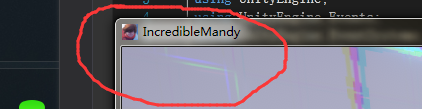
第一种:
using UnityEngine;

using System;

using System.Runtime.InteropServices;

public class SetWindowText : MonoBehaviour

{

    #region WIN32API

    delegate bool EnumWindowsCallBack(IntPtr hwnd, IntPtr lParam);

    [DllImport("user32", CharSet = CharSet.Unicode)]

    static extern bool SetWindowTextW(IntPtr hwnd, string title);

    [DllImport("user32")]

    static extern int EnumWindows(EnumWindowsCallBack lpEnumFunc, IntPtr lParam);

    [DllImport("user32")]

    static extern uint GetWindowThreadProcessId(IntPtr hWnd, ref IntPtr lpdwProcessId);

    #endregion

    IntPtr myWindowHandle;

    public void Start()

    {

        IntPtr handle = (IntPtr)System.Diagnostics.Process.GetCurrentProcess().Id;  //获取进程ID

        EnumWindows(new EnumWindowsCallBack(EnumWindCallback), handle);     //枚举查找本窗口

        SetWindowTextW(myWindowHandle, "测试代码"); //设置窗口标题

    }

    bool EnumWindCallback(IntPtr hwnd, IntPtr lParam)

    {

        IntPtr pid = IntPtr.Zero;

        GetWindowThreadProcessId(hwnd, ref pid);

        if (pid == lParam)  //判断当前窗口是否属于本进程

        {

            myWindowHandle = hwnd;

            return false;

        }

        return true;

    }

}
第二种:
using System;

using System.Collections;

using System.Collections.Generic;

using System.Runtime.InteropServices;

using System.Text;

using UnityEngine;

public class NewBehaviourScript : MonoBehaviour {

    //Import the following.

    [DllImport("user32.dll", EntryPoint = "SetWindowTextW", CharSet = CharSet.Unicode)]

    public static extern bool SetWindowTextW(System.IntPtr hwnd, System.String lpString);

    [DllImport("user32.dll", EntryPoint = "FindWindow")]

    public static extern System.IntPtr FindWindow(System.String className, System.String windowName);

    public void Change()

    {

        //Get the window handle.

        var windowPtr = FindWindow(null, "WindowTitleChange");//打包时的ProductName,找到名字是WindowTitleChange的窗口
     //Set the title text using the window handle.
     SetWindowTextW(windowPtr, "测试代码");
    }
}
Unity 修改windows窗口的标题的更多相关文章
- 对于windows窗口的标题菜单栏的操作——删除/禁用 最小最大话和关闭
HWND hand = FindWindow(NULL, "计算器"); int nStyle = GetWindowLong(hand, GWL_STYLE);nStyle &a ...
- unity 实现调用Windows窗口/对话框交互
Unity调用Window窗口 本文提供全流程,中文翻译. Chinar 坚持将简单的生活方式,带给世人!(拥有更好的阅读体验 -- 高分辨率用户请根据需求调整网页缩放比例) Chinar -- 心分 ...
- Windows 系统上用 .NET/C# 查找所有窗口,并获得窗口的标题、位置、尺寸、最小化、可见性等各种状态
原文:Windows 系统上用 .NET/C# 查找所有窗口,并获得窗口的标题.位置.尺寸.最小化.可见性等各种状态 在 Windows 应用开发中,如果需要操作其他的窗口,那么可以使用 EnumWi ...
- CMD命令之 :修改windows的CMD窗口输出编码格式为UTF-8
修改windows的CMD窗口输出编码格式为UTF-8 转载自 http://xuliduo.iteye.com/blog/639923 dos命令: chcp 65001 就是换成UTF-8代码页 ...
- 按键精灵 句柄 获得句柄 控制windows窗口 后台
新建一个文本文档,打开,Windows就会给这个文本文档的窗口临时分配唯一的一串数字来标识这个窗体,以区别于其他窗口,这串数字就叫句柄. 因为句柄是临时随机分配的,所以每次虽然是打开同一个文件,但 ...
- windows窗口分析,父窗口,子窗口,所有者窗口
(本文尝试通过一些简单的实验,来分析Windows的窗口机制,并对微软的设计理由进行一定的猜测,需要读者具备C++.Windows编程及MFC经验,还得有一定动手能力.文中可能出现一些术语不统一的现象 ...
- Windows窗口消息大全(转)
Windows窗口消息大全,全不全自己看 ////////////////////////////////////////////////////////////////////////// #inc ...
- Windows窗口消息大全
////////////////////////////////////////////////////////////////////////// #include "AFXPRIV.H& ...
- C语言Windows程序开发—Windows窗口样式与常用控件样式【第04天】
(一)Windows窗口(MDICLIENT)样式介绍 /* Windows窗口样式 */ WS_BORDER //带有边框的窗口 WS_CAPTION //带有标题栏的窗口 WS_CHILD //子 ...
随机推荐
- Machine Learning and Data Mining(机器学习与数据挖掘)
Problems[show] Classification Clustering Regression Anomaly detection Association rules Reinforcemen ...
- .net core MVC 通过 Filters 过滤器拦截请求及响应内容
前提: 需要nuget Microsoft.Extensions.Logging.Log4Net.AspNetCore 2.2.6: Swashbuckle.AspNetCore 我暂时用的是 ...
- js定时执行函数
//方法一: //直接现定义函数 var time = window.setInterval(function(){ $('.lingdao_right').click(); },5000); //方 ...
- WPF 控件库——轮播控件
WPF 控件库系列博文地址: WPF 控件库——仿制Chrome的ColorPicker WPF 控件库——仿制Windows10的进度条 WPF 控件库——轮播控件 WPF 控件库——带有惯性的Sc ...
- vs2017安装后自动应用许可证
Vs2017专业版 "C:\Program Files (x86)\Microsoft Visual Studio\2017\Professional\Common7\IDE\StorePI ...
- 13本热门书籍免费送!(Python、SpingBoot、Entity Framework、Ionic、MySQL、深度学习、小程序开发等)
七月第一周,网易云社区联合清华大学出版社为大家送出13本数据分析以及移动开发的书籍(Python.SpingBoot.Entity Framework.Ionic.MySQL.深度学习.小程序开发等) ...
- BST_insert
#include <stdio.h> /* printf, scanf, NULL */ #include <stdlib.h> /* malloc, free */ stru ...
- 特殊用途语言特性(默认实参/内联函数/constexpr函数/assert预处理宏/NDEBUG预处理变量)
默认实参: 某些函数有这样一种形参,在函数的很多次调用中它们都被赋予一个相同的值,此时,我们把这个反复出现的值称为函数的默认实参.调用含有默认实参的函数时,可以包含该实参,也可以省略该实参. 需要特别 ...
- 题解 P3717 【[AHOI2017初中组]cover】
题目链接 本题的大致思路就是搜索. 将矩阵初始化成false.先把灯塔标记.在搜一遍灯塔能照到的点并标记.最后搜一遍找被灯塔标记的个数. 详细解释见题解. 题解走起. #include<bits ...
- loj #2510. 「AHOI / HNOI2018」道路
#2510. 「AHOI / HNOI2018」道路 题目描述 W 国的交通呈一棵树的形状.W 国一共有 n−1 个城市和 nnn 个乡村,其中城市从 111 到 n−1 编号,乡村从 111 到 n ...