
Android API Level在11前后及16之后时Notification的不同用法
作为刚入门Android的小白,最近在按照郭大神的《第一行代码》在练习,在用到Notification时遇到了一些问题,网上资料比较零散,我这里做了一个总结分析给各位,若有错误,恳请指正~
Notification是一种具有全局效果的通知,程序一般通过NotificationManager服务来发送Notification。
Notification支持文字内容显示、震动、三色灯、铃声等多种提示形式,在默认情况下,Notification仅显示消息标题、消息内容、送达时间这3项内容。
以下就是通知的基本布局:
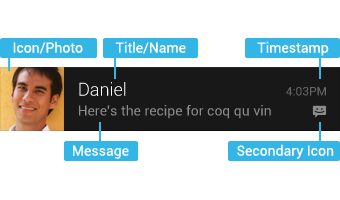
不同API level的区别主要是Notification的构造方法、得到实例的方法,这里顺便总结一下Notification的用法,按照步骤分别给出不同API level下的做法:
1、获取Notification管理器
NotificationManager noteManager = (NotificationManager)getSystemService(NOTIFICATION_SERVICE);
获取管理器的方式都一样,没有改变。
2、新建一个Notification,设置状态栏显示样式
这里只列举了最简单的样式设置,具体的大家可以参考API文档。
// API Level < 11 (Android 3.0)

Notification notification = new Notification(

		   R.mipmap.ic_launcher, "This is ticker text",

		   System.currentTimeMillis());
API<11时,可以直接用Notification的构造方法新建一个Notification,十分方便。
ps:我用的IDE是AndroidStudio,所以icon的id是R.mipmap.***。
// API Level >= 11 (Android 3.0) && API Level < 16 (Android 4.1)

Notification.Builder builder = new Notification.Builder(this)

                     .setSmallIcon(R.mipmap.ic_launcher)

                     .setTicker("This is ticker text")

                     .setWhen(System.currentTimeMillis());

Notification note = builder.getNotification(); // 调用getNotification()来生成Notification
API>11后,就要用Notification.Builder()来代替了,官方API是这样说的:
Notification(int icon, CharSequence tickerText, long when)
Notification.Builder instead.NotificationCompat.Builder, available in the Android Support library.//API Level >= 4 (Android 1.6) && API Level < 16 (Android 4.1)
NotificationCompat.Builder builder = new NotificationCompat.Builder(this)
.setSmallIcon(R.mipmap.ic_launcher)
.setTicker("This is ticker text")
.setWhen(System.currentTimeMillis());
Notification note =builder.getNotification(); //调用builder.getNotification()来生成Notification
因此推荐用NotificationCompat.Builder这种方式。
注意到我在注释里写的 "&& API Level < 16 (Android 4.1)" 了吗?这是因为在Google官方API文档上是这么说的:
public Notification getNotification () Added in API level 11
This method was deprecated in API level .
Use build() instead
因此,当API>=16即Android4.1之后,就要用build()来代替了,使用方法一样,在此就不赘述了。
3、设置Notification的触发事件
点击Notification后,一般都是触发一个新的Activity:
Intent intent = new Intent(this, AnotherActivity.class);

PendingIntent pi = PendingIntent.getActivity(this, 0, intent,

                  PendingIntent.FLAG_CANCEL_CURRENT);
这里不同API版本都一样。
4、设置Notification在通知栏里的样式
// API Level < 11 (Android 3.0)

note.setLatestEventInfo(this, "This is content title", "This is content text", pi);
API<11时,调用的是Notification类的setLatestEventInfo方法。
// API Level >= 11 (Android 3.0)

builder.setContentIntent(pi)

                 .setContentTitle("This is content title")

                 .setContentText("This is content text");
而当API>=11时,设置通知栏中的样式是调用Builder的setContentIntent方法,设置好之后在调用build()方法生成Notification实例。
类似的,NotificationCompat.Builder也是调用同样的方法,这里就不赘述了。
5、发布该Notification
第一个参数为该notification的ID
noteManager.notify(1, note);
总结一下:
低版本(API低于11、16)中的部分方法已经被弃用:
(1)Notification.Builder(this).getNotification()
(2)mNotification.setLatestEventInfo(this, "title", "content", null);
建议开发过程中尽量使用NotificationCompat.Builder(this)的构建方法去创建一个通知类。
Android API Level在11前后及16之后时Notification的不同用法的更多相关文章
- Call requires API level 21(Current min is 16)
Call requires API level 21(Current min is 16) Android开发中,遇到类似这种问题,如何处理? 一种办法是提升sdk最低版本到21,在Android s ...
- Android api level对照表
转自:blog.csdn.net/lihenair/article/details/49869299 Platform Version API Level VERSION_CODE Notes And ...
- Android API level 版本对应关系
详情地址:http://developer.android.com/guide/topics/manifest/uses-sdk-element.html Platform Version API L ...
- Android API level 与version对应关系
https://www.cnblogs.com/jinglecode/p/7753107.html Platform Version API Level VERSION_CODE 中文名称 Andro ...
- android api level对应表(copy)
Platform Version API Level VERSION_CODE Notes Android 4.4 19 KITKAT Platform Highlights Android 4.3 ...
- Android API Level与sdk版本对照表
API等级1: Android 1.0 API等级2: Android 1.1 Petit Four 花式小蛋糕 API等级3: Android 1.5 Cupcake 纸杯蛋糕 API等级4: An ...
- Android API Guides 学习笔记---Application Fundamentals(一)
今天开始学习google官网上的API guides ,主要读了Application Fundamentals这一章节,此章节介绍了一个App的基本组成,共包括四大部分内容. 1. App ...
- Android Call requires API level 11 (current min is 8)的解决方案
[错误描述] 在用Eclipse开发过程中,为了兼容Android2.2和4.0以上版本,我在使用Notification类时做了2个版本的代码,代码根据系统版本不同执行相应模块,结果,等我输完代码, ...
- Android版本和API Level对应关系
http://developer.android.com/guide/topics/manifest/uses-sdk-element.html Platform Version API ...
随机推荐
- hdu4331 Image Recognition 就暴力啊。。啊。。
题意: 给一个1和0组成的正方形矩阵,求 四条边都由1构成的正方形的个数. 方法: 先统计矩阵中每一点,向四个方向,最多有多少个连续的1,这里用dp做也 与此同时,顺便求下 能向右下和 左上 两个方向 ...
- RPATH与RUNPATH
RPATH与RUNPATH 时间 2011-11-01 21:46:44 Qt Labs China 原文 http://labs.qt.nokia.com.cn/2011/11/01/rpath- ...
- HPU周赛题目解析
A - Wilbur and Swimming Pool Time Limit:1000MS Memory Limit:262144KB 64bit IO Format:%I64d & ...
- jQuery 遍历 - siblings() 方法
本文来自:http://www.w3school.com.cn/jquery/traversing_siblings.asp jQuery 遍历参考手册 实例 查找每个 p 元素的所有类名为 &quo ...
- HtmlTextWriter学习笔记
本文来自:http://www.cnblogs.com/tonyqus/archive/2005/02/15/104576.html 这两天正好在研究asp.net自定义控件制作,HtmlTextWr ...
- 专题开发十三:JEECG微云高速开发平台-附录
专题开发十三:JEECG微云高速开发平台-附录 12.1UI库经常使用控件參考演示样例 序号 控件 解决方式 參考演示样例 1 datagrid数据列表.字段採用数据字典显示文本 <t:dgCo ...
- 使用ObjectAnimator开发打开、关闭书本动画
动画效果 动画效果-分享链接 (想做成gif图的,尝试各种工具无果) ObjectAnimator简单介绍及实现思路 ObjectAnimator是从api level 11 (Android3.0x ...
- STM32F407VG (三)ADC
12位ADC是一种逐次逼近型模拟数字转换器. 它有多达19个通道,可測量16个外部和2个内部信号源和VBAT通道.各通道的A/D转换能够单次.连续.扫描或间断模式运行. ADC的结果能够左对齐或右对齐 ...
- DSOframer 的简单介绍和资源整理
DSOframer 是微软提供一款开源的用于在线编辑 Word. Excel .PowerPoint 的 ActiveX 控件.国内很多著名的 OA 中间件,电子印章,签名留痕等大多数是依此改进而来的 ...
- 不用css样式表和背景图片实现圆角矩形,超简洁!
当网站页面的整体布局设计好后,接下来有很多细节的实现是很让人头疼的.其中之一就是圆角矩形的实现. 在网上看了很多圆角矩形的实现方法,基本有两种,一种是用纯css实现,不需要背景图片:另一种是用背景图像 ...