
6-CSS
HTML Style Tags
CSS stands for Cascading Style Sheets.
CSS describes how HTML elements are to be displayed on screen, paper, or in other media.
CSS saves a lot of work. It can control the layout of multiple web pages all at once.
CSS can be added to HTML elements in 3 ways:
- Inline - by using the style attribute in HTML elements
- Internal - by using a <style> element in the <head> section
- External - by using an external CSS file
| Tag | Description |
|---|---|
| <style> | Defines style information for an HTML document |
| <link> | Defines a link between a document and an external resource |
- Use the HTML style attribute for inline styling
- Use the HTML <style> element to define internal CSS
- Use the HTML <link> element to refer to an external CSS file
- Use the HTML <head> element to store <style> and <link> elements
- Use the CSS color property for text colors
- Use the CSS font-family property for text fonts
- Use the CSS font-size property for text sizes
- Use the CSS border property for borders
- Use the CSS padding property for space inside the border
- Use the CSS margin property for space outside the border
 <!DOCTYPE html>

 <html lang="en">

 <head>

     <meta charset="UTF-8">

     <title>Creating a bookmark</title>

 </head>

 <body>

 <

 <a href="#tips">Visit the useful Tips Section</a>

 <h2>Chapter 1</h2>

 <p>This chapter explains ba bla bla</p>

 <h2>Chapter 2</h2>

 <p>This chapter explains ba bla bla</p>

 <h2>Chapter 3</h2>

 <p>This chapter explains ba bla bla</p>

 <h2 >Chapter 4</h2>

 <p>This chapter explains ba bla bla</p>

 <h2>Chapter 5</h2>

 <p>This chapter explains ba bla bla</p>

 <h2>Chapter 6</h2>

 <p>This chapter explains ba bla bla</p>

 <h2>Chapter 7</h2>

 <p>This chapter explains ba bla bla</p>

 <h2>Chapter 8</h2>

 <p>This chapter explains ba bla bla</p>

 <h2>Chapter 9</h2>

 <p>This chapter explains ba bla bla</p>

 <h2>Chapter 10</h2>

 <p>This chapter explains ba bla bla</p>

 <h2 id="tips">Chapter 11</h2>

 <p>This chapter explains ba bla bla</p>

 <h2>Chapter 12</h2>

 <p>This chapter explains ba bla bla</p>

 <h2>Chapter 13</h2>

 <p>This chapter explains ba bla bla</p>

 <h2>Chapter 14</h2>

 <p>This chapter explains ba bla bla</p>

 <h2>Chapter 15</h2>

 <p>This chapter explains ba bla bla</p>

 <h2>Chapter 16</h2>

 <p>This chapter explains ba bla bla</p>

 <h2>Chapter 17</h2>

 <p>This chapter explains ba bla bla</p>

 </body>

 </html>
<!DOCTYPE html>
<html lang="en">
<head>
<style>
body{background-color: #b3d4fc}
h1{color: blue;
font-family: "Arial Black";
font-size: 300%}
#p01{
background-color: blueviolet;
border: 5px solid blue;<!-- 定义边界宽度和颜色-->
padding: 14px;<!-- 定义文字和边界之间的距离-->
margin: 40 px;<!-- 定义边界外的文字文字和边界之间的距离-->
color: red; font-size: 200%;
font-family: "Arial Black"}
p.info{
background-color: yellow;
color: rebeccapurple;
font-size: 200px;
}
#a01:link{<!--定义了连接正常的显示样式-->
color: yellowgreen;
text-decoration: none;
}
#a01:hover{<!--定义了鼠标位于连接上方时候的显示样式-->
color: yellow;
background-color: transparent;
text-decoration: underline;
} </style>
<meta charset="UTF-8">
<title>Color</title>
</head> <body> <h1 style="background-color: red"> <a id="a01" href="http://www.snowfox.wang/w3schools" target="_blank">
This is a link to a website on the World Wide Web</a> </h1><!--href为增加超链接的标志,blank为重新打开一个窗口-->
<h1 style="background-color: orange"><a href="2-Formating.html" target="_blank">Using the local link </a></h1>
<h1 style="background-color: yellow">Background-color set by using yellow</h1>
<h1 style="background-color: blue;color:red;" >Background-color set by using blue</h1>
<p id="p01"<!--定义一个特殊的ID以区别其他的paragraph-->Hello everyone, I am JackSparrow and I am from Anhui Province</p>
<p class="info">天天向上,好好学习</p> <p> Hello everyone, I am JackSparrow and I am from Anhui Province</p>
</body>
</html>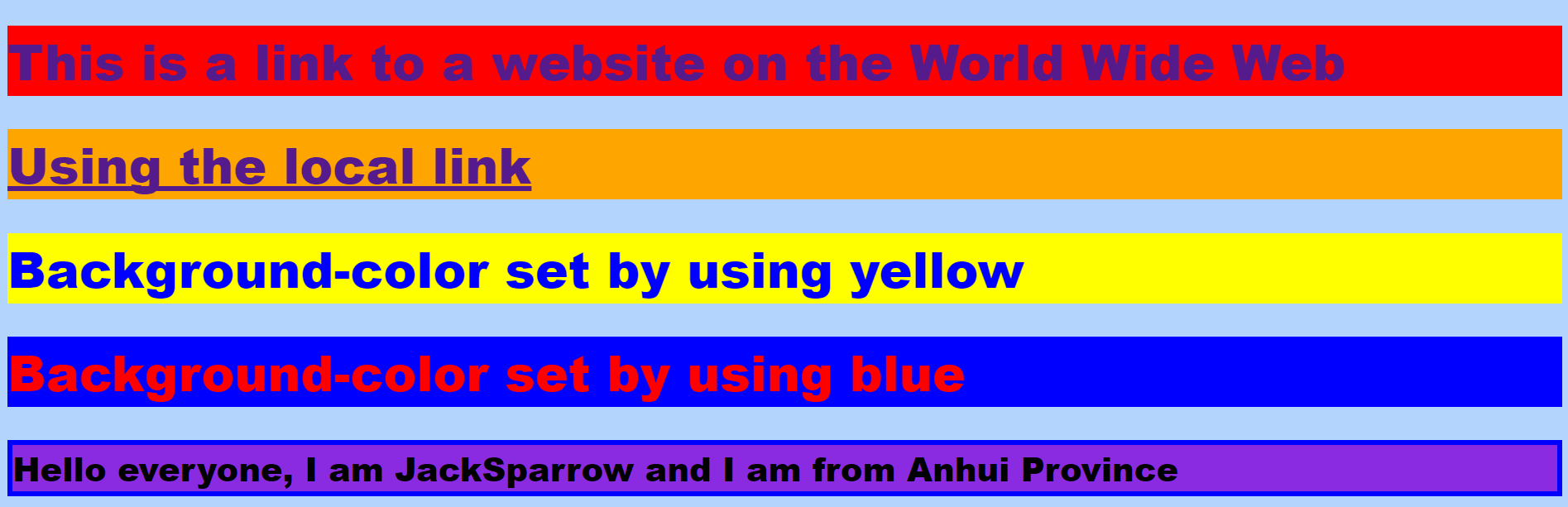

6-CSS的更多相关文章
- Matplotlib数据可视化(3):文本与轴
在一幅图表中,文本.坐标轴和图像的是信息传递的核心,对着三者的设置是作图这最为关心的内容,在上一篇博客中虽然列举了一些设置方法,但没有进行深入介绍,本文以围绕如何对文本和坐标轴进行设置展开(对图像 ...
- CSS的未来
仅供参考 前言 完成<CSS核心技术与实战>这本书,已有一个多月了,而这篇文章原本是打算写在那本书里面的,但本章讲解的内容,毕竟属于CSS未来的范畴,而这一切都还不能够确定下来,所以这一章 ...
- 前端极易被误导的css选择器权重计算及css内联样式的妙用技巧
记得大学时候,专业课的网页设计书籍里面讲过css选择器权重的计算:id是100,class是10,html标签是5等等,然后全部加起来的和进行比较... 我只想说:真是误人子弟,害人不浅! 最近,在前 ...
- 前端css兼容性与易混淆的点
一.常用的骨灰级清除浮动 .clearfix:after { content: "."; display: block; height:; clear: both; visibil ...
- 理解CSS外边距margin
前面的话 margin是盒模型几个属性中一个非常特殊的属性.简单举几个例子:只有margin不显示当前元素背景,只有margin可以设置为负值,margin和宽高支持auto,以及margin具有 ...
- 理解CSS视觉格式化
前面的话 CSS视觉格式化这个词可能比较陌生,但说起盒模型可能就恍然大悟了.实际上,盒模型只是CSS视觉格式化的一部分.视觉格式化分为块级和行内两种处理方式.理解视觉格式化,可以确定得到的效果是应 ...
- 谈谈一些有趣的CSS题目(十二)-- 你该知道的字体 font-family
开本系列,谈谈一些有趣的 CSS 题目,题目类型天马行空,想到什么说什么,不仅为了拓宽一下解决问题的思路,更涉及一些容易忽视的 CSS 细节. 解题不考虑兼容性,题目天马行空,想到什么说什么,如果解题 ...
- ASP.NET MVC with Entity Framework and CSS一书翻译系列文章之第二章:利用模型类创建视图、控制器和数据库
在这一章中,我们将直接进入项目,并且为产品和分类添加一些基本的模型类.我们将在Entity Framework的代码优先模式下,利用这些模型类创建一个数据库.我们还将学习如何在代码中创建数据库上下文类 ...
- 谈谈一些有趣的CSS题目(十一)-- reset.css 知多少?
开本系列,谈谈一些有趣的 CSS 题目,题目类型天马行空,想到什么说什么,不仅为了拓宽一下解决问题的思路,更涉及一些容易忽视的 CSS 细节. 解题不考虑兼容性,题目天马行空,想到什么说什么,如果解题 ...
- 梅须逊雪三分白,雪却输梅一段香——CSS动画与JavaScript动画
CSS动画并不是绝对比JavaScript动画性能更优越,开源动画库Velocity.js等就展现了强劲的性能. 一.两者的主要区别 先开门见山的说说两者之间的区别. 1)CSS动画: 基于CSS的动 ...
随机推荐
- VisualStuido C# Files 的值“<<<<<<< .mine”无效。路径中具有非法字符。
直接在项目中搜是搜不到<<<<<<.mine,可以直接删除obj文件夹.
- IIS 常见异常及解决办法
Ø 简介 IIS 是我们平常接触比较多的服务端软件,用于站点发布等,本文主要记录 IIS 常见的异常及解决办法.主要包括: 1. Visual Studio 启动 Web 项目提示"无 ...
- SQL手工注入入门级笔记(更新中)
一.字符型注入 针对如下php代码进行注入: $sql="select user_name from users where name='$_GET['name']'"; 正常访问 ...
- Codeforces Round #494 (Div. 3) D. Coins and Queries(贪心
题目链接 题目大意:给你n个物品,第iii个物品价值aia_iai,询问q次,问你能不能凑出价值为qiq_iqi的物品. 小贪心吧.从大到小找,能拿就拿就行了. #include<bits/ ...
- python中的join.set ,copy以及删除注意事项:
1 ,join : 将对象以字符串的方式拼接成一个整体 for E : li = ["李白", "是", "诗仙"] s = & ...
- 昨天看了一个大神的fix类,清晰了然
.fix::after{ content:''; display:table; clear:both; }
- 使用IDEA新建Web工程启动报404的错误
新换了一个项目组被人吐槽配置文件都能写错,所以打算从头开始一步步搭建一个项目,包含ssm基础框架.mongodb工具类.redis工具类.jsf配置.log配置等 今天先来搭建一个web工程.工程搭建 ...
- Shiro入门 - 通过自定义Realm连数数据库进行授权
shiro-realm.ini [main] #自定义Realm myRealm=test.shiro.MyRealm #将myRealm设置到securityManager,相当于Spring中的注 ...
- ieda 运行web--导入其它jar包
== 配置 或选择tomcat 1.打开IntelliJ IDEA,点击菜单的“Run”->“Edit Configurations...”,然后会打开运行设置弹框.2.在弹框中,点击左上角的“ ...
- DeepLearning.ai-Week1-Convolution+model+-+Application
1.0 - TensorFlow model 导入相关依赖包. import numpy as np import h5py import matplotlib.pyplot as plt impor ...