
AndroidStudio运行时出现错误:Instant Run requires 'Tools | Android | Enable ADB integration' to be enabled
本来想调出MMDS,没想到报出这个错误:
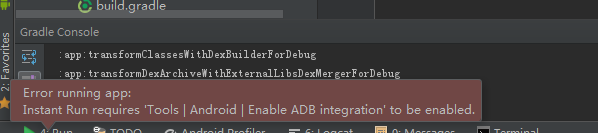
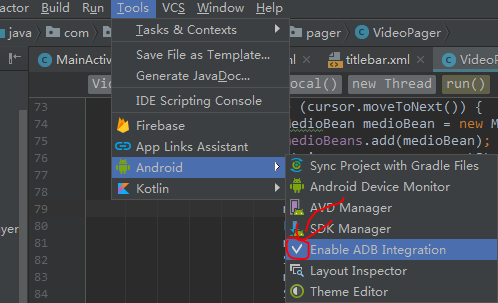
最后发现原来是自己选Android Device Monitor不小心把Enable ADB Integration前面的√去掉了。点击工具栏中的Tools,选中Android,最后点击Enable ADB Integration,使其前面出现✔号就OK了,
原因:
这个是由于Android Studio2.0新版本中的Instant Run (即时运行)引起的,什么是即时运行呢?
Instant Run in Android Studio 2.0 allows you to quickly make changes to your app code while your app is running on an Android device or Android Emulator. Instead of waiting for your entire app to rebuild and redeploy after each code change, Android Studio 2.0 will try to incrementally build and push only the incremental code or resource change. Depending on the code changes you make, you can see the results of your change in under a second. By simply updating your app to use the latest Gradle plugin ( '
com.android.tools.build:gradle:2.0.0-beta2’ ), you can take advantage of this time saving features with no other modifications to your code.
它可以快速的更改运行在Android虚拟机中的APP,也就是说在Android虚拟机中的app还在运行的时候,就可以直接改变它的内部代码
开发者可以不用再等待整个应用程序重建以及每次代码更改后重新部署
简单来说就是改了代码后,点击即时运行,模拟器上的应用不需要重启就可以直接呈现出我们修改后的代码效果!
AndroidStudio运行时出现错误:Instant Run requires 'Tools | Android | Enable ADB integration' to be enabled的更多相关文章
- Instant Run requires 'Tools | Android | Enable ADB integration' to be enabled.
更新了最新的Android Studio预览版之后,运行程序.发现弹出了一个Error Instant Run requires 'Tools | Android | Enable ADB integ ...
- 1.运行Android Studio,一直提示:Error running app: Instant Run requires 'Tools | Android | Enable ADB integration' to be enabled.
1.解决问题办法:菜单栏,Tools -> Adnroid -> enable ADB integration勾上 2.暂时性的解决方案:在Android Studio中的:Prefere ...
- Error running app: Instant Run requires 'Tools | Android | Enable ADB integration' to be enabled.解决办法
刚刚更新AS到2.0版本,然后导入Api Demos的时候出现了这个错误. 解决办法:在AS的菜单栏,Tools->Android ->Enable ADB integration 勾选就 ...
- Android 运行时报错Error running app: Instant Run requires 'Tools | Android | Enable ADB integration' to be enabled. 的解决办法
解决方法:在菜单栏,Tools->Android->Enable ADB integration勾选就可以了.
- Error running app: Instant Run requires 'Tools | Android | Enable ADB integration' to be enabled.
废了半天劲才解决... 就三步:菜单栏,Tools -> Adnroid -> enable ADB integration
- 关于Android Studio 3.2 运行应用时提示 “Instant Run requires that the platform corresponding to your target device (Android 7.0 (Nougat)) is installed.” 的说明
点击"Run",运行App后,Android Studio显示如图1-1界面: 图1-1 这是因为你连接的外部设备(比如Android手机或AVD)的SDK版本在你的电脑上没有安装 ...
- docker 运行时常见错误
docker 运行时常见错误 (1) Cannot connect to the Docker daemon at unix:///var/run/docker.sock. [root@localho ...
- Erlang运行时的错误
Erlang运行时发生错误时,会返回一些错误信息,理解这些信息,对于学好.用好Erlang来说是必要. Erlang中的运行错误包括:badarg, badarith, badmatch, funct ...
- adb错误:Failed to execute android command 'adb devices'.
好吧,我是用的phonegap3.0开发的,很简单,安装的时候一句phonegap run android –device就可以了(-device参数非必要,我是为了不跑模拟器,加上此参数限制只跑到设 ...
随机推荐
- 微信 vue中使用video.js播放m3u8视频,解决安卓自动全屏的问题。
最近一个项目中需要在微信中播放m3u8格式的视频,刚开始用了 vue-video-player 这个插件,在IOS手机体验良好,本以为完事了, 结果安卓手机一点播放就自动全屏,心态略崩.查了资料说是安 ...
- 剑指offer等算法总结归类
从数据结构分 一.链表: 3.题目描述:输入一个链表,从尾到头打印链表每个节点的值(递归) 思路:递归调用,调一次,加一次到list中 14.题目描述:输入一个链表,输出该链表中倒数第k个结点 两个指 ...
- linux下执行Python项目,crontab不能定时执行任务
问题描述: 在项目下的文件执行脚本,可以手动执行 在其他文件目录下,手动执行脚本报错误,提示不存在该模块. 解决方法: 文件头加上: import sysimport ossys.path += [ ...
- 加载 Firefox 配置
有小伙伴在用脚本启动浏览器时候发现原来下载的插件不见了,无法用 firebug在打开的页面上继续定位页面元素,调试起来不方便 .加载浏览器配置,需要用 FirefoxProfile(profile_d ...
- selenium+Python(文件上传)
文件上传操作也比较常见功能之一,上传功能没有用到新有方法或函数,上传过程一般要打开一个本地窗口,从窗口选择本地文件添加.所以,一般会卡在如何操作本地窗口添加上传文件只要定位上传按钮,通send_key ...
- fastjson反序列化多层嵌套泛型类与java中的Type类型
在使用springmvc时,我们通常会定义类似这样的通用类与前端进行交互,以便于前端可以做一些统一的处理: public class Result<T> { private int ret ...
- Java虚拟机知识 总结 记录
总结了自己这两天掌握的一些JVM相关的知识.方便自己复习. jvm全称是Java Virtual Machine(java虚拟机).它之所以被称之为是“虚拟”的,就是因为它仅仅是由一个规范来定义的抽象 ...
- hibernate 中对象的3种状态总结
1.Hibernate把对象分文三种状态:Transient(临时状态).Persistent(持久化状态).Detached(游离状态). 1)Transient:刚刚new出来的对象,就是Tran ...
- poj 1284 Primitive Roots(未完)
Primitive Roots Time Limit: 1000MS Memory Limit: 10000K Total Submissions: 3155 Accepted: 1817 D ...
- java java-web linux C C++ 安装系统 数据结构 算法 教程分享
qq1206630874 v18455730857 免费分享