
UI基础之UITableViewController相关
1> 设置类型为Group
- (instancetype)initWithStyle:(UITableViewStyle)style

{

    return [super initWithStyle:UITableViewStyleGrouped];

}
2> 设置每组cell之间的间距
// 每组头部高度

self.tableView.sectionHeaderHeight = ;

// 每组底部高度

self.tableView.sectionFooterHeight = ;
3> 设置cell的分隔线
// 去掉分隔线
self.tableView.separatorStyle = UITableViewCellSeparatorStyleNone;
/*--  设置cell分隔线为全屏  --*/

// 方案一

// 在iOS7之后,tableView会有自己的内边距

// 将内边距清空

self.tableView.separatorInset = UIEdgeInsetsZero;

// 在iOS8之后,系统会在每一个控件自动布局时添加默认的内边距

// 清空cell的内边距:考虑重复利用,所以在awakeFromNib中设置一次就可以了

- (void)awakeFromNib

{

    self.layoutMargins = UIEdgeInsetsZero;

}

// 方案二

// 了解tableView底层实现,通过设置cell的frame实现

// 取消cell分隔线

self.tableView.separatorStyle = UITableViewCellSeparatorStyleNone;

// 设置tableView的背景色

self.tableView.backgroundColor = [UIColor lightGrayColor];

// 在自定义cell中重写setFrame方法

- (void)setFrame:(CGRect)frame

{

    frame.size.height -= ;

    [super setFrame:frame];

}
4> 设置tableView的弹簧效果
// 取消弹簧效果

self.tableView.bounces = NO;
5> 设置cell选中时的背景颜色
UIView *backgroundV = [[UIView alloc] initWithFrame:cell.bounds];

backgroundV.backgroundColor = [UIColor whiteColor];

cell.selectedBackgroundView = backgroundV;
6> 设置带箭头的cell样式
cell.accessoryType = UITableViewCellAccessoryDisclosureIndicator;
7> 设置cell文字的字体和颜色
cell.textLabel.font = [UIFont systemFontOfSize:15.0];

cell.textLabel.textColor = [UIColor darkGrayColor];
8> 设置cell中的富文本
NSMutableDictionary *attDict = [NSMutableDictionary dictionary];

attDict[NSFontAttributeName] = [UIFont boldSystemFontOfSize:20.0];

attDict[NSForegroundColorAttributeName] = [UIColor whiteColor];

NSAttributedString *attText = [[NSAttributedString alloc] initWithString:@"安全退出" attributes:attDict];

cell.textLabel.attributedText = attText;
9> 设置cell文字居中
cell.textLabel.textAlignment = NSTextAlignmentCenter;
10> 当tableView为UITableViewStylePlain时,隐藏多余的cell
self.tableView.tableFooterView = [[UIView alloc] initWithFrame:CGRectZero];
11> 设置tableView的headerView
    UITableViewHeaderFooterView *headerView = [[UITableViewHeaderFooterView alloc] initWithFrame:CGRectMake(, , SCREEN_WIDTH, )];

    headerView.contentView.backgroundColor = [UIColor redColor];

    self.tableView.tableHeaderView = headerView;
使用TableView时遇到的坑:
1> [TableView] Setting the background color on UITableViewHeaderFooterView has been deprecated. Please set a custom UIView with your desired background color to the backgroundView property instead.
翻译:不赞成在UITableViewHeaderFooterView上设置背景色。请改为将具有所需背景色的自定义UIView设置为backgroundview属性。
解决方案:使用xib时,添加一个View控件,设置View的背景色。
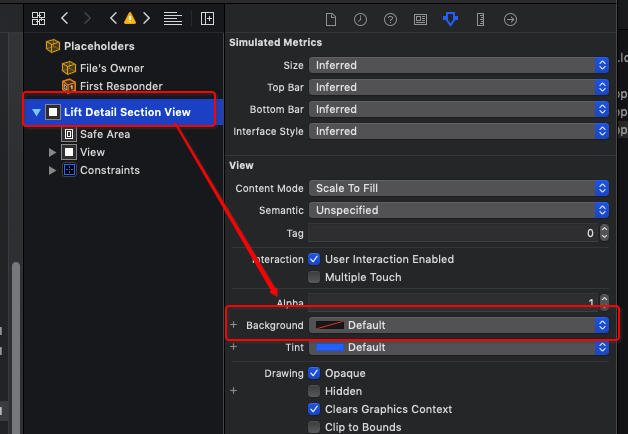

2>[Warning] Warning once only: Detected a case where constraints ambiguously suggest a height of zero for a tableview cell's content view. We're considering the collapse unintentional and using standard height instead.
翻译:[警告]仅警告一次:检测到一种情况,其中约束模糊地建议TableView单元格的内容视图的高度为零。我们考虑的是无意的坍塌,而是使用标准高度。
解决方案:
- (CGFloat)tableView:(UITableView *)tableView heightForRowAtIndexPath:(NSIndexPath *)indexPath {

    return ;

}
UI基础之UITableViewController相关的更多相关文章
- UI基础之UITextField相关
UITextField *textF = [[UITextField alloc] init]; 1.字体相关 textF.text = @"文本框文字"; textF.textC ...
- UI基础之UIButton相关
UIButton *btn = [UIButton buttonWithType:UIButtonTypeCustom]; 1.按钮透明效果 btn.alpha = 0.8; 2.按钮圆角处理 btn ...
- Android UI基础之五大布局
Android UI基础之五大布局 Android的界面是有布局和组件协同完成的,布局好比是建筑里的框架,而组件则相当于建筑里的砖瓦.组件按照布局的要求依次排列,就组成了用户所看见的界面.Andro ...
- iOS开发UI基础—手写控件,frame,center和bounds属性
iOS开发UI基础—手写控件,frame,center和bounds属性 一.手写控件 1.手写控件的步骤 (1)使用相应的控件类创建控件对象 (2)设置该控件的各种属性 (3)添加控件到视图中 (4 ...
- 背水一战 Windows 10 (76) - 控件(控件基类): Control - 基础知识, 焦点相关, 运行时获取 ControlTemplate 和 DataTemplate 中的元素
[源码下载] 背水一战 Windows 10 (76) - 控件(控件基类): Control - 基础知识, 焦点相关, 运行时获取 ControlTemplate 和 DataTemplate 中 ...
- 转发-UI基础教程 – 原生App切图的那些事儿
UI基础教程 – 原生App切图的那些事儿 转发:http://www.shejidaren.com/app-ui-cut-and-slice.html 移动APP切图是UI设计必须学会的一项技能,切 ...
- Android UI基础教程 目录
从csdn下载了这本英文版的书之后,又去京东搞了一个中文目录下来.对照着看. 话说,这本书绝对超值.有money的童鞋看完英文版记得去买中文版的~~ Android UI基础教程完整英文版 pdf+源 ...
- UI基础UIButton
UI基础UIButton 前面写了UIWindow.UIViewController,那些都是一些框架,框架需要填充上具体的view才能组成我们的应用,移动应用开发中UI占了很大一部分,最基础的UI实 ...
- UI基础UIWindow、UIView
UI基础UIWindow.UIView 在PC中,应用程序多是使用视窗的形式显示内容,手机应用也不例外,手机应用中要在屏幕上显示内容首先要创建一个窗口承载内容,iOS应用中使用UIWindow.UIV ...
随机推荐
- 8.31 js基础总结1
JavaScript是一种脚本语言,由web浏览器进行解释和执行.它给予页面灵魂,让页面可以动起来,包括动态的数据,动态的标签,动态的样式等等. 将JavaScript应用到网页中常用的方法有两种,第 ...
- calculator
#include <stdio.h> #include <stdlib.h> typedef enum { FALSE = , TRUE }BOOL; void calcula ...
- nagios二次开发(三)---nagiosql架构简介
NAGIOSQL数据库结构简介 个人觉得如果了解一个系统的架构,应该先从数据库着手,因为数据库是灵魂,当然前提是这个系统用到了数据库.刚才说到了架构,其实我还真不知架构到底是个什么东东,也不知第一句话 ...
- Error:(1, 1) error: illegal character: \65279解决方法
NotePad++,选择格式,选择转为UTF-8无BOM格式,即可解决,感谢http://tzwzero-163-com.iteye.com/blog/1696605
- Python 无限循环
import threading import time class CountDownTimer(threading.Thread): def __init__(self, seconds, act ...
- MFC中无边框窗口的拖动
void CXXXXDialog::OnLButtonDown(UINT nFlags, CPoint point) { PostMessage(WM_NCLBUTTONDOWN, HTCAPTI ...
- python通过自定义异常,提前退出方法
python退出的操作,搜索后都是return.exit()等 return:退出一个方法,并返回一个值 exit():退出python 想要实现的功能: 方法A中调用多个方法,方法B.方法C.. ...
- Java BigDecimal
1构造函数(主要测试参数类型为double和String的两个常用构造函数) BigDecimal aDouble =new BigDecimal(1.22); System.out.println( ...
- MySQL 数据库常用命令
1.MySQL常用命令 create database name; 创建数据库 use databasename; 选择数据库 drop database name 直接删除数据库,不提醒 show ...
- Android部分调试开关
开启 GPU Render 的profiling bar: adb shell setprop debug.hwui.profile visual_bars #或visual_lines adb sh ...