
android LinearLayout和RelativeLayout实现精确布局
先明确几个概念的区别:
padding margin:都是边距的含义,关键问题得明白是什么相对什么的边距
padding:是控件的内容相对控件的边缘的边距.
margin :是控件边缘相对父空间的边距
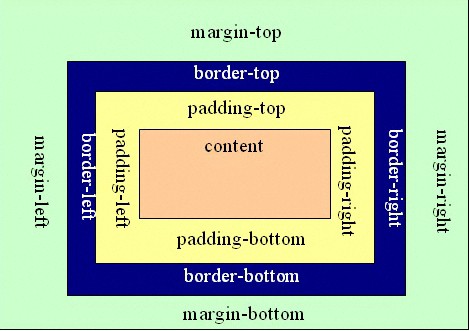
android:gravity是对该view 内容的限定.
比如一个button 上面的text. 你可以设置该text 在view的靠左,靠右等位置.该属性就干了这个.
android:layout_gravity 是用来设置该view中的子view相对于父view的位置.
比如一个button 在linearlayout里,你想把该button放在靠左,靠右等位置就可以在linearlayout中通过该属性设置
XML 布局文件
 <?xml version="1.0" encoding="utf-8"?>

 <LinearLayout xmlns:android="http://schemas.android.com/apk/res/android"

     android:orientation="horizontal"

     android:layout_width="fill_parent"

     android:layout_height="wrap_content"

     android:gravity="center_vertical">

     <ImageView android:id="@+id/ivLogo"

         android:layout_width="50dp"

         android:layout_height="50dp"

         android:src="@drawable/icon"

         android:paddingLeft="5dp" />

     <RelativeLayout android:id="@+id/rl_name"

         android:layout_width="wrap_content"

         android:layout_height="wrap_content"

         android:gravity="right"

         android:padding="10dp">

         <TextView android:id="@+id/tvApplicationName"

             android:layout_width="wrap_content"

             android:layout_height="wrap_content"

             android:textSize="16dp" />

     </RelativeLayout>

     <RelativeLayout android:id="@+id/rl_score"

         android:layout_width="fill_parent"

         android:layout_height="wrap_content"

         android:gravity="right"

         android:padding="10dp">

         <TextView android:id="@+id/tvRating"

         android:layout_width="wrap_content"

             android:layout_height="wrap_content"

             android:text="5.0" />

         <RatingBar android:id="@+id/ratingbar"

             android:layout_width="wrap_content"

             android:layout_height="wrap_content"

             android:numStars="5"

             style="?android:attr/ratingBarStyleSmall"

             android:layout_below="@id/tvRating" />

     </RelativeLayout>

 </LinearLayout>
上面布局文件的效果图
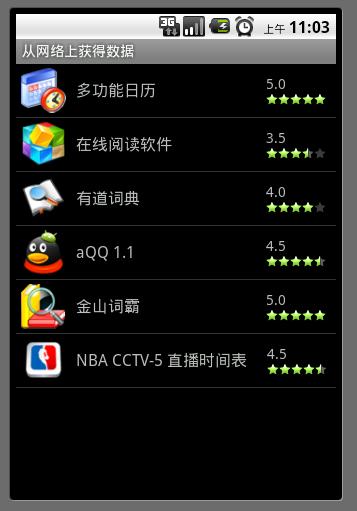
上面的布局文件是一个ListView中的list_item布局,在一个ListView中显示所有的APK资源,每个资源项显示图标,名称及评分。
在listItem的最外层LinearLayout中加android:gravity="center_vertical",设定内容垂直居中显示。
在id为rl_score的RelativeLayout中设定android:layout_width="fill_parent"来填充剩余空间;
android:gravity="right"设定内容相对于rl_score右对齐;
android:padding="10dp"设定RelativeLayout中的内容相对RelativeLayout的边缘的边距为10dp。
这个布局虽然简单,但却是经常用到的。
android LinearLayout和RelativeLayout实现精确布局的更多相关文章
- 用android LinearLayout和RelativeLayout实现精确布局(转)
先明确几个概念的区别: padding margin都是边距的含义,关键问题得明白是什么相对什么的边距. padding是控件的内容相对控件的边缘的边距. margin是控件边缘相对父控件的边距. a ...
- [转]用android LinearLayout和RelativeLayout实现精确布局
先明确几个概念的区别: padding margin都是边距的含义,关键问题得明白是什么相对什么的边距. padding是控件的内容相对控件的边缘的边距. margin是控件边缘相对父控件的边距. a ...
- Android开发——LinearLayout和RelativeLayout的性能对比
0. 前言 我们都知道新建一个Android项目自动生成的Xml布局文件的根节点默认是RelativeLayout,这不是IDE默认设置,而是由android-sdk\tools\templates\ ...
- 【Android】7.5 RelativeLayout(相对布局)
分类:C#.Android.VS2015: 创建日期:2016-02-11 一.简介 RelativeLayout是一种相对布局,容器中子元素的位置是相对于其前一个元素或者其他元素的位置来计算的,或者 ...
- Android五大布局详解——RelativeLayout(相对布局)
RelativeLayout 接着上一篇,本篇我将介绍RelativeLayout(相对布局)的一些知识点. RelativeLayout 这是一个非常常用的布局,相比于上节所学到的LinearLay ...
- Android的学习第六章(布局二--RelativeLayout)
今天我们来说一下Android布局中的Relativelayout布局(相对布局) 根据英译过来意思是相对布局,很容易理解,这一样布局使用的是元素与元素之间的微调做到布局的 含义:通过元素与元素之间的 ...
- Android的学习第六章(布局一LinearLayout)
今天我们来说一下Android五大布局-LinearLayout布局(线性布局) 含义:线性布局,顾名思义,指的是整个Android布局中的控件摆放方式是以线性的方式摆放的, 主要作用:主要对整个界面 ...
- 关于android LinearLayout的比例布局(转载)
关于android LinearLayout的比例布局,主要有以下三个属性需要设置: 1,android:layout_width,android:layout_height,android:layo ...
- Mono for Android (3)-- AbsoluteLayout、FrameLayout、LinearLayout、RelativeLayout、TableLayout
AbsoluteLayout:允许开发人员将视图放在所定义的位置.该布局已经过时了,建议改用其他 FrameLayout:最简单的布局选项,其设计目的是在屏幕上显示单个对象.所有元素都固定在左上角.如 ...
随机推荐
- JS图标插件
1.web开发中,有时候需要图标等控件,amcharts可以胜任. amcharts官方网址:http://www.amcharts.com/javascript-charts/
- 插入数据,返回最新id
最简单的方法就是在查询之后select @@indentity. sql代码: INSERT INTO table_name (.....) VALUES(......) SELECT @@IDEN ...
- codeforces 547B. Mike and Feet 单调栈
题目链接 用单调栈计算出一个数字, 左边第一个比他小的数字的位置, 右边比第一个他小的数字的位置, 然后len = r[i] - l[i] +1. ans[len] = max(ans[len], a ...
- windows中使用Git工具连接GitHub(配置篇)
Git在源码管理领域目前占很大的比重了,而且开源的项目很多都转到GitHub上面了.例如:jQuery, reddit, Sparkle, curl, Ruby on Rails, node.js, ...
- Openstack命令收集
查看rabbitmq 队列 rabbitmqctl list_queues 查看keystone的用户 keystone user-list 查看keystone endpoint keystone ...
- CCNA实验(4) -- EIGRP
enableconf tno ip do loenable pass ciscoline con 0logg syncexec-t 0 0line vty 0 4pass ciscologg sync ...
- Installing perl and writing your first perl program in Ubuntu
Installing perl and writing your first perl program in Ubuntu Installing perl and writing your f ...
- FastCGI | FastCGI -
FastCGI | FastCGI - FastCGI About FastCGI FastCGI is simple because it is actually CGI with only a f ...
- Android中自己定义组件和它的属性
好长时间没有更新博客了.本来想积累点有深度的东西发,但一直没有找到非常好的点.所以.写一些基础的东西.就当积累吧. Android开发中难免会用到自己定义的组件.以下以ImageButton为例来介绍 ...
- Cocos2d-X 动作展示《一》
因为Cocos2d-X中的动作较多,我将全部的动作制作成了一个滚动视图.每一个滚动视图上都有动作名,单击滚动视图就能够展示对应的动作 程序效果图: 使用滚动视图实现动作切换 动作展示 程序代码: 首先 ...