
Spring MVC介绍和第一个例子
1.Spring mvc概述
spring mvc是spring提供给web应用框架设计,实际上MVC框架是一个设计理念。它不仅存在java世界中而且广泛在于各类语言和开发中,包括web的前端应用。对于spring mvc而言,他的流程和各个组件的应用和改造是springmvc的根本。
1.2 springmvc都做了什么
- Controller为中心完成对系统流程的控制管理
- 从请求中搜集数据
- 对传入的参数进行验证
- 将结果返回给视图
- 针对不同的视图提供不同的解决方案
- 针对jsp视图技术提供标签库
- 拦截器
- 上传文件
1.3 spring-mvc结构
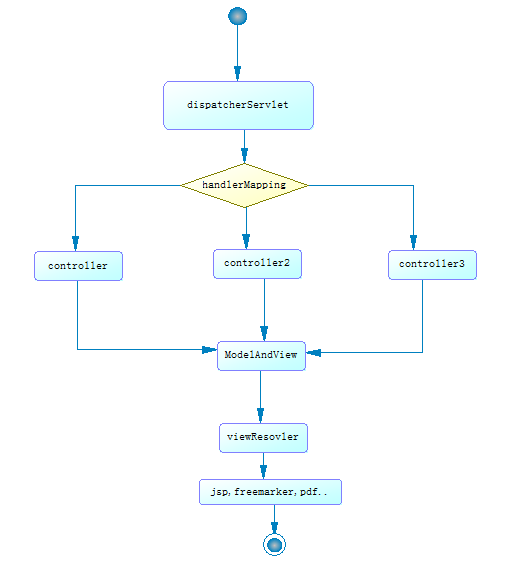
1 DispatcherServlet:中央控制器,把请求给转发到具体的控制类
2 Controller:具体处理请求的控制器(配置文件方式需要配置,注解方式不用配置)
3 handlerMapping:映射处理器,负责映射中央处理器转发给controller时的映射策略
4 ModelAndView:服务层返回的数据和视图层的封装类(无论是配置文件还是注解都不需要配置)
5 ViewResolver & View:视图解析器,解析具体的视图
6 Interceptors :拦截器,负责拦截我们定义的请求然后做处理工作(无论是配置文件方式还是注解都需要先创建再配置)
红色的是需要自己创建,黑色的需要配置。
![]()
![]() 1.4 mvc模式
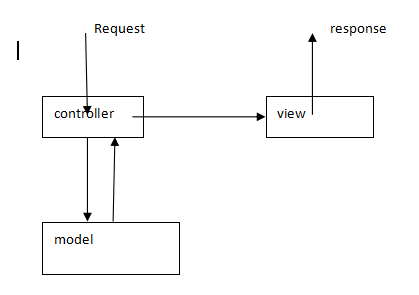
1.4 mvc模式
1.5spring-mvc流程
2.spring-mvc的第一个例子
1. 创建一个web工程
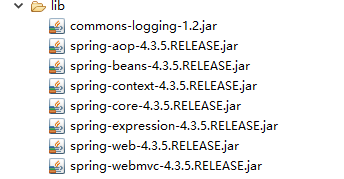
2. 导入依赖包
3.创建springmvc的配置文件 (web.xml)
<?xml version="1.0" encoding="UTF-8"?>

<web-app xmlns:xsi="http://www.w3.org/2001/XMLSchema-instance" xmlns="http://java.sun.com/xml/ns/javaee" xsi:schemaLocation="http://java.sun.com/xml/ns/javaee http://java.sun.com/xml/ns/javaee/web-app_3_0.xsd" id="WebApp_ID" version="3.0">

  <display-name>springMvcDome</display-name>

  <welcome-file-list>

    <welcome-file>index.html</welcome-file>

    <welcome-file>index.htm</welcome-file>

    <welcome-file>index.jsp</welcome-file>

    <welcome-file>default.html</welcome-file>

    <welcome-file>default.htm</welcome-file>

    <welcome-file>default.jsp</welcome-file>

  </welcome-file-list>

  <!-- 配置springmvc中央控制器 -->

  <servlet>

      <servlet-name>springmvc</servlet-name>

      <servlet-class>org.springframework.web.servlet.DispatcherServlet</servlet-class>

  </servlet>

  <servlet-mapping>

      <servlet-name>springmvc</servlet-name>

      <url-pattern>*.do</url-pattern>

  </servlet-mapping>

</web-app>
4.配置spring mvc核心配置文件
文件的命名规则:中央控制器(servlet的名称)的名称+“-servlet.xml”
默认位置:WEB-INF下
配置:controller和视图解析器
 <?xml version="1.0" encoding="UTF-8"?>

 <beans xmlns="http://www.springframework.org/schema/beans"

     xmlns:xsi="http://www.w3.org/2001/XMLSchema-instance" xmlns:mvc="http://www.springframework.org/schema/mvc"

     xmlns:context="http://www.springframework.org/schema/context"

     xmlns:aop="http://www.springframework.org/schema/aop" xmlns:tx="http://www.springframework.org/schema/tx"

     xsi:schemaLocation="http://www.springframework.org/schema/beans

 http://www.springframework.org/schema/beans/spring-beans-4.3.xsd

 http://www.springframework.org/schema/mvc

 http://www.springframework.org/schema/mvc/spring-mvc-4.3.xsd

 http://www.springframework.org/schema/context

 http://www.springframework.org/schema/context/spring-context-4.3.xsd

 http://www.springframework.org/schema/aop

 http://www.springframework.org/schema/aop/spring-aop-4.3.xsd

 http://www.springframework.org/schema/tx

 http://www.springframework.org/schema/tx/spring-tx-4.3.xsd ">

     <!-- 配置controller  默认使用BeanNameurlHandelMapping 根据hello.do来找到controller-->

     <bean id="myController" name="/hello.do" class="com.springmvc.mycontroller.MyController"></bean>

     <!-- 配置视图解析器 -->

     <bean

         class="org.springframework.web.servlet.view.InternalResourceViewResolver">

         <!-- 配置前缀 -->

         <property name="prefix" value="/WEB-INF/jsp/"></property>

         <!-- 配置后缀 -->

         <property name="suffix" value=".jsp"></property>

     </bean>

 </beans>
5.创建controller
package com.springmvc.mycontroller;

import javax.servlet.http.HttpServletRequest;

import javax.servlet.http.HttpServletResponse;

import org.springframework.web.servlet.ModelAndView;

import org.springframework.web.servlet.mvc.AbstractController;

/**

 * spring mvc第一个例子

 * @author Administrator

 *

 */

public class MyController extends AbstractController{

    @Override

    protected ModelAndView handleRequestInternal(HttpServletRequest arg0, HttpServletResponse arg1) throws Exception {

        System.out.println("hello springmvc");

        return new ModelAndView("index");

    }

}
6.测试成功

Spring MVC介绍和第一个例子的更多相关文章
- [翻译]Spring MVC RESTFul Web Service CRUD 例子
Spring MVC RESTFul Web Service CRUD 例子 本文主要翻译自:http://memorynotfound.com/spring-mvc-restful-web-serv ...
- 基于spring mvc的注解DEMO完整例子
弃用了struts,用spring mvc框架做了几个项目,感觉都不错,而且使用了注解方式,可以省掉一大堆配置文件.本文主要介绍使用注解方式配置的spring mvc,之前写的spring3.0 mv ...
- Spring 3.x 实践 第一个例子(Spring 3.x 企业应用开发实战读书笔记第二章)
前言:工作之后一直在搞android,现在需要更多和后台的人员交涉,技术栈不一样,难免鸡同鸭讲,所以稍稍学习下. 这个例子取自于<Spring 3.x 企业应用开发实战>一书中的第二章,I ...
- springmvc的介绍和第一个例子
SpringMVC是Spring 框架自带的一部分. SpringMVC底层基于:Servlet Struts2底层基于:filter struts1底层基于:Servlet spring 各模块 我 ...
- Spring MVC 简介及入门小例子
说明:文章内容全部截选自实验楼教程[Spring MVC 简易教程] 一.什么是 Spring MVC Spring MVC 属于 SpringFrameWork 的后续产品,已经融合在 Spring ...
- spring mvc 介绍
Spring MVC Tutorial tag. * * If you do not want to deal with the intricities of the noscript * secti ...
- spring boot入门 -- 介绍和第一个例子
"越来越多的企业选择使用spring boot 开发系统,spring boot牛在什么地方?难不难学?心动不如行动,让我们一起开始学习吧!" 使用Spring boot ,可以轻 ...
- spring mvc介绍只试图解析(转载)
转载路径 http://haohaoxuexi.iteye.com/blog/1770554 SpringMVC视图解析器 前言 在前一篇博客中讲了SpringMVC的Controller控制器,在这 ...
- spring mvc 提交表单的例子
1. 构建MAVEN项目,然后转换成web格式,结构图如下: 2. 通过@RequestMapping来进行配置,当输入URL时,会以此找到对应方法执行,首先调用setupForm方法,该方法主要是生 ...
随机推荐
- Codeforce 1255 Round #601 (Div. 2) C. League of Leesins (大模拟)
Bob is an avid fan of the video game "League of Leesins", and today he celebrates as the L ...
- UVA-1 #1. A + B Problem
给你两个数 aa 和 bb,请输出他们的和. 输入格式 一行,两个用空格隔开的整数 aa 和 bb. 输出格式 一个整数,表示 a+ba+b. 样例一 input 2 3 output 5 限制与约定 ...
- 【NOI Online 2020】入门组 总结&&反思
前言: 这次的NOI Online 2020 入门组我真的无力吐槽CCF的网站了,放段自己写的diss的文章,供一乐 如下:(考试后当天晚上有感而发) 今天是个好日子!!!(我都经历了什么...... ...
- 写给Android 混淆小白的快速混淆方法
为啥子要混淆 简单来说,Android 进行ProGuard,可以起到压缩,混淆,预检,优化的功能,虽然不能说更安全但还是一个不容忽视的环节. 开始混淆第一步 首先在build.gradle 中将混淆 ...
- 从0开始学自定义View -1
PS:好久没有写博客了,之前的东西有所忘记,百度一下竟然查到了自己的写过的博客,访问量还可以,一开始的写博客的初衷是把自己不会的记录下来,现在没想到也有博友会关注我,这就给了我动力,工作之余把零零碎碎 ...
- 低价购买(LIS方案统计)
题意:https://www.luogu.com.cn/problem/P1108 如果两个数列组成的数字完全相同,那我们说这两个数列相同. 求出最长下降子序列的方案数. 题解来自 wjyyy大神. ...
- matlab 调用C程序进行simulink仿真
文章目录 simulink仿真 创建C程序 编译C程序 运行结果 simulink仿真 simulink仿真中需要使用S-Function模块,可以实现调用C程序进行仿真,下面先建立一个简单的仿真: ...
- vue 如何实现 Input 输入框模糊查询方法
原理:原生js的indexOf() 方法,该方法将从头到尾地检索数组,看它是否含有对应的元素.开始检索的位置在数组 start 处或数组的开头(没有指定 start 参数时).如果找到一个 item, ...
- vue-multi-module【多模块集成的vue项目,多项目共用一份配置,可以互相依赖,也可以独立打包部署】
基于 vue-cli 2 实现,vue 多模块.vue多项目集成工程 Github项目地址 : https://github.com/BothEyes1993/vue-multi-module 目标: ...
- 站在CSS3的肩上定义选择器
按上下文选择元素 按祖先元素选择要格式化的元素 输入ancestor,这里的ancestor是希望格式化的元素的祖先元素的选择器. 输入一个空格(必不可少). 如果需要,对后续的每个祖先元素重复第(1 ...