
事件处理& 事件委托& 区别mouseover与mouseenter
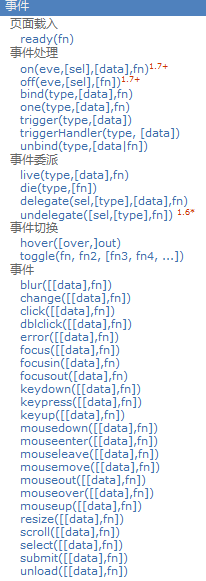
<!DOCTYPE html>

<html>

<head>

  <meta charset="UTF-8">

  <title>18_事件绑定与解绑</title>

</head>

<style type="text/css">

  * {

    margin: 0px;

  }

  .out {

    position: absolute;

    width: 200px;

    height: 200px;

    top: 20px;

    left: 10px;

    background: blue;

  }

  .inner {

    position: absolute;

    width: 100px;

    height: 100px;

    top: 50px;

    background: red;

  }

  .divBtn {

    position: absolute;

    top: 250px;

  }

</style>

<body style="height: 2000px;">

<div class="out">

  外部DIV

  <div class="inner">内部div</div>

</div>

<div class='divBtn'>

  <button id="btn1">取消绑定所有事件</button>

  <button id="btn2">取消绑定mouseover事件</button>

  <button id="btn3">测试事件坐标</button>

  <a href="http://www.baidu.com" id="test4">百度一下</a>

</div>

<!--

1. 事件绑定(2种):

  * eventName(function(){})

    绑定对应事件名的监听,    例如:$('#div').click(function(){});

  * on(eventName, funcion(){})

    通用的绑定事件监听, 例如:$('#div').on('click', function(){})

  * 优缺点:

    eventName: 编码方便, 但只能加一个监听, 且有的事件监听不支持

    on: 编码不方便, 可以添加多个监听, 且更通用

2. 事件解绑:

  * off(eventName)

3. 事件的坐标

  * event.clientX, event.clientY  相对于视口的左上角

  * event.pageX, event.pageY  相对于页面的左上角

  * event.offsetX, event.offsetY 相对于事件元素左上角

4. 事件相关处理

  * 停止事件冒泡 : event.stopPropagation()

  * 阻止事件默认行为 : event.preventDefault()

-->

<script src="js/jquery-1.10.1.js" type="text/javascript" charset="utf-8"></script>

<script type="text/javascript">

  /*

   需求:

   1. 给.out绑定点击监听(用两种方法绑定)

   2. 给.inner绑定鼠标移入和移出的事件监听(用3种方法绑定)

   3. 点击btn1解除.inner上的所有事件监听

   4. 点击btn2解除.inner上的mouseover事件

   5. 点击btn3得到事件坐标

   6. 点击.inner区域, 外部点击监听不响应

   7. 点击链接, 如果当前时间是偶数不跳转

   */

  //1. 给.out绑定点击监听(用两种方法绑定)

  /*$('.out').click(function () {

   console.log('click out')

   })*/

  $('.out').on('click', function () {

    console.log('on click out')

  })

  //2. 给.inner绑定鼠标移入和移出的事件监听(用3种方法绑定)

  /*

   $('.inner')

   .mouseenter(function () { // 进入

    console.log('进入')

   })

   .mouseleave(function () { // 离开

   console.log('离开')

   })

   */

  /*

   $('.inner')

   .on('mouseenter', function () {

   console.log('进入2')

   })

   .on('mouseleave', function () {

   console.log('离开2')

   })

 */

  $('.inner').hover(function () {

    console.log('进入3')

  }, function () {

    console.log('离开3')

  })

//3. 点击btn1解除.inner上的所有事件监听

  $('#btn1').click(function () {

    $('.inner').off()

  })

  //4. 点击btn2解除.inner上的mouseenter事件

  $('#btn2').click(function () {

    $('.inner').off('mouseenter')

  })

  //5. 点击btn3得到事件坐标

  $('#btn3').click(function (event) { // event事件对象

    console.log(event.offsetX, event.offsetY) // 原点为事件元素的左上角

    console.log(event.clientX, event.clientY) // 原点为窗口的左上角

    console.log(event.pageX, event.pageY) // 原点为页面的左上角

  })

  //6. 点击.inner区域, 外部点击监听不响应

  $('.inner').click(function (event) {

    console.log('click inner')

    //停止事件冒泡

    event.stopPropagation()

  })

  //7. 点击链接, 如果当前时间是偶数不跳转

  $('#test4').click(function (event) {

    if(Date.now()%2===0) {

      event.preventDefault()

    }

  })

</script>

</body>

</html>
区别mouseover与mouseenter
<!DOCTYPE html>

<html>

<head>

    <meta charset="UTF-8">

    <title>19_事件切换</title>

</head>

<style type="text/css">

    * {

        margin: 0px;

    }

    .div1 {

        position: absolute;

        width: 200px;

        height: 200px;

        top: 50px;

        left: 10px;

        background: olive;

    }

    .div2 {

        position: absolute;

        width: 100px;

        height: 100px;

        top: 50px;

        background: red;

    }

    .div3 {

        position: absolute;

        width: 200px;

        height: 200px;

        top: 50px;

        left: 230px;

        background: olive;

    }

    .div4 {

        position: absolute;

        width: 100px;

        height: 100px;

        top: 50px;

        background: yellow;

    }

    .divText{

        position: absolute;

        top: 330px;

        left: 10px;

    }

</style>

<body>

<div class="divText">

    区分鼠标的事件

</div>

<div class="div1">

    div1.....

    <div class="div2">div2....</div>

</div>

<div class="div3">

    div3.....

    <div class="div4">div4....</div>

</div>

<!--

区别mouseover与mouseenter?

    * mouseover: 在移入子元素时也会触发, 对应mouseout

    * mouseenter: 只在移入当前元素时才触发, 对应mouseleave

      hover()使用的就是mouseenter()和mouseleave()

区别on('eventName', fun)与eventName(fun)

    * on('eventName', fun): 通用, 但编码麻烦

    * eventName(fun): 编码简单, 但有的事件没有对应的方法

-->

<script src="js/jquery-1.10.1.js" type="text/javascript"></script>

<script type="text/javascript">

    $('.div1')

        .mouseover(function () {

            console.log('mouseover 进入')

        })

        .mouseout(function () {

            console.log('mouseout 离开')

        })

    $('.div3')

        .mouseenter(function () {

            console.log('mouseenter 进入')

        })

        .mouseleave(function () {

            console.log('mouseleave 离开')

        })

</script>

</body>

</html>
事件委托
<!DOCTYPE HTML>

<html>

<head>

  <meta charset="UTF-8">

  <title>20_事件委托2</title>

</head>

<body>

<ul>

  <li>1111</li>

  <li>2222</li>

  <li>3333</li>

  <li>4444</li>

</ul>

<li>22222</li>

<br>

<button id="btn1">添加新的li</button>

<button id="btn2">删除ul上的事件委托的监听器</button>

<!--

1. 事件委托(委派/代理):

  * 将多个子元素(li)的事件监听委托给父辈元素(ul)处理

  * 监听回调是加在了父辈元素上

  * 当操作任何一个子元素(li)时, 事件会冒泡到父辈元素(ul)

  * 父辈元素不会直接处理事件, 而是根据event.target得到发生事件的子元素(li), 通过这个子元素调用事件回调函数

2. 事件委托的2方:

  * 委托方: 业主  li

  * 被委托方: 中介  ul

3. 使用事件委托的好处

  * 添加新的子元素, 自动有事件响应处理

  * 减少事件监听的数量: n==>1

4. jQuery的事件委托API

  * 设置事件委托: $(parentSelector).delegate(childrenSelector, eventName, callback)

  * 移除事件委托: $(parentSelector).undelegate(eventName)

-->

<script src="js/jquery-1.10.1.js"></script>

<script>

  // 设置事件委托

  $('ul').delegate('li', 'click', function () {

    // console.log(this)

    this.style.background = 'red'

  })

  $('#btn1').click(function () {

    $('ul').append('<li>新增的li....</li>')

  })

  $('#btn2').click(function () {

    // 移除事件委托

    $('ul').undelegate('click')

  })

</script>

</body>

</html>
事件处理& 事件委托& 区别mouseover与mouseenter的更多相关文章
- 区别mouseover与mouseenter?
区别mouseover与mouseenter? * mouseover: 在移入子元素时也会触发, 对应mouseout,进入子元素的时候,父元素显示离开状态 * mouseenter: 只在移入当前 ...
- 做二级菜单时候遇到的关于事件冒泡以及mouseover和mouseenter的不同
二级菜单作为最普通小组件,我遇到了坑. <style> .wrapper { height: 150px; border: 1px solid; width: 150px; } .wrap ...
- jQuery里的mouseover与mouseenter事件类型区别
JQ里面有mouseover和mouseenter 2个事件类型干着差不多的活,用不好经常出现些小问题. 今天我解释一下原理: 事件类型翻译: mouseover 鼠标移上 mouseenter 鼠 ...
- mouseover事件与mouseenter事件的区别
不论鼠标指针穿过被选元素或其子元素,都会触发 mouseover 事件.对应mouseout 只有在鼠标指针穿过被选元素时,才会触发 mouseenter 事件.对应mouseleave 被触发的 M ...
- 关于事件mouseover ,mouseout ,mouseenter,mouseleave的区别
轮播中大多会选择mouseover和mouseout 这个时候是没有任何问题的 但当遇到有css3动画的时候,会发现移入移出过快 动画还没加载完成就需要执行下一个动画,完了动画样式就错乱了. 这时候 ...
- 一个例子说明mouseover事件与mouseenter事件的区别
<html> <head> <meta charset="UTF-8"> <title>haha</title> < ...
- 最终解决 mouseenter, mouseleave , mouseout mousehover mousemove等事件的区别?
在jquery中, html页面的div的显示和隐藏, 修改等的功能, 最终都要由 事件 触发来引用, 不管是键盘事件, 还是鼠标事件... mouseenter和mouseleave是成对对应的, ...
- JQ中mouseover和mouseenter的区别
我最近也在学习JQuery,所以最近对JQ中的一些小问题进行总结,方便学习. 在对于刚开始学习JQ的初学者来说,mouseover事件和mouseenter事件总是傻傻分不清楚,毕竟刚开始学习的时候, ...
- jquery的hover mouseover mouseout mouseenter mouseleave的区别
jquery的hover mouseover mouseout mouseenter mouseleave的区别 1.mouseover mouseout mouseover - 鼠标指针经过任何子元 ...
随机推荐
- linux命令之df dh
df -h, --human-readable 查看磁盘空间占用情况 df -h du -h, --human-readable -s, --summarize 查看文件大小 du -h test.t ...
- 在linux上部署自己开发的web项目
在linux上部署自己开发的web项目 前言:相信有很多做开发的小伙伴和我之前一样,只会在windows环境下,利用开发工具开发运行web项目,但是却不知道怎么把开发好的项目部署到linux服务器上去 ...
- RDP凭据离线脱取
内网渗透-获取本地RDP密码 获取RDP 连接记录: reg query "HKEY_CURRENT_USER\Software\Microsoft\Terminal Server Clie ...
- Java——Java面向对象
该系列博文会告诉你如何从入门到进阶,一步步地学习Java基础知识,并上手进行实战,接着了解每个Java知识点背后的实现原理,更完整地了解整个Java技术体系,形成自己的知识框架. 概述: Java是面 ...
- Jetson AGX Xavier/Ubuntu更改pip3源
pip3换源: 修改~/.pip/pip.conf,如果没有这个文件,就创建一个. 内容如下: [global]index-url = https://pypi.tuna.tsinghua.edu.c ...
- Zuul源码分析
先上一张流程图: 我们Zuul的使用如下: @SpringBootApplication @EnableZuulProxy public class ZuulApplication { public ...
- 【系列】Python编程思想(1):Python简介与开发环境搭建
李宁老师的 开始学习. 本系列文章深入介绍了Python的各种技术,堪称是目前最全的Python教程.主要目的是让读者可以了解Python的各种核心技术,包括各种Python函数库.本教程使用Py ...
- 关于SpringBoot的外部化配置使用记录
关于SpringBoot的外部化配置使用记录 声明: 若有任何纰漏.错误请不吝指出! 记录下使用SpringBoot配置时遇到的一些麻烦,虽然这种麻烦是因为知识匮乏导致的. 记录下避免一段时间后自己又 ...
- python --内建结构 汉诺塔结构
规则: 1.每次移动一个盘子 2.任何时候大盘子在下面,小盘子在上面 方法: 1.n=1:直接将A上的盘子移动到c 上面,A->C 2.n=2: 1>A->B 2>A-> ...
- es6中class类的全方面理解
传统的javascript中只有对象,没有类的概念.它是基于原型的面向对象语言.原型对象特点就是将自身的属性共享给新对象.这样的写法相对于其它传统面向对象语言来讲,很有一种独树一帜的感脚!非常容易让人 ...