
Python 爬取 热词并进行分类数据分析-[拓扑数据]
日期:2020.01.29
博客期:137
星期三
【本博客的代码如若要使用,请在下方评论区留言,之后再用(就是跟我说一声)】
所有相关跳转:
a.【简单准备】
b.【云图制作+数据导入】
c.【拓扑数据】(本期博客)
d.【数据修复】
e.【解释修复+热词引用】
f.【JSP演示+页面跳转】
g.【热词分类+目录生成】
h.【热词关系图+报告生成】
i . 【App制作】
j . 【安全性改造】
嗯,先声明一下 “拓扑数据”的意思,应老师需求,我们需要将热词的解释、引用等数据从百科网站中爬取下来,之后将统一的热词数据进行文件处理,组合成新的数据表,然后可以在网页上(暂时是网页)展示更多的信息。
嗯,可以对热词解释进行爬取了,给大家看一下 (以人工智能为例) 
我发现了一个问题:
setAttr("value","人工智能")方法并不能实现input的value属性值变为想要的“人工智能”,我采用的是sendKeys("人工智能")方法来实现,不过这样又有了一个问题,每一次sendKeys()相当于再input内部又附加了这样的字符,比如原本input里有“茄子”字样,之后使用sendKeys(“蔬菜”),input里就变成了“茄子蔬菜”!这个问题就导致了我不能实现页面直接跳转。如何解决呢?
我从它的方法里找到了clear()方法,亲测可用(在sendKeys之前使用)。
我在这里提供测试类代码:
 import parsel

 from urllib import request

 import codecs

 from selenium import webdriver

 import time

 # [ 对字符串的特殊处理方法-集合 ]

 class StrSpecialDealer:

     # 取得当前标签内的文本

     @staticmethod

     def getReaction(stri):

         strs = StrSpecialDealer.simpleDeal(str(stri))

         strs = strs[strs.find('>')+1:strs.rfind('<')]

         return  strs

     # 去除基本的分隔符

     @staticmethod

     def simpleDeal(stri):

         strs = str(stri).replace(" ", "")

         strs = strs.replace("\t", "")

         strs = strs.replace("\r", "")

         strs = strs.replace("\n", "")

         return strs

     # 删除所有标签标记

     @staticmethod

     def deleteRe(stri):

         strs = str(stri)

         st = strs.find('<')

         while(st!=-1):

             str_delete = strs[strs.find('<'):strs.find('>')+1]

             strs = strs.replace(str_delete,"")

             st = strs.find('<')

         return strs

     # 删除带有 日期 的句子

     @staticmethod

     def de_date(stri):

         lines = str(stri).split("。")

         strs = ""

         num = lines.__len__()

         for i in range(0,num):

             st = str(lines[i])

             if (st.__contains__("年") | st.__contains__("月")):

                 pass

             else:

                 strs += st + "。"

         strs = strs.replace("。。", "。")

         return strs

     # 取得带有 日期 的句子之前的句子

     @staticmethod

     def ut_date(stri):

         lines = str(stri).split("。")

         strs = ""

         num = lines.__len__()

         for i in range(0, num):

             st = str(lines[i])

             if (st.__contains__("年")| st.__contains__("月")):

                 break

             else:

                 strs += st + "。"

         strs = strs.replace("。。","。")

         return strs

     @staticmethod

     def beat(stri,num):

         strs = str(stri)

         for i in range(0,num):

             strs = strs.replace("["+str(i)+"]","")

         return  strs

 # [ 连续网页爬取的对象 ]

 class WebConnector:

     profile = ""

     sw = ""

     # ---[定义构造方法]

     def __init__(self):

         self.profile = webdriver.Firefox()

         self.profile.get('https://baike.baidu.com/')

     # ---[定义释放方法]

     def __close__(self):

         self.profile.quit()

     # 获取 url 的内部 HTML 代码

     def getHTMLText(self):

         a = self.profile.page_source

         return a

     # 获取页面内的基本链接

     def getFirstChanel(self):

         index_html = self.getHTMLText()

         index_sel = parsel.Selector(index_html)

         links = index_sel.css('.lemma-summary').extract()[0]

         tpl = StrSpecialDealer.simpleDeal(str(links))

         tpl = StrSpecialDealer.beat(tpl,20)

         tpl = StrSpecialDealer.deleteRe(tpl)

         tpl = StrSpecialDealer.ut_date(tpl)

         return tpl

     def getMore(self,refers):

         self.profile.find_element_by_id("query").clear()

         self.profile.find_element_by_id("query").send_keys(refers)

         self.profile.find_element_by_id("search").click()

         time.sleep(1)

 def main():

     wc = WebConnector()

     wc.getMore("人工智能")

     s = wc.getFirstChanel()

     print(s)

     wc.getMore("5G")

     t = wc.getFirstChanel()

     print(t)

     wc.__close__()

 main()
test.py
嗯,然后我继续整合,将数据导入成文件批处理
对应代码:
 import parsel

 from urllib import request

 import codecs

 from selenium import webdriver

 import time

 # [ 整理后的数据 ]

 class Info:

     # ---[ 方法区 ]

     # 构造方法

     def __init__(self,name,num,more):

         self.name = name

         self.num = num

         self.more = more

     def __toString__(self):

         return (self.name+"\t"+str(self.num)+"\t"+self.more)

     def __toSql__(self,table):

         return ("Insert into "+table+" values ('"+self.name+"',"+self.num+",'"+self.more+"');")

     # ---[ 数据区 ]

     # 名称

     name = ""

     # 频数

     num = 0

     # 中文解释

     more = 0

 # [写文件的方法集合]

 class FileToWebAndContent:

     fileReaderPath = ""

     wc = ""

     sw = ""

     def __init__(self,r,w):

         self.fileReaderPath = r

         self.wc = WebConnector()

         self.sw = StringWriter(w)

         self.sw.makeFileNull()

     def __free__(self):

         self.wc.__close__()

     def __deal__(self):

         fw = open(self.fileReaderPath, mode='r', encoding='utf-8')

         lines = fw.readlines()

         num = lines.__len__()

         for i in range(0,num):

             str_line = lines[i]

             gr = str_line.split("\t")

             name_b = StrSpecialDealer.simpleDeal(gr[0])

             num_b = StrSpecialDealer.simpleDeal(gr[1])

             if(int(num_b)<=2):

                 break

             self.wc.getMore(name_b)

             more_b = self.wc.getFirstChanel()

             if(more_b==""):

                 continue

             info = Info(name_b,num_b,more_b)

             self.sw.write(info.__toString__())

 # [ 对字符串的特殊处理方法-集合 ]

 class StrSpecialDealer:

     # 取得当前标签内的文本

     @staticmethod

     def getReaction(stri):

         strs = StrSpecialDealer.simpleDeal(str(stri))

         strs = strs[strs.find('>')+1:strs.rfind('<')]

         return  strs

     # 去除基本的分隔符

     @staticmethod

     def simpleDeal(stri):

         strs = str(stri).replace(" ", "")

         strs = strs.replace("\t", "")

         strs = strs.replace("\r", "")

         strs = strs.replace("\n", "")

         return strs

     # 删除所有标签标记

     @staticmethod

     def deleteRe(stri):

         strs = str(stri)

         st = strs.find('<')

         while(st!=-1):

             str_delete = strs[strs.find('<'):strs.find('>')+1]

             strs = strs.replace(str_delete,"")

             st = strs.find('<')

         return strs

     # 删除带有 日期 的句子

     @staticmethod

     def de_date(stri):

         lines = str(stri).split("。")

         strs = ""

         num = lines.__len__()

         for i in range(0,num):

             st = str(lines[i])

             if (st.__contains__("年") | st.__contains__("月")):

                 pass

             else:

                 strs += st + "。"

         strs = strs.replace("。。", "。")

         return strs

     # 取得带有 日期 的句子之前的句子

     @staticmethod

     def ut_date(stri):

         lines = str(stri).split("。")

         strs = ""

         num = lines.__len__()

         for i in range(0, num):

             st = str(lines[i])

             if (st.__contains__("年")| st.__contains__("月")):

                 break

             else:

                 strs += st + "。"

         strs = strs.replace("。。","。")

         return strs

     @staticmethod

     def beat(stri,num):

         strs = str(stri)

         for i in range(0,num):

             strs = strs.replace("["+str(i)+"]","")

         return  strs

 # [写文件的方法集合]

 class StringWriter:

     filePath = ""

     def __init__(self,str):

         self.filePath = str

         pass

     def makeFileNull(self):

         f = codecs.open(self.filePath, "w+", 'utf-8')

         f.write("")

         f.close()

     def write(self,stri):

         f = codecs.open(self.filePath, "a+", 'utf-8')

         f.write(stri + "\n")

         f.close()

 # [ 连续网页爬取的对象 ]

 class WebConnector:

     profile = ""

     sw = ""

     # ---[定义构造方法]

     def __init__(self):

         self.profile = webdriver.Firefox()

         self.profile.get('https://baike.baidu.com/')

         # self.sw = StringWriter("../testFile/rc/moreinfo.txt")

         # self.sw.makeFileNull()

     # ---[定义释放方法]

     def __close__(self):

         self.profile.quit()

     # 获取 url 的内部 HTML 代码

     def getHTMLText(self):

         a = self.profile.page_source

         return a

     # 获取页面内的基本链接

     def getFirstChanel(self):

         try:

             index_html = self.getHTMLText()

             index_sel = parsel.Selector(index_html)

             links = index_sel.css('.lemma-summary').extract()[0]

             tpl = StrSpecialDealer.simpleDeal(str(links))

             tpl = StrSpecialDealer.beat(tpl, 20)

             tpl = StrSpecialDealer.deleteRe(tpl)

             tpl = StrSpecialDealer.ut_date(tpl)

             return tpl

         except:

             return ""

     def getMore(self,refers):

         self.profile.find_element_by_id("query").clear()

         self.profile.find_element_by_id("query").send_keys(refers)

         self.profile.find_element_by_id("search").click()

         time.sleep(1)

 def main():

     ftwac = FileToWebAndContent("../testFile/rc/output.txt", "../testFile/rc/moreinfo.txt")

     ftwac.__deal__()

     ftwac.__free__()

 main()
MoreInfo.py
对应得到文件截图: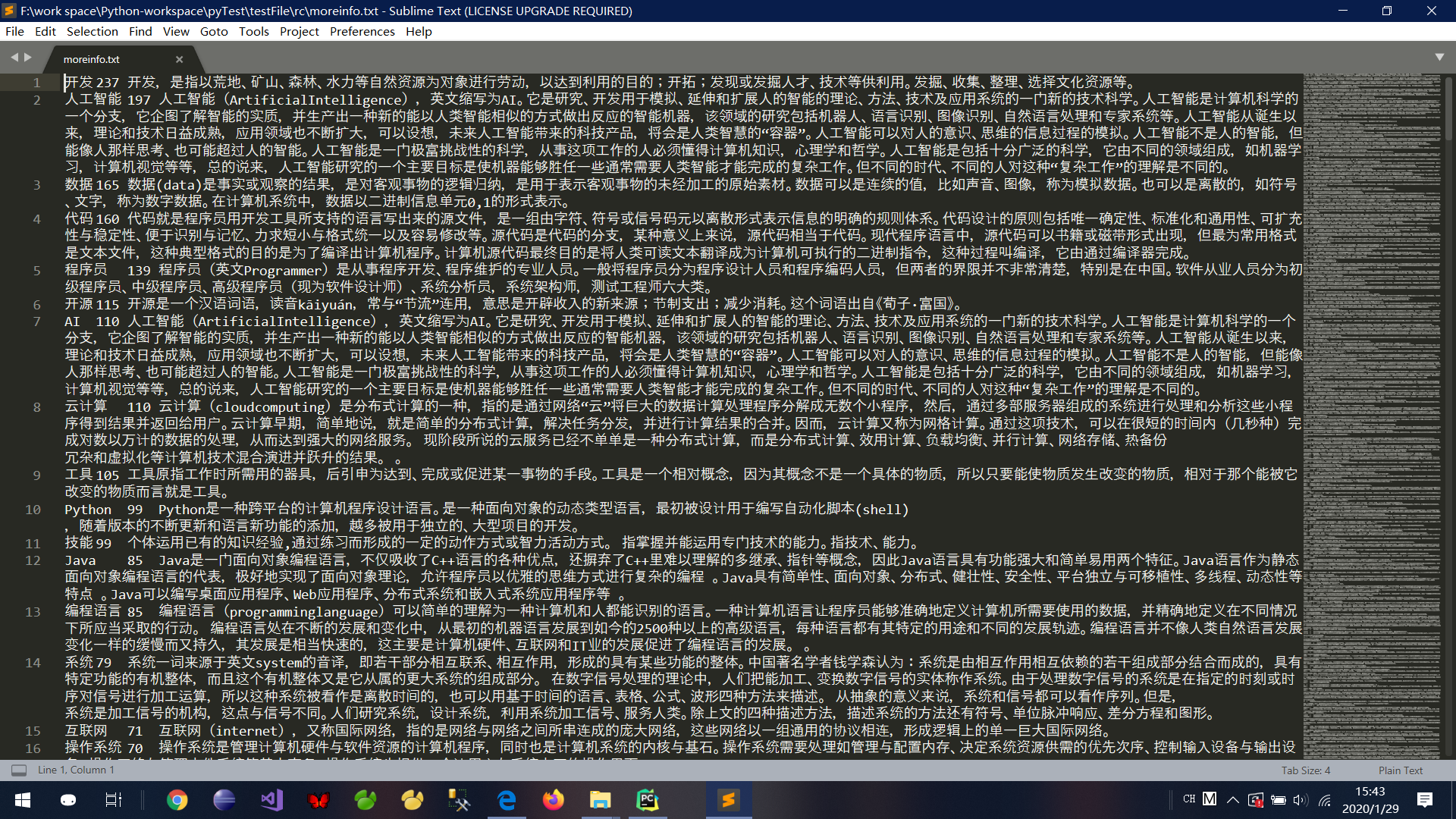
Python 爬取 热词并进行分类数据分析-[拓扑数据]的更多相关文章
- Python 爬取 热词并进行分类数据分析-[解释修复+热词引用]
日期:2020.02.02 博客期:141 星期日 [本博客的代码如若要使用,请在下方评论区留言,之后再用(就是跟我说一声)] 所有相关跳转: a.[简单准备] b.[云图制作+数据导入] c.[拓扑 ...
- Python 爬取 热词并进行分类数据分析-[热词分类+目录生成]
日期:2020.02.04 博客期:143 星期二 [本博客的代码如若要使用,请在下方评论区留言,之后再用(就是跟我说一声)] 所有相关跳转: a.[简单准备] b.[云图制作+数据导入] c.[ ...
- Python 爬取 热词并进行分类数据分析-[云图制作+数据导入]
日期:2020.01.28 博客期:136 星期二 [本博客的代码如若要使用,请在下方评论区留言,之后再用(就是跟我说一声)] 所有相关跳转: a.[简单准备] b.[云图制作+数据导入](本期博客) ...
- Python 爬取 热词并进行分类数据分析-[简单准备] (2020年寒假小目标05)
日期:2020.01.27 博客期:135 星期一 [本博客的代码如若要使用,请在下方评论区留言,之后再用(就是跟我说一声)] 所有相关跳转: a.[简单准备](本期博客) b.[云图制作+数据导入] ...
- Python 爬取 热词并进行分类数据分析-[数据修复]
日期:2020.02.01 博客期:140 星期六 [本博客的代码如若要使用,请在下方评论区留言,之后再用(就是跟我说一声)] 所有相关跳转: a.[简单准备] b.[云图制作+数据导入] c.[拓扑 ...
- Python 爬取 热词并进行分类数据分析-[App制作]
日期:2020.02.14 博客期:154 星期五 [本博客的代码如若要使用,请在下方评论区留言,之后再用(就是跟我说一声)] 所有相关跳转: a.[简单准备] b.[云图制作+数据导入] c.[拓扑 ...
- Python 爬取 热词并进行分类数据分析-[JSP演示+页面跳转]
日期:2020.02.03 博客期:142 星期一 [本博客的代码如若要使用,请在下方评论区留言,之后再用(就是跟我说一声)] 所有相关跳转: a.[简单准备] b.[云图制作+数据导入] c.[拓扑 ...
- Python 爬取 热词并进行分类数据分析-[热词关系图+报告生成]
日期:2020.02.05 博客期:144 星期三 [本博客的代码如若要使用,请在下方评论区留言,之后再用(就是跟我说一声)] 所有相关跳转: a.[简单准备] b.[云图制作+数据导入] c.[拓扑 ...
- Python爬取热搜存入数据库并且还能定时发送邮件!!!
一.前言 微博热搜榜每天都会更新一些新鲜事,但是自己处于各种原因,肯定不能时刻关注着微博,为了与时代接轨,接受最新资讯,就寻思着用Python写个定时爬取微博热搜的并且发送QQ邮件的程序,这样每天可以 ...
随机推荐
- 【visio】跨职能流程图
归属于 流程图类别 相比于普通流程图,突出了参与流程的组织.部门之间的联系,形式化地说,它突出的是参与流程的对象之间的联系. 它除了表达基本流程,同时也能展示每个每个流程的归属方,让每个对象明确知道自 ...
- [lua]紫猫lua教程-命令宝典-L1-01-02. 变量
L1[变量]01. 变量命名规则 命名规则:数字字母下划线构成 但是不能数字开头 不推荐中文名 很多都是不支持中文 但是在一些其他的编辑器里面 比如触摸精灵 之类的 就可以 注意 :变量命名必须要包含 ...
- Vue2.0 中,“渐进式框架”和“自底向上增量开发的设计”这两个概念是什么?(转)
https://www.zhihu.com/question/51907207?rf=55052497 徐飞 在我看来,渐进式代表的含义是:主张最少. 每个框架都不可避免会有自己的一些特点,从而会对使 ...
- 共有T个硬币,其中Z个正面,F个反面,分为两堆,要如何操作使得两堆中的正面硬币数目相等。
类似题目如下(数值是可变化的) 你的面前有30个硬币,其中有10个正面朝上,20个反面朝上,混乱在一团. 要求:现在用厚布遮住你的眼睛.要你把30个硬币分成2团,每团正面朝上的硬币个数相等.问:你要怎 ...
- html2canvas.js 图片不显示
html2canvas.js 图片不显示 在服务器端打开 就可以, 但是在本地就不显示图片. 查找百度,是因为图片不能跨域. 在给非编程人员使用的时候,建议把所有的图片,转化为base64,就可以直接 ...
- Python2中的列表推导式存在变量泄漏问题,在Python3中不存在
列表推导式(list comprehension) Python2: >>> x = 'my homie' >>> dummy = [x for x in 'ABC ...
- python应用-使用python控制win2003服务器
经调研和测试,服务端可通过ansible控制各linux服务器(容器),进行各类操作,且支持远程控制windows服务器,但windows操作系统中,需安装.net及powershell3.0及以上版 ...
- HBuilder笔记
官网: https://uniapp.dcloud.io/quickstart HBuilderX - 高效极客技巧 https://ask.dcloud.net.cn/article/13191 插 ...
- opencv python:轮廓发现
example import cv2 as cv import numpy as np def edge_demo(image): blurred = cv.GaussianBlur(image, ( ...
- 1018 Public Bike Management (30分) (迪杰斯特拉+dfs)
思路就是dijkstra找出最短路,dfs比较每一个最短路. dijkstra可以找出每个点的前一个点, 所以dfs搜索比较的时候怎么处理携带和带走的数量就是关键,考虑到这个携带和带走和路径顺序有关, ...