
C#File类常用文件操作以及一个模拟的控制台文件管理系统
重温一下C#中File类的一些基本操作:
File类,是一个静态类,主要是来提供一些函数库用的。
使用时需要引入System.IO命名空间。
一、常用操作:
1、创建文件方法
//参数1:要创建的文件路径
File.Create(@"D:\Test\Debug1\测试.txt")
2、打开文件方法
//参数1:要打开的文件路径,参数2:打开的文件方式
File.Open(@"D:\Test\Debug1\测试.txt",FileMode.Append)
3、追加文件方法
//参数1:要追加的文件路径,参数2:追加的内容
File.AppendAllText(@"D:\Test\Debug1\测试.txt","哈哈");
4、复制文件方法
//参数1:要复制的源文件路径,参数2:复制后的目标文件路径,参数3:是否覆盖相同文件名
File.Copy(@"D:\Test\Debug1\测试.txt", @"D:\Test\Debug2\测试1.txt", true);
5、移动文件方法
//参数1:要移动的源文件路径,参数2:移动后的目标文件路径
File.Move(@"D:\Test\Debug1\测试.txt", @"D:\Test\Debug3\测试2.txt");
6、删除文件方法
//参数1:要删除的文件路径
File.Delete(@"D:\Test\Debug1\测试.txt");
7、设置文件属性方法
//参数1:要设置属性的文件路径,参数2:设置的属性类型(只读、隐藏等)
File.SetAttributes(@"D:\Test\Debug1\测试.txt", FileAttributes.Hidden);
二、读写操作:
当读取的文件内容不多时:
- File.ReadAllText(FilePath)
- File.ReadAllText(FilePath, Encoding)
- File.ReadAllLines(FilePath)
例如:
- string str = File.ReadAllText(@"c:\temp\ascii.txt");
- string str2 = File.ReadAllText(@"c:\temp\ascii.txt", Encoding.ASCII);
- string[] strs = File.ReadAllLines(@"c:\temp\ascii.txt");
读取内容比较多时:使用StreamReader类
初始化:
- StreamReader sr1 = new StreamReader(@"c:\temp\utf-8.txt");
- StreamReader sr2 = new StreamReader(@"c:\temp\utf-8.txt", Encoding.UTF8);
- FileStream fs = new FileStream(@"C:\temp\utf-8.txt", FileMode.Open, FileAccess.Read, FileShare.None);
- StreamReader sr3 = new StreamReader(fs);
- StreamReader sr4 = new StreamReader(fs, Encoding.UTF8);
初始化后:
读一行
- string nextLine = sr.ReadLine();
读一个字符
- int nextChar = sr.Read();
读100个字符
- int nChars = 100;
- char[] charArray = new char[nChars];
- int nCharsRead = sr.Read(charArray, 0, nChars);
全部读完
- string restOfStream = sr.ReadToEnd();
使用完StreamReader之后,不要忘记关闭它:
- sr.Closee();
写的内容不多时候
- string str1 = "Good Morning!";
- File.WriteAllText(@"c:\temp\test\ascii.txt", str1);
- string[] strs = { "Good Morning!", "Good Afternoon!" };
- File.WriteAllLines(@"c:\temp\ascii.txt", strs);
写的内容比较多时使用StreamWriter
如果文件不存在,创建文件; 如果存在,覆盖文件
- StreamWriter sw1 = new StreamWriter(@"c:\temp\utf-8.txt");
- FileStream fs = new FileStream(@"C:\temp\utf-8.txt", FileMode.CreateNew, FileAccess.Write, FileShare.Read);
- StreamWriter sw3 = new StreamWriter(fs);
如果文件不存在,创建文件; 如果存在,覆盖文件
- FileInfo myFile = new FileInfo(@"C:\temp\utf-8.txt");
- StreamWriter sw5 = myFile.CreateText();
初始化完成后,可以用StreamWriter对象一次写入一行,一个字符,一个字符数组,甚至一个字符数组的一部分。
写一个字符
- sw.Write('a');
写一个字符数组
- char[] charArray = new char[100];
- sw.Write(charArray);
写一个字符数组的一部分
- sw.Write(charArray, 10, 15);
同样,StreamWriter对象使用完后,不要忘记关闭。
- sw.Close();
=================================================================
接下来是一个简单的控制台应用程序的源码
using System;
using System.Collections.Generic;
using System.Linq;
using System.Text;
using System.Threading.Tasks;
using System.IO; namespace _033_test
{
class Program
{
static void Main(string[] args)
{
FileManager file = new FileManager();
file.MenuChoice(); Console.ReadKey();
}
} class FileManager
{
public void DisPlayer()
{
Console.WriteLine("============File Management System=============");
Console.WriteLine("1.Create 2.Delete 3.Check 4.Revise");
Console.WriteLine("===============================================");
Console.WriteLine("请输入你要进行的操作编号,中途如要返回上一级请输入exit");
} public void MenuChoice()
{
while (true)
{
DisPlayer();
string choice = Console.ReadLine();
switch (choice)
{
case "": Create(); continue;
case "": Delete(); continue;
case "": Check(); continue;
case "": Revise(); continue;
case "exit": return;
default: Console.WriteLine("请重新输入正确的选项"); break;
}
}
} public void Create()
{
Console.WriteLine("请指定路径:");
while (true)
{
string path = Console.ReadLine();
if (path == "exit")
{
Console.WriteLine("返回上一级");
break;
}
try
{
if (File.Exists(path))
{
Console.WriteLine("是否覆盖原文件?Y/N");
string str = Console.ReadLine();
if (str == "y" || str == "Y")
{
File.Create(path).Close();
Console.WriteLine("已覆盖原文件");
break;
}
else
{
Console.WriteLine("放弃覆盖,请重新输入路径");
continue;
}
}
else
{
File.Create(path).Close();
Console.WriteLine("文件已创建");
break;
}
}
catch (Exception)
{
Console.WriteLine("错误路径,请重新输入");
continue;
}
}
} public void Delete()
{
Console.WriteLine("请指定路径:");
while (true)
{
string path = Console.ReadLine();
if (path == "exit")
{
Console.WriteLine("返回上一级");
break;
}
if (File.Exists(path))
{
File.Delete(path);
Console.WriteLine("文件已删除");
break;
}
else
{
Console.WriteLine("不存在该文件,请重新输入路径");
continue;
}
}
} public void Check()
{
Console.WriteLine("请指定路径:");
while (true)
{
string path = Console.ReadLine();
if (path == "exit")
{
Console.WriteLine("返回上一级");
break;
}
if (File.Exists(path))
{
FileInfo fInfo = new FileInfo(path);
Console.WriteLine("1.查看文件信息 2.查看文件内容");
while (true)
{
string str = Console.ReadLine();
switch (str)
{
case "":
Console.WriteLine("文件名:" + fInfo.Name);
Console.WriteLine("创建时间:" + fInfo.CreationTime);
Console.WriteLine("最后修改时间:" + fInfo.LastWriteTime);
Console.WriteLine("字节大小:" + fInfo.Length);
break;
case "":
string type = Path.GetExtension(path);
if (type == ".doc" || type == ".txt")
{
byte[] brr = File.ReadAllBytes(path);
string value = Encoding.Default.GetString(brr, , brr.Length);
Console.WriteLine(value);
}
else
{
Console.WriteLine("该类型文件不支持查看");
}
break;
default: Console.WriteLine("错误指令,请重新输入:"); continue;
}
break;
}
break;
}
else
{
Console.WriteLine("不存在该文件,请重新输入路径");
continue;
}
}
} public void Revise()
{
Console.WriteLine("请指定路径:");
while (true)
{
string path = Console.ReadLine();
if (path == "exit")
{
Console.WriteLine("返回上一级");
break;
}
if (File.Exists(path))
{
Console.WriteLine("1.修改内容 2.修改文件名 3.文末添加");
while (true)
{
string str = Console.ReadLine();
switch (str)
{
case "":
Console.WriteLine("本功能允许你将某个字符串替换成另一个字符");
string type = Path.GetExtension(path);
if (type == ".doc" || type == ".txt")
{
byte[] brr = File.ReadAllBytes(path);
string value = Encoding.Default.GetString(brr, , brr.Length);
Console.WriteLine("请输入你要修改的字符串,若文件中有该字符,将全部替换");
string str2 = Console.ReadLine();
Console.WriteLine("请输入将要修改为的字符串");
string str3 = Console.ReadLine();
byte[] brr2 = Encoding.Default.GetBytes(value.Replace(str2, str3));
File.WriteAllBytes(path, brr2);
}
else
{
Console.WriteLine("该类型文件不支持修改");
}
break;
case "":
FileInfo f = new FileInfo(path);
while (true)
{
try
{
Console.WriteLine("请输入文件名(不需要输入拓展名和路径)");
string fName = Console.ReadLine();
//获取文件的父目录和拓展名,并加在fname两边,使其做到重命名的效果
File.Move(path, f.Directory + "\\" + fName + Path.GetExtension(path));
Console.WriteLine("已将该文件重命名");
}
catch (Exception) {
Console.WriteLine("文件名出错,重新输入!");
continue;
}
break;
}
break;
case "":
Console.WriteLine("请输入内容,回车换行,exit退出");
FileStream fs = new FileStream(path, FileMode.Append);
while (true)
{
string value = Console.ReadLine();
if (value == "exit") break;
byte[] arr = Encoding.Default.GetBytes(value + "\r\n");
fs.Write(arr, , arr.Length);
fs.Flush();
}
fs.Close();
break;
default: Console.WriteLine("错误指令,请重新输入:"); continue;
}
break;
}
break;
}
else
{
Console.WriteLine("不存在该文件,请重新输入路径");
continue;
}
}
}
} }
FileManager
运行结果:
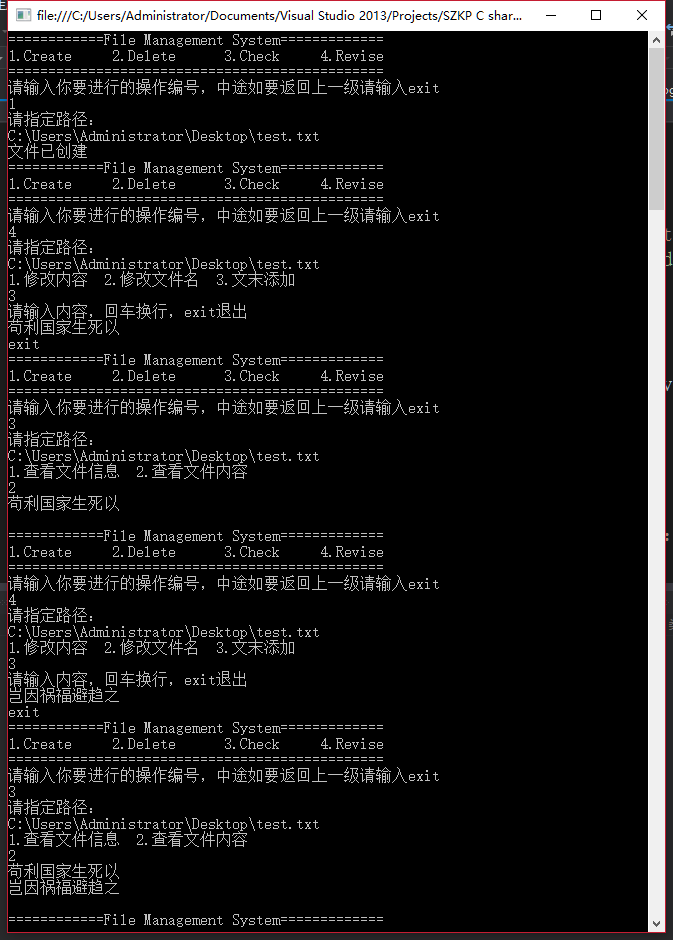
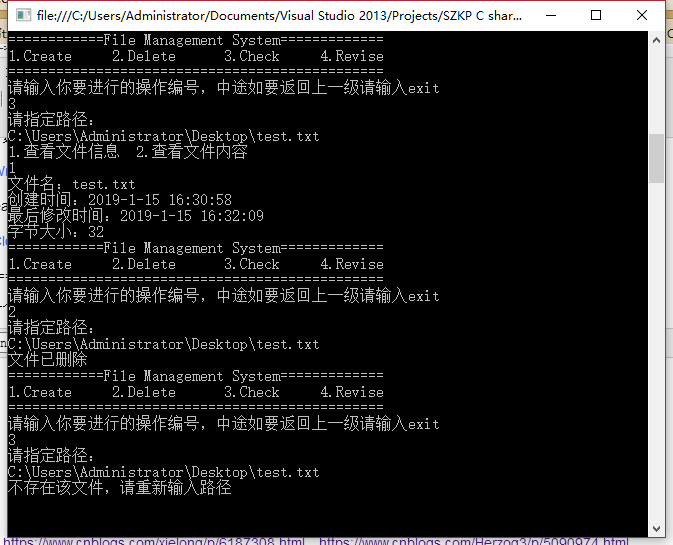
参考来源:https://www.cnblogs.com/xielong/p/6187308.html、https://www.cnblogs.com/Herzog3/p/5090974.html
C#File类常用文件操作以及一个模拟的控制台文件管理系统的更多相关文章
- C#File类常用的文件操作方法(创建、移动、删除、复制等)
File类,是一个静态类,主要是来提供一些函数库用的.静态实用类,提供了很多静态的方法,支持对文件的基本操作,包括创建,拷贝,移动,删除和 打开一个文件. File类方法的参量很多时候都是路径path ...
- File类常用的方法与字节流类方法简介
File类常用的方法 获取功能的方法 public String getAbsolutePath() :返回此File的绝对路径名字符串. public String getPath() :将此Fil ...
- 关于Properties类常用的操作
import java.io.*;import java.util.Enumeration;import java.util.Properties;/** * 关于Properties类常用的操作 * ...
- 重新想象 Windows 8 Store Apps (24) - 文件系统: Application Data 中的文件操作, Package 中的文件操作, 可移动存储中的文件操作
原文:重新想象 Windows 8 Store Apps (24) - 文件系统: Application Data 中的文件操作, Package 中的文件操作, 可移动存储中的文件操作 [源码下载 ...
- Java基础---Java---IO流-----File 类、递归、删除一个带内容的目录、列出指定目录下文件夹、FilenameFilte
File 类 用来将文件或者文件夹封装成对象 方便对文件与文件夹进行操作. File对象可以作为参数传递给流的构造函数 流只用操作数据,而封装数据的文件只能用File类 File类常见方法: 1.创建 ...
- IO流--字符流与字节流--File类常用功能
IO流的常用方法: 1: 文件的读取和写入图解: 2:字节流: 读写文件的方法: 一般效率读取: 读取文件: FileInputStream(); 写数据: Fil ...
- 利用File类过滤器列出目录下的指定目录或文件
需求:列出d盘下的全部txt文件 实现方法:利用File类的过滤器功能 package com.test.common.util; import java.io.File; import java.i ...
- 笔记13:File 类的一些操作
一.对文件的创建(create) private void button1_Click(object sender, EventArgs e) { File.Create(@"F:\\QQP ...
- C++文件操作(输入输出、格式控制、文件打开模式、测试流状态、二进制读写)
1.向文件写数据 头文件#include <ofstream> ①Create an instance of ofstream(创建ofstream实例) ②Open the file w ...
随机推荐
- webpack(6)-模块热替代&tree shaking
模块热替换(hot module replacement 或 HMR) 模块热替换(hot module replacement 或 HMR)是 webpack 提供的最有用的功能之一.它允许在运行时 ...
- [LeetCode] 97. Interleaving String_ Hard tag: Dynamic Programming
Given s1, s2, s3, find whether s3 is formed by the interleaving of s1 and s2. Example 1: Input: s1 = ...
- mybatis增强
MyBatis SQL参数传递(掌握) SQL映射器Mapper接口(掌握)Myb atis批量操作(理解掌握) (多对一)关联映射(掌握) (一对多,多对多)集合映射 MyBatis原理回顾(Obj ...
- spring IOC 分析及实现
什么是IOC Inversion of Control,控制反转,也成依赖倒置. 反转: 依赖对象的创建被反转,使用IOC之前,对象由自己创建,反转后,由IOC容器获取 IOC容器的工作: 负责创建, ...
- Java基础(运算符)
Java中的运算符: 算术运算符:+ - * / % ++ -- %运算符叫取模:它就是取余的例如:43%7=1 其他的都是和数学里的运算符一样(不过在字符串中如果是两个字符串 ...
- windows CMD常用命令
命令简介 cmd是command的缩写.即命令行 . 虽然随着计算机产业的发展,Windows 操作系统的应用越来越广泛,DOS 面临着被淘汰的命运,但是因为它运行安全.稳定,有的用户还在使用,所以一 ...
- Unity shader之ColorMask
Color Mask解释,见unity文档: ColorMask ColorMask RGB | A | 0 | any combination of R, G, B, A Set color cha ...
- C# Winform设计运行时,界面模糊
程序在Visual Studio设计的很清晰的菜单和界面,运行的时候菜单和控件上字体变得很模糊,界面大小也发生了变化 解决方法是:更改程序的配置文件,使程序运行时自动检测屏幕分辨率,在高分屏时禁用系统 ...
- Hadoop 故障整理
1.关于DataNode 错误信息解析 错误内容 java.io.IOException: Incompatible clusterIDs -b89c-43f90751214b; datanode c ...
- 2018-2019-2 20165335『网络对抗技术』Exp5:MSF基础应用
主动攻击的实践: ms17_010(成功) 浏览器攻击的实践:ms14_064(成功) 客户端攻击的实践:adobe reader PDF的攻击(成功) 运用辅助模块的实践:VNC弱口令破解/绕过(失 ...