
Spring整合Redis&JSON序列化&Spring/Web项目部署相关
几种JSON框架用法和效率对比:
https://blog.csdn.net/sisyphus_z/article/details/53333925
https://blog.csdn.net/weixin_42476601/article/details/81700981
https://blog.csdn.net/xuSir_1/article/details/72461364
https://www.cnblogs.com/cdf-opensource-007/p/6395458.html
https://blog.csdn.net/fanpeng1100/article/details/52856813
https://www.cnblogs.com/songjinduo/p/5279461.html
https://www.cnblogs.com/fly-piglet/p/5406506.html
json-lib:
http://www.cnblogs.com/sharpest/p/7844533.html
https://www.cnblogs.com/teach/p/5791029.html
Jackson:
https://blog.csdn.net/weixin_38111957/article/details/81585392
Gson:
https://www.cnblogs.com/majay/p/6336918.html
https://blog.csdn.net/axuanqq/article/details/51441590
fastJson:
https://blog.csdn.net/fullbug/article/details/78629033
Spring整合JUnit4:
https://blog.csdn.net/qq_32786873/article/details/56480880
Spring注解加载配置文件:
http://www.cnblogs.com/warehouse/p/8681187.html
https://www.cnblogs.com/lyjing/p/8406827.html
https://blog.csdn.net/haha_sir/article/details/79105951
https://blog.csdn.net/qq_15204179/article/details/82178802
Spring代码获取配置文件属性值:
https://www.cnblogs.com/yzuzhang/p/7399732.html
https://www.cnblogs.com/Gyoung/p/5507063.html
SpringBoot读取配置文件:
https://blog.csdn.net/qq_32786873/article/details/52840745
Spring的@Configuration配置类引入xml:
https://www.cnblogs.com/ya-qiang/p/9506485.html
纯注解配置SpringMVC:
https://blog.csdn.net/ykzhen2015/article/details/70666623
https://www.cnblogs.com/yxth/p/6907752.html
传统配置消息转换器和自定义消息转换器:
https://www.cnblogs.com/zfding/p/8322382.html
旧版消息转换器配置:
https://www.jianshu.com/p/2f633cb817f5
Web项目部署问题:
1.Mapper方法找不到对应绑定:源于pom文件中的maven打包没有配置resource把Mapper.xml打包到classes目录中,也就是实际运行缺少Mapper.xml文件,
需要在pom.xml中加入(如果Mapper.xml放在resources里面就不需要了):
<build>
    <resources>
        <resource>
            <directory>src/main/java</directory>
            <includes>
                <include>**/*.xml</include>
            </includes>
        </resource>
        <resource>
            <directory>src/main/resources</directory>
        </resource>
    </resources>
</build>
问题和解决办法详见:
https://blog.csdn.net/oMrLeft123/article/details/70239951
https://www.cnblogs.com/lfm601508022/p/InvalidBoundStatement.html
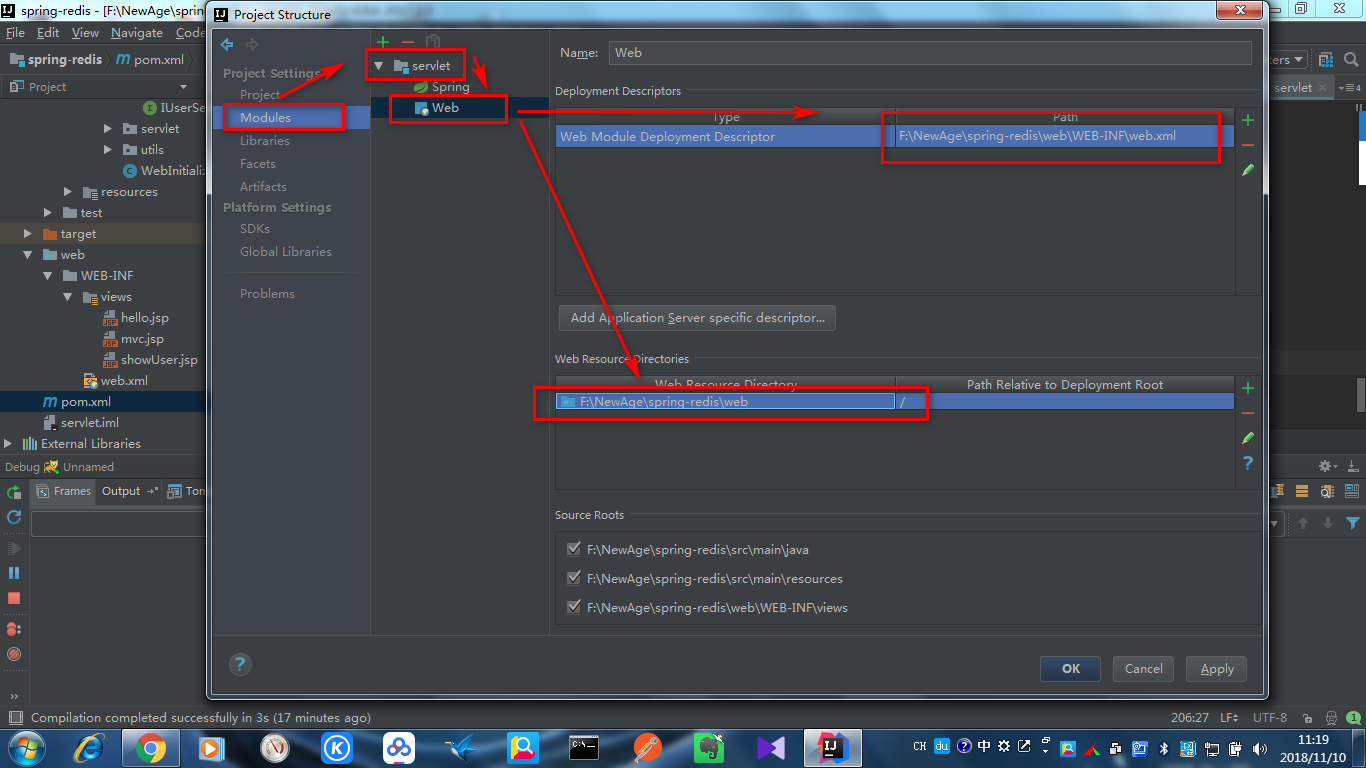
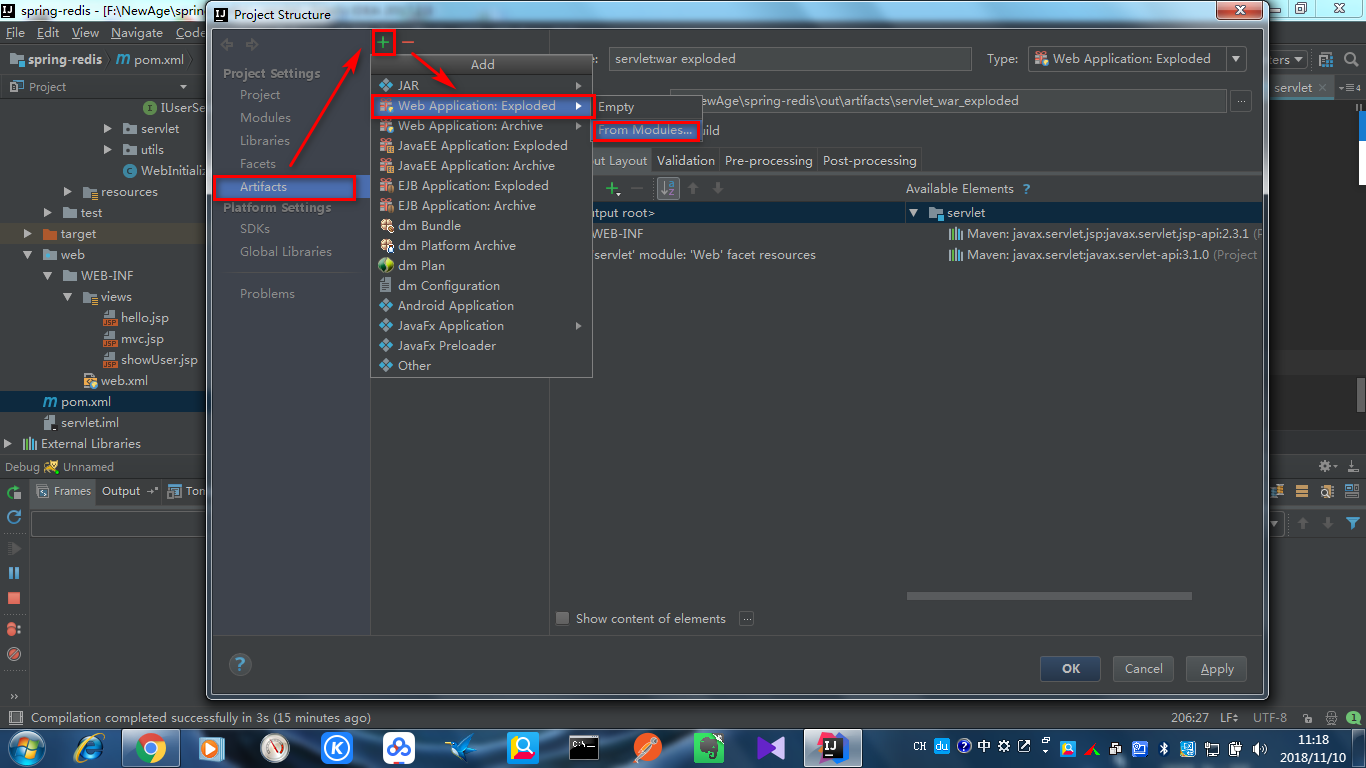
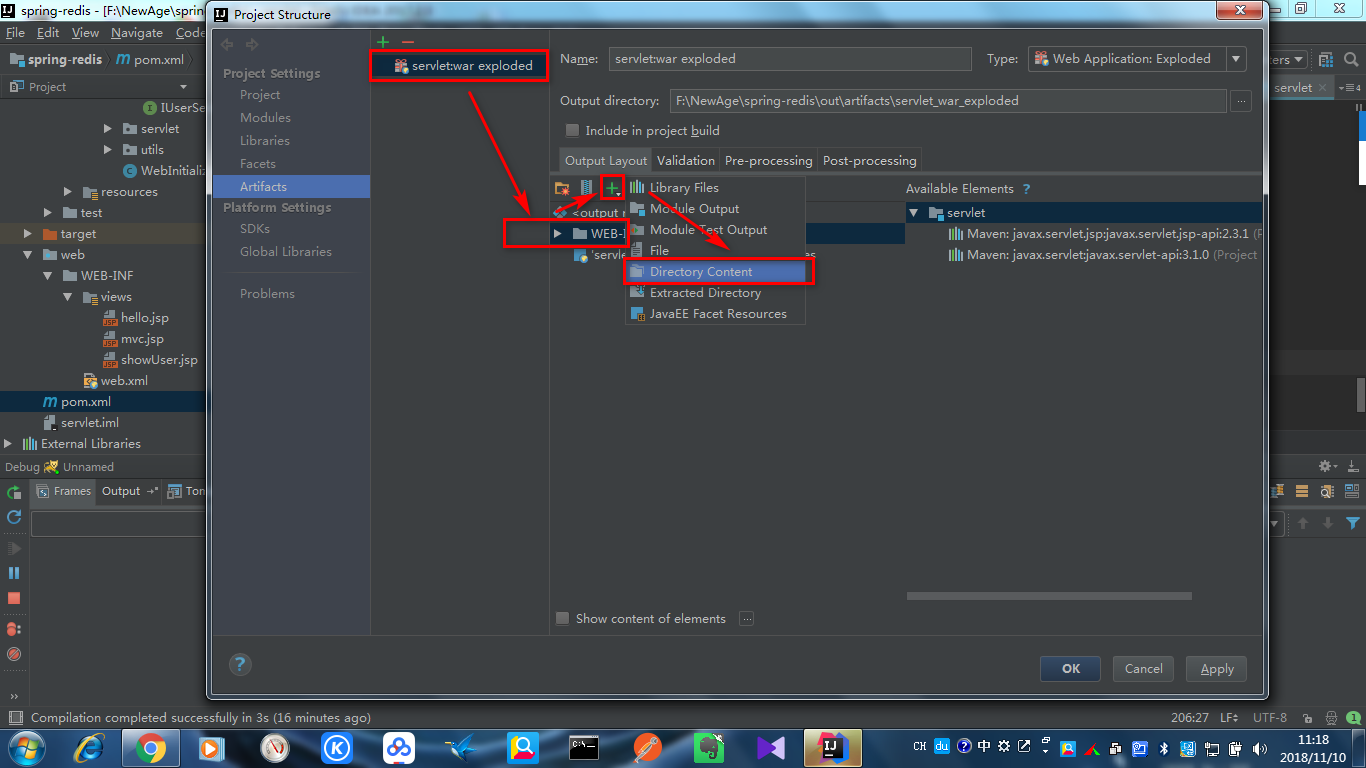
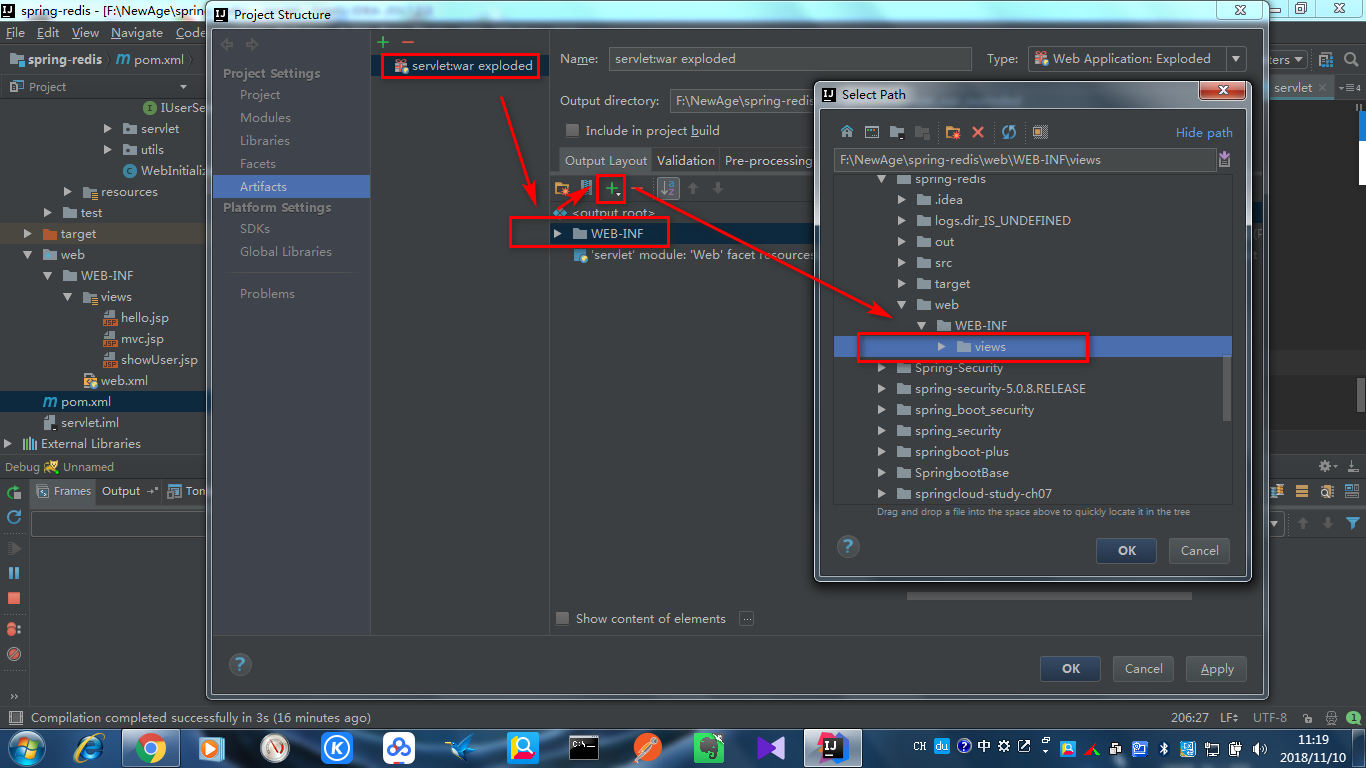
2.找不到/WEB-INF/views下自定义的jsp页面,源于使用IDEA的Artifacts打包时,Web模块的自定义文件夹需要手动加入,具体方法如下:
补充:jsp的c:foreach标签用法:
https://www.cnblogs.com/cai170221/p/8035925.html
3.maven命令打包报错找不到webxml配置或web.xml文件:
需要在pom.xml中手动指定其位置:
<plugins>
    <plugin>
        <artifactId>maven-war-plugin</artifactId>
        <configuration>
            <!--<version>2.5</version>-->
            <webXml>web/WEB-INF/web.xml</webXml>
        </configuration>
    </plugin>
</plugins>
参考:
https://www.cnblogs.com/sxdcgaq8080/p/5704178.html
不创建web.xml的解决办法:
https://blog.csdn.net/zwx19921215/article/details/49076443
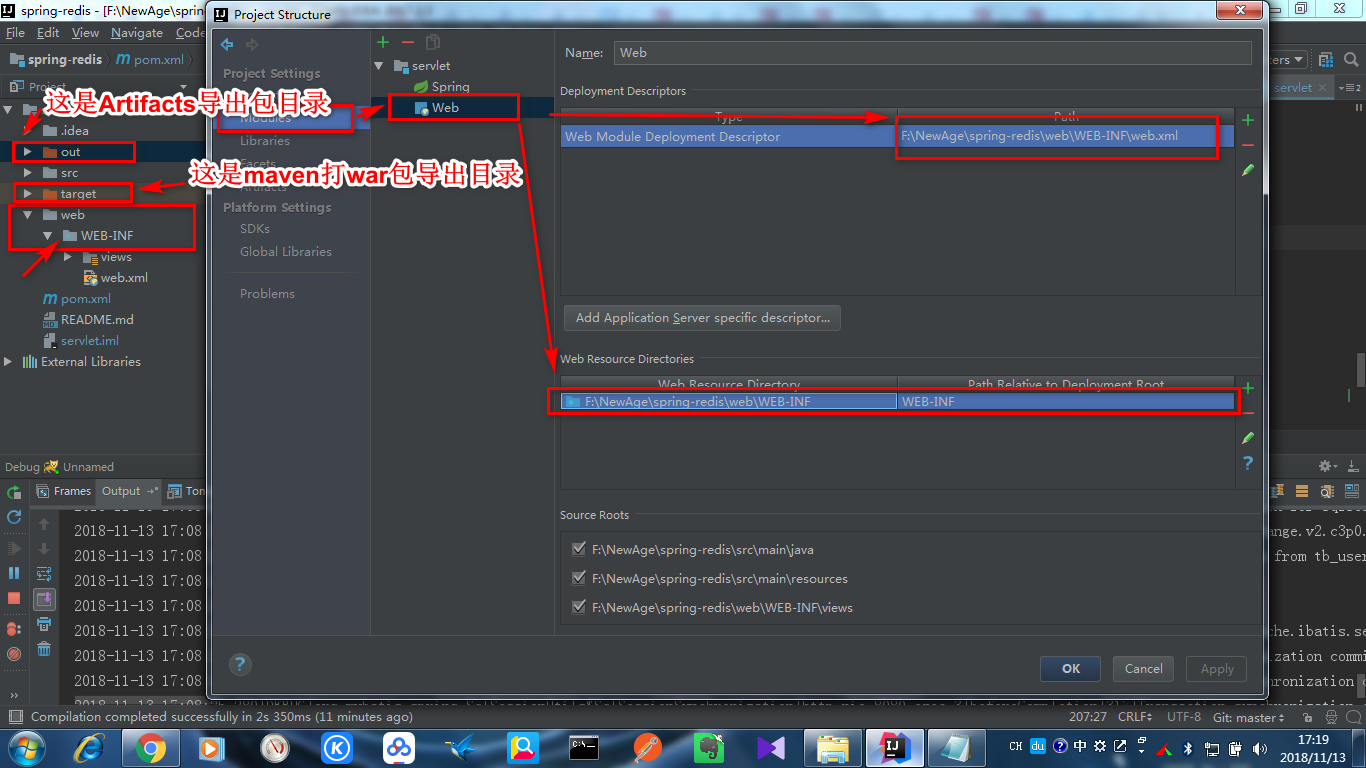
IDEA中有时部署Tomcat需要重新编译,在Project Structure中指定Web模块的根目录位置,让其变成小地球标志,然后按2中方式,在Artifacts中加入自定义文件夹,有时需要加入web.xml文件
maven打包时打war包:
<packaging>war</packaging>
使用Lifecycle下的install命令:
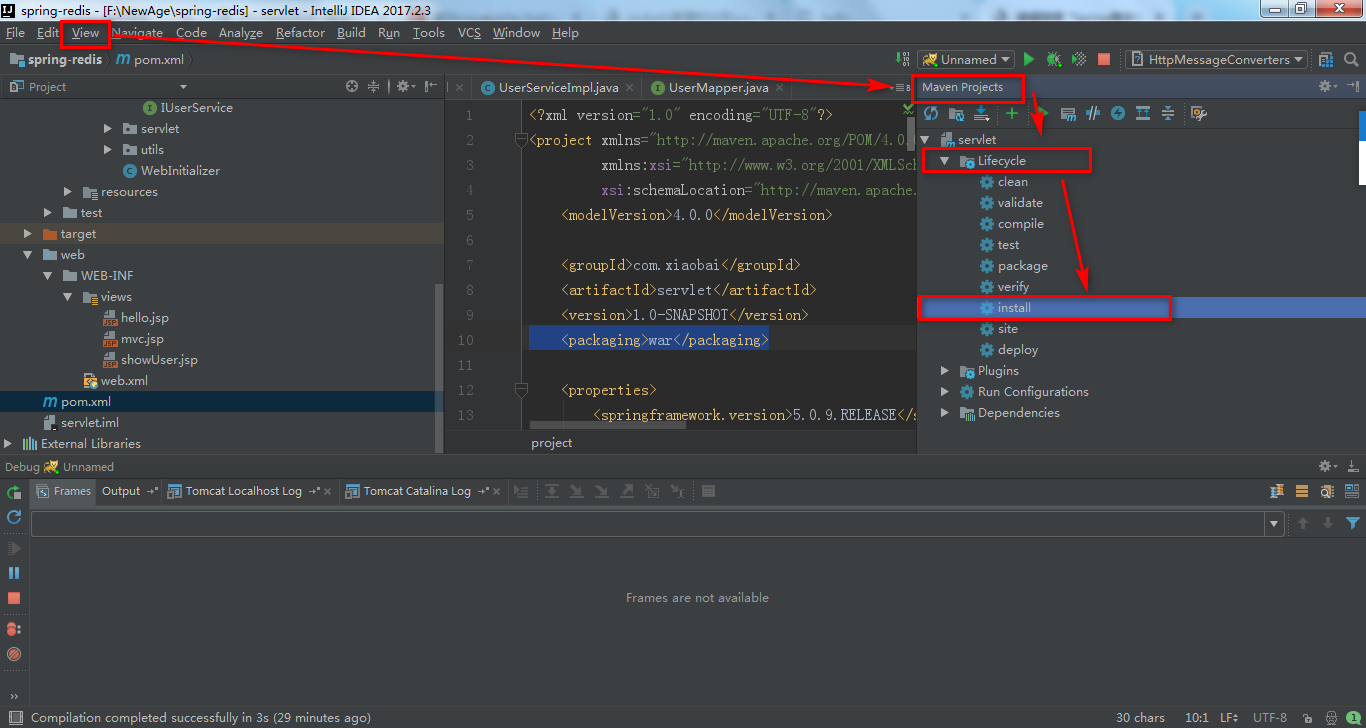
或使用build中配置的各种插件(比如compile插件,spring boot插件等)
springmvc(Web)整合logback:
https://blog.csdn.net/kity9420/article/details/81042580
https://www.cnblogs.com/xy-nb/p/7544880.html
https://www.cnblogs.com/softidea/archive/2016/03/13/5271761.html
mybatis打印sql:
https://www.cnblogs.com/qlong8807/p/5580424.html
https://www.cnblogs.com/jpfss/p/8425381.html
mybatis官方文档:
http://www.mybatis.org/mybatis-3/zh/configuration.html#settings
MyBatis中Mapper.xml文件位置配置和打包引入方式:
https://blog.csdn.net/fanfanzk1314/article/details/71480954/
https://blog.csdn.net/lmy86263/article/details/53428417
https://blog.csdn.net/bestcxx/article/details/72966768
Spring整合MyBatis的Mapper类配置:
https://blog.csdn.net/sinat_25295611/article/details/70832971
http://www.cnblogs.com/wangmingshun/p/5674633.html
Maven打包自定义包含资源文件:
http://bglmmz.iteye.com/blog/2063856
https://www.cnblogs.com/panie2015/p/5737393.html
在Web项目使用maven打包时,就使用maven-war-plugin插件,指定web资源根目录,配置成WEB-INF目录即可,这样在IDEA中配置Web模块时也指定根目录为WEB-INF,这样在Artifacts中导出war包和使用maven打war包时就可以包含到WEB-INF目录下的jsp资源目录和web.xml文件,具体配置如下:
<build>
    <plugins>
        <plugin>
            <artifactId>maven-war-plugin</artifactId>
            <configuration>
                <!--<version>2.5</version>-->
                <webResources>
                    <resource>
                        <!-- 元配置文件的目录,相对于pom.xml文件的路径 -->
                        <directory>web/WEB-INF</directory>
                        <!-- 是否过滤文件,也就是是否启动auto-config的功能 -->
                        <filtering>true</filtering>
                        <!-- 目标路径 -->
                        <targetPath>WEB-INF</targetPath>
                    </resource>
                </webResources>
                <webXml>web/WEB-INF/web.xml</webXml>
            </configuration>
        </plugin>
    </plugins>
    <resources>
        <resource>
            <directory>src/main/java</directory>
            <includes>
                <include>**/*.xml</include>
            </includes>
        </resource>
        <resource>
            <directory>src/main/resources</directory>
        </resource>
    </resources>
</build>
Spring整合Redis作为缓存(使用@EnableCaching):
http://www.cnblogs.com/hello-daocaoren/p/7891907.html
https://www.cnblogs.com/sxdcgaq8080/p/7228163.html
http://www.cnblogs.com/java-class/p/7112541.html
https://www.cnblogs.com/qlqwjy/p/8574121.html
手动(代码)缓存(结合Spring):
http://www.cnblogs.com/qlqwjy/p/8562703.html
Spring缓存注解:
http://www.cnblogs.com/qlqwjy/p/8559119.html
缓存注解操作多个缓存(使用@Caching):
https://blog.csdn.net/whatlookingfor/article/details/51833378/
SpEL表达式:
https://docs.spring.io/spring/docs/4.2.x/spring-framework-reference/html/expressions.html
手写模糊和批量删除(aspect,aop):
https://www.cnblogs.com/zer0Black/p/8410984.html
https://blog.csdn.net/fycstart/article/details/82706646
https://blog.csdn.net/yangshangwei/article/details/77961449
缓存注解key异常问题(字符串类型要加单引号!!):
https://www.oschina.net/question/3429421_2254437
<cache:annotation-driven/>启动缓存注解,和使用Cache接口自定义缓存操作、序列化:
https://www.cnblogs.com/Revel-sl/p/5841861.html
Jackson序列化注解实现POJO的JSON序列化(用于SpringMVC的@ResponseBody返回POJO数据,需要配合Jackson消息转换器):
https://blog.csdn.net/wslyk606/article/details/78325474
https://blog.csdn.net/u011181882/article/details/81300613
https://www.cnblogs.com/luxianyu-s/p/9640588.html
https://blog.csdn.net/qq_16739081/article/details/81053391
Spring整合Redis序列化:
https://blog.csdn.net/xiaolyuh123/article/details/78682200
https://blog.csdn.net/u013958151/article/details/80603365
http://blog.51cto.com/10705830/2166146
Spring整合Redis序列化原理和自定义序列化:
https://www.cnblogs.com/cuglkb/p/6895423.html
https://www.cnblogs.com/liuchao102/p/4479352.html
https://www.cnblogs.com/yaobolove/p/5632891.html
序列化问题:
https://www.2cto.com/kf/201807/764238.html
序列化性能比较和压力测试:
https://blog.csdn.net/boling_cavalry/article/details/80719683
https://blog.csdn.net/bing2011/article/details/80106193
缓存key生成问题:
官方gitHub问题解答:
https://github.com/spring-projects/spring-boot/issues/3625
截取:
@Configuration

@EnableCaching

public class RedisConfig {

  @Bean

  public KeyGenerator simpleKeyGenerator() {

    return (target, method, params) -> {

      StringBuilder sb = new StringBuilder();

      sb.append(target.getClass().getName());

      sb.append(method.getName());

      for (Object obj : params) {

        sb.append(obj.toString());

      }

      return sb.toString();

    };

  }

  @Bean

  public CacheManager cacheManager(RedisTemplate redisTemplate) {

    return new RedisCacheManager(redisTemplate);

  }

  @Bean

  public StringRedisTemplate redisTemplate(RedisConnectionFactory factory) {

    final StringRedisTemplate template = new StringRedisTemplate(factory);

    Jackson2JsonRedisSerializer jackson2JsonRedisSerializer = new Jackson2JsonRedisSerializer(Object.class);

    ObjectMapper om = new ObjectMapper();

    om.setVisibility(PropertyAccessor.ALL, JsonAutoDetect.Visibility.ANY);

    om.enableDefaultTyping(ObjectMapper.DefaultTyping.NON_FINAL);

    jackson2JsonRedisSerializer.setObjectMapper(om);

    template.setValueSerializer(jackson2JsonRedisSerializer);

    template.afterPropertiesSet();

    return template;

  }

}
@CacheConfig(cacheNames = "bangumis")

@Cacheable
|
I am not sure that your More info in the doc |
|
if i set keyGenerator@CacheConfig(cacheNames = "bangumis",keyGenerator = "simpleKeyGenerator") it work,but for this I must set this keyGenerator in everywhere? |
|
I just told you. @Configuration |
|
ok,thank you |
https://blog.csdn.net/u012557814/article/details/79933416
https://blog.csdn.net/qq_36470507/article/details/78967640?utm_source=blogxgwz6
@EnableCaching注解:
https://blog.csdn.net/zl_momomo/article/details/80403564
spring-data-redis缓存序列化:
https://blog.csdn.net/y666666y/article/details/70212767
spring-data-redis缓存注解:
https://blog.csdn.net/sanjay_f/article/details/47372967
高可用Redis配置:
https://www.cnblogs.com/tankaixiong/p/3660075.html
http://www.cnblogs.com/cunkouzh/p/9242292.html
https://www.cnblogs.com/shihaiming/p/6050777.html
Spring Boot整合Redis:
Redis安装问题:
1.Ubuntu默认无法使用root用户(没有密码),普通用户执行make等需要sudo
2.cp,tar,wget这些命令在/usr/local这样的目录使用普通用户执行,没有权限,一般是因为无法在这些目录创建新的文件或目录,因为普通用户没有这些目录的写权限(w),所以也要用sudo
3.普通用户启动Redis等软件应用,是否能成功,要看其是否有相关命令文件的可执行权限(x),配置文件的读权限(r),而不是安装在了什么目录,当然一般需要能进入这些目录
4.Redis启动后无法通过redis-cli或强制ctrl+c终止,提示无法向DB保存数据,是因为启动用户没有配置文件redis.conf中配置的DB目录写权限。需要修改配置dir为启动用户有写权限的目录,比如启动用户根目录,具体子目录需要先创建,否则启动时提示找不到!问题具体参考:
https://www.bbsmax.com/A/ke5jVjMa5r/
5.make,make install和./configure的作用:
https://www.cnblogs.com/tinywan/p/7230039.html
https://www.cnblogs.com/dsc65749924/p/5852177.html
6.自定义安装目录:(注意PREFIX大写,有等号)
注意默认情况的make install可以将redis命令拷贝到/usr/local/bin目录,这是$PATH默认包含的目录,这样在任何目录可执行。
如果自定义安装目录,则不会在$PATH中,需要手动添加。
注意需要拷贝配置文件到自定义安装目录的某处,以便自定义启动。
redis.conf是redis的配置文件,安装的时候不会在安装目录自动生成,所以要手动从redis的解压目录里拷贝过去(还是在解压目录中操作):
cp redis.conf /usr/local/redis/bin注意配置文件中需要配置pid filelog filedir 等,且需要事先创建对应目录,普通启动用户需要对这些目录有可执行、写文件权限,对应文件有读写权限,详见第7步配置详解中需要注意的。
注意:默认只以./redis-server &启动并不会加载任何目录的配置文件,而是默认启动!试过将配置文件配置好放在同一目录以普通用户启动,但仍然出现通过redis-cli来shutdown的db文件无法保存问题:
127.0.0.1:6379> shutdown
9389:M 04 Dec 09:47:54.106 # User requested shutdown...
9389:M 04 Dec 09:47:54.106 * Saving the final RDB snapshot before exiting.
9389:M 04 Dec 09:47:54.106 # Failed opening the RDB file dump.rdb (in server root dir /usr/local/redis/bin) for saving: Permission denied
9389:M 04 Dec 09:47:54.107 # Error trying to save the DB, can't exit.
(error) ERR Errors trying to SHUTDOWN. Check logs.
说明默认没使用任何配置文件!
如果以./redis-server ./redis.conf &启动则顺利加载配置文件,各种文件写入了配置文件中配置的目录,文件名OK.
所以生产环境控制一定要像上面这样这样指定配置好的配置文件启动!!
https://blog.csdn.net/huyuyang6688/article/details/51859899
https://www.jianshu.com/p/3646c46940c3
https://www.cnblogs.com/_popc/p/3684835.html
配置与开机启动(服务):
https://www.cnblogs.com/moxiaoan/p/5724505.html
https://www.cnblogs.com/it-cen/p/4295984.html
https://www.cnblogs.com/Mike_Chang/p/9582185.html
7.配置详解:
参照:(redis.conf文件注释的完整翻译)
http://www.cnblogs.com/zhang-ke/p/5981108.html
http://www.cnblogs.com/kreo/p/4423362.html
https://www.cnblogs.com/pqchao/p/6558688.html
https://www.cnblogs.com/zxtceq/p/7676911.html
https://www.cnblogs.com/happyday56/p/3916388.html
注意:
pid 进程pid文件存储文件,需要启动用户有读写权限,上级目录需要先存在
filelog 日志存储文件需要启动用户有读写权限,上级目录需要先存在
filedir 数据存储目录,必须是目录!需要启动用户有读写权限(可以在其中创建文件),上级目录需要先存在
这里这几个配置的上级目录均设置到了启动用户家目录下的一个目录
Redis集群解决方案:
介绍:
https://www.zhihu.com/question/21419897
https://blog.csdn.net/u011277123/article/details/55002024
https://blog.csdn.net/sanpo/article/details/52839044
三种集群模式:
https://blog.csdn.net/c295477887/article/details/52487621
https://blog.csdn.net/u012129558/article/details/77146287
https://blog.csdn.net/keketrtr/article/details/78802571
https://blog.csdn.net/q649381130/article/details/79931791
哨兵模式详解:
https://blog.csdn.net/lee_nacl/article/details/64125831
https://blog.csdn.net/tengxing007/article/details/77462578
https://blog.csdn.net/shouhuzhezhishen/article/details/69221517
https://blog.csdn.net/csolo/article/details/53147166
https://blog.csdn.net/guduyishuai/article/details/72823535
哨兵模式注意:(亲测)
1.将主从数据库的redis.conf文件,和哨兵的sentinel.conf文件,使用sudo chmod a+w设置为普通用户可写,这样以普通用户启动时,主机宕机,哨兵发起选主时,才能修改里面的主从信息!
2.哨兵的sentinel monitor master01 127.0.0.1 6379 2配置,最后的参数2代表选举时需要的最少(哨兵)投票数。如果多台哨兵宕机,剩下的哨兵少于这个数值,发现哨兵可以侦测到数据库主机下线,但无法完成选举,剩下的数据库全部是slave.原主机上线后,仍然是主,哨兵也可侦测到。也就是可用哨兵数少于最少投票数时,无法选举,主机下线后再无主机,需要其再次上线后才有主机。实际生产环境需要考虑和避免这种多哨兵宕机造成可用哨兵少于投票数的情况的发生!!
分片+哨兵:
https://blog.csdn.net/java20150326/article/details/71036347
Redis Cluster架设:
https://www.cnblogs.com/mafly/p/redis_cluster.html
https://blog.csdn.net/huwh_/article/details/79242625
https://www.cnblogs.com/gomysql/p/4395504.html
https://www.cnblogs.com/boshen-hzb/p/7699783.html
https://blog.csdn.net/pincharensheng/article/details/78391305
https://www.cnblogs.com/yuanermen/p/5717885.html
https://www.cnblogs.com/wuxl360/p/5920330.html
https://www.cnblogs.com/PatrickLiu/p/8444546.html
缓存设计和雪崩、穿透、更新等解决方案:
https://blog.csdn.net/na_tion/article/details/38614333
https://blog.csdn.net/simba_1986/article/details/77823309
https://blog.csdn.net/u011832039/article/details/78924418
https://blog.csdn.net/u013970991/article/details/70000202
https://blog.csdn.net/xlgen157387/article/details/79530877
http://blog.didispace.com/chengchao-huancun-zuijiazhaoshi/
https://blog.csdn.net/zeb_perfect/article/details/54135506
高并发秒杀设计:
https://blog.csdn.net/zgx6208/article/details/53308225
https://blog.csdn.net/CSDN_Terence/article/details/77744042
高可用负载均衡策略:
https://blog.csdn.net/hxehuang/article/details/52576293
KeepAlived+Nginx:
https://blog.csdn.net/l1028386804/article/details/72801492
https://blog.csdn.net/xyang81/article/details/52556886
https://blog.csdn.net/e421083458/article/details/30092795
https://blog.csdn.net/yelllowcong/article/details/78764780
https://blog.csdn.net/lijian12388806/article/details/51882333
https://blog.csdn.net/l192168134/article/details/51801483
Nginx集群:
https://blog.csdn.net/e421083458/article/details/30086413
Nginx+Tomcat:
https://blog.csdn.net/zht666/article/details/38515147
Spring整合Redis&JSON序列化&Spring/Web项目部署相关的更多相关文章
- spring 整合 redis,以及spring的RedisTemplate如何使用
需要的jar包 spring-data-redis-1.6.2.RELEASE.jar jedis-2.7.2.jar(依赖 commons-pool2-2.3.jar) commons-pool2- ...
- 网站性能优化小结和spring整合redis
现在越来越多的地方需要非关系型数据库了,最近网站优化,当然从页面到服务器做了相应的优化后,通过在线网站测试工具与之前没优化对比,发现有显著提升. 服务器优化目前主要优化tomcat,在tomcat目录 ...
- SpringBoot开发二十-Redis入门以及Spring整合Redis
安装 Redis,熟悉 Redis 的命令以及整合Redis,在Spring 中使用Redis. 代码实现 Redis 内置了 16 个库,索引是 0-15 ,默认选择第 0 个 Redis 的常用命 ...
- SpringBoot开发二十四-Redis入门以及Spring整合Redis
需求介绍 安装 Redis,熟悉 Redis 的命令以及整合Redis,在Spring 中使用Redis. 代码实现 Redis 内置了 16 个库,索引是 0-15 ,默认选择第 0 个 Redis ...
- spring整合redis之hello
1.pom.xml文件 <dependencies> <!-- spring核心包 --> <dependency> <groupId>org.spri ...
- Spring整合Redis时报错:java.util.NoSuchElementException: Unable to validate object
我在Spring整合Redis时报错,我是犯了一个很低级的错误! 我设置了Redis的访问密码,在Spring的配置文件却没有配置密码这一项,配置上密码后,终于不报错了!
- Redis的安装以及spring整合Redis时出现Could not get a resource from the pool
Redis的下载与安装 在Linux上使用wget http://download.redis.io/releases/redis-5.0.0.tar.gz下载源码到指定位置 解压:tar -xvf ...
- Spring整合redis实现key过期事件监听
打开redis服务的配置文件 添加notify-keyspace-events Ex 如果是注释了,就取消注释 这个是在以下基础上进行添加的 Spring整合redis:https://www. ...
- Linux06 /Python web项目部署
Linux06 /Python web项目部署 目录 Linux06 /Python web项目部署 1. 部署方式 2. 纯后端代码部署/CRM为例 1. 部署方式 2. crm项目详细部署步骤 3 ...
随机推荐
- Python全栈-day12-day13-函数4
1.迭代器 1)定义:迭代取值的工具 2)优缺点 优点 a.提供一种不依赖索引取值的方法 b.同时一时刻内存在存在的值只有一个,更加省内存 缺点 a.取值麻烦,只能通过next方法一个一个地往后取 b ...
- C#基本知识零散总结
C#基本知识零散总结 类的属性:(property) C#中定义属性使用的语法 public string SomeProperty { get { return "属性的值"; ...
- hdu5032 树状数组
题意: 对于一个1000*1000的Mushroom, 起点在(1,1)给定一个斜率和一个x,求由斜率和x所对应的直线构成的三角形内蘑菇的总值. 每个点的对应的值为(x+A)(y+B) 解 每个点都有 ...
- Windsor
https://github.com/castleproject/Windsor https://github.com/castleproject/Windsor/blob/master/docs/R ...
- 【Hadoop学习之四】HDFS HA搭建(QJM)
环境 虚拟机:VMware 10 Linux版本:CentOS-6.5-x86_64 客户端:Xshell4 FTP:Xftp4 jdk8 hadoop-3.1.1 由于NameNode对于整个HDF ...
- string 常量池 栈 堆
- 2017-2018-2 20165215 实验四《Android开发基础》实验报告
2017-2018-2 20165215 实验四<Android开发基础>实验报告 一.实验报告封面 课程:Java程序设计 班级:1652班 姓名:张家佳 学号:20165215 指导教 ...
- Linux基础命令---显示树形进程pstree
pstree pstree显示正在运行的进程的树形结构,树以PID为根:如果省略了pid则以init为根.如果指定了用户名,则显示根植于该用户拥有的进程的所有进程树.如果pstree被调用为pstre ...
- golang学习笔记6 beego项目路由设置
golang学习笔记5 beego项目路由设置 前面我们已经创建了 beego 项目,而且我们也看到它已经运行起来了,那么是如何运行起来的呢?让我们从入口文件先分析起来吧: package main ...
- 一起学习在 Ubuntu 上授予和移除 sudo 权限
如你所知,用户可以在 Ubuntu 系统上使用 sudo 权限执行任何管理任务.在 Linux 机器上创建新用户时,他们无法执行任何管理任务,直到你将其加入 sudo 组的成员.在这个简短的教程中,我 ...