
iOS开发手记-iOS8中使用定位服务解决方案
问题描述:
在iOS8之前,app第一次开始定位服务时,系统会弹出一个提示框来让用户选择是否允许使用定位信息。但iOS8后,app将不会出现这个弹窗。第一次运行之后,在设置->隐私->定位服务中,你的app没有任何设置,既不是“永不”,也不是“始终”。
代码如下:
#import "XYZFirstViewController.h"

@interface XYZFirstViewController ()

- (IBAction)LocateButtonClick:(id)sender;

@end

@implementation XYZFirstViewController

- (void)viewDidLoad {

    [super viewDidLoad];

    // Do any additional setup after loading the view.

    [[NSNotificationCenter defaultCenter] addObserver:self selector:@selector(startLocate) name:@"startLocateNotification" object:nil];

    _locationManager=[[CLLocationManager alloc] init];

    _locationManager.delegate=self;

    _locationManager.desiredAccuracy=kCLLocationAccuracyBest;

    _locationManager.distanceFilter=1000.0f;

    _mapView.mapType=MKMapTypeStandard;

    _mapView.delegate=self;

}

- (void)didReceiveMemoryWarning {

    [super didReceiveMemoryWarning];

    // Dispose of any resources that can be recreated.

}

-(void) viewWillAppear:(BOOL)animated{

    [super viewWillAppear:animated];

    [_locationManager startUpdatingLocation];

}

-(void) viewWillDisappear:(BOOL)animated

{

    [super viewWillDisappear:animated];

    [_locationManager stopUpdatingLocation];

}

-(void) locationManager:(CLLocationManager *)manager didUpdateLocations:(NSArray *)locations

{

    CLLocation *currentLocation=[locations lastObject];

    _currentLocation=currentLocation;

    self.currentLocationLabel.text=[NSString stringWithFormat:@"%3.5f,%3.5f,%3.5f", currentLocation.coordinate.longitude,currentLocation.coordinate.latitude,currentLocation.altitude];

    MKCoordinateRegion region=MKCoordinateRegionMakeWithDistance(currentLocation.coordinate, , );

    [_mapView setRegion:region animated:YES];

    MKPointAnnotation *point=[[MKPointAnnotation alloc] init];

    point.coordinate=_currentLocation.coordinate;

    point.title=@"my location";

    [_mapView addAnnotation:point];

}

-(void) locationManager:(CLLocationManager *)manager didFailWithError:(NSError *)error

{

    NSLog(@"error:%@",error);

}

/*

#pragma mark - Navigation

// In a storyboard-based application, you will often want to do a little preparation before navigation

- (void)prepareForSegue:(UIStoryboardSegue *)segue sender:(id)sender {

    // Get the new view controller using [segue destinationViewController].

    // Pass the selected object to the new view controller.

}

*/

- (IBAction)LocateButtonClick:(id)sender {

    [[NSNotificationCenter defaultCenter] postNotificationName:@"startLocateNotification" object:self ];

}

-(void) startLocate

{

    CLGeocoder *geocoder=[[CLGeocoder alloc]init];

    [geocoder reverseGeocodeLocation:_currentLocation completionHandler:^(NSArray *placeMarks, NSError *error)

     {

        if([placeMarks count]>)

        {

            NSLog(@"%@",placeMarks);

            CLPlacemark *placeMark=placeMarks[];

            NSDictionary *addressDictonary=placeMark.addressDictionary;

            _currentAddressLabel.text=[NSString stringWithFormat:@"%@,%@,%@",[addressDictonary objectForKey:(NSString *)kABPersonAddressStateKey],[addressDictonary objectForKey:(NSString *)kABPersonAddressCityKey],[addressDictonary objectForKey:(NSString *) kABPersonAddressStreetKey] ];

        }

     }];

}

@end
解决方案:
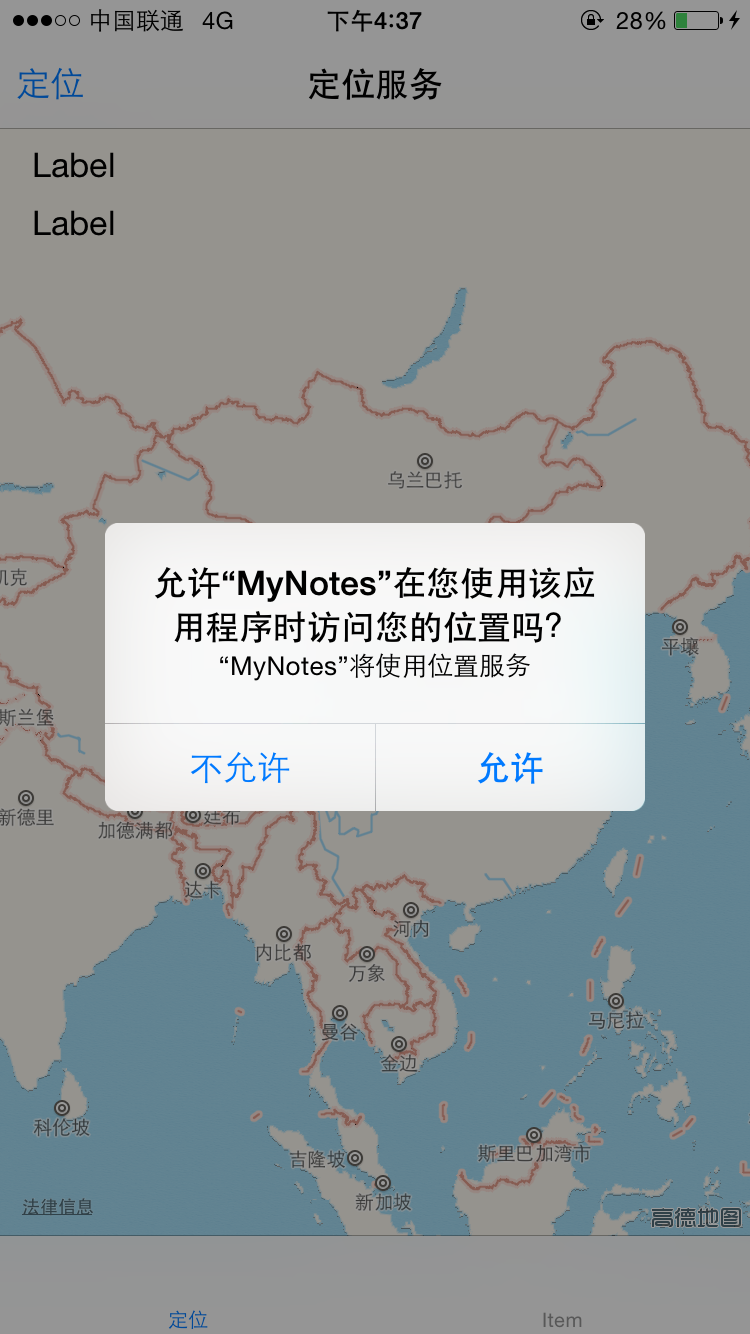
以上代码在iOS8之后需要手动调用CLLocationManager对象的requestAlwaysAuthorization/
requestWhenInUseAuthorization方法。 调用该方法需要在Info.plist中设置NSLocationAlwaysUsageDescription/NSLocationWhenInUseUsageDescription的值,这个值会显示在系统提示框中。
代码如下:
-(void) viewWillAppear:(BOOL)animated{

    [super viewWillAppear:animated];

    [_locationManager requestWhenInUseAuthorization];

    [_locationManager startUpdatingLocation];

}
info.plist设置如下:

允许效果:

iOS开发手记-iOS8中使用定位服务解决方案的更多相关文章
- iOS8中的定位服务
iOS8中的定位服务 My app that worked fine in iOS 7 doesn't work with the iOS 8 SDK. CLLocationManager doesn ...
- iOS开发雕虫小技之傻瓜式定位神器-超简单方式解决iOS后台定时定位
1.概述 由于公司一款产品的需求,最近一直在研究iOS设备的后台定位.主要的难点就是,当系统进入后台之后,程序会被挂起,届时定时器.以及代码都不会Run~ 所以一旦用户将我的App先换到了后台,我的定 ...
- iOS开发之动画中的时间(概况)
一.引言 在iOS开发中使用动画时,可以通过设置动画的duration.speed.begintime.offset属性,来设置动画的时长.速度.起始时间及起始偏移. 用一个简单的例子来说明各个参数的 ...
- CentOS6.5(4)----宿主机无法访问虚拟机中的web服务解决方案
宿主机无法访问虚拟机中的web服务 在Windows7宿主机中的VMware虚拟机中安装了CentOS6.5操作系统,并且基于Nginx搭建了Web服务器,网页刚刚搭建好的时候,通过宿主机的浏览器可以 ...
- iOS开发手记 - iOS9.3 UINavigationController添加后不显示storyboard中viewcontroller里的控件的解决方法
我原先是这么做的,通常也是这么做 - (BOOL)application:(UIApplication *)application didFinishLaunchingWithOptions:(NSD ...
- (转)iOS 开发,工程中混合使用 ARC 和非ARC
[前提知识] ARC:Automatic Reference Counting,自动引用计数 在开发 iOS 3 以及之前的版本的项目时我们要自己负责使用引用计数来管理内存,比如要手动 retain. ...
- iOS 开发,工程中混合使用 ARC 和非ARC(转)
[前提知识] ARC:Automatic Reference Counting,自动引用计数 在开发 iOS 3 以及之前的版本的项目时我们要自己负责使用引用计数来管理内存,比如要手动 retain. ...
- iOS8 无法设置定位服务
针对iOS8系统,需要在plist文件中添加这两个参数 NSLocationAlwaysUsageDescription = YES NSLocationWhenInUseUsageDescripti ...
- iOS开发关于xcode中souceControl的苹果文档翻译(节选)
Subversion 1.7 provides many benefits: svn1.7版本有以下好处: Improved performance. Increased speed for many ...
随机推荐
- tomcat项目中配置数据库连接池
1. 在项目中新建context.xml文件,不要在tomcat服务器的目录中修改context.xml(会对整个服务器生效).. 在web项目的META-INF中存放context.xml 2. ...
- 33、iOS10 由于权限问题导致崩溃的大坑
控制台报忠告: This app has crashed because it attempted to access privacy-sensitive data without a usage d ...
- 2018.10.31 NOIP模拟 一些情报(倍增)
传送门 题目并不难(想) 其实就是用倍增维护几个树上信息. 也就这么几个: 子树内最长链及其后继点. 子树内次长链及其后继点. 子树内第三场链(也就是dzyodzyodzyo口中鬼畜的次次长链) 点i ...
- idea在哪执行maven clean?
- 蓝绿部署、红黑部署、AB测试、灰度发布、金丝雀发布、滚动发布的概念与区别(转)
出处:https://www.baidu.com/link?url=QjboallwNm_jxcL3fHG57wEakiBfAs_3-TChTGu1eBXstlHEsGBc-NDA7AKTqsiroB ...
- error C2143: syntax error : missing ';' before 'type'
许久之前,就想看看C和C++,看看这两种神奇的编程语言,但是一直被这样或者那样的琐事给耽搁了(狂喷自己的拖延症). 今天翻开自己的移动硬盘找到一本古老的书籍:<The C Programming ...
- redis-server进程CPU百分百问题
结论:待确认是否为redis的BUG,原因是进程实际占用的内存远小于配置的最大内存,所以不会是内存不够需要淘汰.CPU百分百redis-server进程集群状态:slave临时解决办法:使用gdb将d ...
- ZUFE2480: 神奇的序列 2017-05-12 16:45 39人阅读 评论(0) 收藏
2480: 神奇的序列 时间限制: 4 Sec 内存限制: 256 MB 提交: 31 解决: 15 [提交][状态][讨论版] 题目描述 序列a如下: a[0] = A; a[1] = B; a ...
- 由异常掉电问题---谈xfs文件系统
由异常掉电问题---谈xfs文件系统 本文皆是作者自己的学习总结或感悟(linux环境),如有不对,欢迎提出一起探讨!! 目录结构 一.相关知识 二.问题提出 三.处理方法 四.最终结果 一.相关知识 ...
- I - Dividing Stones
Description There are N stones, which can be divided into some piles arbitrarily. Let the value of e ...