
Springboot系列:Springboot与Thymeleaf模板引擎整合基础教程(附源码)
前言
由于在开发My Blog项目时使用了大量的技术整合,针对于部分框架的使用和整合的流程没有做详细的介绍和记录,导致有些朋友用起来有些吃力,因此打算在接下来的时间里做一些基础整合的介绍,当然,可能也不会特别的基础,但是源码会开放给大家,方便大家学习,此次的源码地址为springboot-thymeleaf,多谢大家支持。
简介

Thymeleaf是一个跟Velocity、FreeMarker类似的模板引擎,它可以完全替代JSP,相较与其他的模板引擎,它有如下三个极吸引人的特点:
- Thymeleaf在有网络和无网络的环境下皆可运行,即它可以让美工在浏览器查看页面的静态效果,也可以让程序员在服务器查看带数据的动态页面效果。这是由于它支持 html 原型,然后在 html 标签里增加额外的属性来达到模板+数据的展示方式。浏览器解释 html 时会忽略未定义的标签属性,所以thymeleaf的模板可以静态地运行;当有数据返回到页面时,Thymeleaf 标签会动态地替换掉静态内容,使页面动态显示。
- Thymeleaf开箱即用的特性。它提供标准和spring标准两种方言,可以直接套用模板实现JSTL、OGNL表达式效果,避免每天套模板、改jstl、改标签的困扰。同时开发人员也可以扩展和创建自定义的方言。
- Thymeleaf提供spring标准方言和一个与SpringMVC完美集成的可选模块,可以快速的实现表单绑定、属性编辑器、国际化等功能。
整合过程
编辑pom文件,引入Thymeleaf
<?xml version="1.0" encoding="UTF-8"?>

<project xmlns="http://maven.apache.org/POM/4.0.0" xmlns:xsi="http://www.w3.org/2001/XMLSchema-instance" xsi:schemaLocation="http://maven.apache.org/POM/4.0.0 http://maven.apache.org/xsd/maven-4.0.0.xsd">

    <modelVersion>4.0.0</modelVersion>

    <artifactId>com.my.blog</artifactId>

    <name>springboot-thymeleaf</name>

    <description>springboot-thymeleaf</description>

    <parent>

        <groupId>org.springframework.boot</groupId>

        <artifactId>spring-boot-starter-parent</artifactId>

        <version>1.5.1.RELEASE</version>

    </parent>

    <properties>

        <java.version>1.7</java.version>

    </properties>

    <dependencies>

        <dependency>

            <groupId>org.springframework.boot</groupId>

            <artifactId>spring-boot-starter-thymeleaf</artifactId>

        </dependency>

    </dependencies>

    <build>

        <plugins>

            <plugin>

                <groupId>org.springframework.boot</groupId>

                <artifactId>spring-boot-maven-plugin</artifactId>

            </plugin>

        </plugins>

    </build>

</project>
Thymeleaf配置
# thymeleaf

spring.thymeleaf.prefix=classpath:/templates/

spring.thymeleaf.check-template-location=true

spring.thymeleaf.suffix=.html

spring.thymeleaf.encoding=UTF-8

spring.thymeleaf.content-type=text/html

spring.thymeleaf.mode=HTML5

spring.thymeleaf.cache=false
新建模板文件
在resources文件夹下新增templates目录,用于存放模板文件,新增hello.html。
<!DOCTYPE html>

<html lang="en" xmlns:th="http://www.thymeleaf.org">

<head>

    <meta charset="UTF-8"/>

    <title>springboot-thymeleaf demo</title>

</head>

<body>

    <p th:text="'hello, ' + ${name} + '!'" />

</body>

</html>
编辑业务代码及启动类
HelloController :
/**

 * author:13

 * date:2017-09-14

 */

@Controller

public class HelloController {

    @RequestMapping("/hello")

    public String hello(HttpServletRequest request, @RequestParam(value = "name", required = false, defaultValue = "springboot-thymeleaf") String name) {

        request.setAttribute("name", name);

        return "hello";

    }

}
WebApplication :
/**

 * author:13

 * date:2017-09-14

 */

@SpringBootApplication

public class WebApplication extends SpringBootServletInitializer {

    @Override

    protected SpringApplicationBuilder configure(SpringApplicationBuilder application) {

        return application.sources(WebApplication.class);

    }

    public static void main(String[] args) throws Exception {

        SpringApplication.run(WebApplication.class, args);

    }

}
验证
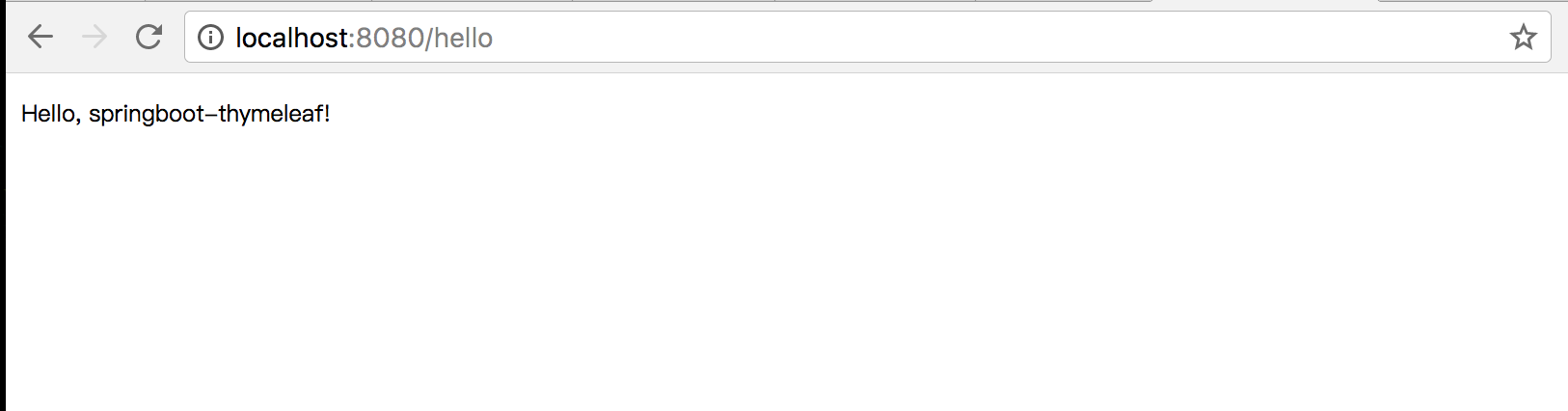
项目启动后,在浏览器端输入以下urlhttp://localhost:8080/hello:
结语
首发于我的个人博客。
如果有问题或者有一些好的创意,欢迎给我留言,也感谢向我指出项目中存在问题的朋友。
代码和这次的问题都是My Blog项目中的,如果你想继续了解该项目可以查看整个系列文章Java开源博客My-Blog(SpringBoot+Docker)系列文章,也可以到我的GitHub仓库或者开源中国代码仓库中查看源码及详细的部署过程和使用文档。
Springboot系列:Springboot与Thymeleaf模板引擎整合基础教程(附源码)的更多相关文章
- Springboot与Thymeleaf模板引擎整合基础教程(附源码)
前言 由于在开发My Blog项目时使用了大量的技术整合,针对于部分框架的使用和整合的流程没有做详细的介绍和记录,导致有些朋友用起来有些吃力,因此打算在接下来的时间里做一些基础整合的介绍,当然,可能也 ...
- SpringBoot系列之集成jsp模板引擎
目录 1.模板引擎简介 2.环境准备 4.源码原理简介 SpringBoot系列之集成jsp模板引擎 @ 1.模板引擎简介 引用百度百科的模板引擎解释: 模板引擎(这里特指用于Web开发的模板引擎)是 ...
- SpringBoot入门篇--使用Thymeleaf模板引擎进行页面的渲染
在做WEB开发的时候,我们不可避免的就是在前端页面之间进行跳转,中间进行数据的查询等等操作.我们在使用SpringBoot之前包括我在内其实大部分都是用的是JSP页面,可以说使用的已经很熟悉.但是我们 ...
- springboot系列四、配置模板引擎、配置热部署
一.配置模板引擎 在之前所见到的信息显示发现都是以 Rest 风格进行显示,但是很明显在实际的开发之中,所有数据的显示最终都应该交由页面完成,但是这个页面并不是*.jsp 页面,而是普通的*.html ...
- SpringBoot项目的前端+thymeleaf模板引擎
SpringBoot项目创建之后,后台的框架是SpringMVC.但前端的resource和template目录都是空的.这个时候需要创建前台页面. 习惯上,我们会创建JSP,但是,SpringBoo ...
- easyUI整合富文本编辑器KindEditor详细教程(附源码)
原因 在今年4月份的时候写过一篇关于easyui整合UEditor的文章Spring+SpringMVC+MyBatis+easyUI整合优化篇(六)easyUI与富文本编辑器UEditor整合,从那 ...
- springboot笔记06——使用Thymeleaf模板引擎
前言 Springboot 推荐使用Thymeleaf做视图层.Thymeleaf支持 html 原型,然后在 html 标签里增加额外的属性来达到模板+数据的展示方式.浏览器解释 html 时会忽略 ...
- SpringBoot 和Vue前后端分离入门教程(附源码)
作者:梁小生0101 juejin.im/post/5c622fb5e51d457f9f2c2381 推荐阅读(点击即可跳转阅读) 1. SpringBoot内容聚合 2. 面试题内容聚合 3. 设计 ...
- arcgis api 3.x for js 共享干货系列之一自写算法实现地图量算工具(附源码下载)
0.内容概览 Geometry 地图服务方式实现地图距离以及面积的量算,简单描述 arcgis api 提供的接口类 geometryEngine 实现地图距离以及面积的量算,简单描述 自定义距离以及 ...
随机推荐
- C++函数中返回引用和返回值的区别
一.主要讨论下面两个函数的区别: int& at() { return m_data_; } int at() { return m_data_; } 上面两个函数,第一个返回值是int的引用 ...
- 复刻smartbits的国产网络测试工具minismb-网络连接数测试方法
复刻smartbits的网路性能测试工具MiniSMB,是一款专门用于测试智能路由器,网络交换机的性能和稳定性的软硬件相结合的工具.可以通过此工具测试任何ip网络设备的端口吞吐率,带宽,并发连接数和最 ...
- vue中使用js动画与velocity.js
一:vue中使用js动画 根据上一篇安装animate.css之后 vue中有动画的钩子函数,@before-enter是内容由无到有的时候自动监听触发的函数,函数会接收到参数el,这样可以动态设置样 ...
- webstorm取消扫描某文件夹,加快打开速度,例如忽略node_modules目录
方法1.如下图所示(只对当前项目有效) 或者 如果要使用这种方法,一种是还没安装依赖的时候先创建node_modules目录然后打开webstorm设置好excluded再安装:另一种是已经安装了依赖 ...
- 使用EF CodeFirst连接MySql数据库
如何使用EF CodeFirst连接MySql数据库? 我们这篇文章介绍怎么使用EF连接MySql 作者的环境 VS2017.Win10.MySql5.x 前言 一般在EF中,默认是使用SqlServ ...
- ADO.NET 【攻击及防御】
sql字符串注入攻击 SQL注入攻击是黑客对数据库进行攻击的常用手段之一.SQL注入的手法相当灵活 SQL注入攻击会导致的数据库安全风险包括:刷库.拖库.撞库. 一般来说,SQL注入一般存在于形如:H ...
- C# 集合 特殊集合
一集合 1.可为不同类型,不固定长度 2.集合类型分为泛型集合(强类型集合)与非泛型集合(弱类型集合). 3.非泛型集合的类和接口位于using System.Collections命名空间. 4.泛 ...
- arm裸板驱动总结(makefile+lds链接脚本+裸板调试)
在裸板2440中,当我们使用nand启动时,2440会自动将前4k字节复制到内部sram中,如下图所示: 然而此时的SDRAM.nandflash的控制时序等都还没初始化,所以我们就只能使用前0~40 ...
- 在 CentOS7 上安装 RabbitMQ 消息队列中间件
RabbitMQ 是流行的开源消息队列系统,是 AMQP(Advanced Message Queuing Protocol 高级消息队列协议)的标准实现,用 erlang 语言开发.RabbitMQ ...
- 如何解决VMware 虚拟机不能铺满屏幕
出现这种情况是因为分辨率设置问题,调整分辨率总能达到你想要的效果: 首先设置vmware为全屏模式 查看物理机的分辨率,然后再将虚拟机的分辨率设置了跟物理机的一致.完美解决 windows10查看分辨 ...