
Spring Security OAuth2 授权码模式
背景:
由于业务实现中涉及到接入第三方系统(app接入有赞商城等),所以涉及到第三方系统需要获取用户信息(用户手机号、姓名等),为了保证用户信息的安全和接入方式的统一,
采用Oauth2四种模式之一的授权码模式。
介绍:
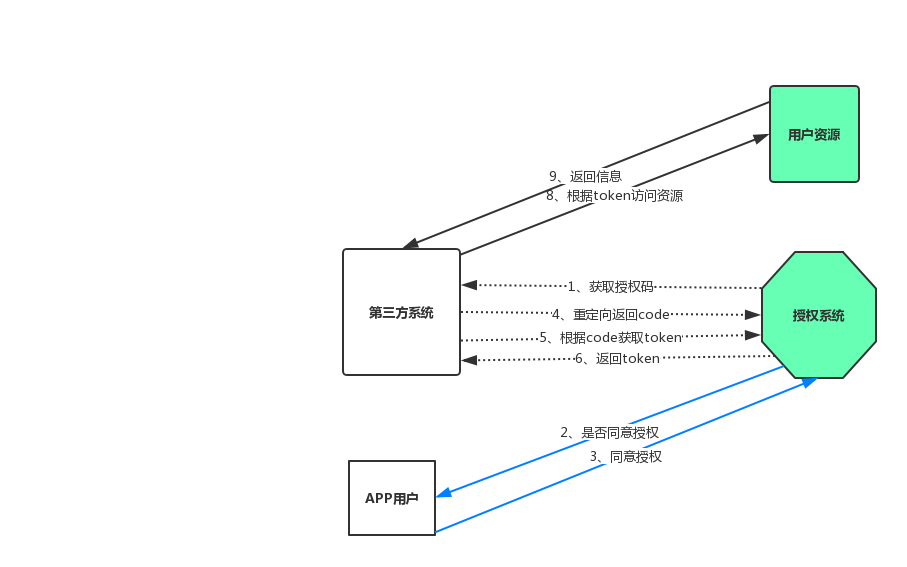
- 第三方系统调用我方提供的授权接口(步骤1)
- 用户同意授权,后跳转第三方系统(步骤2、3)
- 第三方系统获得code,根据code到我方系统获取token(步骤5、6 )
- 根据获取token访问受保护的资源(步骤8、9)
实际应用中由于合作商户,所以需要直接返回code,不需要用户手动授权,即静默模式,所以需要扩展框架,使其支持自动授权
扩展:
项目使用的是spring-security-oauth2-2.0.15 由于默认情况下,需要用户授权通过才能生成授权码。所以需简要对框架进行扩展
(1)spring-security-oauth2获取code的controller:
 RequestMapping(value = "/oauth/authorize")

     public ModelAndView authorize(Map<String, Object> model, @RequestParam Map<String, String> parameters,

             SessionStatus sessionStatus, Principal principal) {

         // Pull out the authorization request first, using the OAuth2RequestFactory. All further logic should

         // query off of the authorization request instead of referring back to the parameters map. The contents of the

         // parameters map will be stored without change in the AuthorizationRequest object once it is created.

         AuthorizationRequest authorizationRequest = getOAuth2RequestFactory().createAuthorizationRequest(parameters);

         Set<String> responseTypes = authorizationRequest.getResponseTypes();

         if (!responseTypes.contains("token") && !responseTypes.contains("code")) {

             throw new UnsupportedResponseTypeException("Unsupported response types: " + responseTypes);

         }

         if (authorizationRequest.getClientId() == null) {

             throw new InvalidClientException("A client id must be provided");

         }

         try {

             if (!(principal instanceof Authentication) || !((Authentication) principal).isAuthenticated()) {

                 throw new InsufficientAuthenticationException(

                         "User must be authenticated with Spring Security before authorization can be completed.");

             }

             ClientDetails client = getClientDetailsService().loadClientByClientId(authorizationRequest.getClientId());

             // The resolved redirect URI is either the redirect_uri from the parameters or the one from

             // clientDetails. Either way we need to store it on the AuthorizationRequest.

             String redirectUriParameter = authorizationRequest.getRequestParameters().get(OAuth2Utils.REDIRECT_URI);

             String resolvedRedirect = redirectResolver.resolveRedirect(redirectUriParameter, client);

             if (!StringUtils.hasText(resolvedRedirect)) {

                 throw new RedirectMismatchException(

                         "A redirectUri must be either supplied or preconfigured in the ClientDetails");

             }

             authorizationRequest.setRedirectUri(resolvedRedirect);

             // We intentionally only validate the parameters requested by the client (ignoring any data that may have

             // been added to the request by the manager).

             oauth2RequestValidator.validateScope(authorizationRequest, client);

             // Some systems may allow for approval decisions to be remembered or approved by default. Check for

             // such logic here, and set the approved flag on the authorization request accordingly.

             authorizationRequest = userApprovalHandler.checkForPreApproval(authorizationRequest,

                     (Authentication) principal);

             // TODO: is this call necessary?

             boolean approved = userApprovalHandler.isApproved(authorizationRequest, (Authentication) principal);

             authorizationRequest.setApproved(approved);

             // Validation is all done, so we can check for auto approval...

             if (authorizationRequest.isApproved()) {

                 if (responseTypes.contains("token")) {

                     return getImplicitGrantResponse(authorizationRequest);

                 }

                 if (responseTypes.contains("code")) {

                     return new ModelAndView(getAuthorizationCodeResponse(authorizationRequest,

                             (Authentication) principal));

                 }

             }

             // Place auth request into the model so that it is stored in the session

             // for approveOrDeny to use. That way we make sure that auth request comes from the session,

             // so any auth request parameters passed to approveOrDeny will be ignored and retrieved from the session.

             model.put("authorizationRequest", authorizationRequest);

             return getUserApprovalPageResponse(model, authorizationRequest, (Authentication) principal);

         }

         catch (RuntimeException e) {

             sessionStatus.setComplete();

             throw e;

         }

     }
52行到59行可知, 当approved 为true的时候会直接返回code码,不会需要用户授权,所以问题变成了如何让扩展的userApprovalHandler生效
(2)扩展的userApprovalHandler生效
   @Override

   public void configure(AuthorizationServerEndpointsConfigurer endpoints) throws Exception {

     endpoints

         .tokenStore(tokenStore)

         .authenticationManager(authenticationManager)

         .userDetailsService(authUserDetailService)

         .authorizationCodeServices(new JdbcAuthorizationCodeServices(dataSource))

         .reuseRefreshTokens(false)

         .userApprovalHandler(new AuthApprovalHandler())

         .exceptionTranslator(customWebResponseExceptionTranslator)

     ;

   }
9行:AuthotizationServer中增加配置自定义配置
应用:
(1)获取code值
需要APP端定制webview开发,根据/oauth/authrorize路径参数中增加token
请求路径:
参数说明:
|
参数名称
|
类型
|
是否必填
|
描述
|
|---|---|---|---|
response_type |
String | 是 | 固定值“code” |
client_id |
String | 是 | 第三方配置的client_id |
redirect_uri |
String | 是 | 第三方配置的回调地址 |
| state | String | 否 | 第三方自定义使用 |
请求示例:
curl -X POST http://localhost:8421/oauth/authorize -H 'Authorization: Bearer b7c2d63f-edff-4790-add9-0b69df7321b5' -d 'response_type=code&client_id=external&redirect_uri=http://www.baidu.com&state=123'
返回结果: 重定向redirect_uri路径
(2)获取accessToken(有效期暂定72h)
请求参数:
|
参数名称
|
类型
|
是否必填
|
描述
|
|---|---|---|---|
client_id |
String | 是 | 第三方配置的client_id |
client_secret |
String | 是 | 第三方配置的密钥 |
| code | String | 是 | 申请的code |
grant_type |
String | 是 | 固定值“authorization_code” |
redirect_uri |
String | 是 | 第三方配置的回调地址,必须与生成code时的uri一样 |
请求示例:
curl -X POST http://localhost:8421/oauth/token -d 'grant_type=authorization_code&client_id=external&client_secret=D524C1A0811DA49592F841085CC0063EB62B3001252A94542795D1CA9824A941&redirect_uri=http://www.baidu.com&code=4TCYkV'
返回结果:
{"access_token":"95b5be18-49a3-44e1-a527-d5da036cfc3f","token_type":"bearer","refresh_token":"b4488c7d-1e8c-4317-a955-1f4bda013a35","expires_in":9891370,"scope":"auth_base"}
(3) 获取refreshToken
暂时不支持
(4) 访问资源(用户信息)
根据获取到的授权token访问用户资源信息
请求示例:
curl -X POST https://wuxi.test.brightcns.cn/api/v2/user/external/info -H 'Authorization: Bearer e86d752e-8d72-4a33-aa98-8e158ac5b50b'
返回结果:
{"success":true,"msg":"success","code":"SUCCESS","data":{"userId":,"phone":,"nickname":"","avatar":"http://wxcardoss.oss-cn-shanghai.aliyuncs.com/null","realName":null,"extendParam":null}}
Spring Security OAuth2 授权码模式的更多相关文章
- 微信授权就是这个原理,Spring Cloud OAuth2 授权码模式
上一篇文章Spring Cloud OAuth2 实现单点登录介绍了使用 password 模式进行身份认证和单点登录.本篇介绍 Spring Cloud OAuth2 的另外一种授权模式-授权码模式 ...
- 阶段5 3.微服务项目【学成在线】_day16 Spring Security Oauth2_06-SpringSecurityOauth2研究-Oauth2授权码模式-申请令牌
3.3 Oauth2授权码模式 3.3.1 Oauth2授权模式 Oauth2有以下授权模式: 授权码模式(Authorization Code) 隐式授权模式(Implicit) 密码模式(Reso ...
- Spring Security 解析(七) —— Spring Security Oauth2 源码解析
Spring Security 解析(七) -- Spring Security Oauth2 源码解析 在学习Spring Cloud 时,遇到了授权服务oauth 相关内容时,总是一知半解,因 ...
- Spring Security OAuth2 源码分析
Spring Security OAuth2 主要两部分功能:1.生成token,2.验证token,最大概的流程进行了一次梳理 1.Server端生成token (post /oauth/token ...
- Spring Security OAuth2 授权失败(401) 问题整理
Spring Cloud架构中采用Spring Security OAuth2作为权限控制,关于OAuth2详细介绍可以参考 http://www.ruanyifeng.com/blog/2014/0 ...
- Spring Security OAuth2 Demo —— 密码模式(Password)
前情回顾 前几节分享了OAuth2的流程与授权码模式和隐式授权模式两种的Demo,我们了解到授权码模式是OAuth2四种模式流程最复杂模式,复杂程度由大至小:授权码模式 > 隐式授权模式 > ...
- Spring Security OAuth2 Demo —— 客户端模式(ClientCredentials)
前情回顾 前几节分享了OAuth2的流程与其它三种授权模式,这几种授权模式复杂程度由大至小:授权码模式 > 隐式授权模式 > 密码模式 > 客户端模式 本文要讲的是最后一种也是最简单 ...
- 阶段5 3.微服务项目【学成在线】_day16 Spring Security Oauth2_07-SpringSecurityOauth2研究-Oauth2授权码模式-资源服务授权测试
下面要完成 5.6两个步骤 3.3.4 资源服务授权 3.3.4.1 资源服务授权流程 资源服务拥有要访问的受保护资源,客户端携带令牌访问资源服务,如果令牌合法则可成功访问资源服务中的资 源,如下图 ...
- Spring Security OAuth2 微服务认证中心自定义授权模式扩展以及常见登录认证场景下的应用实战
一. 前言 [APP 移动端]Spring Security OAuth2 手机短信验证码模式 [微信小程序]Spring Security OAuth2 微信授权模式 [管理系统]Spring Se ...
随机推荐
- hibernate 中HQL查询
由于比较简单,在此处只写一些HQL语言. 表关系,多对一. CREATE TABLE `user` ( `id` ) NOT NULL AUTO_INCREMENT, `uname` varchar( ...
- Apache重启报警,不存在虚拟主机目录(httpd.conf打开了一些扩展)
Apache重启时报警: AH00112: Warning: DocumentRoot [/usr/local/apache/docs/dummy-host.example.com] does not ...
- U3D安卓下OnApplicationQuit不执行的解决方法
安卓下当你按Home键,程序会进入暂停状态.所以只能改成调用OnApplicationPause. Unity论坛上说实现IDispose接口也可以,似乎IOS可以,但安卓测试了,无效.
- 算法5-6:Kd树
问题 给定一系列的点.和一个矩形.求矩形中包括的点的数量. 解答 这个问题能够通过建立矩阵来进行求解.首先将一个空间切割成矩阵,将点放置在相应的格子中.再计算矩形覆盖的格子.再推断格子中的点是否包括在 ...
- iOS_5_汤姆猫
终于效果图: watermark/2/text/aHR0cDovL2Jsb2cuY3Nkbi5uZXQvcHJlX2VtaW5lbnQ=/font/5a6L5L2T/fontsize/400/fill ...
- 基于jquery垂直缩略图切换相册
今天给大家分享一款垂直缩略图切换jQuery相册,这是一款垂直缩略图左右滚动切换响应式jQuery图片相册代码.该 插件适用浏览器:IE8.360.FireFox.Chrome.Safari.Oper ...
- HTTP Status 404–/webDemo/hello
现在用一排很小的字写出来,我真是个大傻逼
- Android——手机尺寸相关的概念 +尺寸单位+关于颜色
手机的尺寸: 屏幕对角线的长度,单位为英寸(2.54cm) 手机的分辨率: 屏幕能显示的像素的数量, 一般用在长方向上数量*宽方向上数量来表达 手机的像素密度: pixels per inch,也称P ...
- Scala中List(Map1,Map2,Map3 ....) 转成一个Map
这个问题研究好久...头大,不记得有fold用法了. fold函数:折叠,提供一个输入参数作为初始值,然后大括号中应用自定义fun函数并返回值. list.fold(Map()){(x,y)=> ...
- docker 容器内ping不通外网
其实只要重启docker就好了 systemctl restart docker https://blog.csdn.net/yangzhenping/article/details/43567155