
【原创】解决Multiple dex files define问题的思路
Multiple dex files define Landroid/support/v4/media/MediaMetadataCompat$Builder;
工作中我们可能会遇到各种 muxtiple dex files define的问题。本文主要来分析此类问题需要如何解决。
下面是build.gradle信息
compileSdkVersion 26

defaultConfig {

    minSdkVersion 21

    targetSdkVersion 22

    versionCode 100

    versionName "1.0.0"

}

dependencies {

    implementation fileTree(dir: 'libs', include: ['*.jar'])

    implementation project(':tm.libs')

    implementation 'com.android.support:appcompat-v7:26.1.0'  // 此处有一个红色告警

    implementation 'com.android.support:design:26.1.0'

    implementation 'com.android.support.constraint:constraint-layout:1.1.3'

    implementation ('com.google.android.exoplayer:exoplayer-core:2.9.6'

    implementation ('com.google.android.exoplayer:exoplayer-ui:2.9.6'

    implementation 'com.googlecode.mp4parser:isoparser:1.1.21'

    implementation 'io.reactivex.rxjava2:rxandroid:2.1.0'

    implementation 'io.reactivex.rxjava2:rxjava:2.2.5'

}
红色告警内容, 意思是com.android.support中存在多版本依赖,可能导致运行时崩溃:
All com.android.support libraries must use the exact same version specification (mixing versions can lead to runtime crashes).

Found versions 27.1.1, 26.1.0. Examples include `com.android.support:support-compat:27.1.1` and `com.android.support:animated-vector-drawable:26.1.0`
遇到这个错误,我们大概是知道原因可能是工程中引用的第三库存在重复依赖的情况。 我们要做的就是如果找到重复依赖的库. 我们可以使用gradlew命令查看依赖,或者直接使用AS提供的工具直接查看。
在Gradle标签下,找到所在工程下面的 dependencies, 双击执行这个任务
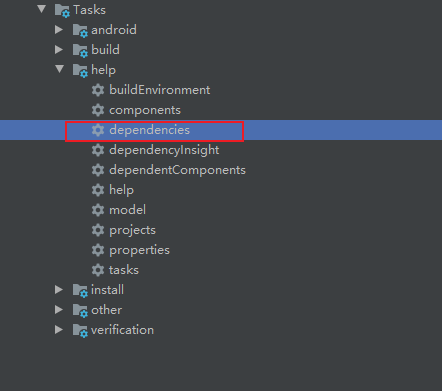
如果你的代码没有其他其他编译错误的话,可以看到下面的依赖信息
debugAndroidTestCompileClasspath - Resolved configuration for compilation for variant: debugAndroidTest

+--- project :tm.libs

+--- com.android.support:appcompat-v7:26.1.0

|    +--- com.android.support:support-annotations:26.1.0 -> 27.1.1

|    +--- com.android.support:support-v4:26.1.0

|    |    +--- com.android.support:support-compat:26.1.0 -> 27.1.1

|    |    |    +--- com.android.support:support-annotations:27.1.1

|    |    |    \--- android.arch.lifecycle:runtime:1.1.0

|    |    |         +--- android.arch.lifecycle:common:1.1.0

|    |    |         \--- android.arch.core:common:1.1.0

|    |    +--- com.android.support:support-media-compat:26.1.0 -> 27.1.1

|    |    |    +--- com.android.support:support-annotations:27.1.1

|    |    |    \--- com.android.support:support-compat:27.1.1 (*)

|    |    +--- com.android.support:support-core-utils:26.1.0

|    |    |    +--- com.android.support:support-annotations:26.1.0 -> 27.1.1

|    |    |    \--- com.android.support:support-compat:26.1.0 -> 27.1.1 (*)

|    |    +--- com.android.support:support-core-ui:26.1.0

|    |    |    +--- com.android.support:support-annotations:26.1.0 -> 27.1.1

|    |    |    \--- com.android.support:support-compat:26.1.0 -> 27.1.1 (*)

|    |    \--- com.android.support:support-fragment:26.1.0

|    |         +--- com.android.support:support-compat:26.1.0 -> 27.1.1 (*)

|    |         +--- com.android.support:support-core-ui:26.1.0 (*)

|    |         \--- com.android.support:support-core-utils:26.1.0 (*)

|    +--- com.android.support:support-vector-drawable:26.1.0

|    |    +--- com.android.support:support-annotations:26.1.0 -> 27.1.1

|    |    \--- com.android.support:support-compat:26.1.0 -> 27.1.1 (*)

|    \--- com.android.support:animated-vector-drawable:26.1.0

|         +--- com.android.support:support-vector-drawable:26.1.0 (*)

|         \--- com.android.support:support-core-ui:26.1.0 (*)

+--- com.android.support:design:26.1.0

|    +--- com.android.support:support-v4:26.1.0 (*)

|    +--- com.android.support:appcompat-v7:26.1.0 (*)

|    +--- com.android.support:recyclerview-v7:26.1.0

|    |    +--- com.android.support:support-annotations:26.1.0 -> 27.1.1

|    |    +--- com.android.support:support-compat:26.1.0 -> 27.1.1 (*)

|    |    \--- com.android.support:support-core-ui:26.1.0 (*)

|    \--- com.android.support:transition:26.1.0

|         +--- com.android.support:support-annotations:26.1.0 -> 27.1.1

|         \--- com.android.support:support-v4:26.1.0 (*)

+--- com.android.support.constraint:constraint-layout:1.1.3

|    \--- com.android.support.constraint:constraint-layout-solver:1.1.3

+--- com.google.android.exoplayer:exoplayer-core:2.9.6

|    \--- com.android.support:support-annotations:27.1.1

+--- com.google.android.exoplayer:exoplayer-ui:2.9.6

|    +--- com.google.android.exoplayer:exoplayer-core:2.9.6 (*)

|    +--- com.android.support:support-media-compat:27.1.1 (*)

|    \--- com.android.support:support-annotations:27.1.1

+--- com.googlecode.mp4parser:isoparser:1.1.21

+--- io.reactivex.rxjava2:rxandroid:2.1.0

|    \--- io.reactivex.rxjava2:rxjava:2.2.0 -> 2.2.5

|         \--- org.reactivestreams:reactive-streams:1.0.2

\--- io.reactivex.rxjava2:rxjava:2.2.5 (*)
可以看到,部分依赖后面标注了(*)号, 表示此依赖会被忽略。 -> 表示此依赖由原版本修改到了新版本。
如果你无视告警,直接运行的话,会报下面的错误
java.lang.RuntimeException: Unable to start activity ComponentInfo{com.tsing.mediaplayer/com.tsingtech.player.MainActivity}: android.view.InflateException: Binary XML file line #0: Binary XML file line #0: Error inflating class com.google.android.exoplayer2.ui.PlayerView

...

  Caused by: java.lang.NoSuchMethodError: No static method getFont(Landroid/content/Context;ILandroid/util/TypedValue;ILandroid/widget/TextView;)Landroid/graphics/Typeface; in class Landroid/support/v4/content/res/ResourcesCompat; or its super classes (declaration of 'android.support.v4.content.res.ResourcesCompat' appears in /data/app/com.tsing.mediaplayer-1/base.apk)
通过build.gradle可知,我们期望的com.android.support:appcompat 版本和design版本均为26.1.0, 但是support-media-compat, support-annotations 和support-compat被修改成了27.1.1,也就是说gradle会自动寻找当前匹配库的最高版本进行依赖。 再结合上面的红色告警信息,表示support-compat库可能存在冲突。 再结合最初的Muxtiple dex错误,确认MediaMetadataCompat所在包正好在support-media-compat
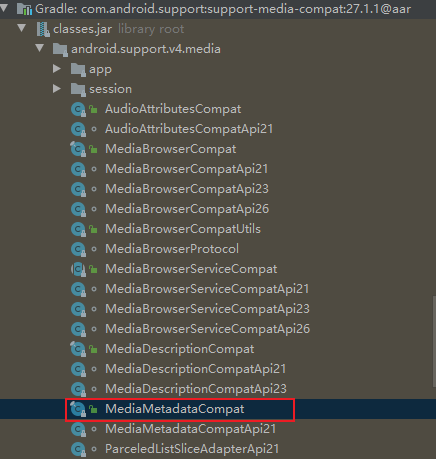
我们已经知道了重复依赖所在的包,解决办法就是将你不需要的包从依赖中排除即可。
implementation ('com.google.android.exoplayer:exoplayer-core:2.9.6') {

	exclude module: 'support-annotations'

}

implementation ('com.google.android.exoplayer:exoplayer-ui:2.9.6') {

	exclude module: 'support-media-compat'

	exclude module: 'support-annotations'

}
查看一下现在的依赖关系:
debugAndroidTestCompileClasspath - Resolved configuration for compilation for variant: debugAndroidTest

+--- project :tm.libs

+--- com.android.support:appcompat-v7:26.1.0

|    +--- com.android.support:support-annotations:26.1.0

|    +--- com.android.support:support-v4:26.1.0

|    |    +--- com.android.support:support-compat:26.1.0

|    |    |    +--- com.android.support:support-annotations:26.1.0

|    |    |    \--- android.arch.lifecycle:runtime:1.0.0

|    |    |         +--- android.arch.lifecycle:common:1.0.0

|    |    |         \--- android.arch.core:common:1.0.0

|    |    +--- com.android.support:support-media-compat:26.1.0

|    |    |    +--- com.android.support:support-annotations:26.1.0

|    |    |    \--- com.android.support:support-compat:26.1.0 (*)

|    |    +--- com.android.support:support-core-utils:26.1.0

|    |    |    +--- com.android.support:support-annotations:26.1.0

|    |    |    \--- com.android.support:support-compat:26.1.0 (*)

|    |    +--- com.android.support:support-core-ui:26.1.0

|    |    |    +--- com.android.support:support-annotations:26.1.0

|    |    |    \--- com.android.support:support-compat:26.1.0 (*)

|    |    \--- com.android.support:support-fragment:26.1.0

|    |         +--- com.android.support:support-compat:26.1.0 (*)

|    |         +--- com.android.support:support-core-ui:26.1.0 (*)

|    |         \--- com.android.support:support-core-utils:26.1.0 (*)

|    +--- com.android.support:support-vector-drawable:26.1.0

|    |    +--- com.android.support:support-annotations:26.1.0

|    |    \--- com.android.support:support-compat:26.1.0 (*)

|    \--- com.android.support:animated-vector-drawable:26.1.0

|         +--- com.android.support:support-vector-drawable:26.1.0 (*)

|         \--- com.android.support:support-core-ui:26.1.0 (*)

+--- com.android.support:design:26.1.0

|    +--- com.android.support:support-v4:26.1.0 (*)

|    +--- com.android.support:appcompat-v7:26.1.0 (*)

|    +--- com.android.support:recyclerview-v7:26.1.0

|    |    +--- com.android.support:support-annotations:26.1.0

|    |    +--- com.android.support:support-compat:26.1.0 (*)

|    |    \--- com.android.support:support-core-ui:26.1.0 (*)

|    \--- com.android.support:transition:26.1.0

|         +--- com.android.support:support-annotations:26.1.0

|         \--- com.android.support:support-v4:26.1.0 (*)

+--- com.android.support.constraint:constraint-layout:1.1.3

|    \--- com.android.support.constraint:constraint-layout-solver:1.1.3

+--- com.google.android.exoplayer:exoplayer-core:2.9.6

+--- com.google.android.exoplayer:exoplayer-ui:2.9.6

|    \--- com.google.android.exoplayer:exoplayer-core:2.9.6

+--- com.googlecode.mp4parser:isoparser:1.1.21

+--- io.reactivex.rxjava2:rxandroid:2.1.0

|    \--- io.reactivex.rxjava2:rxjava:2.2.0 -> 2.2.5

|         \--- org.reactivestreams:reactive-streams:1.0.2

\--- io.reactivex.rxjava2:rxjava:2.2.5 (*)
已经没有了 27.1.1的依赖,上面的红色告警也消失了。同理,其他的multiple dex define问题, 也可以用这个方法来根本解决!
【原创】解决Multiple dex files define问题的思路的更多相关文章
- Unable to execute dex: Multiple dex files define 解决方法
程序编译正常,在用Eclipse调试执行时,报错Unable to execute dex: Multiple dex files define: 方法: 原因是有重复的.jar被引用,可以 ...
- Unable to execute dex: Multiple dex files define异常的解决办法
问题: [2016-01-06 16:47:58 - Dex Loader] Unable to execute dex: Multiple dex files define Landroid/sup ...
- Multiple dex files define Lcom/sina/sso/RemoteSSO错误解决办法
在安卓上遇到了Multiple dex files define Lcom/sina/sso/RemoteSSO的编译错误 在网上找解决办法 搜到了解决办法是这样的 方案1:Eclipse->P ...
- eclipse:运行 Android 项目时出现 “Unable to execute dex: Multiple dex files define” 解决方法
android 项目在eclipse 出现Unable to execute dex: Multiple dex files define Conversion to Dalvik format fa ...
- Unable to execute dex: Multiple dex files define 的解决方法
我们在引入library时可能会出现这个错误 比如: [2013-11-05 14:22:15 - Dex Loader] Unable to execute dex: Multiple dex fi ...
- 转:Unable to execute dex: Multiple dex files define 解决方法
转自:http://blog.csdn.net/mxlxiao7/article/details/8978930 问题发生概述: 程序编译正常,在用Eclipse调试执行时,报错Unable to e ...
- 解决com.android.dex.DexException: Multiple dex files define Lcom/google/gson/JsonSerializer;
我在开发Windows Azure的Mobile Service(隔天补上创建过程)的安卓客户端时,报出了com.android.dex.DexException: Multiple dex file ...
- Android Multiple dex files define 解决包冲突
这段时间有一个新需求,安卓App通过URL在线预览PDF.选择使用并倒入PdfViewPager库时,报了如下异常: jdmerchants:transformDexArchiveWithExtern ...
- Multiple dex files define解决记录
引用多个library时经常会遇到Multiple dex files define错误,最常见的是support库多次定义,此时可用以下gradle命令来查看工程的引用树: gradlew -q d ...
- Multiple dex files define Lcom/google/zxing/BarcodeFormat
解决zxing “Could not find class 'com.goole.zxing.Result”和“Multiple dex files define”问题 时间 2014-04-24 1 ...
随机推荐
- windows11上面打开HEIC文件的有效方法
今天在传资料的时候,用手机拍了一张照片传到window11,打开时竟然无法打开,顿时有点诧异,仔细看了文件类型(HEIC),可能软件不识别,怎么解决呢? 经过搜索整理尝试了许多方法,没找到一个合适的. ...
- vue-图书管理系统
/* 路由模块 */ const express = require('express'); const router = express.Router(); const service = requ ...
- 前端vue的JsPDF html2canvas 生成pdf并以文件流形式上传到后端(转载)
原文地址 1.首先在文件内引入htmlToPdf.js这里代码引入了html2canvas和jspdf//需要 npm i html2Canvas 和 npm i jspdf 在这里将getPdf 这 ...
- Vulnhub 靶场 DIGITALWORLD.LOCAL: SNAKEOIL
Vulnhub 靶场 DIGITALWORLD.LOCAL: SNAKEOIL 前期准备 靶机地址:https://www.vulnhub.com/entry/digitalworldlocal-sn ...
- Vulnhub 靶场 DOUBLETROUBLE: 1
Vulnhub 靶场 DOUBLETROUBLE: 1 前期准备 靶机地址:https://www.vulnhub.com/entry/doubletrouble-1,743/ kali攻击机: 靶机 ...
- Hyperledger fabric 续篇
前面我们如果进行顺利的话,环境已经可以成功运行,并且前端页面也可以正常显示,为自己鼓掌吧!!! 接下来,其实也是我自己想做一下尝试,还记得前面的一条查询车辆情况的指令吗? peer chaincode ...
- react中如何正确使用setState(附例子)
概述 setState中对于某个state多次修改,只执行一次(最后一次),所以可以将修改放在同一次中 import React, {Component} from 'react'; class De ...
- 软件离线许可(License)实现原理
我们经常使用各种开发软件,比如IntelliJ IDEA.Navicat.Visual Studio等,这些软件都有一个特点,就是要收费.一般是我们需要去购买一个许可,然后输入这个许可到软件里就能够使 ...
- Linux环境使用Docker安装MySql
系统环境: CentOS 7.6 64位(同样适用于Ubuntu) 安装步骤: 1.创建文件夹 /home/docker/mysql/config /home/docker/mysql/data 2. ...
- vue3中使用vite-ts构建项目时tsconfig.json的配置
在上一次创建vue3项目在tsconfig.json中配置了文件别名以后,格式校验提示 es3什么鬼,便去看了一下tsconfig.json的配置,以此学习 { "compilerOptio ...