
Ionic + AngularJS
Ionic Framework
Ionic framework is the youngest in our top 5 stack, as the alpha was released in late November 2013. Built on top of the popular AngularJS framework from Google, Ionic utilizes AngularJS to provide the application structure, while Ionic itself focuses on the user interface. In other words, we see a match between the power of Angular and the beauty of Ionic UI.
Ionic provides a set of Angular directives (custom HTML elements) for it’s own components, making it as easy to use the widgets as writing a line of HTML code. In addition to directives, Ionic uses Angular’s touch recognizers, view animation logic, HTML sanitation, and asynchronous communication.
While you can use Ionic straight after cloning or unpacking the library zip, you can also install their Node.js-based CLI through NPM and start quickly with their seed project.
Even though Angular is currently the Ionic’s workhorse, the developers are keeping their (and ours) options open with plans to support other frameworks such as Knockout or EmberJS. This particular review is strongly influenced by AngularJS and it doesn’t vouch for the accuracy with other frameworks when Ionic support emerges.
MV* Pattern
Angular JS used to be an MVC framework, but over time it became closer to MVVM where the $scope object acts as a ViewModel, manipulated through a Controller function. With such a flexible approach developers can use MVC or MVVM per their liking, as long as the goal is achieved: separating presentation from business logic while boosting maintainability and productivity.
Class System
Neither Angular JS or Ionic are object oriented JavaScript frameworks so they don’t make use of a class system. This can (but shouldn’t) be observed as a weakness or a strength, depending on the level of simplicity requested on the JavaScript front end.
DOM control
Angular embeds jqLite, a fraction of jQuery that allows DOM manipulation in a cross-browser compatible manner, leaving a very small footprint. For extended functionality, jQuery can be loaded with the document.
UI and Theming
When it comes to UI, Ionic shows its potential. Ionic’s true beauty is its simplicity. In almost Google-like (but not Android-like) style it uses the existing HTML5 and CSS3 capabilities to deliver fast experiences. The speed is exactly in its simplicity – no unnecessary shadows, rounded corners, gradients but just flat, clean simple, powerful, unadulterated HTML5. Ionic doesn’t promise you native-looking UI, but it does deliver very fast and consistent interface, even on the devices you considered to be slow with rendering HTML5 apps.
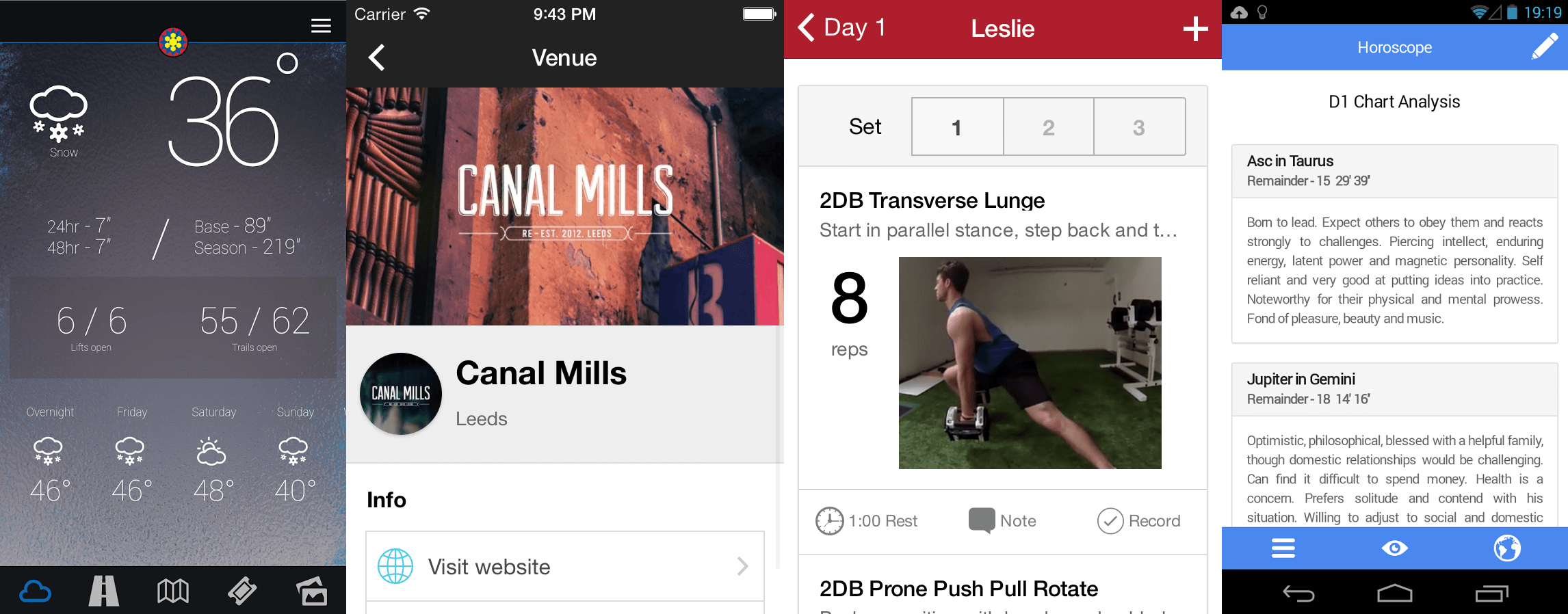
Customizable through SASS, Ionic comes with handy variables and mixins to extend for customized appearance. Additionally, it’s packaged with its own open sourced icon library featuring over 440 icons to chose from.
Widgets
Ionic’s components are powerfully simple. They are custom HTML elements, as per Angular directive principles, but Ionic also provides Controllers to complement configuration and interaction. While some frameworks may provide more complex widgets, Ionic offers somewhat simpler building blocks that can be combined to deliver rich user interfaces. As of alpha version, the framework provides with a plethora of form elements, header and footer bars, buttons, a simple list with customizable items, grid elements, and more.
Responsive Design (RWD)
Internally, Ionic leverages Responsive Web Design principles to yield optimized experience such as based on screen size or pixel density. Any app-specific RWD scenarios are welcome and will play very nicely with Ionic.
Desktop support
Meant for hybrid mobile applications (installable on a mobile device through an app store), Ionic is not meant to be be used for desktop web apps/sites. While the content will be displayed nicely, it will be optimized for its intended purpose. Those wishing to create apps that fit both environments can stay with Angular JS, but use Zurb Foundation, Twitter Bootstrap or similar UI library.
Third party plugins
No third party plugins or extensions are available at the moment.
Extensibility
Much of extensibility in Ionic will come either from (S)CSS or creating Angular directives and controllers. That makes extensibility an integral part of application development – unavoidable, but not demanding at all. Even the developers new at Ionic and Angular won’t struggle.
Building tools
Grunt is used for building Ionic making that #1 JavaScript building tool that much more attractive for your project’s purposes.
Packaging (native)
Ionic apps will require external tools for packaging purposes. It is tested to work with PhoneGap, Cordova, and Trigger.io.
Device API
Ionic does not support device APIs.
Documentation
Ionic’s documentation is decently complete considering the alpha stage of the framework. Example rich, the docs show a preview of what most of components will do on a mobile device. And the preview is very attractive, too.
Angular’s documentation will satisfy beginner developers, but may soon become insufficient. As the appetites for information grow to expert levels, developers may be forced to resort to the source code or elsewhere.
License
Both Ionic and AngularJS are available under the MIT license.
Community
Since it’s in a very early stage of life, Ionic still doesn’t have a mature community. However, given the same circumstance, its popularity is raising faster than for many other (and older) frameworks.
What would they say?
JavaScript developer:
A refreshing and straight forward way of building rich apps no matter the size. The MVC and MVVM patterns are done cum grano salis,
as the old latin would say had they had the opportunity to work with
Angular JS. Additionally, as views are defined using HTML and data
models as simple as plain JavaScript objects, the developers will easily
end up writing less code and use less of the expensive time to produce
high quality apps.
Designer:
Passionate designers will love Ionic as it allows them to customize the
layout to their liking, without having to modify someone else’s
complicated widgets and potentially break the app’s functionality.
Customizing the UI may remind of working with Zurb Foundation or Twitter
Bootstrap.
Product manager:
The initial barrier to get started with AngularJS is very low, without
needing to know the entire framework in order to build an easy app.
However, beginners faced with more advanced tasks in a complex
application will face an increasingly steep learning curve. Also,
Angular is built with testing in mind. Make use of it early in the game.
Keep in mind that Ionic is meant to be used for hybrid apps and not mobile websites.
Ionic + AngularJS的更多相关文章
- Cordova Ionic AngularJS
实践分享:开始用Cordova+Ionic+AngularJS开发App http://www.cocoachina.com/webapp/20150707/12395.html
- Ionic/Angularjs 知识点解析
Ionic/Angularjs 知识点解析 angular-ui-router(状态跳转) state的定义:(在app.js的config下配置) $stateProvider .state('ap ...
- 【Ionic+AngularJS 开发】之『个人日常管理』App(一)
写在前面的话 过去一年自己接触了不少手机前端开发,得益于现在手机性能的提升和4G普及,感觉使用混合技术开发手机App已经可以满足越来越多的应用场景了.新年伊始,对自己2016年所学知识做一个阶段性 ...
- WebApp开发框架Ionic+AngularJS+Cordova
目前的手机APP有三类:原生APP.WebAPP.HybridApp:HybridApp结合了前两类APP各自的优点,越来越流行. Ionic Ionic是一个新的.可以使用HTML5构建混合移动应用 ...
- 【Ionic+AngularJS 开发】之『个人日常管理』App(二)
准备工作 资源 预装工具 安装bower npm install -g bower 安装ngCordova bower install ngCordova (*由于网络获取资源的原因,后面几次建项目后 ...
- HybridAPP开发框架Ionic+AngularJS+Cordova搭建
Ionic Ionic是一个新的.可以使用HTML5构建混合移动应用的用户界面框架,它自称为是"本地与HTML5的结合".该框架提供了很多基本的移动用户界面范例,例如像列表(lis ...
- Ionic+AngularJS 开发的页面在微信公众号下显示不出来原因查究
ionic 页面 微信浏览器遇到的坑 公司的微信公众号一部分页面是用AngularJS+Ioinc开发,发现在本地浏览器测试的时候都没问题,传到服务器在微信公众号下跑就出问题来,经查是: index- ...
- 实践分享:开始用Cordova+Ionic+AngularJS开发App
http://www.cocoachina.com/webapp/20150707/12395.html 本文是一篇关于我本人在使用Cordova+Ionic以及AngularJS开发移动App的过程 ...
- ionic+angularjs开发hybrid App(环境配置+创建测试项目)
本文使用的系统是win10 因为后期需要使用nodejs 所以先把node装好 https://nodejs.org/download/ 下载JDK并配置Java运行环境 http://www.ora ...
随机推荐
- oracle查询某一个字段的数量总和
select count(*) from (select count(*) from 表名称 group by 多种数据量 ) 表名; 举个栗子: 比如说我有一个数据类型的字段, 里面有很多种的数据类 ...
- nginx error_log 错误日志配置说明
nginx的error_log类型如下(从左到右:debug最详细 crit最少): [ debug | info | notice | warn | error | crit ] 例如:error_ ...
- Unity 3D学习之《Unity 3D 手机游戏开发》1
P10: 设置断点步骤02,在Project窗口右键(是在下图中的红色区域,点右键)选择[Sync Mono Develop Project],打开MonoDevelop编辑器 P11: " ...
- jquery检测浏览器类型
使用jquery如下代码检测浏览器版本时:出问题,在检测IE浏览器,如果版本是IE11时,会出现 $.browser.msie的返回值是false,$.browser.mozilla的返回值是true ...
- (转)Java中使用Jedis操作Redis
转自http://www.cnblogs.com/liuling/p/2014-4-19-04.html 使用Java操作Redis需要jedis-2.1.0.jar,下载地址:http://file ...
- Select查询执行顺序
链接:http://blog.jobbole.com/55086/ 很多程序员视 SQL 为洪水猛兽.SQL 是一种为数不多的声明性语言,它的运行方式完全不同于我们所熟知的命令行语言.面向对象的程序语 ...
- Struts2 文件上传和文件下载
一.单个文件上传 文件上传需要两个jar包: 首先制作一个简单的页面,用于实现文件上传 <h1>单个文件上传</h1> <s:form action="uplo ...
- STM32F105解密STM32F105VB芯片解密STM32F105R8单片机破解多少钱?
STM32F105解密STM32F105VB芯片解密STM32F105R8单片机破解 STM32F105芯片Cortex-M3单片机解密: [凯基迪科技] STM32F105R8解密 | STM32F ...
- 模板函数(template function)出现编译链接错误(link error)之解析
总的结论: 将template function 或者 template class的完整定义直接放在.h文件中,然后加到要使用这些template function的.cpp文件中. 1. 现 ...
- Linux UBI子系统设计初探
问题领域 flash存储设备存在如下特点: 存在坏块 使用寿命较短 存储介质不稳定 读写速度慢 不支持随机访问(nand) 只能通过擦除将0改成1 最小读写单位为page or sub-page 便宜 ...