
JavaWeb_(Mybatis框架)MyBatis整合Spring框架
MyBatis + Spring整合开发
a)使用Spring容器用单例模式管理Mybatis的sqlSessionFactory;
b)使用Spring管理连接池、数据源等;
c)将Dao/Mapper动态代理对象注入到Spring容器中,使用时直接获取;
一、MyBatis整合Spring框架
a)导入所需的包;
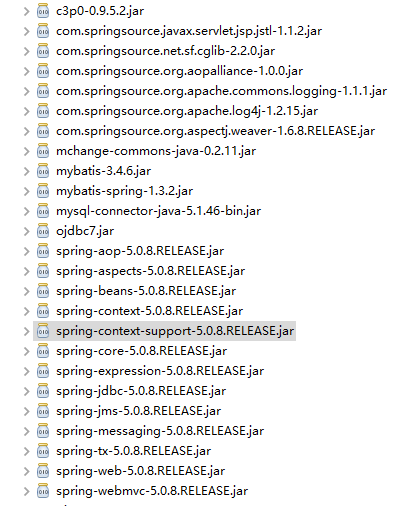
b)创建Mybatis主配置文件sqlMapConfig.xml;
<?xml version="1.0" encoding="UTF-8" ?>

<!DOCTYPE configuration

  PUBLIC "-//mybatis.org//DTD Config 3.0//EN"

  "http://mybatis.org/dtd/mybatis-3-config.dtd">

<configuration>

  <!-- 别名配置 -->

  <typeAliases>

      <!-- 别名直接按他的类名去取的User(不区别大小写) -->

      <package name="com.Gary.bean"/>

  </typeAliases>

</configuration>
sqlMapConfig.xml
c)创建Spring主配置文件applicationContext.xml (以下是spring框架xml的头,需要导入约束);
<?xml version="1.0" encoding="UTF-8"?>

<beans

    xmlns:xsi="http://www.w3.org/2001/XMLSchema-instance"

    xmlns="http://www.springframework.org/schema/beans"

    xmlns:aop="http://www.springframework.org/schema/aop"

    xmlns:context="http://www.springframework.org/schema/context"

    xmlns:tx="http://www.springframework.org/schema/tx"

    xmlns:util="http://www.springframework.org/schema/util"

    xsi:schemaLocation="http://www.springframework.org/schema/beans

    http://www.springframework.org/schema/beans/spring-beans.xsd

    http://www.springframework.org/schema/aop http://www.springframework.org/schema/aop/spring-aop.xsd

    http://www.springframework.org/schema/context http://www.springframework.org/schema/context/spring-context.xsd

    http://www.springframework.org/schema/tx http://www.springframework.org/schema/tx/spring-tx.xsd

    http://www.springframework.org/schema/util http://www.springframework.org/schema/util/spring-util.xsd ">

</beans>
applicationContent.xml
d)配置C3P0连接池;
    <!-- 配置c3p0连接池 -->

    <bean name="dataSource" class="com.mchange.v2.c3p0.ComboPooledDataSource">

        <property name="driverClass" value="${jdbc.driverClass}"/>

        <property name="jdbcUrl" value="${jdbc.jdbcUrl}"/>

        <property name="user" value="${jdbc.user}"/>

        <property name="password" value="${jdbc.password}"/>

    </bean>
<?xml version="1.0" encoding="UTF-8"?>

<beans

    xmlns:xsi="http://www.w3.org/2001/XMLSchema-instance"

    xmlns="http://www.springframework.org/schema/beans"

    xmlns:aop="http://www.springframework.org/schema/aop"

    xmlns:context="http://www.springframework.org/schema/context"

    xmlns:tx="http://www.springframework.org/schema/tx"

    xmlns:util="http://www.springframework.org/schema/util"

    xsi:schemaLocation="http://www.springframework.org/schema/beans

    http://www.springframework.org/schema/beans/spring-beans.xsd

    http://www.springframework.org/schema/aop http://www.springframework.org/schema/aop/spring-aop.xsd

    http://www.springframework.org/schema/context http://www.springframework.org/schema/context/spring-context.xsd

    http://www.springframework.org/schema/tx http://www.springframework.org/schema/tx/spring-tx.xsd

    http://www.springframework.org/schema/util http://www.springframework.org/schema/util/spring-util.xsd ">

    <!-- 读取配置文件 -->

    <context:property-placeholder location="db.properties" />

    <!-- 配置c3p0连接池 -->

    <bean name="dataSource" class="com.mchange.v2.c3p0.ComboPooledDataSource">

        <property name="driverClass" value="${jdbc.driverClass}"/>

        <property name="jdbcUrl" value="${jdbc.jdbcUrl}"/>

        <property name="user" value="${jdbc.user}"/>

        <property name="password" value="${jdbc.password}"/>

    </bean>

</beans>
applicationContent.xml
e)读取db.properties;
    <!-- 读取配置文件 -->

    <context:property-placeholder location="db.properties" />
jdbc.driverClass=com.mysql.jdbc.Driver
jdbc.jdbcUrl=jdbc:mysql://localhost:3306/ssm_mybatis
jdbc.user=root
jdbc.password=123456
<?xml version="1.0" encoding="UTF-8"?>

<beans

    xmlns:xsi="http://www.w3.org/2001/XMLSchema-instance"

    xmlns="http://www.springframework.org/schema/beans"

    xmlns:aop="http://www.springframework.org/schema/aop"

    xmlns:context="http://www.springframework.org/schema/context"

    xmlns:tx="http://www.springframework.org/schema/tx"

    xmlns:util="http://www.springframework.org/schema/util"

    xsi:schemaLocation="http://www.springframework.org/schema/beans

    http://www.springframework.org/schema/beans/spring-beans.xsd

    http://www.springframework.org/schema/aop http://www.springframework.org/schema/aop/spring-aop.xsd

    http://www.springframework.org/schema/context http://www.springframework.org/schema/context/spring-context.xsd

    http://www.springframework.org/schema/tx http://www.springframework.org/schema/tx/spring-tx.xsd

    http://www.springframework.org/schema/util http://www.springframework.org/schema/util/spring-util.xsd ">

    <!-- 读取配置文件 -->

    <context:property-placeholder location="db.properties" />

    <!-- 配置c3p0连接池 -->

    <bean name="dataSource" class="com.mchange.v2.c3p0.ComboPooledDataSource">

        <property name="driverClass" value="${jdbc.driverClass}"/>

        <property name="jdbcUrl" value="${jdbc.jdbcUrl}"/>

        <property name="user" value="${jdbc.user}"/>

        <property name="password" value="${jdbc.password}"/>

    </bean>

</beans>
applicationContent.xml
    jdbc.driverClass=com.mysql.jdbc.Driver

    jdbc.jdbcUrl=jdbc:mysql://localhost:3306/ssm_mybatis

    jdbc.user=root

    jdbc.password=123456
db.properties
f)配置sqlSessionFactory;
    <!-- 配置mybatis sqlSessionFactory -->

    <bean id="sqlSessionFactoryBean" class="org.mybatis.spring.SqlSessionFactoryBean">

        <!-- 配置数据源  -->

        <property name="dataSource" ref="dataSource"/>

        <!-- 告诉spring mybatis的核心配置文件 -->

        <property name="configLocation" value="classpath:sqlMapConfig.xml"/>

    </bean>
<?xml version="1.0" encoding="UTF-8"?>

<beans

    xmlns:xsi="http://www.w3.org/2001/XMLSchema-instance"

    xmlns="http://www.springframework.org/schema/beans"

    xmlns:aop="http://www.springframework.org/schema/aop"

    xmlns:context="http://www.springframework.org/schema/context"

    xmlns:tx="http://www.springframework.org/schema/tx"

    xmlns:util="http://www.springframework.org/schema/util"

    xsi:schemaLocation="http://www.springframework.org/schema/beans

    http://www.springframework.org/schema/beans/spring-beans.xsd

    http://www.springframework.org/schema/aop http://www.springframework.org/schema/aop/spring-aop.xsd

    http://www.springframework.org/schema/context http://www.springframework.org/schema/context/spring-context.xsd

    http://www.springframework.org/schema/tx http://www.springframework.org/schema/tx/spring-tx.xsd

    http://www.springframework.org/schema/util http://www.springframework.org/schema/util/spring-util.xsd ">

    <!-- 读取配置文件 -->

    <context:property-placeholder location="db.properties" />

    <!-- 配置c3p0连接池 -->

    <bean name="dataSource" class="com.mchange.v2.c3p0.ComboPooledDataSource">

        <property name="driverClass" value="${jdbc.driverClass}"/>

        <property name="jdbcUrl" value="${jdbc.jdbcUrl}"/>

        <property name="user" value="${jdbc.user}"/>

        <property name="password" value="${jdbc.password}"/>

    </bean>

    <!-- 配置mybatis sqlSessionFactory -->

    <bean id="sqlSessionFactoryBean" class="org.mybatis.spring.SqlSessionFactoryBean">

        <!-- 配置数据源  -->

        <property name="dataSource" ref="dataSource"/>

        <!-- 告诉spring mybatis的核心配置文件 -->

        <property name="configLocation" value="classpath:sqlMapConfig.xml"/>

    </bean>

</beans>
applicationContent.xml
# Global logging configuration

log4j.rootLogger=DEBUG, stdout

# Console output...

log4j.appender.stdout=org.apache.log4j.ConsoleAppender

log4j.appender.stdout.layout=org.apache.log4j.PatternLayout

log4j.appender.stdout.layout.ConversionPattern=%5p [%t] - %m%n
log4j.properties
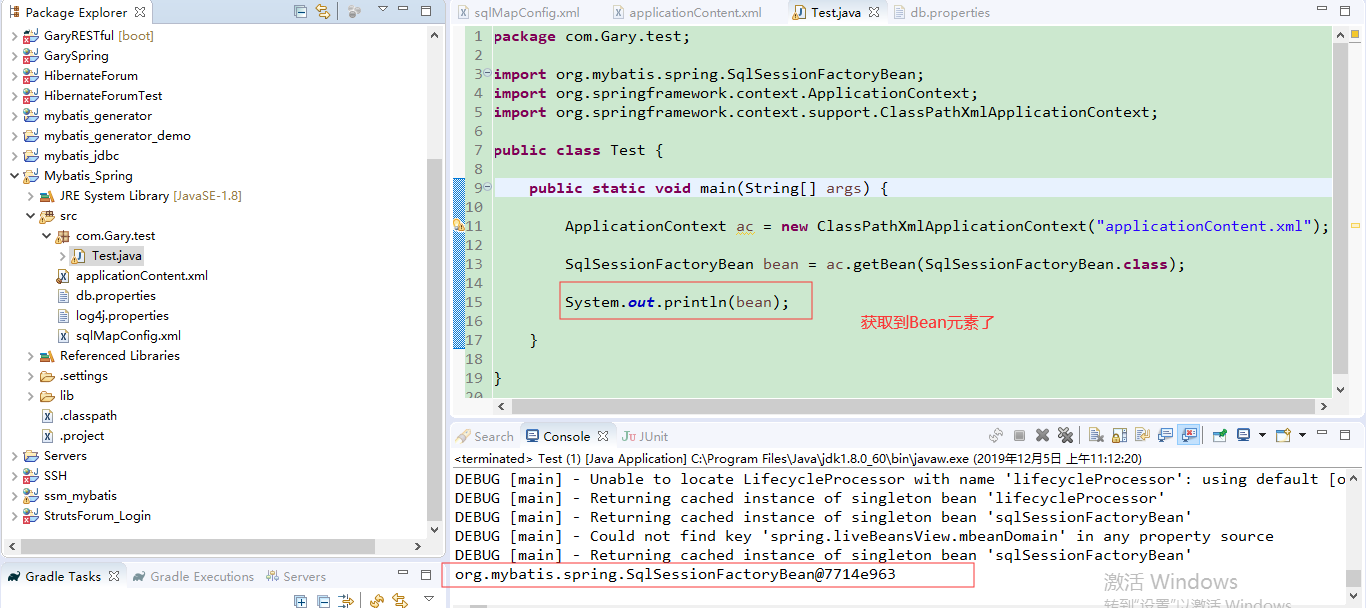
package com.Gary.test;

import org.mybatis.spring.SqlSessionFactoryBean;

import org.springframework.context.ApplicationContext;

import org.springframework.context.support.ClassPathXmlApplicationContext;

public class Test {

    public static void main(String[] args) {

        ApplicationContext ac = new ClassPathXmlApplicationContext("applicationContent.xml");

        SqlSessionFactoryBean bean = ac.getBean(SqlSessionFactoryBean.class);

        System.out.println(bean);

    }

}
Test.java
JavaWeb_(Mybatis框架)MyBatis整合Spring框架的更多相关文章
- 整合Spring框架和MyBatis框架
------------------------siwuxie095 整合 Spring 框架和 MyBatis 框架 ...
- OSGI企业应用开发(四)使用Blueprint整合Spring框架(一)
上篇文章中介绍了如何使用独立的Equinox发行包搭建OSGI运行环境,而不是依赖与具体的Eclipse基础开发工具,本文开始介绍如何使用Blueprint將Spring框架整合到OSGI中. 一.开 ...
- 整合Spring框架和Hibernate框架
-------------------siwuxie095 整合 Spring 框架和 Hibernate 框架 1.导 ...
- mybatis入门_一对多,多对多映射以及整合spring框架
一.一对多映射. 1.1 一对多映射之根据多的一方关联查询一的一方 示例:查询出具体的订单信息,同时也查询出来订单的用户信息. 引入的订单表如下所示: 框选出来的为具体的外键. 订单的Pojo类如下所 ...
- java框架之MyBatis(2)-进阶&整合Spring&逆向工程
进阶内容 准备 jdbc.url=jdbc:mysql://192.168.208.192:3306/test?characterEncoding=utf-8 jdbc.driver=com.mysq ...
- OSGI企业应用开发(五)使用Blueprint整合Spring框架(二)
上篇文章中,我们开发了一个自定义的Bundle,接着从网络中下载到Spring和Blueprint的Bundle,然后复制到DynamicRuntime项目下. 需要注意的是,这些Bundle并不能在 ...
- JavaWeb_(Spring框架)在Struts+Hibernate框架中引入Spring框架
spring的功能:简单来说就是帮我们new对象,什么时候new对象好,什么时候销毁对象. 在MySQL中添加spring数据库,添加user表,并添加一条用户数据 使用struts + hibern ...
- MyBatis使用总结+整合Spring
MyBatis 本是apache的一个开源项目iBatis, 2010年这个项目由apache software foundation 迁移到了google code,并且改名为MyBatis .20 ...
- mybatis笔记<二> 整合spring
mybatis与spring整合需要添加几个jar包,mybatis-spring, spring-context, spring-jdbc 1. spring ioc只要一个jar包就ok 2. 我 ...
随机推荐
- was控制台无法停止应用
问题描述: was控制台无法停止应用,只能通过停止server的方式停止: 代码实现: import org.slf4j.Logger; import org.slf4j.LoggerFactory; ...
- 【php socket通讯】php实现http服务
http服务是建立在tcp服务之上的,它是tcp/ip协议的应用,前面我们已经实现了tcp服务,并且使用三种不同的方式连接tcp服务 php中连接tcp服务的三种方式 既然http也是tcp应用层的一 ...
- vue购物车动画效果
使用动画的三个函数 v-on:before-enter="beforeEnter" v-on:enter="enter" v-on:after-enter=&q ...
- 五、HashMap的使用 及其源码解析
HashMap的底层实现原理?领接表(数组+链表)hash表数组+链表+红黑树 链表:查找慢 插入 删除快红黑树:查找快 插入 删除慢 HashMap是线程安全的吗?不是线程安全的 在什么情况下 ,是 ...
- logstash+elasticsearch+kibana搭建日志收集分析系统
来源: http://blog.csdn.net/xifeijian/article/details/50829617 日志监控和分析在保障业务稳定运行时,起到了很重要的作用,不过一般情况下日志都分散 ...
- 《数据结构与算法之美》 <03>数组:为什么很多编程语言中数组都从0开始编号?
提到数组,我想你肯定不陌生,甚至还会自信地说,它很简单啊. 是的,在每一种编程语言中,基本都会有数组这种数据类型.不过,它不仅仅是一种编程语言中的数据类型,还是一种最基础的数据结构.尽管数组看起来非常 ...
- openpose-opencv 的body数据多人体姿态估计
介绍 opencv除了支持常用的物体检测模型和分类模型之外,还支持openpose模型,同样是线下训练和线上调用.这里不做特别多的介绍,先把源代码和数据放出来- 实验模型获取地址:https://gi ...
- selenium 操作多个窗口间切换
#coding=gbk ''' selenium多个窗口间切换 ''' from selenium import webdriver as wd from selenium.webdriver imp ...
- python 学习笔记_1 pip安装、卸载、更新包相关操作及数据类型学习
'''prepare_1 pip安装.卸载.更新组件type 各数据类型''' py -3 -m pip py -3 -m pip listpy -3 -m pip show nosepy -3 -m ...
- git rev-list 按照时间来列出两个 commit id 之间的相差数
git rev-list 按照时间来列出两个 commit id 之间的相差数 git rev-list: Lists commit objects in reverse chronological ...