
hive 使用beelin连接报错
1、在当前服务器启动hiveserver2服务,远程客户端通过beeline连接
报错信息如下:
root@master:~# beeline  -u jdbc:hive2//master:10000

ls: cannot access /data1/hadoop/hive/lib/hive-jdbc-*-standalone.jar: No such file or directory

SLF4J: Class path contains multiple SLF4J bindings.

SLF4J: Found binding in [jar:file:/data1/hadoop/hive/lib/log4j-slf4j-impl-2.4..jar!/org/slf4j/impl/StaticLoggerBinder.class]

SLF4J: Found binding in [jar:file:/data1/hadoop/hadoop/share/hadoop/common/lib/slf4j-log4j12-1.7..jar!/org/slf4j/impl/StaticLoggerBinder.class]

SLF4J: See http://www.slf4j.org/codes.html#multiple_bindings for an explanation.

SLF4J: Actual binding is of type [org.apache.logging.slf4j.Log4jLoggerFactory]

scan complete in 1ms

// :: [main]: ERROR beeline.ClassNameCompleter: Fail to parse the class name from the Jar file due to the exception:java.io.FileNotFoundException: org/ehcache/sizeof/impl/sizeof-agent.jar (No such file or directory)

scan complete in 762ms            #这里提示找不到文件或者目录

No known driver to handle "jdbc:hive2//master:10000"

Beeline version 2.1. by Apache Hive

beeline>
其实这个问题是由于jdbc协议地址写错造成的,在hive2之后少了个“:”
改成以下这个形式即可:
# beeline  -u jdbc:hive2://master:10000  (这是在命令行直接输入)
或者
先输入beeline
然后输入:
!connect jdbc:hive2://master:10000
2、用户不被允许
# beeline -u jdbc:hive2://master:10000 -n root

ls: cannot access /data1/hadoop/hive/lib/hive-jdbc-*-standalone.jar: No such file or directory

SLF4J: Class path contains multiple SLF4J bindings.

SLF4J: Found binding in [jar:file:/data1/hadoop/hive/lib/log4j-slf4j-impl-2.4..jar!/org/slf4j/impl/StaticLoggerBinder.class]

SLF4J: Found binding in [jar:file:/data1/hadoop/hadoop/share/hadoop/common/lib/slf4j-log4j12-1.7..jar!/org/slf4j/impl/StaticLoggerBinder.class]

SLF4J: See http://www.slf4j.org/codes.html#multiple_bindings for an explanation.

SLF4J: Actual binding is of type [org.apache.logging.slf4j.Log4jLoggerFactory]

Connecting to jdbc:hive2://master:10000

Error: Failed to open new session: java.lang.RuntimeException: org.apache.hadoop.ipc.RemoteException(org.apache.hadoop.security.authorize.AuthorizationException): User: root is not allowed to impersonate root (state=,code=)

Beeline version 2.1. by Apache Hive

beeline>
(1)修改core-site.xml文件,加入如下选项:
<property>

    <name>hadoop.proxyuser.root.hosts</name>   #配置成*的意义,表示任意节点使用 hadoop 集群的代理用户 root 都能访问 hdfs 集群

    <value>*</value>

</property>

<property>

    <name>hadoop.proxyuser.root.groups</name> #表示代理用户的组所属

    <value>*</value>

</property>
上述的proxyuser后面的root即是报错时User后面的用户,如:User: root is not allowed to
如果报错为:User: yjt is not allowed to,那么修改如下:
hadoop.proxyuser.yjt.hosts

hadoop.proxyuser.yjt.groups
这样改的原因:
主要原因是hadoop引入了一个安全伪装机制,使得hadoop 不允许上层系统直接将实际用户传递到hadoop层,而是将实际用户传递给一个超级代理,由此代理在hadoop上执行操作,避免任意客户端随意操作hadoop,如下图:
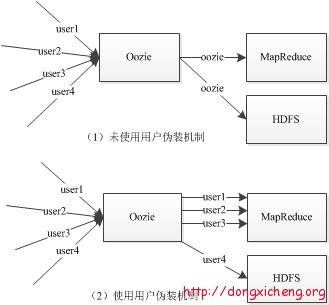
图上的超级代理是“Oozie”,你自己的超级代理是上面设置的proxyuser后面的“xxx”。
而hadoop内部还是延用linux对应的用户和权限。即你用哪个linux用户启动hadoop,对应的用户也就成为hadoop的内部用户
(2)在hdfs-sitx.xml文件添加:
<property>

    <name>dfs.webhdfs.enabled</name>

    <value>true</value>

</property>
上诉配置完以后,重新启动hadoop集群,其实只要hdfs就可以了。
接着执行如下命令:
/# beeline -u jdbc:hive2://master:10000 -n root

ls: cannot access /data1/hadoop/hive/lib/hive-jdbc-*-standalone.jar: No such file or directory

SLF4J: Class path contains multiple SLF4J bindings.

SLF4J: Found binding in [jar:file:/data1/hadoop/hive/lib/log4j-slf4j-impl-2.4..jar!/org/slf4j/impl/StaticLoggerBinder.class]

SLF4J: Found binding in [jar:file:/data1/hadoop/hadoop/share/hadoop/common/lib/slf4j-log4j12-1.7..jar!/org/slf4j/impl/StaticLoggerBinder.class]

SLF4J: See http://www.slf4j.org/codes.html#multiple_bindings for an explanation.

SLF4J: Actual binding is of type [org.apache.logging.slf4j.Log4jLoggerFactory]

Connecting to jdbc:hive2://master:10000

Error: Failed to open new session: java.lang.RuntimeException: org.apache.hadoop.ipc.RemoteException(org.apache.hadoop.security.authorize.AuthorizationException): User: root is not allowed to impersonate root (state=,code=)

Beeline version 2.1. by Apache Hive

beeline>
what???,不对???
如果上诉配置正确,集群也已经重启,还是报这样的错误,那么查看一下启动hiveserver2的机器是否启动了namenode节点?
(1)如果没有启动namenode节点,那么查看你配置的用户(这里是root用户)是否有对应的操作hdfs目录的权限(权限控制可能会导致该错误)
(2)如果该节点启动了namenode,那么使用 hdfs haadmin -getAllServiceState 检查该节点的namenode的状态是否是standby。如果是,kill掉,让该节点的namenode变成active。
我碰到的问题就是上诉2,也就是namenode节点是standby。
kill掉以后,再试试
root@master:/# hdfs haadmin -getAllServiceState

master:                                        standby

slave1:                                        active

root@master:/# hdfs haadmin -getAllServiceState

master:                                        active

// :: INFO ipc.Client: Retrying connect to server: slave1/172.17.0.3:. Already tried  time(s); retry policy is RetryUpToMaximumCountWithFixedSleep(maxRetries=, sleepTime= MILLISECONDS)

slave1:                                        Failed to connect: Call From master/172.17.0.2 to slave1: failed on connection exception: java.net.ConnectException: Connection refused; For more details see:  http://wiki.apache.org/hadoop/ConnectionRefused

root@master:/# beeline -u jdbc:hive2://master:10000 -n root

ls: cannot access /data1/hadoop/hive/lib/hive-jdbc-*-standalone.jar: No such file or directory

SLF4J: Class path contains multiple SLF4J bindings.

SLF4J: Found binding in [jar:file:/data1/hadoop/hive/lib/log4j-slf4j-impl-2.4..jar!/org/slf4j/impl/StaticLoggerBinder.class]

SLF4J: Found binding in [jar:file:/data1/hadoop/hadoop/share/hadoop/common/lib/slf4j-log4j12-1.7..jar!/org/slf4j/impl/StaticLoggerBinder.class]

SLF4J: See http://www.slf4j.org/codes.html#multiple_bindings for an explanation.

SLF4J: Actual binding is of type [org.apache.logging.slf4j.Log4jLoggerFactory]

Connecting to jdbc:hive2://master:10000

Connected to: Apache Hive (version 2.1.)

Driver: Hive JDBC (version 2.1.)

// :: [main]: WARN jdbc.HiveConnection: Request to set autoCommit to false; Hive does not support autoCommit=false.

Transaction isolation: TRANSACTION_REPEATABLE_READ

Beeline version 2.1. by Apache Hive

: jdbc:hive2://master:10000>
0: jdbc:hive2://master:10000> show databases;
OK
+----------------+--+
| database_name |
+----------------+--+
| default |
| myhive |
+----------------+--+
发现正常连接了。
借鉴:https://blog.csdn.net/qq_16633405/article/details/82190440
hive 使用beelin连接报错的更多相关文章
- 解决oracle服务器重启之后连接报错的问题
DB服务器重启之后再连接报错如下: 原因是重启之后listener.ora被还原成初始文件,sid被清空. 解决步骤: 1.查看监听服务和数据库服务: 由此找到listener.ora文件的路径:D: ...
- 监听报错 TNS-00525: Insufficient privilege for operation 11gR2 + 连接报错ORA-12537: TNS:connection closed
1.TNS-00525: Insufficient privilege for operation Started with pid= Listening on: (DESCRIPTION=(ADDR ...
- Oracle SQL Developer连接报错(ORA-12505)
Oracle SQL Developer连接报错(ORA-12505) 之前我的Oracle数据库出现问题,费大波周折终于弄好了,今天又创建了一个DBA管理员的连接方式出现问题,本人现在把解决方案分享 ...
- 启动tomcat直接报错:org.apache.tomcat.util.digester.Digester startElement
今天很奇怪,自己手动搭建了一个ssm(spring+springmvc+mybatis)的项目,然后添加到tomcat下,启动直接报错: 2017-3-19 9:24:47 org.apache.to ...
- Jmeter录制脚本过程及Could not create script recorder报错、您的连接不是私密连接报错
转载自 https://www.cnblogs.com/wwho/p/7173172.html Jmeter录制脚本过程及Could not create script recorder报错.您 ...
- Oracle 12c SQL Developer连接报错(ORA-12505)
Oracle 12c SQL Developer连接报错(ORA-12505) 连接时报错码:Listener refused the connection with following error: ...
- 二、Jmeter录制脚本过程及Could not create script recorder报错、您的连接不是私密连接报错
两个报错:Could not create script recorder报错和您的连接不是私密连接报错 1.录制过程 * 打开jmeter * 点击Templated,选择Recoding模版 * ...
- ssh连接报错Write failed: Broken pipe Resource temporarily unavailable
问题描述 使用root连接服务器正常,切换普通用户连接报错 具体报错如下:Write failed: Broken pipe 或者:failed to execute /bin/bash: Resou ...
- Mysql远程连接报错:SQL Error (1130): Host '192.168.61.128' is not allowed to connect to this MySQL server
Mysql远程连接报错:SQL Error (1130): Host '192.168.0.18' is not allowed to connect to this MySQL server ...
随机推荐
- 查看IIS错误日志
部署在IIS中的程序,难免出现数据产生异常 在事件查看器中,可以看出来具体的错误信息,代码定位
- python入门-windows下python环境搭建
1. 下载安装包 选择executable版,根据自己电脑的操作系统选择是32位还是64为. python3.6-64位下载 python3.6-32位下载 2. 安装python 下载之后是这样的 ...
- 文件锁 flock/fcntl
多个进程同时操作一个文件 1. flock int flock(int fd, int operation); LOCK_SH 建立共享锁定.多个进程可同时对同一个文件作共享锁定(读锁定) LOCK_ ...
- stm32和cortex M3学习内核简单总结
1.stm32综述 2.寄存器组 3.操作模式和特权级别 4.存储器映射 5.中断和异常 6.其他 Stm32综述 这可以说是我第一款认真学习的单片机了,学完这个就要开启我通往arm9的大门了,接下来 ...
- 高性能的js第三方库——lodash、 Underscore、async、md5及moment
背景:为了实现某些功能,如:数据排序.分组.筛选.深拷贝等,自己写的函数或网上搜索处理的转换函数质量无法保证,这时直接使用成熟的js第三方库是首选. *注:“framework(框架)”,“libra ...
- unittest管理测试用例
#coding=utf-8 from selenium import webdriver from time import sleep import unittest #导入unittest库 imp ...
- The New Stack:KubeEdge将Kubernetes的能力延伸至边缘
3月29日,权威技术分析网站The New Stack在Edge/IoT专栏发表了关于边缘计算项目KubeEdge的最新调研报告.原文观点如下: https://github.com/kubeedge ...
- c++第五次博客作业
C++虚函数,纯虚函数,抽象类以及虚基类的区别 Part1.C++中的虚函数 什么是虚函数: 直观表达就是,如果一个函数的声明中有 virtual 关键字,那么这个函数就是虚函数. ...
- MySQL 中 关于 find_in_set 用法
在项目中用的是 EF.MySQL,在查询中用到某一个字段的值在某几个中.一开始想到的是 in. 但是,这个字段是 int 类型的,传入的参数需要用“,”分隔.这样传入的就是字符型的. 这样的结果是:本 ...
- PL/SQL存储过程
一.概述 过程和函数统称为PL/SQL子程序,他们是被命名的PL/SQL块,均存储于数据库中. 并通过输入.输出和输入输出参数与其调用者交换信息.唯一区别是函数总向调用者返回数据. 二.存储过程详解 ...