
iOS 11适配和iPhone X的适配
这两天对自己负责的项目进行iOS 11和iPhone X的适配,网上的博客很多,也看了很多别人的记录博客,这里把自己遇到的问题记录下,当然有些不仅仅是iOS 11和iPhone X的适配,还包括自己遇到的问题和解决方法。
1> iOS Assertion failure in -[UITableView _classicHeightForRowAtIndexPath:]:
这问题是由于cell高度负数导致,去看看:
- (CGFloat)tableView:(UITableView *)tableView heightForRowAtIndexPath:(NSIndexPath *)indexPath { }
2> iOS 11使用第三方侧滑Cell-MSCMoreOptionTableViewCell,不能出现多个按钮:
https://github.com/scheinem/MSCMoreOptionTableViewCell/issues/37
https://forums.developer.apple.com/thread/86009
具体代码如下:
-(id)tableView:(UITableView *)tableView trailingSwipeActionsConfigurationForRowAtIndexPath:(NSIndexPath *)indexPath {

    return [self getRowActions:tableView indexPath:indexPath];

}

-(id)tableView:(UITableView *)tableView editActionsForRowAtIndexPath:(NSIndexPath *)indexPath {

    return [self getRowActions:tableView indexPath:indexPath];

}

-(id)getRowActions:(UITableView *)tableView indexPath:(NSIndexPath *)indexPath {

    if (@available(iOS , *)) {

        UIContextualAction *delete = [UIContextualAction contextualActionWithStyle:UIContextualActionStyleDestructive

                                                                             title:@"删除"

                                                                           handler:^(UIContextualAction * _Nonnull action, __kindof UIView * _Nonnull sourceView, void (^ _Nonnull completionHandler)(BOOL)) {

                                                                               completionHandler(YES);

                                                                           }];

        delete.backgroundColor = [UIColor redColor];

        UIContextualAction *modify = [UIContextualAction contextualActionWithStyle:UIContextualActionStyleDestructive

                                                                             title:@"修改"

                                                                           handler:^(UIContextualAction * _Nonnull action, __kindof UIView * _Nonnull sourceView, void (^ _Nonnull completionHandler)(BOOL)) {

                                                                               completionHandler(YES);

                                                                           }];

        modify.backgroundColor = [UIColor redColor];

        UISwipeActionsConfiguration *swipeActionConfig = [UISwipeActionsConfiguration configurationWithActions:@[delete, modify]];

        swipeActionConfig.performsFirstActionWithFullSwipe = NO;

        return swipeActionConfig;

    }

    return nil;

}
当然你可以使用iOS 8自带的侧滑Cell出现多个按钮,这里因为之前项目适配iOS 7,懒得改了,代码如下:
- (NSArray *)tableView:(UITableView *)tableView editActionsForRowAtIndexPath:(NSIndexPath *)indexPath {

    // 添加一个删除按钮

    UITableViewRowAction *deleteRowAction = [UITableViewRowAction rowActionWithStyle:UITableViewRowActionStyleDestructive title:@"删除"handler:^(UITableViewRowAction *action, NSIndexPath *indexPath) {

        [self tableView:tableView moreOptionButtonPressedInRowAtIndexPath:indexPath];

    }];

    // 添加一个修改按钮

    UITableViewRowAction *modifyRowAction = [UITableViewRowAction rowActionWithStyle:UITableViewRowActionStyleNormal title:@"修改"handler:^(UITableViewRowAction *action, NSIndexPath *indexPath) {

        [self tableView:tableView moreOptionButtonPressedInRowAtIndexPath:indexPath];

    }];

    modifyRowAction.backgroundEffect = [UIBlurEffect effectWithStyle:UIBlurEffectStyleDark];

    return @[modifyRowAction, deleteRowAction];

  }
3> iOS 11TableView的sectionHeader高度变大:实现返回View的代理即可。
#pragma mark - talbeView delegate

- (CGFloat)tableView:(UITableView *)tableView heightForHeaderInSection:(NSInteger)section {

    return .f;

}

- (CGFloat)tableView:(UITableView *)tableView heightForFooterInSection:(NSInteger)section {

    return 0.1f;

}

// 解决iOS 11 sectionHeader高度变高的问题

- (UIView *)tableView:(UITableView *)tableView viewForHeaderInSection:(NSInteger)section {

    return [UIView new];

}

- (UIView *)tableView:(UITableView *)tableView viewForFooterInSection:(NSInteger)section {

    return [UIView new];

}
4> 添加下面的代码,会造成系统选择相册顶部偏移:
//    //解决iOS11,仅实现heightForHeaderInSection,没有实现viewForHeaderInSection方法时,section间距大的问题

//    [UITableView appearance].estimatedRowHeight = 0;

//    [UITableView appearance].estimatedSectionHeaderHeight = 0;

//    [UITableView appearance].estimatedSectionFooterHeight = 0;

//

//    //iOS11 解决SafeArea的问题,同时能解决pop时上级页面scrollView抖动的问题

//    if (@available(iOS 11, *)) {

//        [UIScrollView appearance].contentInsetAdjustmentBehavior = UIScrollViewContentInsetAdjustmentNever; //iOS11 解决SafeArea的问题,同时能解决pop时上级页面scrollView抖动的问题

//    }
5> iOS 11 SearchBar的高度变化:
#define iOS(version) ([[UIDevice currentDevice].systemVersion doubleValue] >= version)

#define K_SEARCH_BAR_HEIGHT (iOS(11)?56.f:44.f)
有博客说可以这样:我好像试了没什么效果
// 强制高度:

 [self.searchBar.heightAnchor constraintLessThanOrEqualToConstant:].active = YES;
6> iOS 11 新增的两个保存相册权限:
    <key>NSPhotoLibraryUsageDescription</key>

    <string>App需要您的同意,才能访问相册</string>

    <key>NSPhotoLibraryAddUsageDescription</key>

       <string>App需要您的同意,才能访问相册</string>
7> 跳转到AppStore:
-(void)goToAppStore

{

NSString *itunesurl = @"itms-apps://itunes.apple.com/cn/app/idXXXXXX?mt=8&action=write-review";

[[UIApplication sharedApplication] openURL:[NSURL URLWithString:itunesurl]];

}

注意:把里面的XXX替换成你自己的APP ID。
8>iOS 11返回按钮点击不灵敏:
参考博客: http://m.blog.csdn.net/wenmingzheng/article/details/78081342
iPhone X的适配:
1> 启动图:添加1125 * 2436的图片即可;
2> 安全区域上下不遮挡:
这里注意:思思一直以为所有页面都需要距离底部34的安全距离,其实没有必要,如果你的tableview是像模拟器里“设置”页面一样的话 就不用减34p ,如果tableview底部还有其他按钮的 就要减34啦!都说官方没有一定的强制要求。
参见系统设置界面:
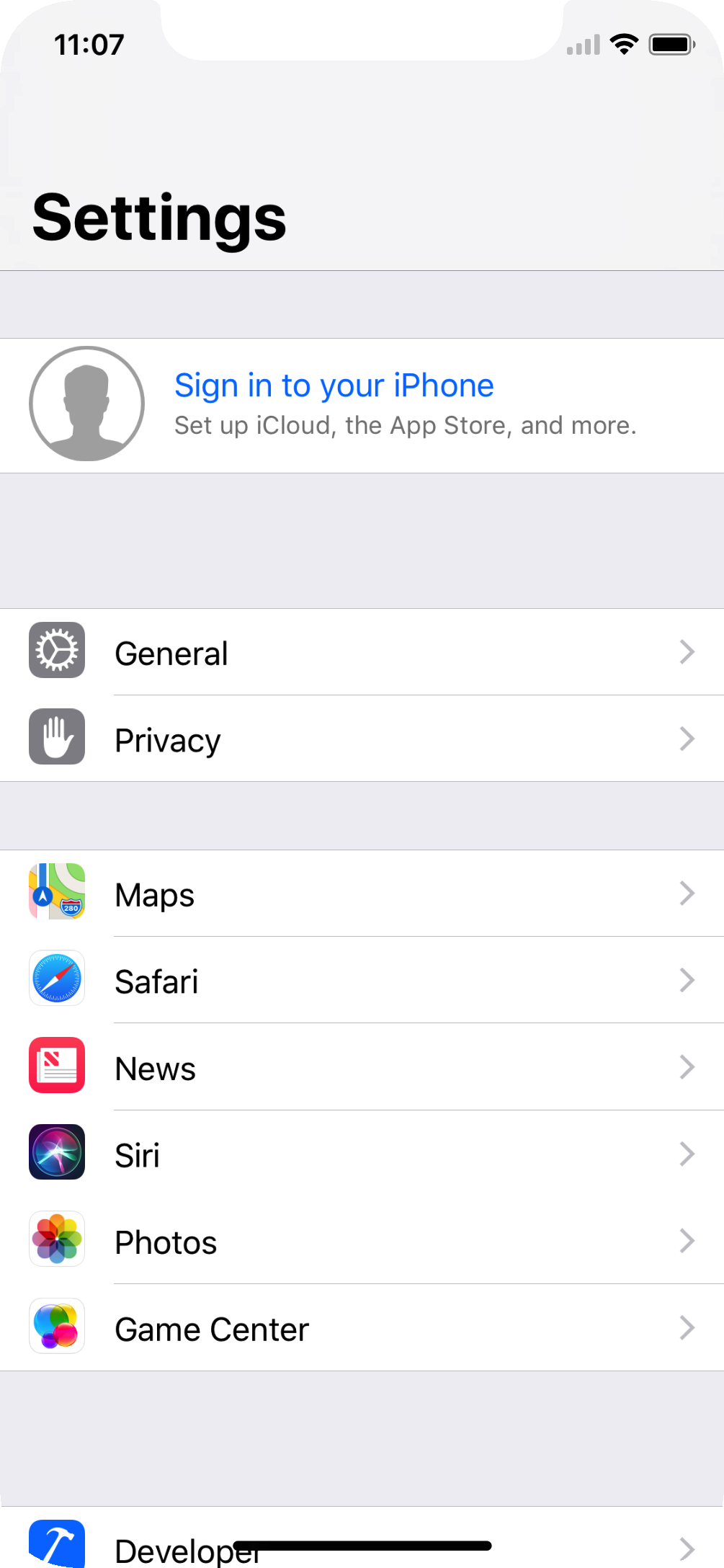
我居然不知道参考系统的页面,还在一直的纠结要不要减去34,该打,哈哈
iOS 11适配和iPhone X的适配的更多相关文章
- iOS:界面适配(三)--iPhone不同机型适配 6/6plus 前
转:http://blog.csdn.net/houseq/article/details/40051207 对于不同苹果设备,各个参数查看<iOS:机型参数.sdk.xcode各版本>. ...
- 关于IOS的屏幕适配(iPhone)——资源适配
IOS的屏幕适配几乎不需要大量的代码操作,更多的时间我们只是动动鼠标选择一下就搞定.可以苹果在这方面做的还是比较人性的,解放了开发者. 首先来说说Iphone这几种屏(由于最近做的是iPhone AP ...
- 适配 iOS 11 & iPhone X 大全
1.升级iOS11后造成的变化 1. 1升级后,发现某个拥有tableView的界面错乱,组间距和contentInset错乱,因为iOS11中UIViewController的automatical ...
- IOS 11 下适配UITableView
9月份苹果发布了IOS11和Iphone X,这一操作系统一硬件对于开发者适配上面还是造作了不少蛋疼的地方.先来看看IOS 11,这些蛋疼的需要适配的地方: 1.UIScrollView及其子类在IO ...
- iOS 11 & iPhone X 适配资料集
本文主要简单谈谈并收集一些关于 iOS 11 & iPhone X 的适配及设计指南. iPhone X 众所周知,iPhone X 屏幕与其他的 iPhone 设备均不同,苹果称 iPhon ...
- iOS 11更新后以及iPhone X推出后工程中遇到的问题及适配
1.UITableView滑动时右侧的滑动条忽长忽短的乱跳以及MJRefresh上拉刷新死循环 这是因为tableView在iOS11默认使用Self-Sizing,tableView的estimat ...
- iPhone X 适配 ( iOS 11适配 )
总结: 1.状态栏高度发生变化,解决方案:布局的时候这个高度不要写死,通过方法获取高度. 2.导航栏的视图层级结构发生变化而导致 UI(titleView.UIBarButtonItem) 问题. 3 ...
- IOS学习——iphone X的适配
说实话,对于一个刚入门iOS两个月的新手而言,在拿到这个任务的时候整个人都是懵逼的,怎么做适配?哪些地方需要适配?该怎么做?一个个问题搞得头都大了. 首先,啥都不管,先在iPhone X上运行起来看看 ...
- 58 同城 iOS 客户端 iOS11 及 iPhone X 适配实践
一.前言 前段时间 WWDC 大会上苹果推出了 iOS11 系统 和 iPhone X 新机型,相信各个 iOS 团队的开发者都已经在计划新系统和新机型的适配工作了.不得不说,新系统和新机型的发布确实 ...
随机推荐
- less-@arguments变量
@arguments变量:包含了所有传递进来的参数. 如果你不想单独处理每一个参数的话可以像这样写: /*arguments*/ //之前这么写 .border_arg(@w:30px,@c:red, ...
- c++初步认识
经过漫长的C学习终于踏入C++的知识库当中了,还是保持以前的习惯会一步步通过写博客的形式来记录点滴学习记录,这种学习方式是相当慢的,但是对我来说是最踏实的,不浮躁,一步一个脚印.C++是一门啥语言呢, ...
- java8之Metaspace
HotSpot JVM是java中最常用的java虚拟机.在java8 HotSpot JVM 中,虚拟机的内存模型做了修改调整.以前HotSpot JVM的内存模型分为新生代,老年代,永久 ...
- JavaScript004,输出
<!DOCTYPE html> <html> <head> <meta charset="utf-8"> <title> ...
- CSS3媒体查询实例
<!DOCTYPE html> <html> <head> <meta charset="utf-8"> <title> ...
- C语言calloc()函数:分配内存空间并初始化——stm32中的应用
经常在代码中看到使用malloc来分配,然后memset清零,其实calloc更加方便,一句顶两句~ 头文件:#include <stdlib.h> calloc() 函数用来动态地分配内 ...
- keil结合st-link使用SWO的两种调试方法笔记
通过strongerHuang的教程,实现了SWO的两种调试方法, 1.在keil调试的过程中,使用debug printf viewer打印信息, 2.在STM32 ST-LINK Utility中 ...
- 自定义错误throw
<!DOCTYPE html> <html lang="en"> <head> <meta charset="UTF-8&quo ...
- 【基础算法-ST表】入门 -C++
前言 学了树状数组看到ST表模板跃跃欲试的时候发现完全没思路,因为给出的查询的时间实在太短了!几乎是需要完成O(1)查询.所以ST表到底是什么神仙算法能够做到这么快的查询? ST表 ST表是一个用来解 ...
- OSI七层协议模型
OSI七层模型详解 TCP/IP协议 链接:https://www.nowcoder.com/questionTerminal/b2ccf60bbb13483b94b4bffe200b4f3c 来源: ...