
springboot学习入门简易版五---springboot2.0整合jsp(11)
springboot对jsp支持不友好,内部tomcat对jsp不支持,需要使用外部tomcat,且必须打包为war包。
1 创建maven项目
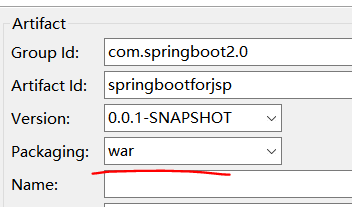
注意:必须为war类型,否则找不到页面。
且不要把jsp页面存放在resources(原因:可能被别人访问,其次不在classes类路径中),因此,一般自行创建目录存放(一般/WEB-INF/下。
2 pom文件
<packaging>war</packaging> <!-- 注意为war包!!! -->

   <!-- spring-boot-starter-parent 整合第三方常用框架依赖信息(包含各种依赖信息) -->

  <parent>

      <groupId>org.springframework.boot</groupId>

      <artifactId>spring-boot-starter-parent</artifactId>

      <version>2.0.0.RELEASE</version>

  </parent>

  <!-- spring-boot-starter-web springboot整合springmvc web

      实现原理:maven依赖继承关系,相当于把第三方常用maven依赖信息,在parent项目中已封装

  -->

  <dependencies>

      <!-- 根据需要选择parent中封装的第三方框架 -->

      <dependency>

          <groupId>org.springframework.boot</groupId>

          <artifactId>spring-boot-starter-web</artifactId>

          <!-- 不需要写版本号,因为在parent中已封装好版本号 -->

      </dependency>

      <!-- tomcat -->

      <dependency>

        <groupId>org.springframework.boot</groupId>

        <artifactId>spring-boot-starter-tomcat</artifactId>

    </dependency>

    <!-- SpringBoot 外部tomcat支持 -->

    <dependency>

        <groupId>org.apache.tomcat.embed</groupId>

        <artifactId>tomcat-embed-jasper</artifactId>

    </dependency>

    <!-- 解决No Java compiler available for configuration options compilerClassName报错

        https://www.mkyong.com/spring-boot/spring-boot-web-jsp-no-java-compiler-available/

     -->

    <dependency>

        <groupId>org.eclipse.jdt.core.compiler</groupId>

        <artifactId>ecj</artifactId>

        <version>4.6.1</version>

        <scope>provided</scope>

    </dependency>

  </dependencies>
注意点:
1)<packaging>war</packaging> <!-- 注意为war包!!! -->
2)No Java compiler available for configuration options compilerClassName报错 :
解决办法引入ecj依赖
<dependency>
<groupId>org.eclipse.jdt.core.compiler</groupId>
<artifactId>ecj</artifactId>
<version>4.6.1</version>
<scope>provided</scope>
</dependency>
3 创建application.properties
#springmvc 配置

spring.mvc.view.prefix=/WEB-INF/jsp/

spring.mvc.view.suffix=.jsp
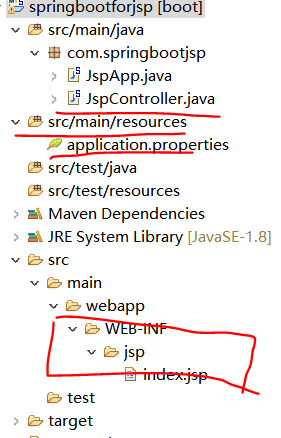
4 在webapp目录下创建WEB-INF/jsp
如上图,新建index.jsp页面
<%@ page language="java" contentType="text/html; charset=utf-8"  pageEncoding="utf-8"%>

<!DOCTYPE html PUBLIC "-//W3C//DTD HTML 4.01 Transitional//EN" "http://www.w3.org/TR/html4/loose.dtd">

<html>

<head>

<meta http-equiv="Content-Type" content="text/html; charset=utf-8">

<title>Insert title here</title>

</head>

<body>

springboot 整合 jsp

</body>

</html>
5 创建JspController类和启动类JspApp
@SpringBootApplication

public class JspApp {

    public static void main(String[] args) {

        SpringApplication.run(JspApp.class, args);

    }

}
@Controller //注意不能使用@RestController(无视图层),否则无法找到对应的jsp页面

public class JspController {

    @RequestMapping("/index")

    public String index() {

        return "index";//对应jsp文件名称即index.jsp

    }

}
6 运行启动类JspApp
访问:http://localhost:8080/index
启动后访问报错:
java.lang.IllegalStateException: No Java compiler available for configuration options compilerClassName: [null] and compiler: [null]
参考:https://www.cnblogs.com/ming-blogs/p/10283764.html
添加
<dependency>
<groupId>org.eclipse.jdt.core.compiler</groupId>
<artifactId>ecj</artifactId>
<version>4.6.1</version>
<scope>provided</scope>
</dependency>
依赖即可
再次访问,页面返回springboot 整合 jsp
https://www.mkyong.com/spring-boot/spring-boot-web-jsp-no-java-compiler-available/
git代码:https://github.com/cslj2013/springboot2.0_for_jsp.git
springboot学习入门简易版五---springboot2.0整合jsp(11)的更多相关文章
- springboot学习入门简易版六---springboot2.0整合全局捕获异常及log4j日志(12-13)
使用Aop实现 1创建异常请求 在原有项目基础上,jspController中创建一个可能发生异常的请求: /** * 全局捕获异常测试 * @param i * @return */ @Reques ...
- springboot学习入门简易版九---springboot2.0整合多数据源mybatis mysql8+(22)
一个项目中配置多个数据源(链接不同库jdbc),无限大,具体多少根据内存大小 项目中多数据源如何划分:分包名(业务)或注解方式.分包名方式类似多个不同的jar,同业务需求放一个包中. 分包方式配置多数 ...
- springboot学习入门简易版三---springboot2.0启动方式
2.4使用@componentscan方式启动 2.4.1 @EnableAutoConfiguration 默认只扫描当前类 @EnableAutoConfiguration 默认只扫描当前类,如果 ...
- springboot学习入门简易版二---springboot2.0项目创建
2 springboot项目创建(5) 环境要求:jdk1.8+ 项目结构: 2.1创建maven工程 Group id :com.springbootdemo Artifact id: spring ...
- springboot学习入门简易版八---springboot2.0多环境配置、整合mybatis mysql8+(19-20)
2.11 SpringBoot多环境配置(19) application.properties中配置 Spring.profiles.active=prd 配置环境: Application-dev ...
- springboot学习入门简易版四---springboot2.0静态资源访问及整合freemarker视图层
2.4.4 SpringBoot静态资源访问(9) Springboot默认提供静态资源目录位置需放在classpath下,目录名需要符合如下规则 /static /public /resourc ...
- springboot学习入门简易版一---springboot2.0介绍
1.1为什么用springboot(2) 传统项目,整合ssm或ssh,配置文件,jar冲突,整合麻烦.Tomcat容器加载web.xml配置内容 springboot完全采用注解化(使用注解方式启动 ...
- springboot学习入门简易版七---springboot2.0使用@Async异步执行方法(17)
1启动类开启异步调用注解 @SpringBootApplication @EnableAsync //开启异步调用 public class StartApplication { 不开启则异步调用无效 ...
- eclipse 中springboot2.0整合jsp 出现No Java compiler available for configuration options compilerClassName
今天使用eclipse创建springboot整合jsp出现一个问题,在idea中并没有遇到这个问题.最后发现是需要在eclipse中添加一个eclipse依赖,依赖如下: <dependenc ...
随机推荐
- fxjwind Calcite分析 - Volcano模型
参考,https://matt33.com/2019/03/17/apache-calcite-planner/ Volcano模型使用,分为下面几个步骤, //1. 初始化 VolcanoPlann ...
- Hbuilder提交项目到GitHub出现cannot open git-upload-pack
问题描述 Hbuilder上传本地项目到GitHub时是通过下载的Egit插件,然而提交代码时出现下图问题 网上有说添加http的sslVerify=false,然并卵. 解决方案 不用hbuilde ...
- tensorflow运行时openssl与boringssl兼容性问题
tensorflow中,grpc使用boringssl进行加密,boringssl是google基于openssl自行开发的一条分支,有许多相同函数,但底层实现以及支持的加密类型有不同. 且tenso ...
- ES6将两个数组合并成一个对象数组
需求 有这么两个数组 let metrodates = [ "2008-01", "2008-02", "2008-03",..ect ]; ...
- mysql-connector-java(6.0以上)的时差问题
一.背景 通过mybatis日志观察插入数据库的时间为当前时间,但是打开数据库表发现时间滞后了8个小时. 二.推论及解决 很容易猜到这是时区的问题. 三.最后找到的问题点如下: jdbc:mysql: ...
- Layui 点击查询分页,页码不刷新解决方法
Layui 点击查询分页,页码不刷新解决方法 function queryDataGrid() { layui.table.reload(tableName, { where: { //设定异步数据接 ...
- (转)CentOS 7.6 上编译安装httpd 2.4.38
原文:https://www.s4lm0x.com/archives/40.html https://www.cnblogs.com/sunshine-H/p/8110608.html----超详细 ...
- 修改LINUX 默认的22端口
Linux远程端口修改操作手册 一.修改端口前需要检查selinux状态,并把selinux永久关闭 关闭方法: 1. 执行setenforce 0 2. vi /etc/selinux/confi ...
- CentOS7 安装特定版本的Docker
先卸载旧版本 sudo yum remove docker \ docker-client \ docker-client-latest \ docker-common \ docker-late ...
- 监听微信、支付宝等移动app及浏览器的返回、后退、上一页按钮的事件方法
在实际的应用中,我们常常需要实现在移动app和浏览器中点击返回.后退.上一页等按钮实现自己的关闭页面.调整到指定页面或执行一些其它操作的 需求,那在代码中怎样监听当点击微信.支付宝.百度糯米.百度钱包 ...