
C实现Linux中copy功能
/*

mycp.c

*/

#include<stdio.h>

#include<stdlib.h>

#include<unistd.h>

#include<fcntl.h>

#include<string.h>

#include<dirent.h>

#include<sys/types.h>

#include<sys/stat.h>

#include<getopt.h>

#include<stdbool.h>

#define BUFFERSIZE 1024

#define COPYMORE 0644

/*用于处理从目录文件复制到目录文件的操作,传入的参数应该是目录路径*/

int copyD2D(char *src, char *dest);

/*用于处理从文件复制到文件的操作,输入的参数是文件名*/

int copyF2F(char *src, char *dest);

/*判断filename是否是目录名*/

bool isdir(char *filename);

/*字符串反转*/

char *strrev(char *str);

/*main函数用于接收命令行传进来的参数,并判断是否符合规范。

然后根据不同的情况调用不同的子函数。*/

int main(int argc, char **argv)

{

    /*

    标记-r/-R选项,该选项代表递归复制文件夹

    标记-l选项,-l选项代表创建硬链接

    标记-s选项,-s选项代表创建符号链接

    */

    bool opt_r = false;

    bool opt_l = false;

    bool opt_s = false;

    /*

    用于记录源文件

    用于记录目标文件

    记录选项的字符

    */

    char *src = NULL;

    char *dest = NULL;

    char c;

    /*循环检测命令行参数中的选项*/

    while((c = getopt(argc, argv, "rRls")) != -)

    {

        switch(c)

        {

            case 'R':

            case 'r':

                opt_r = true;

                break;

            case 'l':

                opt_l = true;

                break;

            case 's':

                opt_s = true;

                break;

        }

    }

    /*命令行参数中应该有两个文件名。若没有,则输出提示,并终止程序*/

    if (optind >= argc - )

    {

        printf("lack operator \n");

        exit();

    }

    /*从命令行参数中读取源文件和目标文件名*/

    src = argv[optind];

    dest = argv[optind + ];

     /*根据opt_l选项的真假,做相应操作。

    若为真,则创建硬链接,使用link函数。*/

    if (opt_l)

    {

        if (isdir(src))

        {

            printf("dirent canot build hard linker\n");

            exit();

        }

        /*link 函数的返回值:若成功,则返回0;若出错,返回-1*/

        if ((link(src, dest)) == )

        {

            return ;

        }

        else

        {

            printf("create hard linker error\n");

            exit();

        }

    }

     /*根据opt_s选项的真假,做相应操作。

    若为真,则创建符号链接,使用symlink函数。*/

    if (opt_s)

    {

        if(isdir(src))

        {

            printf("dirent cannot create soft linker\n");

            exit();

        }

        if (symlink(src, dest) == )

        {

            return ;

        }

        else

        {

            printf("create soft linker error\n");

            exit();

        }

    }

    if (!isdir(src))

    {

        /*若源文件src不是目录,直接调用copyF2F函数。*/

        if ((copyF2F(src, dest)) == )

        {

            return ;

        }

        else

        {

            printf("copy file error\n");

            exit();

        }

    }

    else if(isdir(src))

    {

        if (!isdir(dest))

        {

            printf("Canot copy the dirent to a file\n");

            exit();

        }

        /*若源文件src和目标文件dest都是目录,直接调用copyD2D函数。*/

        else if(isdir(dest) && opt_r)

        {

            if (copyD2D(src, dest) != )

            {

                printf("copy catalog error\n");

                exit();

            }

            else

            {

                return ;

            }

        }

        else

        {

            printf("copy catalog need option -r\n");

            exit();

        }

    }

    else

    {

        printf("the operation is illegal\n");

        exit();

    }

    return ;

}

/*该函数用于处理复制目录的情况*/

int copyD2D(char *src_dir, char *dest_dir)

{

    DIR *dp = NULL;

    struct dirent *dirp;

    char tempDest[];

    char tempSrc[];

    strcpy(tempDest, dest_dir);

    strcpy(tempSrc, src_dir);

    /*使用opendir函数打开src_dir目录,获得指向该目录名字的指针*/

    if ((dp = opendir(src_dir)) == NULL)

    {

        return ;

    }

    else

    {

        while((dirp = readdir(dp)))

        {

            struct stat  file_stat;

            if (!isdir(dirp->d_name))

            {

                /*将dirent结构中的d_name成员变量链接到上级目录字符串*/

                strcat(tempDest, dirp->d_name);

                strcat(tempSrc, dirp->d_name);

                 /*此处转换为文件复制函数的方式处理目录复制*/

                copyF2F(tempSrc, tempDest);

                /*通过字符串拷贝函数,将tempDest和tempSrc还原为上级的目录名*/

                strcpy(tempDest, dest_dir);

                strcpy(tempSrc, src_dir);

            }

        }

        closedir(dp);

    }

    return ;

}

/*该函数通过read,write等基本的系统函数,完成文件的拷贝工作*/

int copyF2F(char *src_file, char *dest_file)

{

    int in_fd, out_fd, n_chars;

    char buf[BUFFERSIZE];

    /*如果目标文件是一个目录,那么默认是在该目录下建立一个与源文件同名的文件*/

    if (isdir(dest_file))

    {

        char c;

        char temp[] = {};

        char *r_temp;

        int n = strlen(src_file);

        int m = ;

        /*读取源文件的最后一级文件名作为目标文件名*/

        while((c = src_file[n-]) != '/')

        {

            temp[m] = c;

            m++;

            n--;

        }

        r_temp = strrev(temp);

        strcat(dest_file, r_temp);

    }

     /* 以可读模式打开源文件 */

    if ((in_fd = open(src_file, O_RDONLY)) == -)

    {

        printf("%s file read error!\n", src_file);

        return ;

    }

    /* O_WRONLY代表以读写的方式打开目标文件,O_CREAT选项代表若文件不存在则创建,

    COPYMORE = 0644,文件所有者可读可写,其他可读 */

    if ((out_fd = open(dest_file, O_WRONLY | O_CREAT, COPYMORE)) == -)

    {

        return ;

    }

    /* 通过read和write系统调用实现文件的复制 */

    while ((n_chars = read(in_fd, buf, BUFFERSIZE)) > )

    {

        if (write(out_fd, buf, n_chars) != n_chars)

        {

            printf("%s file write error!\n", src_file);

            return ;

        }

        if (n_chars == -)

        {

            printf("%s file read error!\n", src_file);

            return ;

        }

    }

    if (close(in_fd) == - || close(out_fd) == -)

    {

        printf("close file error\n");

        return ;

    }

    return ;

}

/*判断filename是否为目录文件*/

bool isdir(char *filename)

{

    struct stat fileInfo;

    if (stat(filename, &fileInfo) >= )

    {

        if (S_ISDIR(fileInfo.st_mode))

        {

            return true;

        }

        else

        {

            return false;

        }

    }

}

char *strrev(char *str)

{

    int i = strlen(str) - , j = ;

    char ch;

    while(i > j)

    {

        ch = str[i];

        str[i] = str[j];

        str[j] = ch;

        i--;

        j++;

    }

    return str;

}
运行结果:

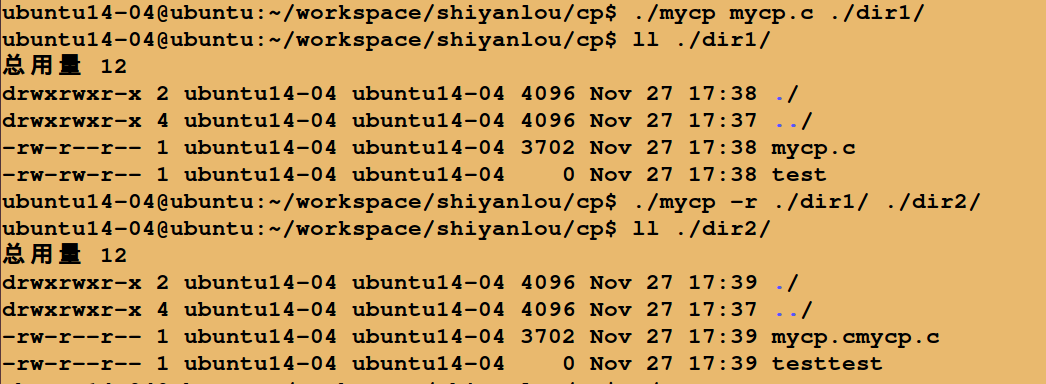
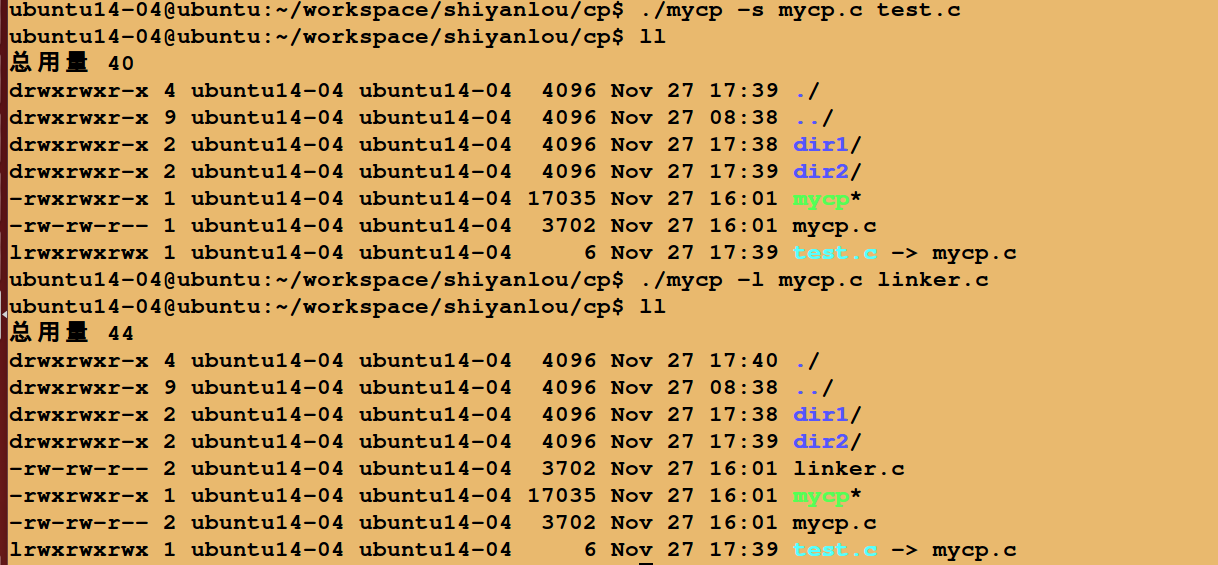
C实现Linux中copy功能的更多相关文章
- Linux系统中cgroup功能介绍
1 Cgroups简介 1.1 What are cgroups ? Cgroups(控制组)是Linux内核的一个功能,用来限制.统计和分离一个进程组的资源(CPU.内存.磁盘输入输出等).换句话 ...
- linux中怎样关闭ICMP回应功能
引用自:http://blog.csdn.net/qq844352155/article/details/49700121 linux中怎样关闭ICMP回应功能 输入: echo 1 > ...
- 【linux】【网络安全】linux中怎样关闭ICMP回应功能
引用自:http://blog.csdn.net/qq844352155/article/details/49700121 linux中怎样关闭ICMP回应功能 输入: echo ...
- Linux中的定时自动执行功能(at,crontab)
Linux中的定时自动执行功能(at,crontab) 概念 在Linux系统中,提供了两种提前对工作进行安排的方式 at 只执行一次 crontab 周期性重复执行 通过对这两个工具的应用可以让我们 ...
- linux中socket的理解
对linux中socket的理解 一.socket 一般来说socket有一个别名也叫做套接字. socket起源于Unix,都可以用“打开open –> 读写write/read –> ...
- Linux中exec命令相关
Linux中exec命令相关 exec和source都属于bash内部命令(builtins commands),在bash下输入man exec或man source可以查看所有的内部命令信息. b ...
- Linux就这个范儿 第15章 七种武器 linux 同步IO: sync、fsync与fdatasync Linux中的内存大页面huge page/large page David Cutler Linux读写内存数据的三种方式
Linux就这个范儿 第15章 七种武器 linux 同步IO: sync.fsync与fdatasync Linux中的内存大页面huge page/large page David Cut ...
- Linux 中的零拷贝技术,第 1 部分
概述 本系列由两篇文章组成,介绍了当前用于 Linux 操作系统上的几种零拷贝技术,简单描述了各种零拷贝技术的实现,以及它们的特点和适用场景.本文是本系列文章的第一部分,主要是介绍一些零拷贝技术的相关 ...
- [转]linux中强大的screen命令
[转]linux中强大的screen命令 http://pythonorg.diandian.com/post/2012-01-05/40027464147 今天用SCREEN用点生了,有几个功能不知 ...
随机推荐
- unity资源机制(转)
原文地址:https://www.jianshu.com/p/ca5cb9d910c0作者:重装机霸 2.资源概述 Unity必须通过导入将所支持的资源序列化,生成AssetComponents后,才 ...
- kubeadm安装kubernetes 1.16.2
目录 简介 环境说明 安装 准备基础环境 安装docker 安装kubeadm.kubelet.kubectl 配置kubeadm-config.yaml 部署master 安装flannel网络插件 ...
- Python课程第六天作业
1.以自己的理解总结为什么会出现循环导入,并用代码举例说明 循环导入报错并不是应为相互之间引用而导致报错,实际上是在导入一个模块时发现引用的模块不存在 示例如下: m1.py from m2 impo ...
- 【spring boot】加载同名Bean解决方法
原文地址:https://blog.csdn.net/liuyueyi25/article/details/83280239 @SpringBootApplication @ComponentScan ...
- html 图片滚动代码
我自己也在用的,网页常用!分享出来 最简单易懂源码 <!--下面是向上滚动代码--> <div id=butong_net_top style=overflow:hidden;hei ...
- C#多线程下如何保证线程安全?
多线程编程相对于单线程会出现一个特有的问题,就是线程安全的问题.所谓的线程安全,就是如果你的代码所在的进程中有多个线程在同时运行,而这些线程可能会同时运行这段代码.如果每次运行结果和单线程运行的结果是 ...
- C#自定义消息函数,需要一个TextBox,一个委托,直接上代码;
private delegate void de_OutputMessage(string str); public void OutputMessage(string str) { if (text ...
- C#实现UrlEncode (URL编码)
public static string UrlEncode(string str) { StringBuilder sb = new StringBuilder(); byte[] byStr = ...
- Python - Win10系统下Python3.x环境配置
Win10系统下Python3.x环境配置 https://blog.csdn.net/qq_41952474/article/details/82630551
- Windows+VS2017使用gRPC
gRPC官方Windows安装说明: Install Visual Studio 2015 or 2017 (Visual C++ compiler will be used). Install Gi ...