
javaWeb之自动发送邮件生日祝福(ServletContextListener监听)
在看完本随笔仍然不理解的可以看 javaWeb邮箱发送 :里面有具体的邮箱服务器配置
企业在员工生日当天发送邮箱生日祝福:
一般是用监听器完成: 而合适的监听是ServletContextListener ,每天都定时查看该天过生日的员工,并发送邮件祝福
创建一个监听器:
package com.study.mail;

import java.sql.SQLException;

import java.text.SimpleDateFormat;

import java.util.Date;

import java.util.List;

import java.util.Timer;

import java.util.TimerTask;

import javax.mail.MessagingException;

import javax.mail.internet.AddressException;

import javax.servlet.ServletContextEvent;

import javax.servlet.ServletContextListener;

import org.apache.commons.dbutils.QueryRunner;

import org.apache.commons.dbutils.handlers.BeanListHandler;

import com.study.utils.DataSourceUtils;

public class MyServletContextListener implements ServletContextListener {

    public void contextInitialized(ServletContextEvent arg0)  {

        Timer timer=new Timer();

        final SimpleDateFormat sdf=new SimpleDateFormat("MM-dd");

        final QueryRunner qr=new QueryRunner(DataSourceUtils.getDataSource());

         timer.schedule(new TimerTask() {

            @Override

            public void run() {

                //判断今天的日期

                String today="\"%"+sdf.format(new Date())+"%\"";

                // today 容易写成      "%"+sdf.format(new Date())+"%"

                // 导致生成的sql语句为:  select * from user where birthday like %11-13%

                // 正常运行的sql语句为:   select * from user where birthday like  "%11-13%",

                //因此使用   ‘\’  转义符把  " 转化

                //今天生日的员工

                String sql="select * from user where birthday like "+today;

                List<User> userList =null;

                try {

                System.out.println(sql);

                userList = qr.query(sql, new BeanListHandler<User>(User.class));

                } catch (SQLException e) {

                    e.printStackTrace();

                }

                if (userList!=null) {

                    for (User user : userList) {

                        String emailMsg="亲爱的"+user.getName()+"<br/>祝你生日快乐";

                        try {

                            MailUtils.sendMail(user.getEmail(), "生日祝福", emailMsg);

                        } catch (AddressException e) {

                            e.printStackTrace();

                        } catch (MessagingException e) {

                            e.printStackTrace();

                        }

                    }

                }

            }

        }, new Date(), 1000*5);

         //new Date()  具体的项目不为这个, 1000*5  // 真正项目是1000*60*60*24 一天

    }

    public void contextDestroyed(ServletContextEvent arg0)  {

         // TODO Auto-generated method stub

    }

}
User 类:
package com.study.mail;

public class User {

    private String name;

    private String passWord;

    private String email;

    private String birthday;

    public String getName() {

        return name;

    }

    public void setName(String name) {

        this.name = name;

    }

    public String getPassWord() {

        return passWord;

    }

    public void setPassWord(String passWord) {

        this.passWord = passWord;

    }

    public String getEmail() {

        return email;

    }

    public void setEmail(String email) {

        this.email = email;

    }

    public String getBirthday() {

        return birthday;

    }

    public void setBirthday(String birthday) {

        this.birthday = birthday;

    }

}
MailUtils类:
package com.study.mail;

import java.util.Properties;

import javax.mail.Authenticator;

import javax.mail.Message;

import javax.mail.MessagingException;

import javax.mail.PasswordAuthentication;

import javax.mail.Session;

import javax.mail.Transport;

import javax.mail.internet.AddressException;

import javax.mail.internet.InternetAddress;

import javax.mail.internet.MimeMessage;

import javax.mail.internet.MimeMessage.RecipientType;

public class MailUtils {

    public static void sendMail(String email,String subject, String emailMsg)

            throws AddressException, MessagingException {

        // 1.创建一个程序与邮件服务器会话对象 Session

        Properties props = new Properties();

        props.setProperty("mail.transport.protocol", "SMTP");//发送邮件的协议

        props.setProperty("mail.host", "localhost");//发送邮件的服务器地址

        props.setProperty("mail.smtp.auth", "true");// 指定验证为true

        // 创建验证器

        Authenticator auth = new Authenticator() {

            public PasswordAuthentication getPasswordAuthentication() {

                return new PasswordAuthentication("tom", "123456");//发送邮件的账号认证

            }

        };

        Session session = Session.getInstance(props, auth);

        // 2.创建一个Message,它相当于是邮件内容

        Message message = new MimeMessage(session);

        message.setFrom(new InternetAddress("tom@study.com")); // 设置发送者

        message.setRecipient(RecipientType.TO, new InternetAddress(email)); // 设置发送方式与接收者

        message.setSubject(subject);//设置邮件的主题

        // message.setText("这是一封激活邮件,请<a href='#'>点击</a>");

        //设置邮件的内容

        message.setContent(emailMsg, "text/html;charset=utf-8");

        // 3.创建 Transport用于将邮件发送

        Transport.send(message);

    }

}
DataSourceUtils类
package com.study.utils;

import java.sql.Connection;

import java.sql.ResultSet;

import java.sql.SQLException;

import java.sql.Statement;

import javax.sql.DataSource;

import com.mchange.v2.c3p0.ComboPooledDataSource;

public class DataSourceUtils {

    private static DataSource dataSource = new ComboPooledDataSource();

    private static ThreadLocal<Connection> tl = new ThreadLocal<Connection>();

    // 直接可以获取一个连接池

    public static DataSource getDataSource() {

        return dataSource;

    }

    public static Connection getConnection() throws SQLException{

        return dataSource.getConnection();

    }

    // 获取连接对象

    public static Connection getCurrentConnection() throws SQLException {

        Connection con = tl.get();

        if (con == null) {

            con = dataSource.getConnection();

            tl.set(con);

        }

        return con;

    }

    // 开启事务

    public static void startTransaction() throws SQLException {

        Connection con = getCurrentConnection();

        if (con != null) {

            con.setAutoCommit(false);

        }

    }

    // 事务回滚

    public static void rollback() throws SQLException {

        Connection con = getCurrentConnection();

        if (con != null) {

            con.rollback();

        }

    }

    // 提交并且 关闭资源及从ThreadLocall中释放

    public static void commitAndRelease() throws SQLException {

        Connection con = getCurrentConnection();

        if (con != null) {

            con.commit(); // 事务提交

            con.close();// 关闭资源

            tl.remove();// 从线程绑定中移除

        }

    }

    // 关闭资源方法

    public static void closeConnection() throws SQLException {

        Connection con = getCurrentConnection();

        if (con != null) {

            con.close();

        }

    }

    public static void closeStatement(Statement st) throws SQLException {

        if (st != null) {

            st.close();

        }

    }

    public static void closeResultSet(ResultSet rs) throws SQLException {

        if (rs != null) {

            rs.close();

        }

    }

}
C3p0-config.xml
<?xml version="1.0" encoding="UTF-8"?>

<c3p0-config>

    <default-config>

        <property name="user">root</property>

        <property name="password">root</property>

        <property name="driverClass">com.mysql.jdbc.Driver</property>

        <property name="jdbcUrl">jdbc:mysql:///WEBListener</property>

    </default-config>

</c3p0-config>
mysql数据库:

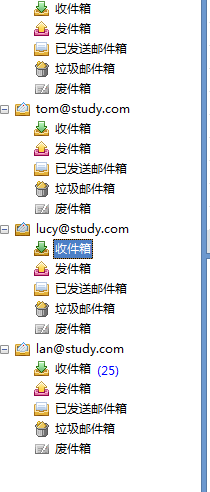
foxmail用户
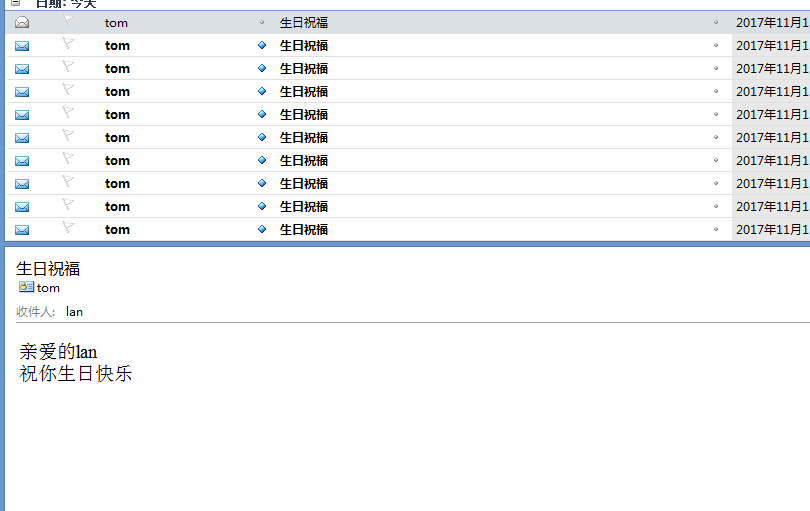
应用开启:生日当天的user收到邮件
javaWeb之自动发送邮件生日祝福(ServletContextListener监听)的更多相关文章
- springBoot高级:自动配置分析,事件监听,启动流程分析,监控,部署
知识点梳理 课堂讲义 02-SpringBoot自动配置-@Conditional使用 Condition是Spring4.0后引入的条件化配置接口,通过实现Condition接口可以完成有条件的加载 ...
- JavaWeb学习记录(二十七)——定时发送邮件ServletContextListener监听实现
public class EmailSendListener implements ServletContextListener{ @Override public void contextDe ...
- javaweb监听
监听项目启动 package com.java7115.quartz; import javax.servlet.ServletContextEvent; import javax.servlet.S ...
- 涂抹Oracle笔记1-创建数据库及配置监听程序
一.安装ORACLE数据库软件及创建实例OLTP:online transaction processing 指那些短事务,高并发,读写频繁的数据库系统.--DB_BLOCK_SIZE通常设置较小.O ...
- 如何让oracle DB、监听和oem开机启动(dbstart)
如何让oracle DB.监听和oem开机启动(dbstart) 让oracle DB.监听和oem开机启动(dbstart) Oracle提供了伴随操作系统自动重启的功能,在Windows中,可以修 ...
- 监听Web容器启动与关闭
在Servlet API 中有一个 ServletContextListener 接口,它能够监听 ServletContext 对象的生命周期,实际上就是监听 Web 应用的生命周期. 要监听web ...
- 使用cordova,监听安卓机物理返回按键,实现退出程序的功能
在使用html5开发app时,并不能像Android原生那样调取手机自身的方法.而cordova正好弥补了html5这一缺陷. 一,在cordova中文网http://cordova.axuer.co ...
- JavaWeb监听器的使用(一)监听上下文和会话信息
1.监听上下文的类 package com.examp.ch9; import java.io.FileOutputStream; import java.io.PrintWriter; import ...
- Java线程监听,意外退出线程后自动重启
Java线程监听,意外退出线程后自动重启 某日,天朗气清,回公司,未到9点,刷微博,顿觉问题泛滥,惊恐万分! 前一天写了一个微博爬行程序,主要工作原理就是每隔2分钟爬行一次微博,获取某N个关注朋友微博 ...
随机推荐
- ABP官方文档翻译 6.5 内嵌资源文件
内嵌资源文件 介绍 创建内嵌文件 xproj/project.json形式 csproj形式 添加内嵌资源管理器 使用内嵌视图 使用内嵌资源 ASP.NET Core 配置 忽略文件 重写内嵌文件 介 ...
- ABP官方文档翻译 6.1.1 MVC控制器
ASP.NET MVC控制器 介绍 AbpController基类 本地化 其他 过滤器 异常处理和结果包装 审计日志 验证 授权 工作单元 介绍 ABP通过Abp.Web.Mvc nuget包集成到 ...
- POJ Ikki's Story IV - Panda's Trick [2-SAT]
题意: 圆上n个点,m对点之间连边,连在园内或园外,所有边不相交是否可行 发现两对点连线都在内相交则都在外也相交,那么只有一个在内一个在外啦,转化为$2-SAT$问题 #include <ios ...
- POJ 3581 Sequence [后缀数组]
Sequence Time Limit: 5000MS Memory Limit: 65536K Total Submissions: 6911 Accepted: 1543 Case Tim ...
- js中的this和箭头函数中的this
一.ES6 允许使用"箭头"(=>)定义函数. // var f = v => v;// 上面的箭头函数等同于: // var f = function(v) {// ...
- 注册表操作(VC_Win32)
注册表操作(VC_Win32) 数据类型 注册表的数据类型主要有以下四种:显示类型(在编辑器中) 数据类型 说明 REG_SZ 字符串 文本字符串REG_MULTI_SZ 多字符串 ...
- python语言基础汇总
注释 代码中添加注释是一个良好的编程习惯,python语言的注释才用井号'#'作为注释开头的,可以是任意内容,解释器会忽略掉这部分内容.其他每一行都是语句,当语句以冒号':'结尾时,缩进的语句视为代码 ...
- ajaxfileupload批量上传文件+图片尺寸限制
1.首先展示ajaxfileupload代码,在这里修改为批量上传 //ajaxfileupload不展示全部代码,这是修改前与修改后代码对比,目的是上传多个文件 createUploadForm: ...
- linux磁盘及分区详解
1.Linux 分区简介 1.1 主分区 vs 扩展分区 硬盘分区表中最多能存储四个分区,但我们实际使用时一般只分为两个分区,一个是主分区(Primary Partion)一个是扩展分区(extend ...
- eclipse设置git忽略文件
使用eclipse开发的程序员们经常会接触版本控制软件,这里只要说下eclipse使用egit的情况下设置忽略文件. 特此说明在这里使用window->team->ignored对于git ...