
windows10 開機失敗,且按F8無法進入安全模式
windows10 開機失敗,且按F8無法進入安全模式:
在cmd視窗下:
bcdedit set {default} bootmenupolicy legacy
重啟,再按F8試一試吧!
To Enable or Disable F8 Advanced Boot Options using displaybootmenu Command
2. Do step 3 (enable) or step 4 (disable) for what you want to do.
 bcdedit /set {bootmgr} displaybootmenu yes
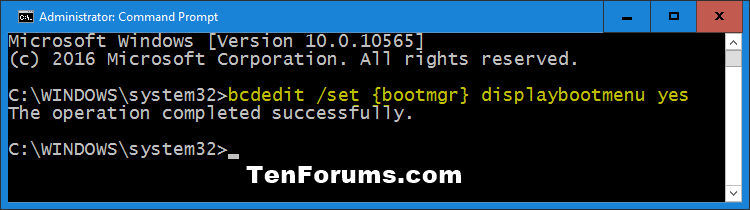
 This is the default setting.
bcdedit /set {bootmgr} displaybootmenu no

5. When finished, you can close the command prompt if you like.
 OPTION TWO
To Enable or Disable F8 Advanced Boot Options using bootmenupolicy Command
If you multi boot operating systems, then this option is handy to be
able to specify which OS you want to enable or disable F8 Advanced Boot
Options for.
2. Type bcdedit in the command prompt, and press Enter.
3. Under the top Windows Boot Manager section, look to the right of default, and make note of what it has as the identifier (ex: "{current}"). This is for your default OS. (see screenshot below)
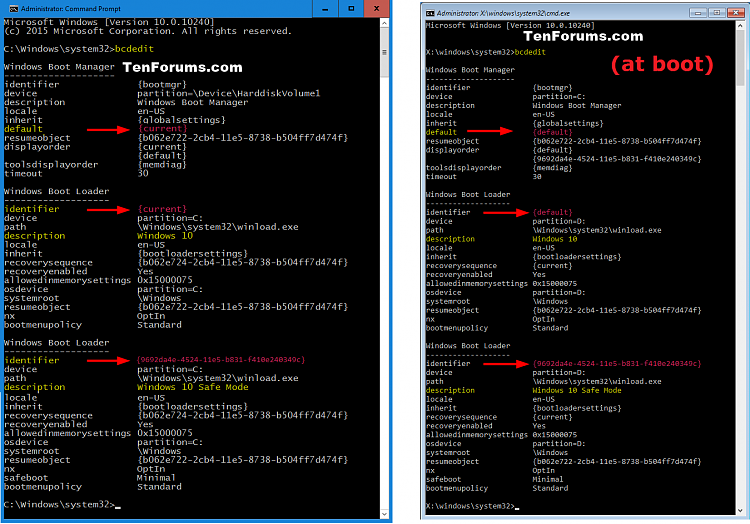
4. Do step 5 (enable) or step 6 (disable) for what you want to do.
bcdedit /set {identifier} bootmenupolicy Legacy
Substitute identifier in the command above with the actual identifier (ex: {current}) from step 3 for your default OS.
For example: bcdedit /set {current} bootmenupolicy Legacy
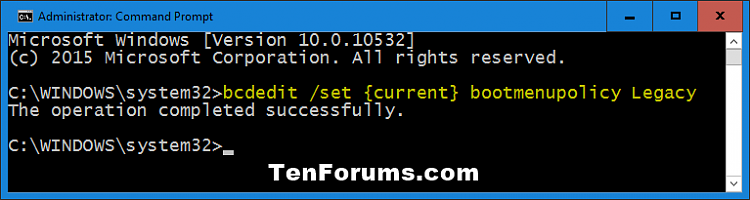
This is the default setting.
bcdedit /set {identifier} bootmenupolicy Standard
Substitute identifier in the command above with the actual identifier (ex: {current}) from step 3 for your default OS.
For example: bcdedit /set {current} bootmenupolicy Standard
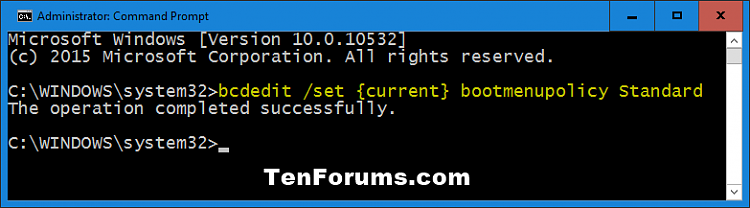
7. When finished, you can close the command prompt if you like.
windows10 開機失敗,且按F8無法進入安全模式的更多相关文章
- .rpt 文件怎麽打開?Crystal Reports 打開.rpt失敗 ?
.rpt 是SAP Crystal Reports 製作出來的檔案的後綴名, 可以通過 SAP Crystal Reports Viewer 打開,也可以直接用記事本(notepad / Note ...
- LoadLibrary失敗,GetLastError 返回127錯誤
該原因一般是由於DLL或其依賴的DLL使用了高版本的API,而在低系統中運行時,找不到該函數所引發的錯誤. 比如:該函數:InterlockedExchange64, 看MSDN: Client Re ...
- USB多重系統 - 開機碟工具 – WinSetupFromUSB
WinSetupFromUSB下載與安裝 讓USB磁碟擁有多重開機的功能,WinSetupFromUSB有著提軟體和硬體的高相容性. [官方網頁]:http://www.winsetupfromusb ...
- ThinkPad T410i 2516A21 升級手札(換SSD固態硬碟、I7 CPU、開機20秒)
最近筆記本越來越慢,開機得20分鐘,而且CPU動不動就飆到80度,趁著開學網上活動,準備給老伙計來一次重大升級.查一下主板芯片,最高支持8G內存,已經滿了,光驅位加了一個1T機械硬盤,那麼能升級的就只 ...
- vSphere Client部署OVA失敗:無效:SHA256(xxxxxxx.ovf)。
通過vSphere Client部署OVA失敗. 您會看到此錯誤:OVF包無效,無法部署.以下清單文件條目(第1行)無效:SHA256(xxxxxxx.ovf). 原因 出現此問題的原因是vSpher ...
- 如何讓RHEL7/CentOS7開機過程顯示更多資訊
rhgb選項rhgb用於圖形啟動(graphical boot-up), quiet 而quiet選項可以消除大部分啟動消息. 如何讓RHEL7/CentOS7開機過程顯示更多資訊 Arthur Ch ...
- office outlook 無法開啟 outlook 視窗
例如[無法啟動Microsoft Office Outlook.無法開啟Outlook 視窗.] 1.啟動 Outlook 安全模式outlook.exe /safe2.清除並重新產生目前設定檔的功能 ...
- SSIS 無法將保護的 XML 節點 "DTS:Password" 解密,錯誤為 0x8009000B "機碼用在特定狀態時無效
发现之前部署的SSIS,执行失败,查看日志 來源: 描述: 無法將保護的 XML 節點 -- ::-- ::-- :: DataReader 來源 [] 描述: System.Exception: S ...
- 透過手機 App 在 OpenELEC(XBMC)中輸入中文
這裡介紹如何使用手機 App 在沒有中文輸入法的 OpenELEC(XBMC)中輸入中文字. OpenELEC(XBMC)雖然有內建中文語系,但是卻沒有中文的輸入法,沒辦法直接輸入中文字,這對於一般家 ...
随机推荐
- Python发行版(编译器)
一.Python编译器简介 根据实现Python编译器语言一般分为以下几种: 1.1.CPython 标准的Python,解释型编译器. Python:标准的CPython版本,即官方发布版本. IP ...
- 《嵌入式linux应用程序开发标准教程》笔记——6.文件IO编程
前段时间看APUE,确实比较详细,不过过于详细了,当成工具书倒是比较合适,还是读一读这种培训机构的书籍,进度会比较快,遇到问题时再回去翻翻APUE,这样的效率可能更高一些. <嵌入式linux应 ...
- int (*a)[10] 和 int *a[10] 的区别
int *a[10] :指针数组.数组a里存放的是10个int型指针 int (*a)[10] :数组指针.a是指针,指向一个数组.此数组有10个int型元素 int *a[10] 先找到声明符a,然 ...
- JavaScript正则表达式-相关的String对象方法
match()方法 match(regExp); 使用指定的正则表达式来搜索字符串. 如果找到匹配字符串返回一个数组,否则返回null. 返回的数组包含两个属性:index和input. index是 ...
- arrive 和reach 的区别
例如:He arrived yesterday. 没宾语的话就用arrive了reach作抵达讲时是及物动词,后面要宾语的 分清arrive和reach的区别arrive是不及物动词,后面不能直接加地 ...
- MongoDB教程(笔记)
一.NoSQL简介 1.什么是NoSQL NoSQL,指的是非关系型的数据库.NoSQL有时也称作Not Only SQL的缩写,是对不同于传统的关系型数据库的数据库管理系统的统称. NoSQL用于超 ...
- Java-替换字符串中的字符
package com.tj; public class MyClass implements Cloneable { public static void main(String[] args) { ...
- hdu2255 奔小康赚大钱 KM 算法
参见这里 #include <iostream> #include <cstring> #include <cstdio> using namespace std; ...
- Leetcode 396.旋转函数
旋转函数 给定一个长度为 n 的整数数组 A . 假设 Bk 是数组 A 顺时针旋转 k 个位置后的数组,我们定义 A 的"旋转函数" F 为: F(k) = 0 * Bk[0] ...
- 贴一下我写过的c++程序代码
5258 #include <iostream>#include <iomanip>#include <cmath>using namespace std;clas ...