
Linux中安装Nginx
1、安装编译文件及库文件
yum -y install make zlib zlib-devel gcc-c++ libtool openssl openssl-devel

2、安装PCRE,Nginx的rewrite的伪静态匹配规则需要用到正则表达式,PCRE就是起到这个作用。
下载地址:wget http://downloads.sourceforge.net/project/pcre/pcre/8.35/pcre-8.35.tar.gz
如果wget没有安装的话,需要先安装wget,yum -y install wget. wget是Linux环境下的下载工具。wget命令的使用见此文章:http://www.cnblogs.com/cindy-cindy/p/6847502.html

3、解压pcre安装包:tar -zxvf pcre-8.35.tar.gz
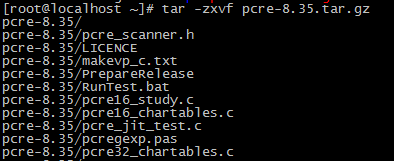
4、进入安装目录,编译安装
cd pcre-8.35
./configure
make && make install
5、查看pcre版本
pcre-config --version

6、下载Nginx
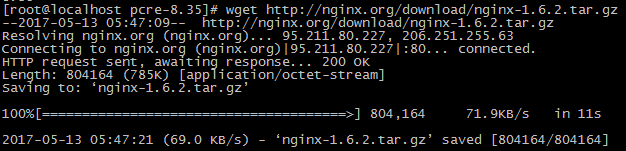
wget http://nginx.org/download/nginx-1.6.2.tar.gz
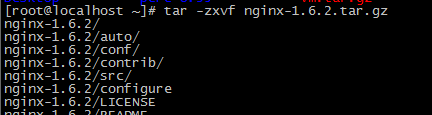
7、解压并进入安装包
8、编译安装
./configure --prefix=/usr/local/webserver/nginx --with-http_stub_status_module --with-http_ssl_module --with-pcre=/usr/local/src/pcre-8.35
make
make install
9、查看Nginx版本

10、Nginx配置
1、创建Nginx 运行使用的用户
/usr/sbin/groupadd www
/usr/sbin/useradd -g www www
2、配置nginx.conf ,将/usr/local/webserver/nginx/conf/nginx.conf替换为以下内容
user www www;

worker_processes 2; #设置值和CPU核心数一致

error_log /usr/local/webserver/nginx/logs/nginx_error.log crit; #日志位置和日志级别

pid /usr/local/webserver/nginx/nginx.pid;

#Specifies the value for maximum file descriptors that can be opened by this process.

worker_rlimit_nofile 65535;

events

{

  use epoll;

  worker_connections 65535;

}

http

{

  include mime.types;

  default_type application/octet-stream;

  log_format main  '$remote_addr - $remote_user [$time_local] "$request" '

               '$status $body_bytes_sent "$http_referer" '

               '"$http_user_agent" $http_x_forwarded_for';

#charset gb2312;

  server_names_hash_bucket_size 128;

  client_header_buffer_size 32k;

  large_client_header_buffers 4 32k;

  client_max_body_size 8m;

  sendfile on;

  tcp_nopush on;

  keepalive_timeout 60;

  tcp_nodelay on;

  fastcgi_connect_timeout 300;

  fastcgi_send_timeout 300;

  fastcgi_read_timeout 300;

  fastcgi_buffer_size 64k;

  fastcgi_buffers 4 64k;

  fastcgi_busy_buffers_size 128k;

  fastcgi_temp_file_write_size 128k;

  gzip on;

  gzip_min_length 1k;

  gzip_buffers 4 16k;

  gzip_http_version 1.0;

  gzip_comp_level 2;

  gzip_types text/plain application/x-javascript text/css application/xml;

  gzip_vary on;

  #limit_zone crawler $binary_remote_addr 10m;

 #下面是server虚拟主机的配置

 server

  {

    listen 80;#监听端口

    server_name localhost;#域名

    index index.html index.htm index.php;

    root /usr/local/webserver/nginx/html;#站点目录

      location ~ .*\.(php|php5)?$

    {

      #fastcgi_pass unix:/tmp/php-cgi.sock;

      fastcgi_pass 127.0.0.1:9000;

      fastcgi_index index.php;

      include fastcgi.conf;

    }

    location ~ .*\.(gif|jpg|jpeg|png|bmp|swf|ico)$

    {

      expires 30d;

  # access_log off;

    }

    location ~ .*\.(js|css)?$

    {

      expires 15d;

   # access_log off;

    }

    access_log off;

  }

}
3、检查nginx.conf配置文件的正确性
/usr/local/webserver/nginx/sbin/nginx -t

4、关于Nginx连接数的配置,请参看网址:http://www.cnblogs.com/cindy-cindy/p/6847507.html
Linux中安装Nginx的更多相关文章
- Nginx系列篇一:linux中安装Nginx
提示: 如遇到yum或者wget的问题, 请详见--->杂集:更换centos yum源 请详见--->杂集:关于VMware中linux使用NAT模式配置 1.安装nginx需要的环境 ...
- 在linux中安装nginx
linux系统安装在vmware中,首先在主机中利用shell工具与虚拟机连接 1.在linux中查看虚拟机的ip地址 在终端输入 ifconfig 红框里面就是ip地址 2.在主机中打开shell工 ...
- linux中安装nginx时查看修改80端口时没有iptables文件的内容?? 求解
- 【转】linux 编译安装nginx,配置自启动脚本
linux 编译安装nginx,配置自启动脚本 本文章来给各位同学介绍一篇关于linux 编译安装nginx,配置自启动脚本教程,希望有需要了解的朋友可一起来学习学习哦. 在公司的suse服务器装ng ...
- linux 编译安装nginx,配置自启动脚本
本文章来给各位同学介绍一篇关于linux 编译安装nginx,配置自启动脚本教程,希望有需要了解的朋友可一起来学习学习哦. 在公司的suse服务器装nginx,记录下安装过程: 参照这篇文章:Linu ...
- linux 下 安装nginx及压力测试
linux 编译安装nginx,配置自启动脚本 下载nginx: wget http://nginx.org/download/nginx-1.8.0.tar.gz下载openssl : wget h ...
- linux中查看nginx、apache、php、mysql配置文件路径的方法
如何在Linux中查看nginx.apache.PHP.MySQL配置文件路径了,如果你接收一个别人配置过的环境,但没留下相关文档.这时该怎么判断找到正确的加载文件路径了.可以通过以下来判断1.判断a ...
- linux(centos7) 安装nginx
linux(centos7) 安装nginx 1.14(stable) 版本 Nginx配置文件常见结构的从外到内依次是「http」「server」「location」等等,缺省的继承关系是从外到内, ...
- linux中查看nginx、apache、php、mysql配置文件路径
linux高效.稳定,但是也带来维护上的一些问题.配置文件究竟在哪里????? 如何在linux中查看nginx.apache.php.mysql配置文件路径了,如果你接收一个别人配置过的环境,但没留 ...
随机推荐
- [CPP] new delete
前言 今天我们来谈一谈CPP中很关键的两个操作 new 和 delete ,关于他们与析构函数的关系.动态分配的内存空间.new array ( new[] ) 和 delete array ( de ...
- 制作一个控制台小程序,要求:用户可以在控制到录入学生的姓名,当用户输入quit(不区分大小写)时,程序停止接收用户输入,并且显示出学生个数及姓名
string name = string.Empty; //定义一个集合来接收学生 List<string> my = new List<string>(); do { Con ...
- [转] 常用的sql server规范
常见的字段类型选择 1.字符类型建议采用varchar/nvarchar数据类型 2.金额货币建议采用money数据类型 3.科学计数建议采用numeric数据类型 4.自增长标识建议采用bigi ...
- 配置内核源码make menuconfig时出现 #include CURSES_LOC错误
配置内核时出现如下错误: liuxin@sunshine-virtual-machine:~/work/nfs_root/system/linux-2.6.22.6$ make menuconfig ...
- 深入理解Java线程池:ScheduledThreadPoolExecutor
介绍 自JDK1.5开始,JDK提供了ScheduledThreadPoolExecutor类来支持周期性任务的调度.在这之前的实现需要依靠Timer和TimerTask或者其它第三方工具来完成.但T ...
- ssh 连接慢问题
连接先看报错: There were 11 failed login attempts since the last successful login. 先前有上百上千失败login,被攻击了,把短时 ...
- Go按照条件编译
Go 支持按照条件编译,具体来说它是通过 go/build包 里定义的tags和命名约定来让Go的包可以管理不同平台的代码 . 我们这里以下面这个开源项目为例,来看Go的按条件编译, 这个开源项目是把 ...
- 【Chromium】sandboxed window问题记录
问题发现 在业务逻辑中发现有时使用chrome.app.window.create这个API创建出来的窗口无法使用其他的API,不仅其他chrome.app.window的API说window is ...
- Chromium base库分割字符串SplitString
前一段时间在工作过程中遇到一个场景需要将http response中的request header中的cookie字段取出并进行解析,但是手头没有解析cookie的工具类,同时cookie的表现就是个 ...
- C#学习笔记-原型模式
题目:编写基本的简历. 实现: 创建基本的Resume类,然后主函数通过实例化Resume来写简历即可. Resume类: class Resume { private string name; pr ...