
Shell脚本初学习
第一个shell程序运行,教程来自:http://jingyan.baidu.com/article/8cdccae947f83e315413cd05.html
代码如下:
 #!/bin/sh

 touch a.txt

 sleep

 echo "testtesttesttest">>a.txt
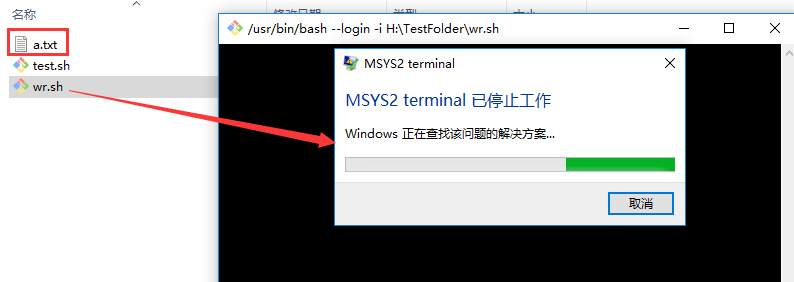
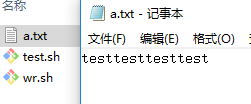
不知道为什么提示:MSYS2 terminal已停止工作。尚未解决。
然后用git pull的代码
 #!/bin/bash

 #mkdir  翟宇豪

 #cd     翟宇豪

 #git init

 #git pull https://git.coding.net/Rio56/wf.git master

 declare -A map=(["冉华"]="https://git.coding.net/Dawnfox/wf.git"

         ["刘淑霞"]="https://git.coding.net/liusx0303/CountWords.git"

         ["胡佑蓉"]="https://coding.net/u/huyr000/p/countWord/git"

         ["王超"]="https://git.coding.net/SuperCodingChao/wfProject.git"

         ["高远博"]="https://coding.net/u/Rainbows/p/wc/git"

         ["陈建宇"]=" https://coding.net/u/MR__Chen/p/Demo/git"

         ["代秋彤"]="https://git.coding.net/a284617374/soft.git"

         ["方铭"]="https://coding.net/u/MingZi-/p/cipingtongji/git"

         ["葛美义"]=" https://git.coding.net/gmyznb/wordcount1.git"

         ["黄泽宇"]="https://coding.net/u/huangzy_95/p/wf/git"

         ["贾男男"]="https://git.coding.net/lynlynyess/Wordcount.git"

         ["贾雅杰"]="https://git.coding.net/jyj5951/wf.git"

         ["姜珊"]="https://coding.net/u/js2017102865/p/StreamReader/git"

         ["阚博文"]="https://git.coding.net/zbwd666/zbwd.git"

         ["李传康"]="https://git.coding.net/lick468/wf.git"

         ["李圆圆"]="https://git.coding.net/lyy181/count.git"

         ["蔺依铭"]="https://git.coding.net/Hitagi123/word-count.git"

         ["刘成志"]=" https://git.coding.net/liuchengzhi0944/word_dirt.git"

         ["刘耀泽"]="https://coding.net/u/liuyz349/p/word_count/git"

         ["米赫"]="https://git.coding.net/immixiaomi/wf.git"

         ["苗威"]="https://git.coding.net/Vrocker/wf.git"

         ["任思佳"]="https://coding.net/u/rensijia/p/count-words/git"

         ["邵朔"]="https://coding.net/u/ss505072461/p/wf/git"

         ["宋雨"]="https://coding.net/u/songyuu/p/python_wf/git"

         ["田继平"]="https://git.coding.net/tianjiping/11111.git"

         ["王航"]="https://git.coding.net/wangh013/wordNumber.git"

         ["王磊"]="https://git.coding.net/137911934/SE20170914.git"

         ["王伟东"]="https://git.coding.net/wangwd/SecondAssignment.git"

         ["王玉玲"]="https://coding.net/u/tutu123/p/tutu1234/git"

         ["吴雨丹"]="https://git.coding.net/clairewyd/wf.git"

         ["徐劭斌"]="https://git.coding.net/xushaobin/ConsoleApplication3.git"

         ["杨梓瑞"]="https://git.coding.net/Vector121/homework.git"

         ["袁玥"]="https://git.coding.net/yuanyue2017102885/wordcount_1and2.git"

         ["翟宇豪"]="https://git.coding.net/Rio56/wf.git"

         ["张恩聚"]="https://git.coding.net/ZhangEJ/wf.git"

         ["邹双黛"]="https://git.coding.net/szjzsd/123.git"

         )

 for key in ${!map[@]} ; do

     mkdir $key

     cd  $key

     git init

     git pull ${map[$key]} master

     cd  ..

 done

 #echo ${!map[@]}

 #

 #echo ${map[@]}

 #

 # for key in ${!map[@]} ; do

 #     #    echo ${map[$key]}

 #     echo $key;

 # done
生成的文件夹乱码:
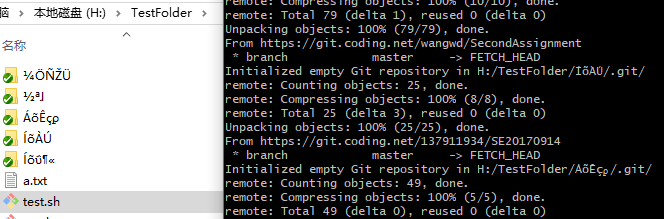
对shell脚本有了一点点认识,但看它也有变量定义等等,暂时还未学习。
留一个教程之后学习 http://www.runoob.com/linux/linux-shell.html
希望有遇到过此类问题的前辈帮忙解答~
Shell脚本初学习的更多相关文章
- 详细介绍Linux shell脚本基础学习
Linux shell脚本基础学习这里我们先来第一讲,介绍shell的语法基础,开头.注释.变量和 环境变量,向大家做一个基础的介绍,虽然不涉及具体东西,但是打好基础是以后学习轻松地前提.1. Lin ...
- Shell脚本编程学习入门 02
Shell脚本编程学习入门是本文要介绍的内容,我们可以使用任意一种文字编辑器,比如gedit.kedit.emacs.vi等来编写shell脚本,它必须以如下行开始(必须放在文件的第一行): #! ...
- Shell脚本的学习(二)
Shell脚本的学习(二) 方法: 1) 一个计算器: 2)递归实现打印目录 3)方法调用
- Shell脚本的学习(一)
Shell脚本的学习(一) 一)代码式shell脚本简介 1.下载 Xshell 5 建一个文件夹 mkdri home/data ; 1)查看一个在data里建一个1.sh 查看是否建立成功. 2) ...
- Linux shell脚本全面学习
Linux shell脚本全面学习 1. Linux 脚本编写基础 1.1 语法基本介绍 1.1.1 开头 程序必须以下面的行开始(必须方在文件的第一行): #!/bin/sh 符号#!用来告诉系统它 ...
- Linux shell脚本基础学习详细介绍(完整版)二
详细介绍Linux shell脚本基础学习(五) Linux shell脚本基础前面我们在介绍Linux shell脚本的控制流程时,还有一部分内容没讲就是有关here document的内容这里继续 ...
- Linux shell脚本基础学习详细介绍(完整版)一
Linux shell脚本基础学习这里我们先来第一讲,介绍shell的语法基础,开头.注释.变量和 环境变量,向大家做一个基础的介绍,虽然不涉及具体东西,但是打好基础是以后学习轻松地前提.1. Lin ...
- Shell脚本基础学习
Shell脚本基础学习 当你在类Unix机器上编程时, 或者参与大型项目如k8s等, 某些框架和软件的安装都是使用shell脚本写的. 学会基本的shell脚本使用, 让你走上人生巅峰, 才怪. 学会 ...
- Shell脚本编程学习入门 01
从程序员的角度来看, Shell本身是一种用C语言编写的程序,从用户的角度来看,Shell是用户与Linux操作系统沟通的桥梁.用户既可以输入命令执行,又可以利用 Shell脚本编程,完成更加复杂的操 ...
随机推荐
- SQLServer禁用、启用外键约束
1 2 3 4 5 6 7 8 9 10 11 12 13 14 15 16 17 ---启用or禁用指定表所有外键约束 alter table PUB_STRU NOCHECK constrai ...
- java获取服务器基本信息
实现步骤: (1)创建servlet BrowserServer (2)调用HttpServletRequest对象的getServerName()方法获取服务器名称 (3)调用HttpServlet ...
- ionic 环境搭建
1.安装nodejs (8.4.0) 下载地址 https://nodejs.org/zh-cn/ 2.Java jdk 版本号 jdk1.8.0_121 3.安装 cordova npm ins ...
- spark or sparkstreaming的内存泄露问题?
关于sparkstreaming的无法正常产生数据---->到崩溃---->到数据读写极为缓慢(或块丢失?)问题 前两阶段请看我的博客:https://www.cnblogs.com/wa ...
- Python学习 :面向对象 -- 成员修饰符
成员修饰符 两种成员 - 公有成员 - 私有成员, __字段名 - 无法直接访问,只能通过内部方法来间接访问私有成员 简例:公有成员与私有成员 class Info: country = '中国' ...
- Python中各种进制之间的转化
1.十进制转化为其它进制 (1)bin(x):十进制转化为二进制 [实例1] x=bin(20) # x的值为字符串'0b10100' (2)oct(x):十进制转化为八进制 [实例2] x=oc ...
- 使用ofstream输出unicode
void saveWideFileHead(std::ofstream& out)// 写入文件内容前,先写入BOM { char const* const utf16head = " ...
- PTA(BasicLevel)-1009 说反话
一 .问题描述 原题描述 给定一句英语,要求你编写程序,将句中所有单词的顺序颠倒输出.不同于字符串逆序,这里需要的是将字符串中的单词顺序翻转. 输入样例: Hello World Here ...
- bat脚本,winscp,shell加mysql存储过程实现mysql单条数据迁移
起因 公司有个任务,需要迁移mysql中的单条数据.从公司的dev环境到staging环境,dev环境的mysql安装在windows server 2012 R2下,stage是aws的服务器不能直 ...
- 我遇到的有关git的问题及解决方法总结
有关git的问题 ** 1.在github上创建项目 2.使用git clone https://github.com/xxxxxxx/xxxxx.git克隆到本地 3.编辑项目 4.git add ...