
VS中C#连接SQLite数据库处理器架构“x86”不匹配的问题
原文链接
https://www.cnblogs.com/zhaoliankun/p/9088200.html
我的环境配置:windows 64,VS,SQLite(点击下载),System.Data.SQLite.DLL(点击下载)。
1.在VS中新建一个控制台应用程序,如下图
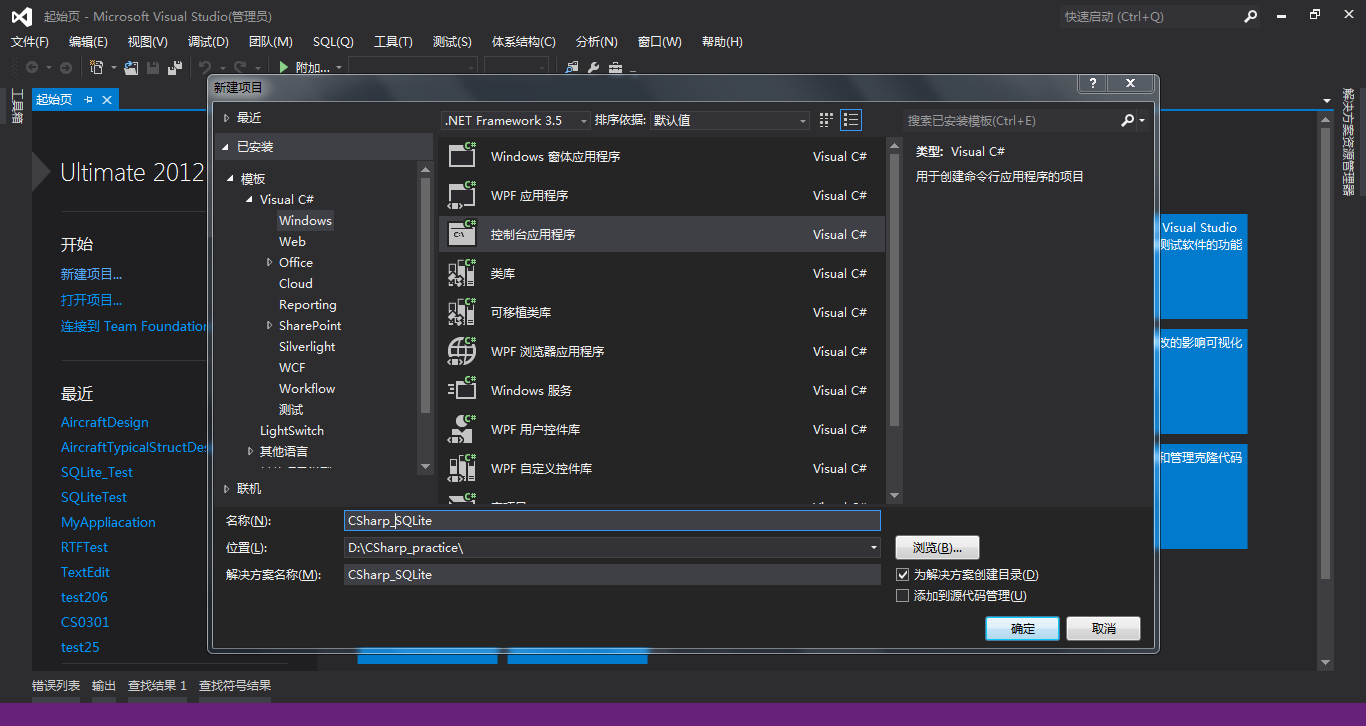
2.添加引用
将下载的System.Data.SQLite.DLL复制到新建项目的路径下
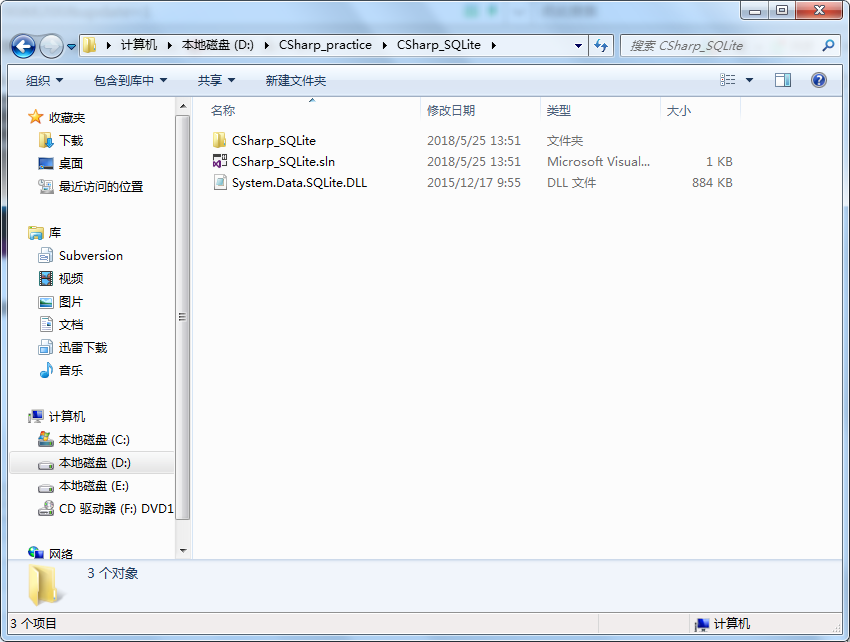
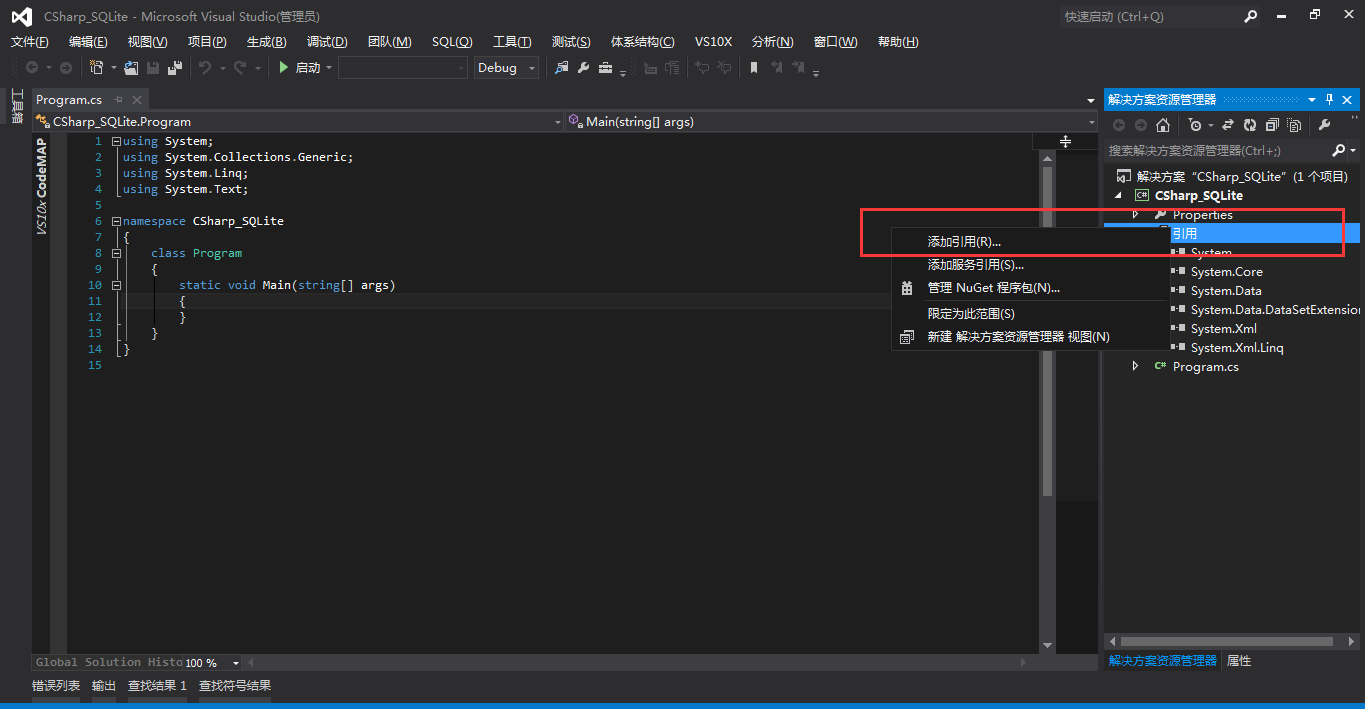
在VS中找到项目,右键选择添加引用
浏览到dll路径下,添加进来。
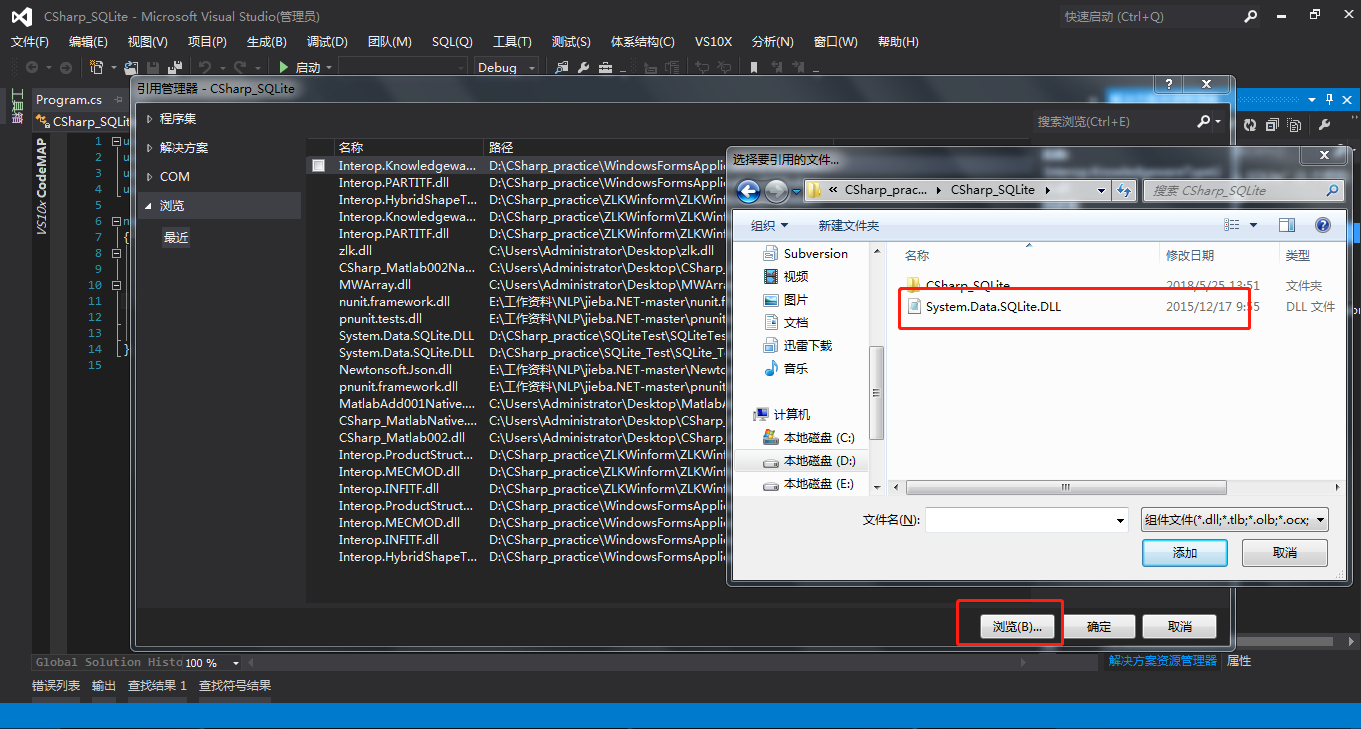
代码中添加
using System.Data.SQLite;
添加类库CSQLiteHelper,用于存放SQLite操作方法(此代码原文链接. https://blog.csdn.net/pukuimin1226/article/details/8516733)
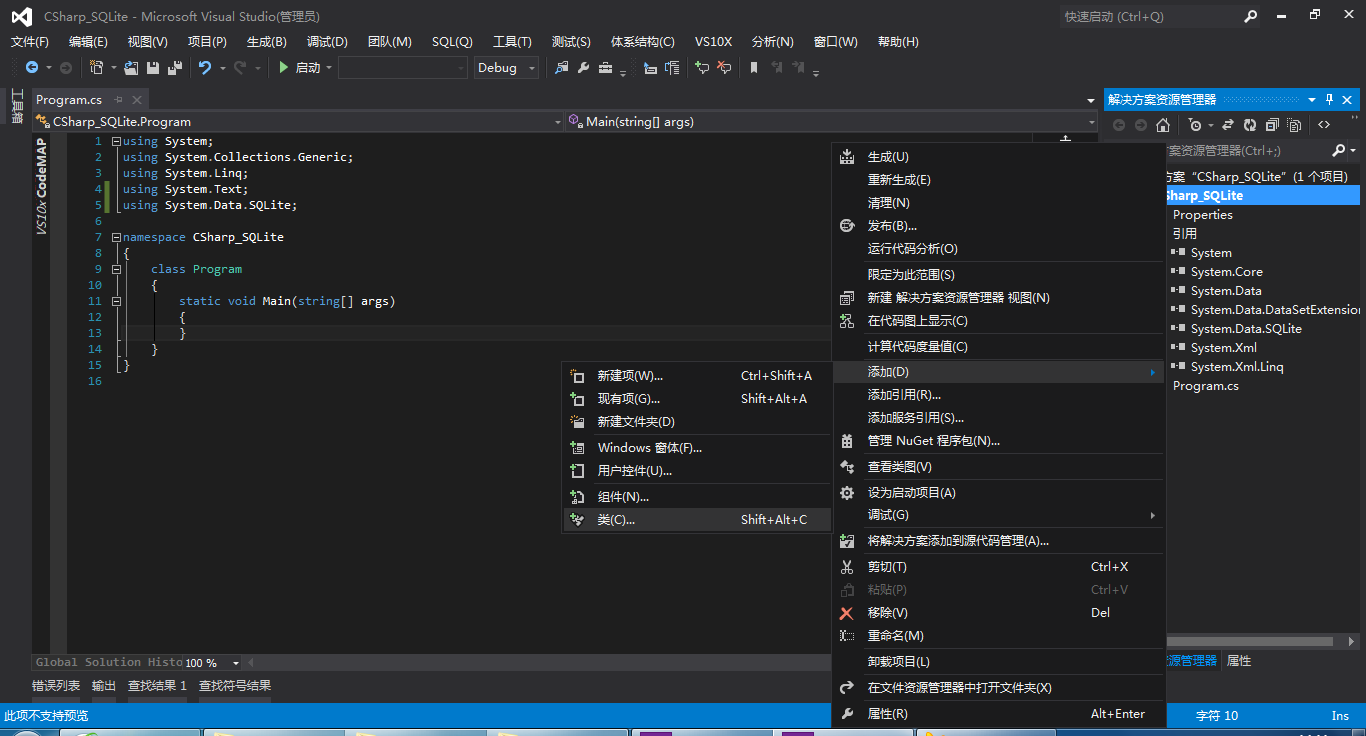
具体代码
 using System;

 using System.Collections.Generic;

 using System.Linq;

 using System.Text;

 using System.Data.SQLite;

 using System.Data;

 using System.Xml;

 using System.Text.RegularExpressions;

 using System.IO;

 namespace CSharp_SQLite

 {

     public class CSQLiteHelper

     {

         private string _dbName = "";

         private SQLiteConnection _SQLiteConn = null;     //连接对象

         private SQLiteTransaction _SQLiteTrans = null;   //事务对象

         private bool _IsRunTrans = false;        //事务运行标识

         private string _SQLiteConnString = null; //连接字符串

         private bool _AutoCommit = false; //事务自动提交标识

         public string SQLiteConnString

         {

             set { this._SQLiteConnString = value; }

             get { return this._SQLiteConnString; }

         }

         public CSQLiteHelper(string dbPath)

         {

             this._dbName = dbPath;

             this._SQLiteConnString = "Data Source=" + dbPath;

         }

         /// <summary>

         /// 新建数据库文件

         /// </summary>

         /// <param name="dbPath">数据库文件路径及名称</param>

         /// <returns>新建成功,返回true,否则返回false</returns>

         static public Boolean NewDbFile(string dbPath)

         {

             try

             {

                 SQLiteConnection.CreateFile(dbPath);

                 return true;

             }

             catch (Exception ex)

             {

                 throw new Exception("新建数据库文件" + dbPath + "失败:" + ex.Message);

             }

         }

         /// <summary>

         /// 创建表

         /// </summary>

         /// <param name="dbPath">指定数据库文件</param>

         /// <param name="tableName">表名称</param>

         static public void NewTable(string dbPath, string tableName)

         {

             SQLiteConnection sqliteConn = new SQLiteConnection("data source=" + dbPath);

             if (sqliteConn.State != System.Data.ConnectionState.Open)

             {

                 sqliteConn.Open();

                 SQLiteCommand cmd = new SQLiteCommand();

                 cmd.Connection = sqliteConn;

                 cmd.CommandText = "CREATE TABLE " + tableName + "(Name varchar,Team varchar, Number varchar)";

                 cmd.ExecuteNonQuery();

             }

             sqliteConn.Close();

         }

         /// <summary>

         /// 打开当前数据库的连接

         /// </summary>

         /// <returns></returns>

         public Boolean OpenDb()

         {

             try

             {

                 this._SQLiteConn = new SQLiteConnection(this._SQLiteConnString);

                 this._SQLiteConn.Open();

                 return true;

             }

             catch (Exception ex)

             {

                 throw new Exception("打开数据库:" + _dbName + "的连接失败:" + ex.Message);

             }

         }

         /// <summary>

         /// 打开指定数据库的连接

         /// </summary>

         /// <param name="dbPath">数据库路径</param>

         /// <returns></returns>

         public Boolean OpenDb(string dbPath)

         {

             try

             {

                 string sqliteConnString = "Data Source=" + dbPath;

                 this._SQLiteConn = new SQLiteConnection(sqliteConnString);

                 this._dbName = dbPath;

                 this._SQLiteConnString = sqliteConnString;

                 this._SQLiteConn.Open();

                 return true;

             }

             catch (Exception ex)

             {

                 throw new Exception("打开数据库:" + dbPath + "的连接失败:" + ex.Message);

             }

         }

         /// <summary>

         /// 关闭数据库连接

         /// </summary>

         public void CloseDb()

         {

             if (this._SQLiteConn != null && this._SQLiteConn.State != ConnectionState.Closed)

             {

                 if (this._IsRunTrans && this._AutoCommit)

                 {

                     this.Commit();

                 }

                 this._SQLiteConn.Close();

                 this._SQLiteConn = null;

             }

         }

         /// <summary>

         /// 开始数据库事务

         /// </summary>

         public void BeginTransaction()

         {

             this._SQLiteConn.BeginTransaction();

             this._IsRunTrans = true;

         }

         /// <summary>

         /// 开始数据库事务

         /// </summary>

         /// <param name="isoLevel">事务锁级别</param>

         public void BeginTransaction(IsolationLevel isoLevel)

         {

             this._SQLiteConn.BeginTransaction(isoLevel);

             this._IsRunTrans = true;

         }

         /// <summary>

         /// 提交当前挂起的事务

         /// </summary>

         public void Commit()

         {

             if (this._IsRunTrans)

             {

                 this._SQLiteTrans.Commit();

                 this._IsRunTrans = false;

             }

         }

     }

 }
此时运行会报错,
警告 所生成项目的处理器架构“MSIL”与引用“System.Data.SQLite”的处理器架构“x86”不匹配。这种不匹配可能会导致运行时失败。请考虑通过配置管理器更改您的项目的目标处理器架构,以使您的项目与引用间的处理器架构保持一致,或者为引用关联一个与您的项目的目标处理器架构相符的处理器架构。
修改项目属性:x86。
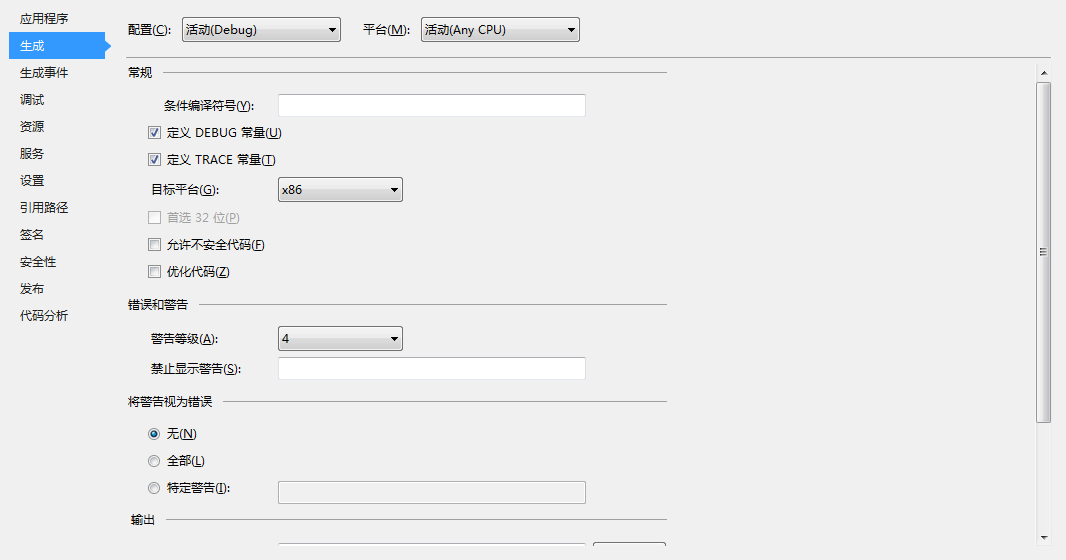
再次运行,无误。
VS中C#连接SQLite数据库处理器架构“x86”不匹配的问题的更多相关文章
- 所生成项目的处理器架构“MSIL”与引用“Microsoft.AspNet.Scaffolding.12.0, Version=12.0.0.0, Culture=neutral, PublicKeyToken=b03f5f7f11d50a3a, processorArchitecture=x86”的处理器架构“x86”不匹配。
生成成功后: 3>C:\Program Files (x86)\MSBuild\14.0\bin\Microsoft.Common.CurrentVersion.targets(1820,5): ...
- 所生成项目的处理器架构“MSIL”与引用“***”的处理器架构“x86”不匹配。这种不匹配可能会导致运行时失败。请考虑通过配置管理器...
警告:所生成项目的处理器架构“MSIL”与引用“***”的处理器架构“x86”不匹配.这种不匹配可能会导致运行时失败.请考虑通过配置管理器更改您的项目的目标处理器架构,以使您的项目与引用间的处理器架构 ...
- C# 所生成项目的处理器架构“MSIL”与引用“Oracle.DataAccess, Version=4.112.3.0, Culture=neutral, PublicKeyToken=89b483f429c47342, processorArchitecture=x86”的处理器架构“x86”不匹配。这种不匹配可能会导致运行时失败。
这个问题一般都是Oracle.DataAccess的版本不兼容问题造成的. 解决办法: 1.把Oracle.DataAccess.dll文件拿到C盘或D盘的安装文件的地方进行搜索. 2.会出现在pro ...
- Adobe AIR中使用Flex连接Sqlite数据库(1)(创建数据库和表,以及同步和异步执行模式)
系列文章导航 Adobe AIR中使用Flex连接Sqlite数据库(1)(创建数据库和表) Adobe AIR中使用Flex连接Sqlite数据库(2)(添加,删除,修改以及语句参数) Adobe ...
- VS2010连接SQLite数据库
Visual studio 2010及以上版本,连接SQLite数据库 1.在Sqlite开发站点下载SQLite的.exe安装包 Ctrl+F搜索这条语句:This is the only setu ...
- Python3实现连接SQLite数据库的方法
本文实例讲述了Python3实现连接SQLite数据库的方法,对于Python的学习有不错的参考借鉴价值.分享给大家供大家参考之用.具体方法如下: 实例代码如下: ? 1 2 3 4 5 6 7 8 ...
- 一起学微软Power BI系列-使用技巧(6) 连接Sqlite数据库
好久没有研究Power BI了,看到高飞大神弄的东西,太惭愧了.今天有个小东西,数据在Sqlite里面,想倒腾到Power BI Desktop里面折腾一下,结果发现还不直接支持.所以只好硬着头皮上去 ...
- VS2010上连接SQLite数据库
VS2010连接SQLite数据库 Visual studio 2010及以上版本,连接SQLite数据库 1.在Sqlite开发站点下载SQLite的.exe安装包 Ctrl+F搜索这条语句:Thi ...
- Delphi 2010下使用sqlitesimpledelphi连接SQLite数据库及中文乱码问题的解决
应女朋友的要求,要写一款销售管理的软件.用于管理服装店每天的销售记录,已及管理服装店的客户,并对客户进行生日提醒 因为之前使用C#写过一款家庭管理软件,主要是自己用,所以使用了服务器型数据库MySQL ...
随机推荐
- MongoDB 生态 – 可视化管理工具
工欲善其事,必先利其器,我们在使用数据库时,通常需要各种工具的支持来提高效率:很多新用户在刚接触 MongoDB 时,遇到的问题是『不知道有哪些现成的工具可以使用』,本系列文章将主要介绍 MongoD ...
- Vue cli 脚手架使用
1:基本的安装 安装node 安装npm Windows 更改环境变量 重启 环境变量生效 安装vue-cli 安装webpack 2:项目构建 https://segmentfault.com/a/ ...
- Nginx 系统维护配置
转自:http://blog.csdn.net/kkgbn/article/details/52153383 tomcat关闭后 请求返回502状态码 error_page /.html; locat ...
- 自己动手搭建Git服务器-Gitblit
首先到官网http://gitblit.com/下载最新版本的Gitblit GO 解压缩到本地目录中 E:\git\gitblit132 官方文档:http://gitblit.com/setu ...
- mongodb查询速度慢是什么原因?
mongodb查询速度慢是什么原因? 通过mongodb客户端samus代码研究解决问题 最近有项目需要用到mongodb,于是在网上下载了mongodb的源码,根据示例写了测试代码, ...
- [leetcode]141. Linked List Cycle判断链表是否有环
Given a linked list, determine if it has a cycle in it. Follow up:Can you solve it without using ext ...
- SqlMapConfig配置文件中的typeAliases标签用于自定义别名
1.mybatis支持别名: 别名 映射的类型 _byte byte _long long _short short _int int _integer int _double double _flo ...
- yii 关于如何改变默认访问的控制器(site)
以前Yii1学了个皮毛就没去管了,现在想重新捡起来Yii2.0.2却出来了,于是搭建好环境来学习. 安装好Yii2后第一个想到的问题就是修改默认的控制器了. 按照网上所说,终于在/vendor/yii ...
- string.match(RegExp) 与 RegExp.exec(string) 深入详解
string.match(RegExp) 与 RegExp.exec(string) 相同点与不同点对比解析: 1. 这两个方法,如果匹配成功,返回一个数组,匹配失败,返回null. 2. 当RegE ...
- USB相关注册表
计算机\HKEY_LOCAL_MACHINE\SYSTEM\CurrentControlSet\Control\Class\{ SYSTEM\\CurrentControlSet\\Control\\ ...