
mysql 5.6.15升级到5.6.43
今天闲来无事,观察测试环境的zabbix服务器,发现内存泄漏严重,于是重启了,想起了前几天写的帖子发生了严重的内存泄漏可以把mysql升级到最新的小版本
于是乎就试着升级
old version:5.6.15-log
new version:5.6.43-log
下载官方二进制安装包
mysql-5.6.43-linux-glibc2.12-x86_64.tar.gz
以前有直接升级的文档,今天想根据官方的文档来
MySQL 5.6 Reference Manual
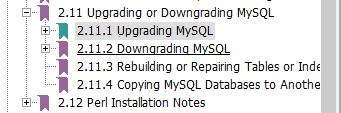
这个文档很详细,分别列出了升级和降级的详细步骤和需要关注的地方,这些英文也比较简单,对比这看也还是比较容易
MySQL Upgrade Strategies ##mysql升级的策略
Upgrade Methods ##升级方式
Upgrade Paths ##升级途径
Before You Begin ##升级前要做的准备
In-Place Upgrade ##"原地"升级,类似于表做ddl时候有些in-place的意思
Logical Upgrade ##逻辑升级,mysqldump方式
Upgrade Troubleshooting ##升级后的一些问题解决
In-Place Upgrade,Logical Upgrade这两种升级方式要重启mysql,当然对于我们线上的业务有些是不允许的,就可以做M-S,主从升级
Upgrading a Replication Setup
这个文档还是比较详细,特别是在升级前的一些参数,比如5.5升级到5.6,那些参数是新增,删减,default值的等待需要注意的地方
建议在做升级前,都需要详细的阅读此部分,再做详细的测试,再考虑升级的事情。
--下面是mysql 5.6.15 升级到5.6.43的小版本升级
--如果是5.5升级到5.6,或者5.6升级到5.7,最好先阅读MySQL Upgrade Strategies
[mysql@mysqlhq ~]$ cd /home/data/mysqldata/scripts/

[mysql@mysqlhq scripts]$ ./mysql_db_shutdown.sh

shutdown mysql service:localhost_3306

Warning: Using a password on the command line interface can be insecure.

[mysql@mysqlhq scripts]$ 190423 15:33:09 mysqld_safe mysqld from pid file /home/data/mysqldata/3306/data/mysqlhq.pid ended

[root@mysqlhq soft]# tar -zxvf mysql-5.6.43-linux-glibc2.12-x86_64.tar.gz  -C /usr/local/

[root@mysqlhq soft]# cd /usr/local/

[root@mysqlhq local]# ln -s mysql-5.6.43-linux-glibc2.12-x86_64 mysql

[root@mysqlhq local]# chown -R mysql:mysql /usr/local/mysql/

[mysql@mysqlhq scripts]$ ./mysql_db_startup.sh

startup mysql service:localhost_3306

[mysql@mysqlhq scripts]$ 190423 15:46:22 mysqld_safe Logging to '/home/data/mysqldata/3306/log/mysql-error.log'.

190423 15:46:22 mysqld_safe Starting mysqld daemon with databases from /home/data/mysqldata/3306/data

[mysql@mysqlhq scripts]$ tail -n 100 /home/data/mysqldata/3306/log/mysql-error.log

190423 15:33:09 mysqld_safe mysqld from pid file /home/data/mysqldata/3306/data/mysqlhq.pid ended

190423 15:46:22 mysqld_safe Logging to '/home/data/mysqldata/3306/log/mysql-error.log'.

190423 15:46:22 mysqld_safe Starting mysqld daemon with databases from /home/data/mysqldata/3306/data

2019-04-23 15:46:22 0 [Note] --secure-file-priv is set to NULL. Operations related to importing and exporting data are disabled

2019-04-23 15:46:22 0 [Note] /usr/local/mysql/bin/mysqld (mysqld 5.6.43-log) starting as process 25122 ...

2019-04-23 15:46:22 25122 [Note] Plugin 'FEDERATED' is disabled.

2019-04-23 15:46:22 25122 [Note] InnoDB: Using atomics to ref count buffer pool pages

2019-04-23 15:46:22 25122 [Note] InnoDB: The InnoDB memory heap is disabled

2019-04-23 15:46:22 25122 [Note] InnoDB: Mutexes and rw_locks use GCC atomic builtins

2019-04-23 15:46:22 25122 [Note] InnoDB: Memory barrier is not used

2019-04-23 15:46:22 25122 [Note] InnoDB: Compressed tables use zlib 1.2.11

2019-04-23 15:46:22 25122 [Note] InnoDB: Using CPU crc32 instructions

2019-04-23 15:46:22 25122 [Note] InnoDB: Initializing buffer pool, size = 6.0G

2019-04-23 15:46:23 25122 [Note] InnoDB: Completed initialization of buffer pool

2019-04-23 15:46:23 25122 [Note] InnoDB: Highest supported file format is Barracuda.

2019-04-23 15:46:24 25122 [Note] InnoDB: 128 rollback segment(s) are active.

2019-04-23 15:46:24 25122 [Note] InnoDB: Waiting for purge to start

2019-04-23 15:46:24 25122 [Note] InnoDB: 5.6.43 started; log sequence number 104761307544

2019-04-23 15:46:24 25122 [Note] Server hostname (bind-address): '*'; port: 3306

2019-04-23 15:46:24 25122 [Note] IPv6 is available.

2019-04-23 15:46:24 25122 [Note]   - '::' resolves to '::';

2019-04-23 15:46:24 25122 [Note] Server socket created on IP: '::'.

2019-04-23 15:46:24 25122 [Warning] 'proxies_priv' entry '@ root@mysqlhq' ignored in --skip-name-resolve mode.

2019-04-23 15:46:24 25122 [Note] Event Scheduler: Loaded 0 events

2019-04-23 15:46:24 25122 [Note] /usr/local/mysql/bin/mysqld: ready for connections.

Version: '5.6.43-log'  socket: '/home/data/mysqldata/3306/mysql.sock'  port: 3306  MySQL Community Server (GPL)

2019-04-23 15:46:24 25122 [Note] Event Scheduler: scheduler thread started with id 1

[mysql@mysqlhq scripts]$ mysql_upgrade  -uroot -p -S /home/data/mysqldata/3306/mysql.sock

Enter password:

Looking for 'mysql' as: mysql

Looking for 'mysqlcheck' as: mysqlcheck

Error: Server version (5.6.43-log) does not match with the version of

the server (5.6.15) with which this program was built/distributed. You can

use --skip-version-check to skip this check.

FATAL ERROR: Upgrade failed

[mysql@mysqlhq scripts]$ mysql_upgrade  -uroot -p -S /home/data/mysqldata/3306/mysql.sock --skip-version-check

Enter password:

Looking for 'mysql' as: mysql

Looking for 'mysqlcheck' as: mysqlcheck

Running 'mysqlcheck' with connection arguments: '--socket=/home/data/mysqldata/3306/mysql.sock'

Warning: Using a password on the command line interface can be insecure.

Running 'mysqlcheck' with connection arguments: '--socket=/home/data/mysqldata/3306/mysql.sock'

Warning: Using a password on the command line interface can be insecure.

mysql.columns_priv                                 OK

mysql.db                                           OK

mysql.event                                        OK

mysql.func                                         OK

mysql.general_log                                  OK

mysql.help_category                                OK

mysql.help_keyword                                 OK

mysql.help_relation                                OK

mysql.help_topic                                   OK

mysql.innodb_index_stats                           OK

mysql.innodb_table_stats                           OK

mysql.ndb_binlog_index                             OK

mysql.plugin                                       OK

mysql.proc                                         OK

mysql.procs_priv                                   OK

mysql.proxies_priv                                 OK

mysql.servers                                      OK

mysql.slave_master_info                            OK

mysql.slave_relay_log_info                         OK

mysql.slave_worker_info                            OK

mysql.slow_log                                     OK

mysql.tables_priv                                  OK

mysql.time_zone                                    OK

mysql.time_zone_leap_second                        OK

mysql.time_zone_name                               OK

mysql.time_zone_transition                         OK

mysql.time_zone_transition_type                    OK

mysql.user                                         OK

Running 'mysql_fix_privilege_tables'...

Warning: Using a password on the command line interface can be insecure.

Running 'mysqlcheck' with connection arguments: '--socket=/home/data/mysqldata/3306/mysql.sock'

Warning: Using a password on the command line interface can be insecure.

Running 'mysqlcheck' with connection arguments: '--socket=/home/data/mysqldata/3306/mysql.sock'

Warning: Using a password on the command line interface can be insecure.

test.TB1                                           OK

...

zabbix.timeperiods                                 OK

zabbix.trends                                      OK

zabbix.trends_uint                                 OK

zabbix.trigger_depends                             OK

zabbix.trigger_discovery                           OK

zabbix.trigger_tag                                 OK

zabbix.triggers                                    OK

zabbix.users                                       OK

zabbix.users_groups                                OK

zabbix.usrgrp                                      OK

zabbix.valuemaps                                   OK

OK

[mysql@mysqlhq scripts]$ ./mysql_db_shutdown.sh

shutdown mysql service:localhost_3306

Warning: Using a password on the command line interface can be insecure.

[mysql@mysqlhq scripts]$ ps -ef|190423 15:50:21 mysqld_safe mysqld from pid file /home/data/mysqldata/3306/data/mysqlhq.pid ended

[mysql@mysqlhq scripts]$ ps -ef|grep mysql

root     23898  1975  0 15:38 pts/0    00:00:00 su - mysql

mysql    23899 23898  0 15:38 pts/0    00:00:00 -bash

mysql    25557 23899  0 15:50 pts/0    00:00:00 ps -ef

mysql    25558 23899  0 15:50 pts/0    00:00:00 grep --color=auto mysql

[mysql@mysqlhq scripts]$ ./mysql_db_startup.sh

startup mysql service:localhost_3306

[mysql@mysqlhq scripts]$ 190423 15:50:35 mysqld_safe Logging to '/home/data/mysqldata/3306/log/mysql-error.log'.

190423 15:50:35 mysqld_safe Starting mysqld daemon with databases from /home/data/mysqldata/3306/data

[mysql@mysqlhq scripts]$ ps -ef|grep mysql

root     23898  1975  0 15:38 pts/0    00:00:00 su - mysql

mysql    23899 23898  0 15:38 pts/0    00:00:00 -bash

mysql    25563     1  0 15:50 pts/0    00:00:00 /bin/sh /usr/local/mysql/bin/mysqld_safe --defaults-file=/home/data/mysqldata/3306/my.cnf

mysql    26433 25563  5 15:50 pts/0    00:00:01 /usr/local/mysql/bin/mysqld --defaults-file=/home/data/mysqldata/3306/my.cnf --basedir=/usr/local/mysql --datadir=/home/data/mysqldata/3306/data --plugin-dir=/usr/local/mysql/lib/plugin --log-error=/home/data/mysqldata/3306/log/mysql-error.log --open-files-limit=65535 --pid-file=mysqlhq.pid --socket=/home/data/mysqldata/3306/mysql.sock --port=3306

mysql    26527 23899  0 15:51 pts/0    00:00:00 ps -ef

mysql    26528 23899  0 15:51 pts/0    00:00:00 grep --color=auto mysql

[mysql@mysqlhq scripts]$ ./mysqlplus.sh

login mysql service:localhost_3306

Warning: Using a password on the command line interface can be insecure.

Welcome to the MySQL monitor.  Commands end with ; or \g.

Your MySQL connection id is 32

Server version: 5.6.43-log MySQL Community Server (GPL)

Copyright (c) 2000, 2019, Oracle and/or its affiliates. All rights reserved.

Oracle is a registered trademark of Oracle Corporation and/or its

affiliates. Other names may be trademarks of their respective

owners.

Type 'help;' or '\h' for help. Type '\c' to clear the current input statement.

(system@127.0.0.1:3306) [(none)]> select @@version;

+------------+

| @@version  |

+------------+

| 5.6.43-log |

+------------+

1 row in set (0.00 sec)
mysql 5.6.15升级到5.6.43的更多相关文章
- MySQL 5.1.73升级为MySQL 5.5.35详解
一.前言 二.概述 三.安装MySQL 5.1.73 四.升级为MySQL 5.5.35 五.总结 注,测试环境 CentOS 6.4 x86_64,MySQL 版本(5.1.73.5.5.35)目前 ...
- 在CentOS上把MySQL从5.5升级到5.6(转)
http://www.th7.cn/db/mysql/201408/66064.shtml 在CentOS上把MySQL从5.5升级到5.6 摘要:本文记录了在CentOS 6.3上,把MySQL从5 ...
- windows 系统如何安装 mysql 8.0.15 数据库?
windows 系统如何安装 mysql 8.0.15 数据库? 1. 下载安装包 下载地址:https://cdn.mysql.com//Downloads/MySQL-8.0/mysql-8.0. ...
- 在CentOS上把MySQL从5.5升级到5.6
在CentOS上把MySQL从5.5升级到5.6 摘要:本文记录了在CentOS 6.3上,把MySQL从5.5.28升级到5.6.19的过程. 1. 概述 在我做的一个项目中,最近我对生产服务器上的 ...
- 从mysql8.0.15升级到8.0.16
从mysql8.0.15升级到8.0.16 环境简介 操作系统:Centos 6.10 64位 目前版本:8.0.15 MySQL Community Server 二进制 目的:升级为8.0.16 ...
- MySQL 从 5.5 升级到 5.6,启动时报错 [ERROR] Plugin 'InnoDB' init function returned error
MySQL 从 5.5 升级到 5.6,启动时报错: [ERROR] Plugin 'InnoDB' init function returned error. [ERROR] Plugin 'Inn ...
- MySQL/MariaDB/Percona数据库升级脚本
MySQL/MariaDB/Percona数据库升级脚本截取<OneinStack>中upgrade_db.sh, 一般情况下不建议升级数据库版本,该脚本专提供给各位版本控们.为防止大版本 ...
- Centos 6.4上面用Shell脚本一键安装mysql 5.6.15
Centos 6.4上面用Shell脚本一键安装mysql 5.6.15 #!/bin/bash if [ `uname -m` == "x86_64" ];then machi ...
- CentOS6.5把MySQL从5.1升级到5.6后,MySQL不能启动
解决了:进入mysql安装目录 cd /var/lib/mysql删除了如下三个文件:ibdata1 ib_logfile0 ib_logfile1 CentOS6.5把MySQL从5.1升级到5 ...
随机推荐
- Spring Boot安装
Spring引导依赖项groupId使用org.springframework.boot. 通常Maven POM文件将继承自spring-boot-starter-parent项目,并将依赖性声明为 ...
- Python环境管理--virtualenvwrapper
遇到问题: 当最近的开发和部署过程中,多个服务器部署的时候发现对于库和包的管理非常混乱,主要有俩个版本问题: 因为业务需要,代码得分别部署在不同的服务器上面,每次部署的时候都得重复的安装包而且不能确定 ...
- hdu4289最小割
最近博客断更了一段时间啊,快期末了,先把这个专题搞完再说 最小割=最大流 拆点方法很重要,刚开始我拆点不对就wa了,然后改进后tle,应该是数组开小了,一改果然是 #include<map> ...
- Idea2018激活
[help]-->[register]-->[license server]-->输入下方链接 http://xdouble.cn:8888/ 如果不行,请用下面的这个: http: ...
- 运行MySQL远程连接
方法一:修改MySQL自带的“mysql”数据库中的“USER”表 USE mysql; UPDATE USER SET HOST='%' WHERE USER='root'; SELECT * FR ...
- IOS-网络(ASI使用)
ASI与AFN区别 区别: 1.底层实现 1>AFN的底层基于OC的NSURLConnection与NSURLSession 2>ASI的底层基于纯C语言的CFNetWork框架 3> ...
- MySql查询生日的两种方式
需要是要查询日期段内过生日的会员,分为两种情况: 1. 不跨年 例如: 查询2017-01-01到2017-01-20之间过生日的会员 (假定今天是2017-01-01则这种也可以描述为20天内过生 ...
- 使用c++实现一个FTP客户端(二)
接上篇http://www.cnblogs.com/jzincnblogs/p/5213978.html,这篇主要记录编程方面的重点. 客户端使用了Windows Socket提供的API,支持上传. ...
- Oracle 分析函数及常用函数
什么叫分析函数(Analytic function)? Oracle从8.1.6开始提供分析函数,分析函数用于计算基于组的某种聚合值,它和聚合函数的不同之处是 对于每个组返回多行,而聚合函数对于每个组 ...
- ajax向后台请求数据,后台接收到数据并进行了处理,但前台就是调用error方法
如果你的前台页面书写正确的情况下,并且运行情况和本文题目类似,那不妨试试这个: 在ajax方法中加上:async:false,让ajax同步执行. 因为ajax默认是异步的,至于为什么会不执行succ ...