
Maven错误:[ERROR] No compiler is provided in this environment. Perhaps you are running on a JRE rather than a JDK?的解决方法
错误:
[ERROR] No compiler is provided in this environment. Perhaps you are running on a JRE rather than a JDK?
解决方法:
1、如果是Eclipse时,应该是安装好JDK后Eclipse默认使用的是JRE,所以只要调节回来即可。
两种方式都可行:
①
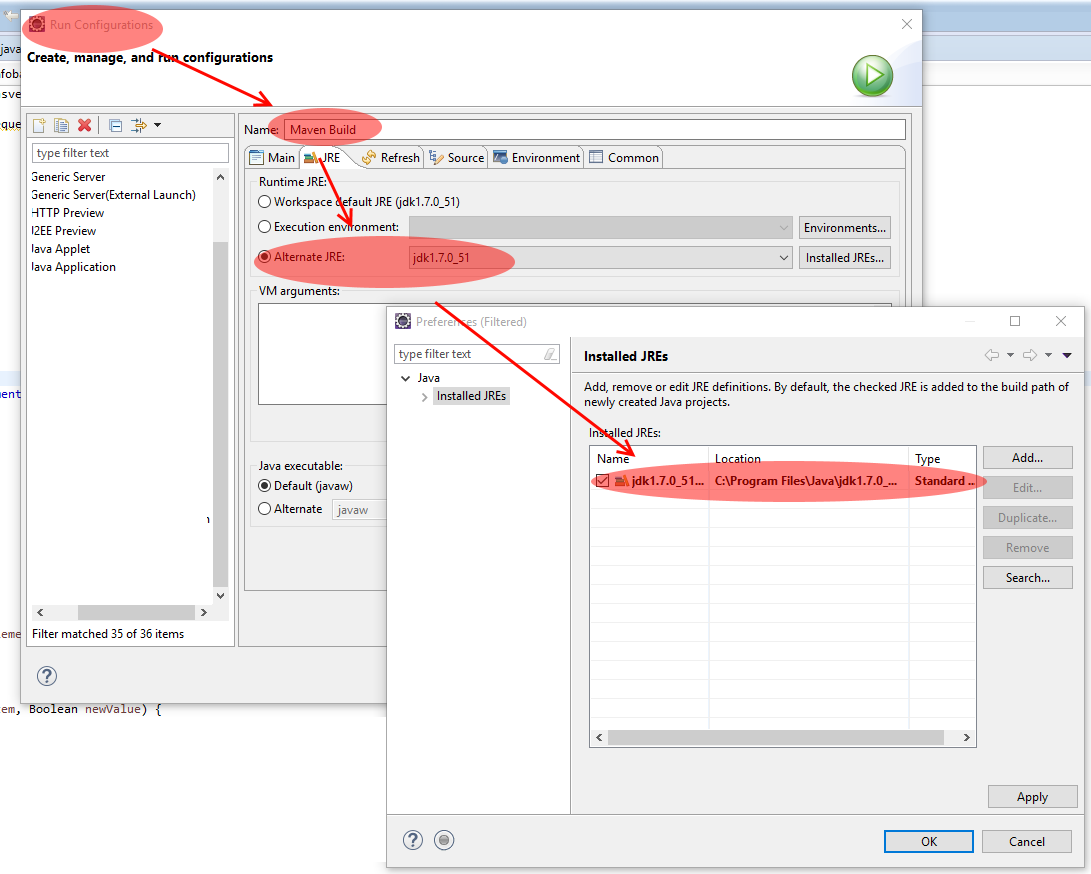
②、
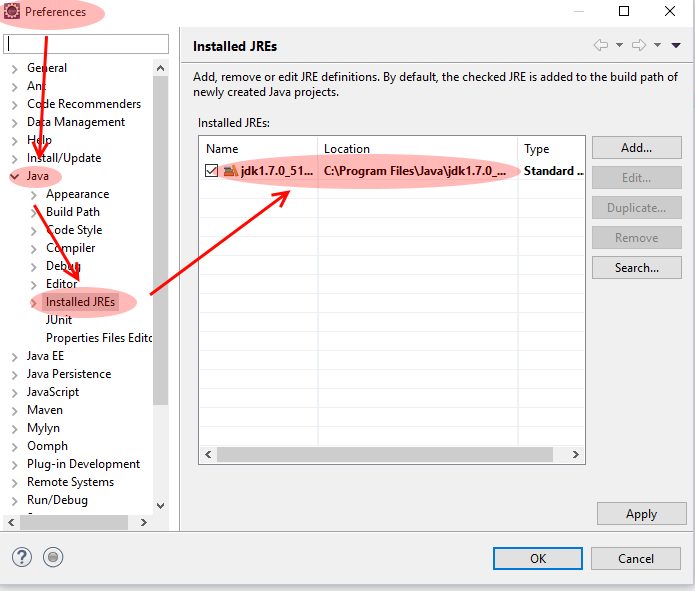
2、如果一个Maven项目导入Eclipse之后,而上面又没有设置成JDK的路径时,此时也会出现如上错误,那么解决方法就是把Eclipse自动生成的文件全部删除,只保留远程Maven的目录结构。
3、还可以直接针对插件制定版本,比如在POM上增加如下插件的配置:
<plugin>

    <groupId>org.apache.maven.plugins</groupId>

    <artifactId>maven-compiler-plugin</artifactId>

    <version>3.1</version>

    <configuration>

        <fork>true</fork>

        <executable>D:\Java\jdk1.7.0_17\bin\javac.exe</executable>

    </configuration>

</plugin>
不过不建议使用这种方法,版本和路径不容易在每台机器上控制。
参考:
http://blog.csdn.net/fox_lht/article/details/16369147
Maven错误:[ERROR] No compiler is provided in this environment. Perhaps you are running on a JRE rather than a JDK?的解决方法的更多相关文章
- maven打包错误:No compiler is provided in this environment. Perhaps you are running on a JRE rather than a JDK?
[INFO] Scanning for projects...[INFO] ...
- eclipse Maven操作出现No compiler is provided in this environment.Perhaps you are running on a JRE rather than a JDK?
右键 pom.xml -> Run as -> Maven install 后出现类似如下错误: 解决方法: 1)选择项目后,点击 eclipse 导航栏中 [Window]-->[ ...
- Maven No compiler is provided in this environment. Perhaps you are running on a JRE rather than a JDK? 问题
maven编译项目时出错,提示信息如下: [ERROR] Failed to execute goal org.apache.maven.plugins:maven-compiler-plugin:3 ...
- maven启动报错No compiler is provided in this environment. Perhaps you are running on a JRE rather than a JDK?
[INFO] Scanning for projects... [WARNING] [WARNING] Some problems were encountered while building th ...
- maven No compiler is provided in this environment. Perhaps you are running on a JRE rather than a JDK?
maven install项目时出错,提示信息如下: [ERROR] Failed to execute goal org.apache.maven.plugins:maven-compiler-pl ...
- maven install 报错 No compiler is provided in this environment. Perhaps you are running on a JRE rather than a JDK?
1.控制台打印信息 [INFO] Scanning for projects... [INFO] [INFO] ---------------------< org.cqupt.mauger:R ...
- 【maven】maven的web项目打包报错:No compiler is provided in this environment. Perhaps you are running on a JRE rather than a JDK
打包过程中报错如下: No compiler is provided in this environment. Perhaps you are running on a JRE rather than ...
- 一秒解决--------No compiler is provided in this environment. Perhaps you are running on a JRE rather than a JDK?
在打war包时候遇到错误: Failed to execute goal org.apache.maven.plugins:maven-compiler-plugin:3.6.0:compile (d ...
- No compiler is provided in this environment. Perhaps you are running on a JRE rather than a JDK?
以前用MyEclipse,现在用eclipse配置maven后,运行run install.报错: [ERROR] No compiler is provided in this environmen ...
随机推荐
- Java-java-com-util-common-service:TreeService.java
ylbtech-Java-java-com-util-common-service:TreeService.java 1.返回顶部 1. package com.shineyoo.manager.ut ...
- SiteMesh3使用实例和详解
一.SiteMesh介绍 SiteMesh是一个网页布局和修饰的框架,利用它可以将网页的内容和页面结构分离,以达到页面结构共享的目的.[来自百度百科] 通俗的理解就是,SiteMesh把页面中变化的和 ...
- codevs1060 搞笑世界杯(概率dp)
1060 搞笑世界杯 时间限制: 1 s 空间限制: 128000 KB 题目等级 : 钻石 Diamond 题目描述 Description 随着世界杯小组赛的结束,法国,阿根廷等世界 ...
- sql 改字段名
sp_rename '[zErpMini].[dbo].[STK_Stock].Isextension','IsExtened'
- python--7、面向对象
什么是面向对象 对象,即抽象的一类事物中的某个具体的个体.这个世界中存在的一切皆为对象,不存在的也能创建出来. 较之面向过程的区别: 编程的复杂度远高于面向过程,不了解面向对象而立即上手基于它设计程序 ...
- 运用<body>属性,渲染页面效果
新建一个HTML5文件,为<body>标签添加样式,代码如下: 01 <!doctype html> 02 <html> 03 <head> 04 &l ...
- 如何使用SQL Developer创建数据库连接
SQL Develope启动后,需要创建一个数据库连接,只有创建了数据库连接,才能在该数据库的方案中创建.更改对象或编辑表中的数据. 创建数据库连接的步骤如下. (1)在主界面左边窗口的“连接”选项卡 ...
- Java数据的基本类型
整数类型: byte:8位(1个字节) eg:byte x=2,y: 错误实例:byte b:b=b+3: 其中b=b+3是错误的,应该是b=(byte)(b+3)强制转换: short:16位( ...
- dhtmlxtree动态加载节点数据的小随笔
最近做了一个这个东西,颇有些感触,随笔记录一下自己的过程. 首先特别感谢:https://blog.csdn.net/cfl20121314/article/details/46852591,对我的帮 ...
- Java_Web之神奇的Ajax
为什么使用Ajax? 无刷新:不刷新整个页面,只刷新局部 无刷新的好处 提供类似C/S的交互效果,操作更方面 只更新部分页面,有效利用带宽 什么是Ajax? XMLHttpRequest常用方 ...