
Lerning Entity Framework 6 ------ Joins and Left outer Joins
Joins allow developers to combine data from multiple tables into a sigle query.
Let's have a look at codes:
Creating a project
Create a project named JoinTest
Add Packages by NuGet
Create entities:
 public class Person

 {

     public int PersonId { get; set; }

     [MaxLength(50)]

     public string Name { get; set; }

     public virtual PersonType PersonType { get; set; }

 }

 public class PersonType

 {

     public int PersonTypeId { get; set; }

     public string PersonTypeName { get; set; }

 }

 public class MyContext:DbContext

 {

     public MyContext():base("name=Test")

     {

     }

     public DbSet<PersonType> PersonTypes { get; set; }

     public DbSet<Person> People { get; set; }

 }
Execute commands:
- Enable-Migrations
- Add-Migration init
- Update-Database
Add some test data by coding:
 static void Main(string[] args)

 {

     AddTestData();

 }

 private static void AddTestData()

 {

     using (MyContext context = new MyContext())

     {

         PersonType student = new PersonType();

         student.PersonTypeName = "学生";

         PersonType worker = new PersonType();

         worker.PersonTypeName = "工人";

         Person p1 = new Person();

         p1.Name = "王进喜";

         p1.PersonType = worker;

         Person p2 = new Person();

         p2.Name = "柴玲";

         p2.PersonType = student;

         Person p3 = new Person();

         p3.Name = "完颜亮";

         context.People.Add(p1);

         context.People.Add(p2);

         context.People.Add(p3);

         context.SaveChanges();

     }

 }
}
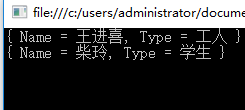
using joins
static void Main(string[] args)

{

    //AddTestData();

    using (MyContext db = new MyContext())

    {

        var result = from p in db.People

                     join t in db.PersonTypes

                     on p.PersonType.PersonTypeId equals t.PersonTypeId

                     select new { Name = p.Name, Type = t.PersonTypeName };

        foreach (var item in result)

        {

            Console.WriteLine(item);

        }

    }

    Console.ReadLine();

}
using Left outer joins
static void Main(string[] args)

{

    //AddTestData();

    using (MyContext db = new MyContext())

    {

        var result = from p in db.People

                     join t in db.PersonTypes

                     on p.PersonType.PersonTypeId equals t.PersonTypeId into finalGroup

                     from groupData in finalGroup.DefaultIfEmpty()

                     select new { Name = p.Name, Type = groupData.PersonTypeName??"Unknown" };

        foreach (var item in result)

        {

            Console.WriteLine(item);

        }

    }

    Console.ReadLine();
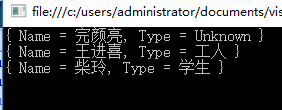
I think this tructure is hard to understand, but it's useful.
That's all.
Lerning Entity Framework 6 ------ Joins and Left outer Joins的更多相关文章
- Lerning Entity Framework 6 ------ Defining Relationships
There are three types of relationships in database. They are: One-to-Many One-to-One Many-to-Many Th ...
- Lerning Entity Framework 6 ------ Handling concurrency With SQL Server Database
The default Way to handle concurrency of Entity Framework is using optimistic concurrency. When two ...
- Lerning Entity Framework 6 ------ Working with in-memory data
Sometimes, you need to find some data in an existing context instead of the database. By befault, En ...
- Lerning Entity Framework 6 ------ Inserting, Querying, Updating, and Deleting Data
Creating Entities First of all, Let's create some entities to have a test. Create a project Add foll ...
- Lerning Entity Framework 6 ------ Defining the Database Structure
There are three ways to define the database structure by Entity Framework API. They are: Attributes ...
- Lerning Entity Framework 6 ------ Introduction to TPH
Sometimes, you have created two models. They have the same parent class like this: public class Pers ...
- Lerning Entity Framework 6 ------ Complex types
Complex types are classes that map to a subset of columns of a table.They don't contains key. They a ...
- Lerning Entity Framework 6 ------ Using a commandInterceptor
Sometimes, We want to check the original sql statements. creating a commandInterceptor is a good way ...
- Lerning Entity Framework 6 ------ A demo of using Entity framework with MySql
Create a new project named MySqlTest Install following packages by right-clicking on the References ...
随机推荐
- leetcode438
public class Solution {;public IList<int> FindAnagrams(string s, string p) { List<int> l ...
- Innodb锁相关总结
一.InnoDB共有七种类型的锁: (1)共享/排它锁(Shared and Exclusive Locks) (2)意向锁(Intention Locks) (3)插入意向锁(Insert Inte ...
- hitTest,UIWindow sendEvent ,touchbegan, 响应链
https://developer.apple.com/documentation/uikit/touches_presses_and_gestures/using_responders_and_th ...
- 今天花了好长的时间终于把SecureCRT安装成功了 现在分享给大家 安装的步骤, 希望对大家用帮助
转载地址:https://www.cnblogs.com/lianghe01/p/6618651.html 今天花了好长的时间终于把SecureCRT安装成功了 现在分享给大家 安装的步骤, 希望对大 ...
- python3之Django基础篇
一.Django基础 Django 是用Python开发的一个免费开源的Web框架,可以用于快速搭建高性能,优雅的网站! Django的特点: 强大的数据库功能:拥有强大的数据库操作接口(QueryS ...
- EOS踩坑记 2
[EOS踩坑记 2] 1.--contracts-console 在开发模式下,需要将 nodeos 添加此选项. 2.Debug Method The main method used to deb ...
- idea常用快捷键及操作
ctrl+j ===== 智能提示 可用模版及关键字 ctrl+p ===== 显示方法可填入的参数 ctrl+space ===== 补全提示项目中可用的变量 ctrl+shift+j ==== ...
- c#: WebBrowser控件html代码注入及交互
主题仍是下载相关. 页面加载完成后,注入html元素,以使能够与主程序交互.并使WebBrowser与js交互,可以实现一些有趣的功能. 欲使WebBrowser与js交互,其所在页面类,须加上[Co ...
- 227. Basic Calculator II 无括号版本计算器
[抄题]: Implement a basic calculator to evaluate a simple expression string. The expression string con ...
- 什么叫做API?看完你就理解了
阅读编程资料时经常会看到API这个名词,网上各种高大上的解释估计放倒了一批初学者.初学者看到下面这一段话可能就有点头痛了. API(Application Programming Interface, ...