
TensorFlow基础笔记(9) Tensorboard可视化显示以及查看pb meta模型文件的方法
参考: http://blog.csdn.net/l18930738887/article/details/55000008
http://www.jianshu.com/p/19bb60b52dad
http://blog.csdn.net/sinat_33761963/article/details/62433234
import tensorflow as tf

import numpy as np

def add_layer(inputs, in_size, out_size, n_layer, activation_function=None):

    # add one more layer and return the output of this layer

    layer_name = 'layer%s' % n_layer

    with tf.name_scope(layer_name):

        with tf.name_scope('weights'):

            Weights = tf.Variable(tf.random_normal([in_size, out_size]), name='W')

            tf.summary.histogram(layer_name + '/weights', Weights)

        with tf.name_scope('biases'):

            biases = tf.Variable(tf.zeros([1, out_size]) + 0.1, name='b')

            tf.summary.histogram(layer_name + '/biases', biases)

        with tf.name_scope('Wx_plus_b'):

            Wx_plus_b = tf.add(tf.matmul(inputs, Weights), biases)

        if activation_function is None:

            outputs = Wx_plus_b

        else:

            outputs = activation_function(Wx_plus_b, )

        tf.summary.histogram(layer_name + '/outputs', outputs)

    return outputs

# Make up some real data

x_data = np.linspace(-1,1,300)[:, np.newaxis]

noise = np.random.normal(0, 0.05, x_data.shape)

y_data = np.square(x_data) - 0.5 + noise

# define placeholder for inputs to network

with tf.name_scope('inputs'):

    xs = tf.placeholder(tf.float32, [None, 1],name='input_x')

    ys = tf.placeholder(tf.float32, [None, 1],name='input_y')

# add hidden layer

l1 = add_layer(xs, 1, 10, n_layer=1, activation_function=tf.nn.relu)

# add output layer

prediction = add_layer(l1, 10, 1, n_layer=2, activation_function=None)

# the error between prediciton and real data

with tf.name_scope('loss'):

    loss = tf.reduce_mean(tf.reduce_sum(tf.square(ys - prediction),

                                        reduction_indices=[1]))

    tf.summary.scalar('loss', loss)

with tf.name_scope('train'):

    train_step = tf.train.GradientDescentOptimizer(0.1).minimize(loss)

sess = tf.Session()

merged = tf.summary.merge_all()

# save the logs

writer = tf.summary.FileWriter("logs/", sess.graph)

sess.run(tf.global_variables_initializer())

for i in range(1000):

    # training

    sess.run(train_step, feed_dict={xs: x_data, ys: y_data})

    if i % 50 == 0:

        # to see the step improvement

        result = sess.run(merged,

                          feed_dict={xs: x_data, ys: y_data})

        writer.add_summary(result, i)
到运行python的所在目录下,打一下命令:
$ tensorboard --logdir="logs/"
再在网页中输入链接:127.0.1.1:6006 即可获得展示: 推荐使用friefox浏览器,我电脑上chrom浏览器打不开
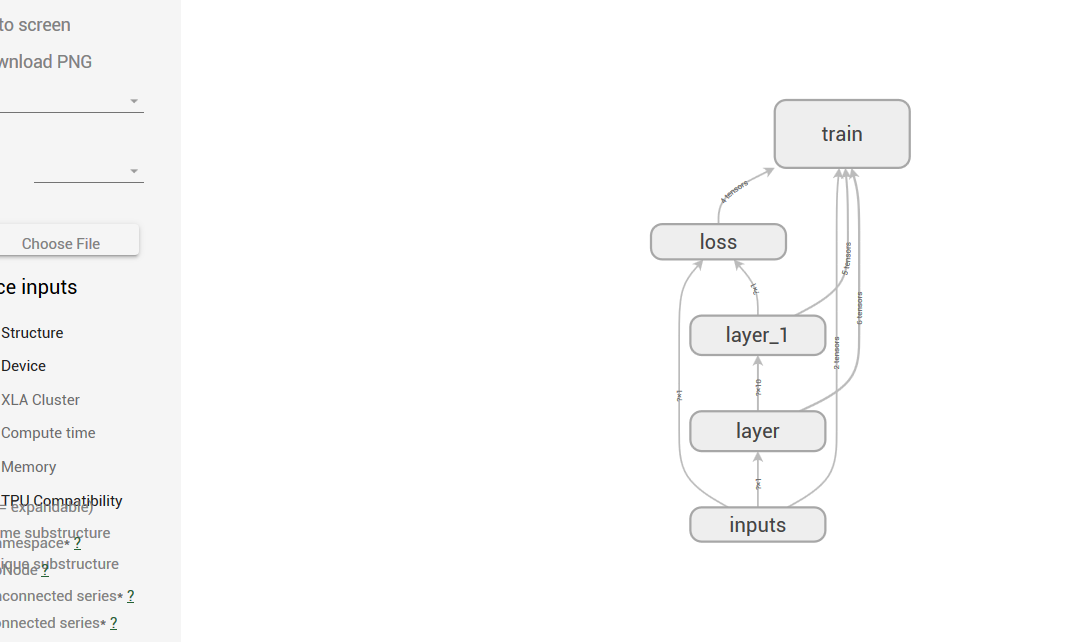
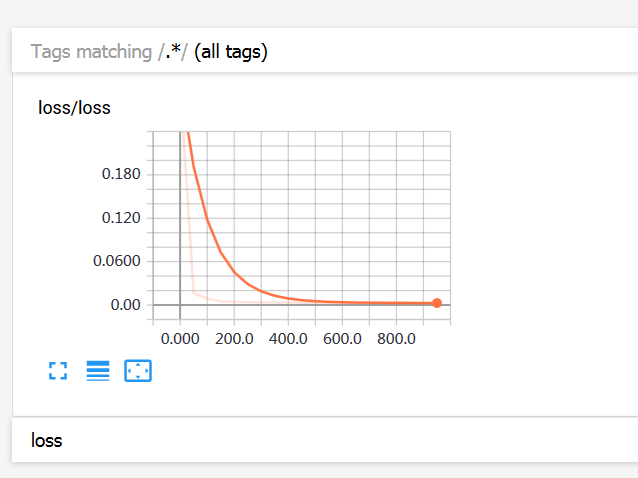
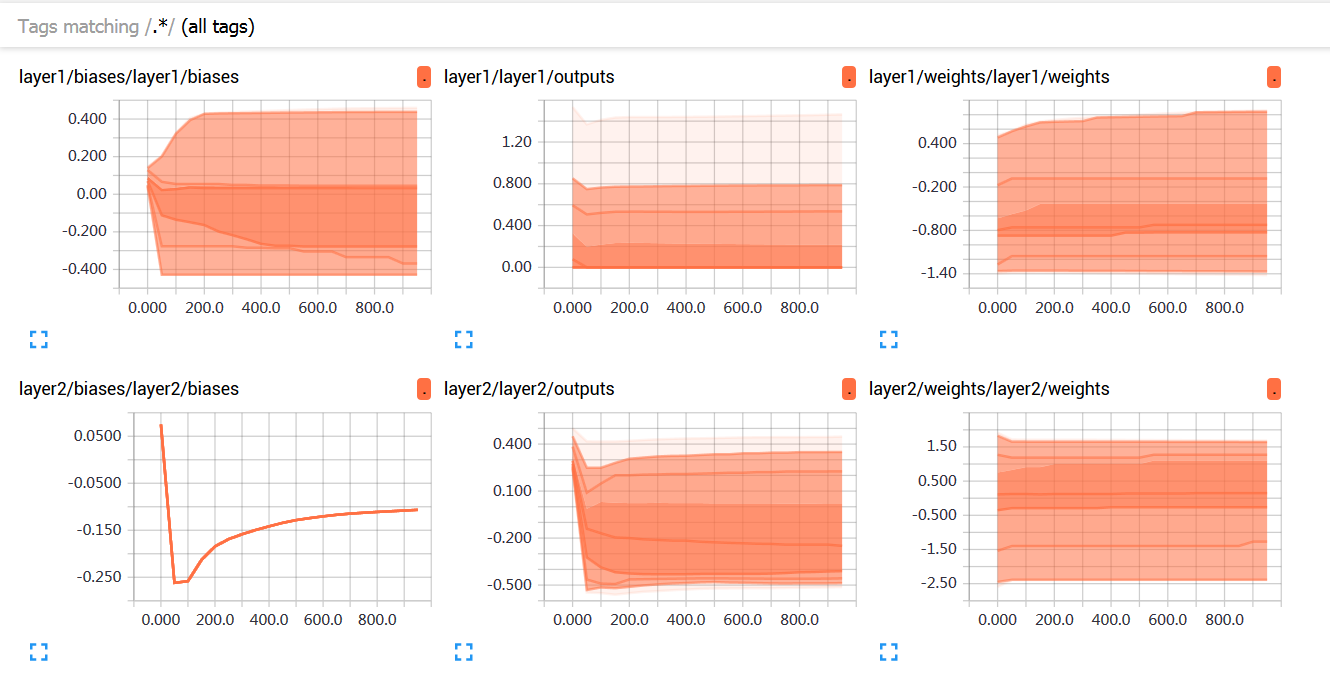
比如,从他人处获得一个Graph,想看看它的结构,怎么弄?
Google提供了一个工具,TensorBoard,它能以图表的方式分析你在训练过程中汇总的各种数据,其中包括Graph结构。
所以我们可以简单的写几行Pyhton,加载Graph,只在logdir里,输出Graph结构数据,并可以查看其图结构。
可参考:http://www.tensorfly.cn/tfdoc/how_tos/summaries_and_tensorboard.html
https://www.tensorflow.org/get_started/summaries_and_tensorboard
代码如下:
import tensorflow as tf

from tensorflow.python.platform import gfile

# 这是从二进制格式的pb文件加载模型

graph = tf.get_default_graph()

graphdef = graph.as_graph_def()

graphdef.ParseFromString(gfile.FastGFile("/data/TensorFlowAndroidMNIST/app/src/main/expert-graph.pb", "rb").read())

_ = tf.import_graph_def(graphdef, name="")
import tensorflow as tf

from tensorflow.python.platform import gfile

#这是从文件格式的meta文件加载模型

graph = tf.get_default_graph()

graphdef = graph.as_graph_def()

# graphdef.ParseFromString(gfile.FastGFile("/data/TensorFlowAndroidMNIST/app/src/main/expert-graph.pb", "rb").read())

# _ = tf.import_graph_def(graphdef, name="")

_ = tf.train.import_meta_graph("./InsightFace_iter_best_1950000.ckpt.meta")

summary_write = tf.summary.FileWriter("./" , graph)
然后再启动tensorboard:
tensorboard --logdir /data/TensorFlowAndroidMNIST/logdir --host 你的ip --port 你端口(默认6006)
一个打开pb文件的实例
import tensorflow as tf

from tensorflow.python.platform import gfile

graph = tf.get_default_graph()

graphdef = graph.as_graph_def()

graphdef.ParseFromString(gfile.FastGFile("./log/mtcnn.pb", "rb").read())

_ = tf.import_graph_def(graphdef, name="")

summary_write = tf.summary.FileWriter("./log" , graph)
TensorFlow基础笔记(9) Tensorboard可视化显示以及查看pb meta模型文件的方法的更多相关文章
- TensorFlow基础笔记(0) 参考资源学习文档
1 官方文档 https://www.tensorflow.org/api_docs/ 2 极客学院中文文档 http://www.tensorfly.cn/tfdoc/api_docs/python ...
- TensorFlow基础笔记(3) cifar10 分类学习
TensorFlow基础笔记(3) cifar10 分类学习 CIFAR-10 is a common benchmark in machine learning for image recognit ...
- 超简单tensorflow入门优化程序&&tensorboard可视化
程序1 任务描述: x = 3.0, y = 100.0, 运算公式 x×W+b = y,求 W和b的最优解. 使用tensorflow编程实现: #-*- coding: utf-8 -*-) im ...
- TensorFlow基础笔记(14) 网络模型的保存与恢复_mnist数据实例
http://blog.csdn.net/huachao1001/article/details/78502910 http://blog.csdn.net/u014432647/article/de ...
- 【转】从Shell脚本内部将所有标准输出及标准错误显示在屏幕并同时写入文件的方法
如果全部都要重定向的话每一条命令后面>>并不方便,可以这么做.在开头就声明 exec 1>>$log_file表示将脚本中所有的正确输出全部追加到$log_file,错误信息会 ...
- Tensorflow 搭建神经网络及tensorboard可视化
1. session对话控制 matrix1 = tf.constant([[3,3]]) matrix2 = tf.constant([[2],[2]]) product = tf.matmul(m ...
- TensorFlow基础笔记(5) VGGnet_test
参考 http://blog.csdn.net/jsond/article/details/72667829 资源: 1.相关的vgg模型下载网址 http://www.vlfeat.org/matc ...
- TensorFlow基础笔记(15) 编译TensorFlow.so,提供给C++平台调用
参考 http://blog.csdn.net/rockingdingo/article/details/75452711 https://www.cnblogs.com/hrlnw/p/700764 ...
- TensorFlow基础笔记(0) tensorflow的基本数据类型操作
import numpy as np import tensorflow as tf #build a graph print("build a graph") #生产变量tens ...
随机推荐
- mysql (已解决p)MYSQL5.7启动不了,本地计算机上的 MySQL57 服务启动后停止。
找到目录E:\AppServ\MySQL\data 备份data中的数据,然后删除掉data中所有的东西(如果删除不掉请在进程中找到mysqld.exe并且关闭) 打开CMD cd E:\AppSer ...
- python标准库介绍——28 sha 模块详解
==sha 模块== ``sha`` 模块提供了计算信息摘要(密文)的另种方法, 如 [Example 2-39 #eg-2-39] 所示. 它与 ``md5`` 模块类似, 但生成的是 160 位签 ...
- Excel导入的时候日期格式会变成double式的String数据处理
例如:java从Excel单元格读取的日期如43052.0,在后台处理的时候又需要将其处理为日期格式,使用如下代码对其进行转换即可: SimpleDateFormat sdf = new Simple ...
- Linux操作系统CentOS7.2发行版本的安装与配置(安装是选择服务器类型)
原文地址:http://1130739.blog.51cto.com/1120739/1738791 由于CentOS 7出来不久,对于这个版本的系统安装与配置的教程较少,今天就索性介绍一下CentO ...
- windows live writer 2012 0x80070643
折腾了两天,windows live writer 安装不成功,最后放弃了,发现一个叫做菊子曰的软件,但是免费版本的,发图片有限制,感觉非常不爽.windows live writer报错如下 ...
- 并发编程之socketserver模块
一.socketserver模块介绍 基于tcp套接字,关键的就是两个循环,一个是链接循环,一个是通信循环 socketserver模块中分两大类:srever类(解决链接问题)和request类(解 ...
- RabbitMQ 远程 IP 访问 解决办法 -摘自网络
刚刚安装的RabbitMQ-Server-3.3.5,并且也已经开启了Web管理功能,但是现在存在一个问题: 出于安全的考虑,guest这个默认的用户只能通过http://localhost:1567 ...
- Java的spi介绍和简单应用
1.什么是java的spi SPI 全称为 (Service Provider Interface) ,是JDK内置的一种服务提供发现机制. 目前有不少框架用它来做服务的扩展发现, 简单来说,它就是一 ...
- adobe acrobat 无效批注对象
http://blog.csdn.net/pipisorry/article/details/40894881 adobe acrobat一直弹出 无效批注对象 检查后提示:"本页面上的全部 ...
- 转:python常用运维脚本实例
python常用运维脚本实例 转载 file是一个类,使用file('file_name', 'r+')这种方式打开文件,返回一个file对象,以写模式打开文件不存在则会被创建.但是更推荐使用内置函 ...