
ASP.NET Core:WebAppCoreReact
| ylbtech-ASP.NET Core:WebAppCoreReact |
| 1.返回顶部 |
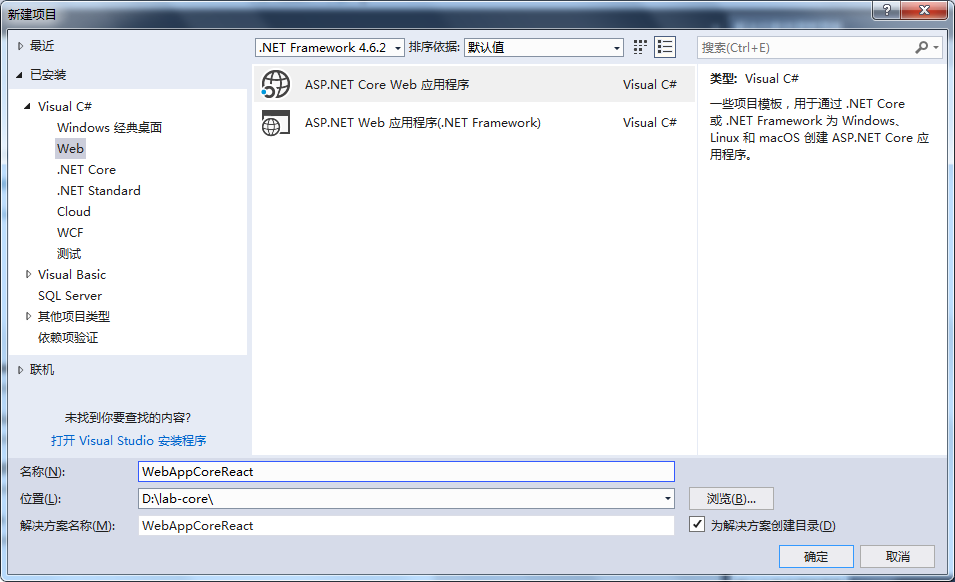
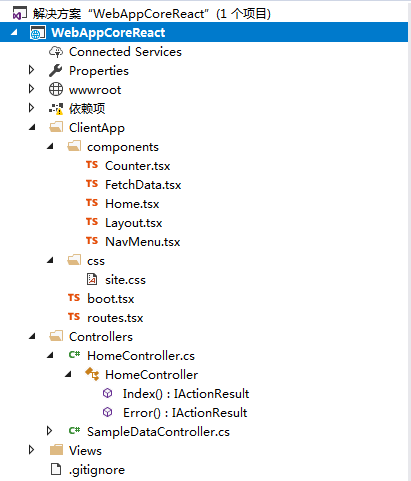
|

|

5、
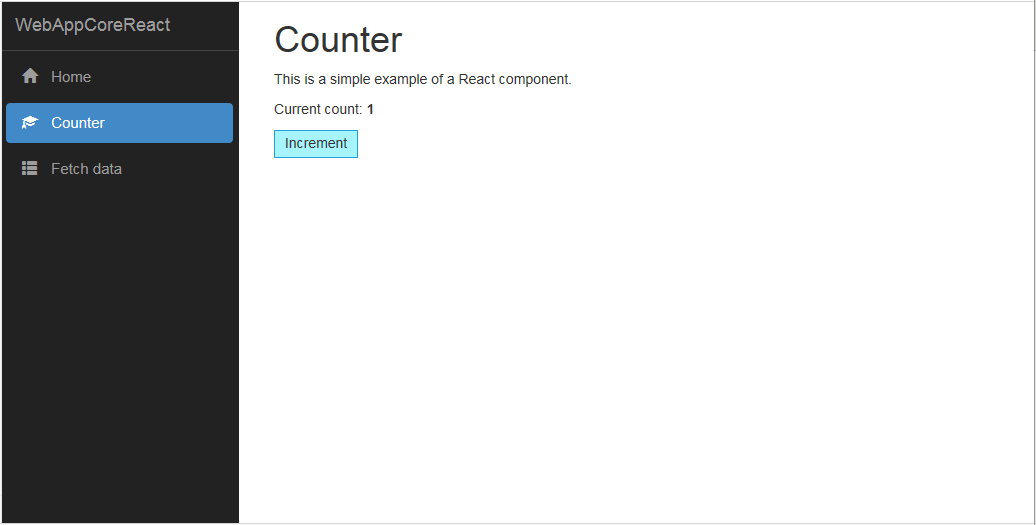
6、

7、
| 2. wwwroot 返回顶部 |
| 3. ClientApp返回顶部 |
import * as React from 'react';

import { RouteComponentProps } from 'react-router';

interface CounterState {

    currentCount: number;

}

export class Counter extends React.Component<RouteComponentProps<{}>, CounterState> {

    constructor() {

        super();

        this.state = { currentCount:  };

    }

    public render() {

        return <div>

            <h1>Counter</h1>

            <p>This is a simple example of a React component.</p>

            <p>Current count: <strong>{ this.state.currentCount }</strong></p>

            <button onClick={ () => { this.incrementCounter() } }>Increment</button>

        </div>;

    }

    incrementCounter() {

        this.setState({

            currentCount: this.state.currentCount +

        });

    }

}
import * as React from 'react';

import { RouteComponentProps } from 'react-router';

import 'isomorphic-fetch';

interface FetchDataExampleState {

    forecasts: WeatherForecast[];

    loading: boolean;

}

export class FetchData extends React.Component<RouteComponentProps<{}>, FetchDataExampleState> {

    constructor() {

        super();

        this.state = { forecasts: [], loading: true };

        fetch('api/SampleData/WeatherForecasts')

            .then(response => response.json() as Promise<WeatherForecast[]>)

            .then(data => {

                this.setState({ forecasts: data, loading: false });

            });

    }

    public render() {

        let contents = this.state.loading

            ? <p><em>Loading...</em></p>

            : FetchData.renderForecastsTable(this.state.forecasts);

        return <div>

            <h1>Weather forecast</h1>

            <p>This component demonstrates fetching data from the server.</p>

            { contents }

        </div>;

    }

    private static renderForecastsTable(forecasts: WeatherForecast[]) {

        return <table className='table'>

            <thead>

                <tr>

                    <th>Date</th>

                    <th>Temp. (C)</th>

                    <th>Temp. (F)</th>

                    <th>Summary</th>

                </tr>

            </thead>

            <tbody>

            {forecasts.map(forecast =>

                <tr key={ forecast.dateFormatted }>

                    <td>{ forecast.dateFormatted }</td>

                    <td>{ forecast.temperatureC }</td>

                    <td>{ forecast.temperatureF }</td>

                    <td>{ forecast.summary }</td>

                </tr>

            )}

            </tbody>

        </table>;

    }

}

interface WeatherForecast {

    dateFormatted: string;

    temperatureC: number;

    temperatureF: number;

    summary: string;

}
import * as React from 'react';

import { RouteComponentProps } from 'react-router';

export class Home extends React.Component<RouteComponentProps<{}>, {}> {

    public render() {

        return <div>

            <h1>Hello, world!</h1>

            <p>Welcome to your new single-page application, built with:</p>

            <ul>

                <li><a href='https://get.asp.net/'>ASP.NET Core</a> and <a href='https://msdn.microsoft.com/en-us/library/67ef8sbd.aspx'>C#</a> for cross-platform server-side code</li>

                <li><a href='https://facebook.github.io/react/'>React</a> and <a href='http://www.typescriptlang.org/'>TypeScript</a> for client-side code</li>

                <li><a href='https://webpack.github.io/'>Webpack</a> for building and bundling client-side resources</li>

                <li><a href='http://getbootstrap.com/'>Bootstrap</a> for layout and styling</li>

            </ul>

            <p>To help you get started, we've also set up:</p>

            <ul>

                <li><strong>Client-side navigation</strong>. For example, click <em>Counter</em> then <em>Back</em> to return here.</li>

                <li><strong>Webpack dev middleware</strong>. In development mode, there's no need to run the <code>webpack</code> build tool. Your client-side resources are dynamically built on demand. Updates are available as soon as you modify any file.</li>

                <li><strong>Hot module replacement</strong>. In development mode, you don't even need to reload the page after making most changes. Within seconds of saving changes to files, rebuilt React components will be injected directly into your running application, preserving its live state.</li>

                <li><strong>Efficient production builds</strong>. In production mode, development-time features are disabled, and the <code>webpack</code> build tool produces minified static CSS and JavaScript files.</li>

            </ul>

            <h4>Going further</h4>

            <p>

                For larger applications, or for server-side prerendering (i.e., for <em>isomorphic</em> or <em>universal</em> applications), you should consider using a Flux/Redux-like architecture.

                You can generate an ASP.NET Core application with React and Redux using <code>dotnet new reactredux</code> instead of using this template.

            </p>

        </div>;

    }

}
import * as React from 'react';

import { NavMenu } from './NavMenu';

export interface LayoutProps {

    children?: React.ReactNode;

}

export class Layout extends React.Component<LayoutProps, {}> {

    public render() {

        return <div className='container-fluid'>

            <div className='row'>

                <div className='col-sm-3'>

                    <NavMenu />

                </div>

                <div className='col-sm-9'>

                    { this.props.children }

                </div>

            </div>

        </div>;

    }

}
import * as React from 'react';

import { Link, NavLink } from 'react-router-dom';

export class NavMenu extends React.Component<{}, {}> {

    public render() {

        return <div className='main-nav'>

                <div className='navbar navbar-inverse'>

                <div className='navbar-header'>

                    <button type='button' className='navbar-toggle' data-toggle='collapse' data-target='.navbar-collapse'>

                        <span className='sr-only'>Toggle navigation</span>

                        <span className='icon-bar'></span>

                        <span className='icon-bar'></span>

                        <span className='icon-bar'></span>

                    </button>

                    <Link className='navbar-brand' to={ '/' }>WebAppCoreReact</Link>

                </div>

                <div className='clearfix'></div>

                <div className='navbar-collapse collapse'>

                    <ul className='nav navbar-nav'>

                        <li>

                            <NavLink to={ '/' } exact activeClassName='active'>

                                <span className='glyphicon glyphicon-home'></span> Home

                            </NavLink>

                        </li>

                        <li>

                            <NavLink to={ '/counter' } activeClassName='active'>

                                <span className='glyphicon glyphicon-education'></span> Counter

                            </NavLink>

                        </li>

                        <li>

                            <NavLink to={ '/fetchdata' } activeClassName='active'>

                                <span className='glyphicon glyphicon-th-list'></span> Fetch data

                            </NavLink>

                        </li>

                    </ul>

                </div>

            </div>

        </div>;

    }

}
.main-nav li .glyphicon {

    margin-right: 10px;

}

/* Highlighting rules for nav menu items */

.main-nav li a.active,

.main-nav li a.active:hover,

.main-nav li a.active:focus {

    background-color: #4189C7;

    color: white;

}

/* Keep the nav menu independent of scrolling and on top of other items */

.main-nav {

    position: fixed;

    top:;

    left:;

    right:;

    z-index:;

}

@media (max-width: 767px) {

    /* On small screens, the nav menu spans the full width of the screen. Leave a space for it. */

    body {

        padding-top: 50px;

    }

}

@media (min-width: 768px) {

    /* On small screens, convert the nav menu to a vertical sidebar */

    .main-nav {

        height: 100%;

        width: calc(25% - 20px);

    }

    .main-nav .navbar {

        border-radius: 0px;

        border-width: 0px;

        height: 100%;

    }

    .main-nav .navbar-header {

        float: none;

    }

    .main-nav .navbar-collapse {

        border-top: 1px solid #444;

        padding: 0px;

    }

    .main-nav .navbar ul {

        float: none;

    }

    .main-nav .navbar li {

        float: none;

        font-size: 15px;

        margin: 6px;

    }

    .main-nav .navbar li a {

        padding: 10px 16px;

        border-radius: 4px;

    }

    .main-nav .navbar a {

        /* If a menu item's text is too long, truncate it */

        width: 100%;

        white-space: nowrap;

        overflow: hidden;

        text-overflow: ellipsis;

    }

}
import './css/site.css';

import 'bootstrap';

import * as React from 'react';

import * as ReactDOM from 'react-dom';

import { AppContainer } from 'react-hot-loader';

import { BrowserRouter } from 'react-router-dom';

import * as RoutesModule from './routes';

let routes = RoutesModule.routes;

function renderApp() {

    // This code starts up the React app when it runs in a browser. It sets up the routing

    // configuration and injects the app into a DOM element.

    const baseUrl = document.getElementsByTagName('base')[].getAttribute('href')!;

    ReactDOM.render(

        <AppContainer>

            <BrowserRouter children={ routes } basename={ baseUrl } />

        </AppContainer>,

        document.getElementById('react-app')

    );

}

renderApp();

// Allow Hot Module Replacement

if (module.hot) {

    module.hot.accept('./routes', () => {

        routes = require<typeof RoutesModule>('./routes').routes;

        renderApp();

    });

}
import * as React from 'react';

import { Route } from 'react-router-dom';

import { Layout } from './components/Layout';

import { Home } from './components/Home';

import { FetchData } from './components/FetchData';

import { Counter } from './components/Counter';

export const routes = <Layout>

    <Route exact path='/' component={ Home } />

    <Route path='/counter' component={ Counter } />

    <Route path='/fetchdata' component={ FetchData } />

</Layout>;
| 4. Controllers返回顶部 |
using System;

using System.Collections.Generic;

using System.Diagnostics;

using System.Linq;

using System.Threading.Tasks;

using Microsoft.AspNetCore.Mvc;

namespace WebAppCoreReact.Controllers

{

    public class HomeController : Controller

    {

        public IActionResult Index()

        {

            return View();

        }

        public IActionResult Error()

        {

            ViewData["RequestId"] = Activity.Current?.Id ?? HttpContext.TraceIdentifier;

            return View();

        }

    }

}
using System;

using System.Collections.Generic;

using System.Linq;

using System.Threading.Tasks;

using Microsoft.AspNetCore.Mvc;

namespace WebAppCoreReact.Controllers

{

    [Route("api/[controller]")]

    public class SampleDataController : Controller

    {

        private static string[] Summaries = new[]

        {

            "Freezing", "Bracing", "Chilly", "Cool", "Mild", "Warm", "Balmy", "Hot", "Sweltering", "Scorching"

        };

        [HttpGet("[action]")]

        public IEnumerable<WeatherForecast> WeatherForecasts()

        {

            var rng = new Random();

            return Enumerable.Range(, ).Select(index => new WeatherForecast

            {

                DateFormatted = DateTime.Now.AddDays(index).ToString("d"),

                TemperatureC = rng.Next(-, ),

                Summary = Summaries[rng.Next(Summaries.Length)]

            });

        }

        public class WeatherForecast

        {

            public string DateFormatted { get; set; }

            public int TemperatureC { get; set; }

            public string Summary { get; set; }

            public int TemperatureF

            {

                get

                {

                    return  + (int)(TemperatureC / 0.5556);

                }

            }

        }

    }

}
| 5. Views返回顶部 |
@{

    ViewData["Title"] = "Home Page";

}

<div id="react-app">Loading...</div>

@section scripts {

    <script src="~/dist/main.js" asp-append-version="true"></script>

}
<!DOCTYPE html>

<html>

<head>

    <meta charset="utf-8" />

    <meta name="viewport" content="width=device-width, initial-scale=1.0" />

    <title>@ViewData["Title"] - WebAppCoreReact</title>

    <base href="~/" />

    <link rel="stylesheet" href="~/dist/vendor.css" asp-append-version="true" />

    <environment exclude="Development">

        <link rel="stylesheet" href="~/dist/site.css" asp-append-version="true" />

    </environment>

</head>

<body>

    @RenderBody()

    <script src="~/dist/vendor.js" asp-append-version="true"></script>

    @RenderSection("scripts", required: false)

</body>

</html>
@{

    ViewData["Title"] = "Error";

}

<h1 class="text-danger">Error.</h1>

<h2 class="text-danger">An error occurred while processing your request.</h2>

@if (!string.IsNullOrEmpty((string)ViewData["RequestId"]))

{

    <p>

        <strong>Request ID:</strong> <code>@ViewData["RequestId"]</code>

    </p>

}

<h3>Development Mode</h3>

<p>

    Swapping to <strong>Development</strong> environment will display more detailed information about the error that occurred.

</p>

<p>

    <strong>Development environment should not be enabled in deployed applications</strong>, as it can result in sensitive information from exceptions being displayed to end users. For local debugging, development environment can be enabled by setting the <strong>ASPNETCORE_ENVIRONMENT</strong> environment variable to <strong>Development</strong>, and restarting the application.

</p>
@using WebAppCoreReact

@addTagHelper *, Microsoft.AspNetCore.Mvc.TagHelpers

@addTagHelper *, Microsoft.AspNetCore.SpaServices
@{

    Layout = "_Layout";

}
| 6.返回顶部 |
{

  "Logging": {

    "IncludeScopes": false,

    "Debug": {

      "LogLevel": {

        "Default": "Warning"

      }

    },

    "Console": {

      "LogLevel": {

        "Default": "Warning"

      }

    }

  }

}
{

  "name": "WebAppCoreReact",

  "private": true,

  "version": "0.0.0",

  "devDependencies": {

    "@types/history": "4.6.0",

    "@types/react": "15.0.35",

    "@types/react-dom": "15.5.1",

    "@types/react-hot-loader": "3.0.3",

    "@types/react-router": "4.0.12",

    "@types/react-router-dom": "4.0.5",

    "@types/webpack-env": "1.13.0",

    "aspnet-webpack": "^2.0.1",

    "aspnet-webpack-react": "^3.0.0",

    "awesome-typescript-loader": "3.2.1",

    "bootstrap": "3.3.7",

    "css-loader": "0.28.4",

    "event-source-polyfill": "0.0.9",

    "extract-text-webpack-plugin": "2.1.2",

    "file-loader": "0.11.2",

    "isomorphic-fetch": "2.2.1",

    "jquery": "3.2.1",

    "json-loader": "0.5.4",

    "react": "15.6.1",

    "react-dom": "15.6.1",

    "react-hot-loader": "3.0.0-beta.7",

    "react-router-dom": "4.1.1",

    "style-loader": "0.18.2",

    "typescript": "2.4.1",

    "url-loader": "0.5.9",

    "webpack": "2.5.1",

    "webpack-hot-middleware": "2.18.2"

  }

}
using System;

using System.Collections.Generic;

using System.IO;

using System.Linq;

using System.Threading.Tasks;

using Microsoft.AspNetCore;

using Microsoft.AspNetCore.Hosting;

using Microsoft.Extensions.Configuration;

using Microsoft.Extensions.Logging;

namespace WebAppCoreReact

{

    public class Program

    {

        public static void Main(string[] args)

        {

            BuildWebHost(args).Run();

        }

        public static IWebHost BuildWebHost(string[] args) =>

            WebHost.CreateDefaultBuilder(args)

                .UseStartup<Startup>()

                .Build();

    }

}
using System;

using System.Collections.Generic;

using System.Linq;

using System.Threading.Tasks;

using Microsoft.AspNetCore.Builder;

using Microsoft.AspNetCore.Hosting;

using Microsoft.AspNetCore.SpaServices.Webpack;

using Microsoft.Extensions.Configuration;

using Microsoft.Extensions.DependencyInjection;

namespace WebAppCoreReact

{

    public class Startup

    {

        public Startup(IConfiguration configuration)

        {

            Configuration = configuration;

        }

        public IConfiguration Configuration { get; }

        // This method gets called by the runtime. Use this method to add services to the container.

        public void ConfigureServices(IServiceCollection services)

        {

            services.AddMvc();

        }

        // This method gets called by the runtime. Use this method to configure the HTTP request pipeline.

        public void Configure(IApplicationBuilder app, IHostingEnvironment env)

        {

            if (env.IsDevelopment())

            {

                app.UseDeveloperExceptionPage();

                app.UseWebpackDevMiddleware(new WebpackDevMiddlewareOptions

                {

                    HotModuleReplacement = true,

                    ReactHotModuleReplacement = true

                });

            }

            else

            {

                app.UseExceptionHandler("/Home/Error");

            }

            app.UseStaticFiles();

            app.UseMvc(routes =>

            {

                routes.MapRoute(

                    name: "default",

                    template: "{controller=Home}/{action=Index}/{id?}");

                routes.MapSpaFallbackRoute(

                    name: "spa-fallback",

                    defaults: new { controller = "Home", action = "Index" });

            });

        }

    }

}
{

  "compilerOptions": {

    "baseUrl": ".",

    "module": "es2015",

    "moduleResolution": "node",

    "target": "es5",

    "jsx": "react",

    "sourceMap": true,

    "skipDefaultLibCheck": true,

    "strict": true,

    "types": ["webpack-env"]

  },

  "exclude": [

      "bin",

      "node_modules"

  ]

}
const path = require('path');

const webpack = require('webpack');

const ExtractTextPlugin = require('extract-text-webpack-plugin');

const CheckerPlugin = require('awesome-typescript-loader').CheckerPlugin;

const bundleOutputDir = './wwwroot/dist';

module.exports = (env) => {

    const isDevBuild = !(env && env.prod);

    return [{

        stats: { modules: false },

        entry: { 'main': './ClientApp/boot.tsx' },

        resolve: { extensions: ['.js', '.jsx', '.ts', '.tsx'] },

        output: {

            path: path.join(__dirname, bundleOutputDir),

            filename: '[name].js',

            publicPath: 'dist/'

        },

        module: {

            rules: [

                { test: /\.tsx?$/, include: /ClientApp/, use: 'awesome-typescript-loader?silent=true' },

                { test: /\.css$/, use: isDevBuild ? ['style-loader', 'css-loader'] : ExtractTextPlugin.extract({ use: 'css-loader?minimize' }) },

                { test: /\.(png|jpg|jpeg|gif|svg)$/, use: 'url-loader?limit=25000' }

            ]

        },

        plugins: [

            new CheckerPlugin(),

            new webpack.DllReferencePlugin({

                context: __dirname,

                manifest: require('./wwwroot/dist/vendor-manifest.json')

            })

        ].concat(isDevBuild ? [

            // Plugins that apply in development builds only

            new webpack.SourceMapDevToolPlugin({

                filename: '[file].map', // Remove this line if you prefer inline source maps

                moduleFilenameTemplate: path.relative(bundleOutputDir, '[resourcePath]') // Point sourcemap entries to the original file locations on disk

            })

        ] : [

            // Plugins that apply in production builds only

            new webpack.optimize.UglifyJsPlugin(),

            new ExtractTextPlugin('site.css')

        ])

    }];

};
 |
作者:ylbtech 出处:http://ylbtech.cnblogs.com/ 本文版权归作者和博客园共有,欢迎转载,但未经作者同意必须保留此段声明,且在文章页面明显位置给出原文连接,否则保留追究法律责任的权利。 |
ASP.NET Core:WebAppCoreReact的更多相关文章
- ASP.NET Core:部署项目到Ubuntu Server
概述 基于上一篇成功安装Ubuntu Server 16.10的基础上,接下来继续我们ASP.NET Core项目的部署之旅! 只是对于这些年整天和Windows打交道的我,初次使用Linux确实有点 ...
- 实战Asp.Net Core:DI生命周期
title: 实战Asp.Net Core:DI生命周期 date: 2018-11-30 21:54:52 --- 1.前言 Asp.Net Core 默认支持 DI(依赖注入) 软件设计模式,那使 ...
- 初识ASP.NET CORE:二、优劣
Which one is right for me? ASP.NET is a mature web platform that provides all the services that you ...
- 初识ASP.NET CORE:一、HTTP pipeline
完整的http请求在asp.net framework中的处理流程: Asp.Net HttpRequest--> HTTP.exe--> inetinfo.exe(w3wp.exe)-& ...
- ASP.NET Core:CMD命令行+记事本 创建Console程序和Web Application
今天看了Scott关于ASP.NET Core的介绍视频,发现用命令行一步一步新建项目.添加Package.Restore.Build.Run 执行的实现方式,更让容易让我们了解.NET Core的运 ...
- ASP.NET Core:使用Dapper和SwaggerUI来丰富你的系统框架
一.概述 1.用VS2017创建如下图的几个.NET Standard类库,默认版本为1.4,你可以通过项目属性进行修改,最高支持到1.6,大概五月份左右会更新至2.0,API会翻倍,很期待! 排名分 ...
- 实战Asp.Net Core:部署应用
1.前言 某一刻,你已经把 .Net Core 的程序写好了.接下来,还可以做什么呢?那就是部署了. 作为一名开发工程师,如果不会部署自己开发的应用,那么这也是不完整的.接下来,我们就来说说,如何部署 ...
- ASP.NET Core:WebAppCoreRESTful
ylbtech-ASP.NET Core:WebAppCoreRESTFul 1.返回顶部 1. 2. 3. 4. 2. Controllers返回顶部 1.HomeControlle ...
- ASP.NET Core:Pages
ylbtech-ASP.NET Core:Pages 1.返回顶部 1._Layout.cshtm <!DOCTYPE html> <html> <head> &l ...
随机推荐
- DBA总结
HA MHA(1)从宕机崩溃的master保存二进制日志事件(binlog events);(2)识别含有最新更新的slave:(3)应用差异的中继日志(relay log)到其他的slave:(4) ...
- reason: '*** setObjectForKey: object cannot be nil (key: 1)'-crash!
[self.imageDownloadsInProgress setObject:iconDownloader forKey:[NSNumber numberWithInteger:tag]]; 字典 ...
- Oracle RAC环境下怎样更新patch(Rolling Patch)
Oracle RAC数据库环境与单实例数据库环境有非常多共性,也有非常多异性.对于数据库补丁的更新相同如此.都能够通过opatch来完毕.但RAC环境的补丁更新有几种不同的更新方式,甚至于能够 ...
- hdu2204Eddy's爱好
大概题意是要你输出1到n中,可以表示成a^b的数,a,b都是大于0的整数的个数, 当中b大于1. 由于1到n中.可以全然开平方的个数就是(n^0.5)的整数部分. 以此类推能够得到,全然开立方.全然开 ...
- android 4.4以上能够实现的沉浸式状态栏效果
仅仅有android4.4以及以上的版本号才支持状态栏沉浸效果 先把程序执行在4.4下面的手机上,看下效果: 在4.4以上的效果: watermark/2/text/aHR0cDovL2Jsb2cuY ...
- FSB总线、HT总线、QPI总线、DMI总线
http://wenku.baidu.com/link?url=d0NQFyvVpU--FpQUIjkPcdE036riitKgKib3385qr7VdB1oNUcIDpRndY-HH4ITjzJln ...
- 在线API
JExcelApi http://jexcelapi.sourceforge.net/resources/javadocs/index.html Poi http://poi.apache.org/a ...
- 杭电(hdu)1181 变形课
变形课 Time Limit: 2000/1000 MS (Java/Others) Memory Limit: 131072/65536 K (Java/Others) Total Submi ...
- 文件管理中心iOS APP (国外市场:File Center) 技术支持
文件管理中心iOS APP (国外市场:File Center) 技术支持网址:http://www.cnblogs.com/flychen/邮箱:592802944@qq.com
- UIView局部点击
今天上班遇到一种情况,需要局部响应点击事件,比如在一个UIImageView中设置一个小圆圈图片,要求点击圆圈里面不响应点击,点击小圆圈外面的部分响应点击.可以通过重写hitTest:withEven ...