
postgresql备份和恢复
备份: pg_dump -d m3vg -h localhost -p 5432 -U delta -W -f 1024.dump -F tar
恢复: pg_restore -h localhost -p 5432 -Udelta -W 1024.dump -d m3vg
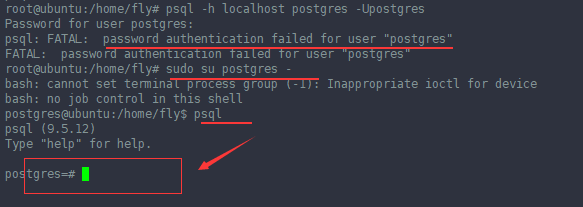
忘记postgresql的用户的密码,怎么进入psql呢?
1. sudo su postgres -
2. psql
执行上面两部就可以进入了
-------------------------------------------------------------------------------------------------------------------------------------------------------------------------------------------------
pg_dump is an effective tool to backup postgres database. It creates a *.sql file with CREATE TABLE, ALTER TABLE, and COPY SQL statements of source database. To restore these dumps psql command is enough.
Using pg_dump, you can backup a local database and restore it on a remote database at the same time, using a single command. In this article, let us review several practical examples on how to use pg_dump to backup and restore.
For the impatient, here is the quick snippet of how backup and restore postgres database using pg_dump and psql:
Backup:  $ pg_dump -U {user-name} {source_db} -f {dumpfilename.sql}

Restore: $ psql -U {user-name} -d {desintation_db}-f {dumpfilename.sql}
1. Backup a single postgres database
This example will backup erp database that belongs to user geekstuff, to the file mydb.sql
$ pg_dump -U geekstuff erp -f mydb.sql
It prompts for password, after authentication mydb.sql got created with create table, alter table and copy commands for all the tables in the erp database. Following is a partial output of mydb.sql showing the dump information of employee_details table.
2. Backup all postgres databases
To backup all databases, list out all the available databases as shown below.
Login as postgres / psql user:
$ su postgres
List the databases:
$ psql -l

List of databases

Name | Owner | Encoding

-----------+-----------+----------

article | sathiya | UTF8

backup | postgres | UTF8

erp | geekstuff | UTF8

geeker | sathiya | UTF8
Backup all postgres databases using pg_dumpall:
You can backup all the databases using pg_dumpall command.
$ pg_dumpall > all.sql
Verify the backup:
Verify whether all the databases are backed up,
$ grep "^[\]connect" all.sql

\connect article

\connect backup

\connect erp

\connect geeker
3. Backup a specific postgres table
$ pg_dump --table products -U geekstuff article -f onlytable.sql
To backup a specific table, use the –table TABLENAME option in the pg_dump command. If there are same table names in different schema then use the –schema SCHEMANAME option.
How To Restore Postgres Database
1. Restore a postgres database
$ psql -U erp -d erp_devel -f mydb.sql
This restores the dumped database to the erp_devel database.
Restore error messages
While restoring, there may be following errors and warning, which can be ignored.
psql:mydb.sql:13: ERROR:  must be owner of schema public

psql:mydb.sql:34: ERROR:  must be member of role "geekstuff"

psql:mydb.sql:59: WARNING:  no privileges could be revoked

psql:mydb.sql:60: WARNING:  no privileges could be revoked

psql:mydb.sql:61: WARNING:  no privileges were granted

psql:mydb.sql:62: WARNING:  no privileges were granted
2. Backup a local postgres database and restore to remote server using single command:
$ pg_dump dbname | psql -h hostname dbname
The above dumps the local database, and extracts it at the given hostname.
3. Restore all the postgres databases
$ su postgres

$ psql -f alldb.sql
4. Restore a single postgres table
The following psql command installs the product table in the geek stuff database.
$ psql -f producttable.sql geekstuff
postgresql备份和恢复的更多相关文章
- PostgreSQL 备份和恢复
备份和恢复有三种不同的基本方法来备份PostgreSQL数据SQL转储文件系统级备份File system level backup连续归档 1. SQL转储 pg_dump dbname > ...
- PostgreSQL备份和恢复数据表
备份数据表: pg_dump -U user_name db_name -t table_name -f /tmp/backup_file.suffix 恢复数据表: 方法1: 登录数据库:\i /t ...
- postgresql数据库备份和恢复
PostgreSQL自带一个客户端pgAdmin,里面有个备份,恢复选项,也能对数据库进行备份 恢复(还原),但最近发现数据库慢慢庞大的时候,经常出错,备份的文件过程中出错的几率那是相当大,手动调节灰 ...
- PostgreSQL的备份和恢复
关于PostgreSQL的备份和恢复详细信息请参阅<PostgreSQL中文文档>. 备份: #pg_dump --username=postgres v70_demo > v70_ ...
- postgresql数据库备份和恢复(超快)
PostgreSQL自带一个客户端pgAdmin,里面有个备份,恢复选项,也能对数据库进行备份 恢复(还原),但最近发现数据库慢慢庞大的时候,经常出错,备份的文件过程中出错的几率那是相当大,手动调节灰 ...
- PostgreSQL数据库常用脚本-初始化、备份、恢复推荐脚本
公司最近开始逐步推广使用PostgreSQL,为方便开发人员和实施人员操作,特整理数据库初始化.备份.恢复的推荐脚本如下: 1. 连接数据库 psql -h 127.0.0.1 -p 1921 -U ...
- Gitlab备份和恢复操作记录
前面已经介绍了Gitlab环境部署记录,这里简单说下Gitlab的备份和恢复操作记录: 1)Gitlab的备份目录路径设置 [root@code-server ~]# vim /etc/gitlab/ ...
- 转载:Gitlab备份和恢复操作记录
转载:Gitlab备份和恢复操作记录 包含了备份和数据恢复的操作记录,实验可行 前面已经介绍了Gitlab环境部署记录,这里简单说下Gitlab的备份和恢复操作记录: 1)Gitlab的备份目录路径设 ...
- Gitlab+Jenkins学习之路(四)之gitlab备份和恢复
gitlab的备份和恢复 (1)创建备份目录,并授权 [root@linux-node1 ~]# mkdir /data/backups/gitlab -p [root@linux-node1 ~]# ...
随机推荐
- Tuple类型的使用
1.什么是Tuple Tuple类型,可以存放任何类型 2.Tuple有哪些分类 .Net 4.0 定义了8个泛型Tuple类,和一个Tuple静态类 3.Tuple的使用
- 锐动SDK应用于在线教育方面的解决方案
在线教育 PC端.Android端的屏幕.摄像头录制和直播功能,教师不再拘泥于专业的视频教室进行直播授课. 强大的视频编辑功能,便于课件的制作和不断修改升级. 在线课堂实现了教学视频内容在PC.PAD ...
- postgresql遇到的性能问题
问题SQL scwksmlcls.wk_cls_c , scwklrgcls.wk_lrg_cls_nm , scwkmdlcls.wk_mdl_cls_nm , scwksmlcls.wk_sml_ ...
- JPQL 模糊查询,查询条件拼接(like使用)
@Transactional public List<ViewCorplist2> findAllCorpsLikeK(String kw) { System.out.println(kw ...
- 设置CAD显示窗体
AcDbViewTableRecord view; AcGePoint3d max = acdbHostApplicationServices()->workingDatabase()-> ...
- 11Oracle Database 视图
Oracle Database 视图 视图语法 create [or replace] view <名字> as <select 语句> 视图用于简化查询,视图中实际存放的是一 ...
- BZOJ 1176: [Balkan2007]Mokia KDtree
Code: #include<bits/stdc++.h> #define setIO(s) freopen(s".in","r",stdin), ...
- Leetcode 498:对角线遍历Diagonal Traverse(python3、java)
对角线遍历 给定一个含有 M x N 个元素的矩阵(M 行,N 列),请以对角线遍历的顺序返回这个矩阵中的所有元素,对角线遍历如下图所示. Given a matrix of M x N elemen ...
- Getting start with dbus in systemd (03) - sd-bus.h 使用例子 (systemd version>=221)
sd-bus.h 例子 注意: sd-dbus 是systemd提供的lib,但是这个lib,只有在systemd>v221版本后才可以使用,centos 219版本太低,所以不能使用. 参考: ...
- C++ Primer(第4版)-学习笔记-第3部分:类和数据抽象
第12章 类 每个类可以没有成员,也可以定义多个成员,成员可以是数据.函数或类型别名. 成员函数必须在类内部声明,可以在类内部定义,也可以在类外部定义.如果在类内部定义,就默认是内联函数. ...