
webservice的cxf和spring整合发布
1、新建一个web项目
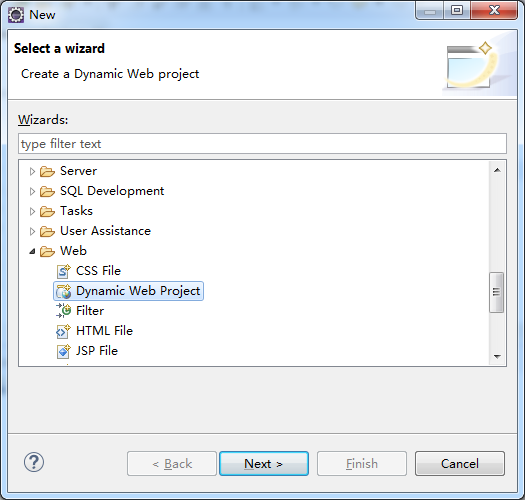
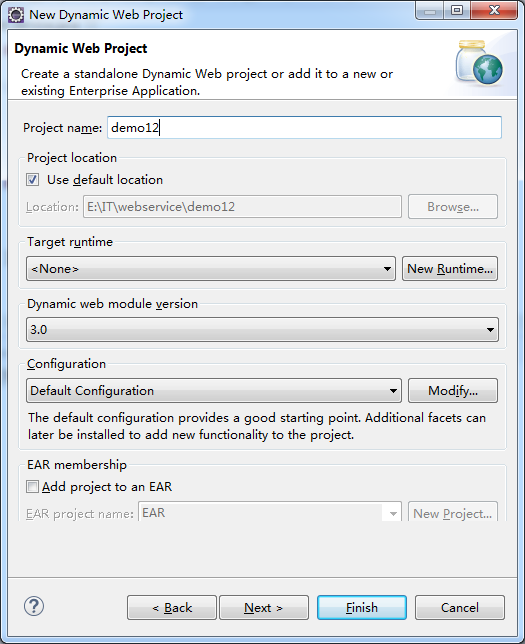
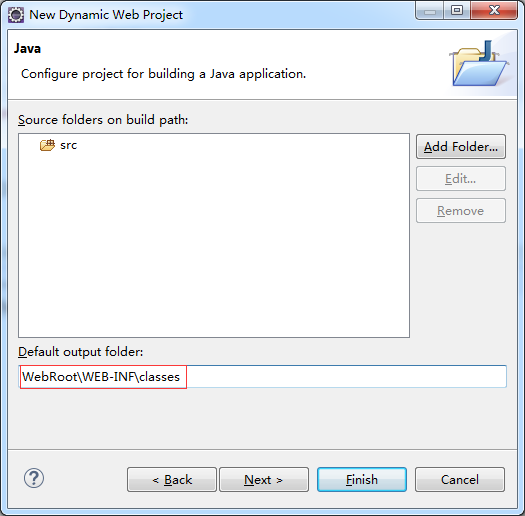
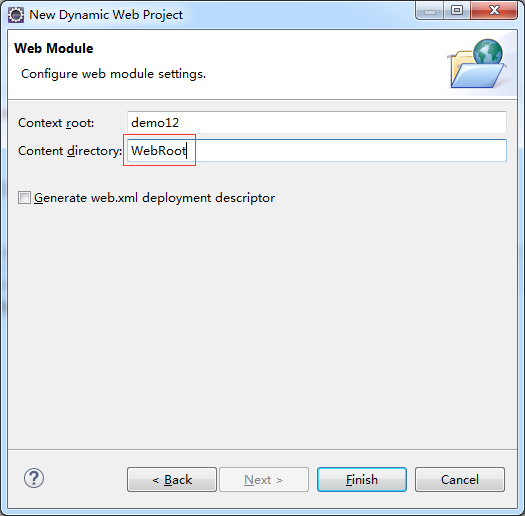
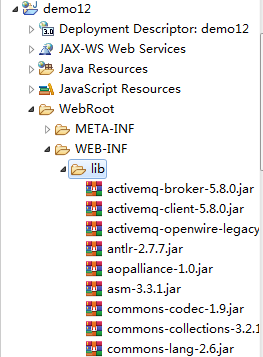
2、导入cxf相应的jar包,并部署到项目中
3、服务接口
 package com.xiaostudy;

 /**

  * @desc 服务器接口

  * @author xiaostudy

  *

  */

 public interface Test_service {

     public String getNumber(String number);

 }
4、服务接口实现类
 package com.xiaostudy;

 import javax.jws.WebService;

 import javax.xml.ws.BindingType;

 import javax.xml.ws.soap.SOAPBinding;

 /**

  * @desc 服务器接口实现类

  * @author xiaostudy

  *

  */

 @WebService

 @BindingType(SOAPBinding.SOAP12HTTP_BINDING)//SOAP1.2声明

 public class Test_serviceImpl implements Test_service {

     /**

      * @desc 处理客户端的数据,并返回数据

      * @param number 参数

      * @return String 返回数据类型

      */

     @Override

     public String getNumber(String number) {

         System.out.println("我服务器端执行了。。。。");

         return number+"_xiaostudy";

     }

 }
5、编写applicationContext.xml
 <?xml version="1.0" encoding="utf-8"?>

 <beans xmlns="http://www.springframework.org/schema/beans"

     xmlns:xsi="http://www.w3.org/2001/XMLSchema-instance" xmlns:jaxws="http://cxf.apache.org/jaxws"

     xmlns:jaxrs="http://cxf.apache.org/jaxrs" xmlns:cxf="http://cxf.apache.org/core"

     xsi:schemaLocation="http://www.springframework.org/schema/beans

                             http://www.springframework.org/schema/beans/spring-beans.xsd

                             http://cxf.apache.org/jaxrs http://cxf.apache.org/schemas/jaxrs.xsd

                             http://cxf.apache.org/jaxws http://cxf.apache.org/schemas/jaxws.xsd

                             http://cxf.apache.org/core http://cxf.apache.org/schemas/core.xsd">

     <!-- <jaxws:server发布SOAP协议的服务 ,对JaxWsServerFactoryBean类封装-->

     <jaxws:server address="/number" serviceClass="com.xiaostudy.Test_serviceImpl">

         <jaxws:serviceBean>

             <ref bean="test_serviceImpl"/>

         </jaxws:serviceBean>

         <!-- 配置拦截器 -->

         <jaxws:inInterceptors>

             <ref bean="inInterceptor"/>

         </jaxws:inInterceptors>

         <jaxws:outInterceptors>

             <ref bean="outInterceptor"/>

         </jaxws:outInterceptors>

     </jaxws:server>

     <!-- 配置服务实现类 -->

     <bean name="test_serviceImpl" class="com.xiaostudy.Test_serviceImpl"/>

     <!-- 配置拦截器的bean -->

     <bean name="inInterceptor" class="org.apache.cxf.interceptor.LoggingInInterceptor"/>

     <bean name="outInterceptor" class="org.apache.cxf.interceptor.LoggingOutInterceptor"/>

 </beans>
6、编写web.xml
 <?xml version="1.0" encoding="UTF-8"?>

 <web-app xmlns:xsi="http://www.w3.org/2001/XMLSchema-instance"

          xmlns="http://java.sun.com/xml/ns/javaee"

          xsi:schemaLocation="http://java.sun.com/xml/ns/javaee http://java.sun.com/xml/ns/javaee/web-app_3_0.xsd" id="WebApp_ID" version="3.0">

     <display-name>ws_2_cxf_spring_server</display-name>

     <!-- 设置spring的环境 -->

     <context-param>

         <!--contextConfigLocation是不能修改的  -->

         <param-name>contextConfigLocation</param-name>

         <param-value>classpath:applicationContext.xml</param-value>

     </context-param>

     <listener>

         <listener-class>org.springframework.web.context.ContextLoaderListener</listener-class>

     </listener>

     <!-- 配置CXF的Servlet -->

     <servlet>

         <servlet-name>CXF</servlet-name>

         <servlet-class>org.apache.cxf.transport.servlet.CXFServlet</servlet-class>

     </servlet>

     <servlet-mapping>

         <servlet-name>CXF</servlet-name>

         <url-pattern>/ws/*</url-pattern>

     </servlet-mapping>

     <welcome-file-list>

         <welcome-file>index.html</welcome-file>

         <welcome-file>index.htm</welcome-file>

         <welcome-file>index.jsp</welcome-file>

         <welcome-file>default.html</welcome-file>

         <welcome-file>default.htm</welcome-file>

         <welcome-file>default.jsp</welcome-file>

     </welcome-file-list>

 </web-app>
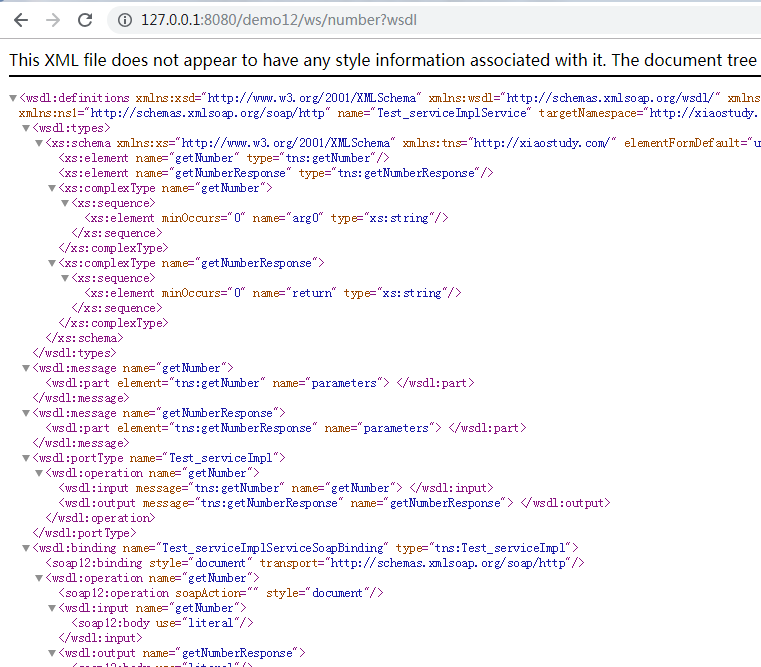
7、Tomcat服务开启
webservice的cxf和spring整合发布的更多相关文章
- 【WebService】WebService之CXF和Spring整合(六)
前面介绍了WebService与CXF的使用,项目中我们经常用到Spring,这里介绍CXF与Spring整合 步骤 1.创建一个Maven Web项目,可以参照:[Maven]Eclipse 使用M ...
- webservice的cxf和spring整合客户端开发
1.新建一个java项目 2.导入cxf相关的jar包,并部署到项目中 3.用命令生成客户端使用说明文档 wsdl2java -p com.xiaostudy -d . http://127.0.0. ...
- Java WebService 教程系列之 Spring 整合 CXF
Java WebService 教程系列之 Spring 整合 CXF 一.引入 jar 包 <dependency> <groupId>org.apache.cxf</ ...
- 13_CXF和Spring整合发布服务
[服务端] 第一步:建立一个Web项目 第二步:填充CXF jar包 第三步:创建接口及服务类 [工程截图(对比之前的WebService_CXF_Server00)] [applicationCon ...
- 浅谈WebService之JAX-RS与spring整合
背景:首先谈一下webservice: 1.Web service是一个平台独立的,低耦合的,自包含的.基于可编程的web的应用程序, 可使用开放的XML(标准通用标记语言下的一个子集)标准来描述.发 ...
- CXF和spring整合遇到的问题:No bean named 'cxf' is defined
今天在做ws和spring整合的时候,很不幸的遇到了这个问题,百度了好久,竟然没人遇到这个问题,后来谷歌了一下,都是遇到这个问题的了...在看到一篇文章中提到了cxf.xml,所以我果断的打开这个配置 ...
- WebService学习之旅(三)JAX-WS与Spring整合发布WebService
Spring本身就提供了对JAX-WS的支持,有兴趣的读者可以研究下Spring的Spring-WS项目,项目地址: http://docs.spring.io/spring-ws/sites/1.5 ...
- (七)CXF之与spring整合发布web服务
一.需求分析 用spring发布服务 二.案例 2.1 引入maven依赖 <dependencies> <!-- 添加Spring支持 --> <dependency& ...
- cxf和spring结合,发布restFull风格的服务
rest(Representational State Transfer):表现层状态转化,它是一种风格,用于资源定位,例如:http://ip:port/user/student/001 和资源操作 ...
随机推荐
- rrdtool ubuntu python snmpwalk
rrdtool install: apt-get install libpango1.0-dev libxml2-dev wget https://packages.debian.org/wheezy ...
- JAVA—List集合总结
List接口总结: List接口是Collection接口的子接口,从其名称可以看出,是一个元素有序(并不是按大小排序,具有顺序索引,类似于数组),默认按照元素的添加顺序设置元素的索引,List和Se ...
- python中lambda使用
一.lambda函数 1.lambda函数基础: lambda函数也叫匿名函数,即,函数没有具体的名称,而用def创建的方法是有名称的.如下: """命名的foo函数&q ...
- Python中字符串拼接的N种方法
python拼接字符串一般有以下几种方法: ①直接通过(+)操作符拼接 s = 'Hello'+' '+'World'+'!'print(s) 输出结果:Hello World! 使用这种方式进行字符 ...
- .Net站点架构设计(八)測试
.Net站点架构时间(八)測试 一般而言.总体測试策略是:先针对部分系统进行性能及压力測试,得到各部分的峰值处理性能:再模拟总体流程測试,此时倒不用依照峰值跑,重点測试总体业务流程及业务预期负荷. 在 ...
- Git Extension工具安装及使用
以下界面所示的三个工具,如果没安装过,则勾上让其安装.MsysGit为Git的Windows版本,必须要安装:Kdiff为对比/合并工具,可选安装,可以换为使用其它的相关工具:最后一个Windows ...
- 两台Linux系统之间传输文件
用CRT分别连上两台需要传输文件的linux系统服务器,并检查防火墙是否关闭. 查看防火墙状态: /etc/init.d/iptables status 若防火墙启用,暂时关闭防火墙: /etc/in ...
- ALV tree DUMP 问题处理-20180328
Category ABAP Programming Error Runtime Errors MESSAGE_TYPE_X ABAP Program SAPLOLEA Application Comp ...
- Spark 2.2 DataFrame的一些算子操作
Spark Session中的DataFrame类似于一张关系型数据表.在关系型数据库中对单表或进行的查询操作,在DataFrame中都可以通过调用其API接口来实现. 可以参考,Scala提供的Da ...
- TensorFlow学习笔记(三)-- feed_dict 使用
个人理解:就是TF的一种输入语法. 跟C语言的scanf(),C++的 cin>> 意思差不多,只是长相奇怪了点而已. 做完下面几个例子,基本也就适应了. 首先占位符申请空间:使用的时候, ...