
How to Show/Hide a Button Using the Business Process Flow Stage
How to Show/Hide a Button Using the Business Process Flow Stage
First, we will create one new record in the Opportunity entity. After creating the new Opportunity record, the Close as Won button is displayed.
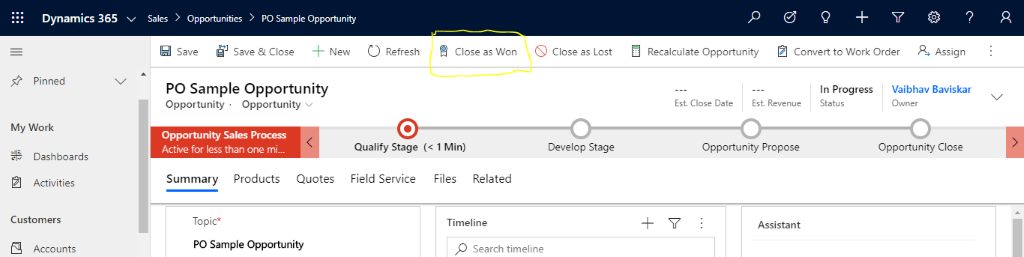
To achieve the Show/Hide button functionality as per Business Process Flow (BPF) stages:
Create a custom JavaScript in which we will check the BPF stage and accordingly we are showing and hiding the button.
Go to the customizations and create one new solution and add an Opportunity form; also, create one new web resource for Javascript.
JavaScript :
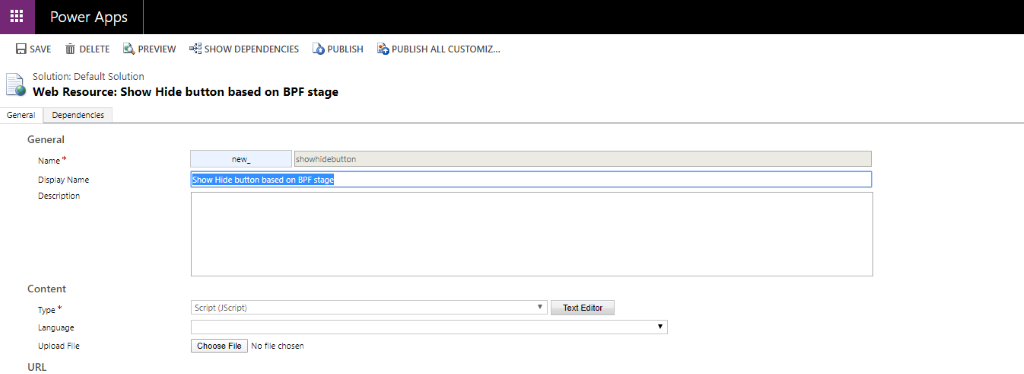 1.2 Creating new web resource (JavaScript)
Once JavaScript is created, open the ribbon workbench and select the solution that contains the Opportunity form.
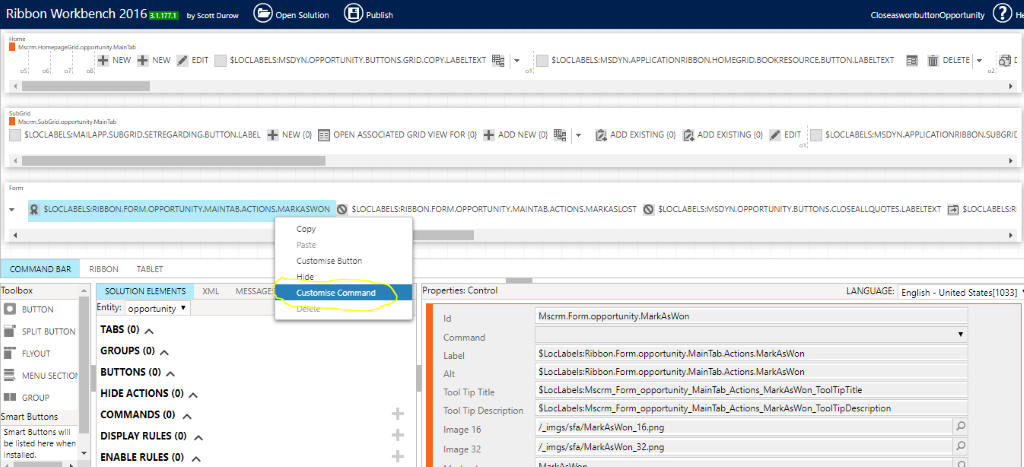 1.3 Customize the “close as won” button on form.
Select the button and click Customise command. Next, create a new Enable Rule and add CustomRule inside that. Use below property for CustomRule:
Default : True , invertResult="" , funcationName: closeAsWonCustomEnable ,Javascriptname : new_ showhidebutton
Once you create a new Enable Rule, add that rule inside “Close as won” button command and publish.
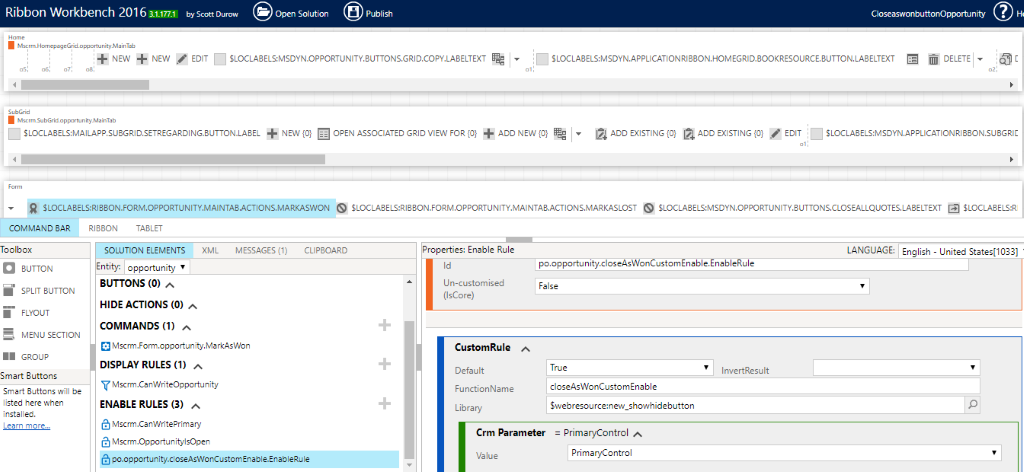 1.4 Create new enable rule for “close as won” button and add that to “close as won” button command.
After publishing the custom rule for Close as Won button, we will go to the Opportunity entity and create one new record.
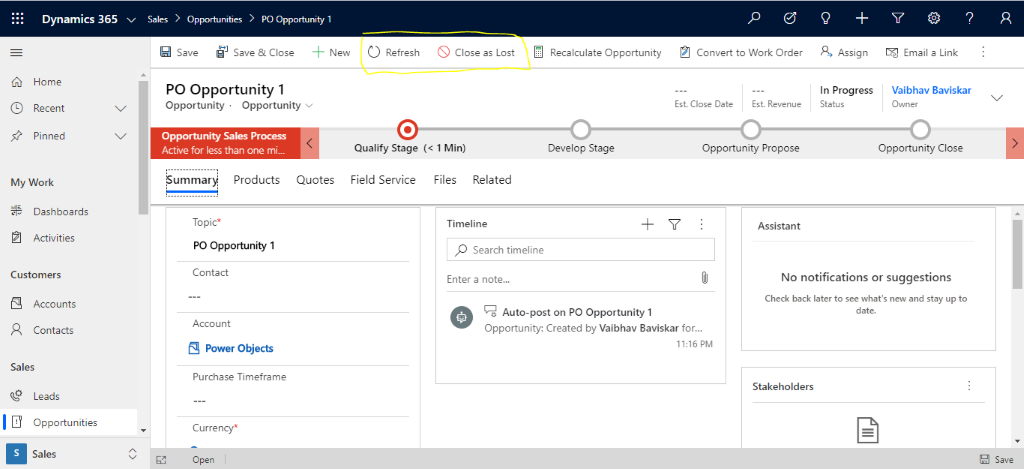
Once we create a new Opportunity record, we can see in the below screenshot that the Close as won button is not showing:
Now, move to the next stage, and when the last BPF stage arrives for this opportunity (BPF last stage: Opportunity Close) then the JavaScript (new_showhidebutton) will return TRUE and Close as Won button will show:
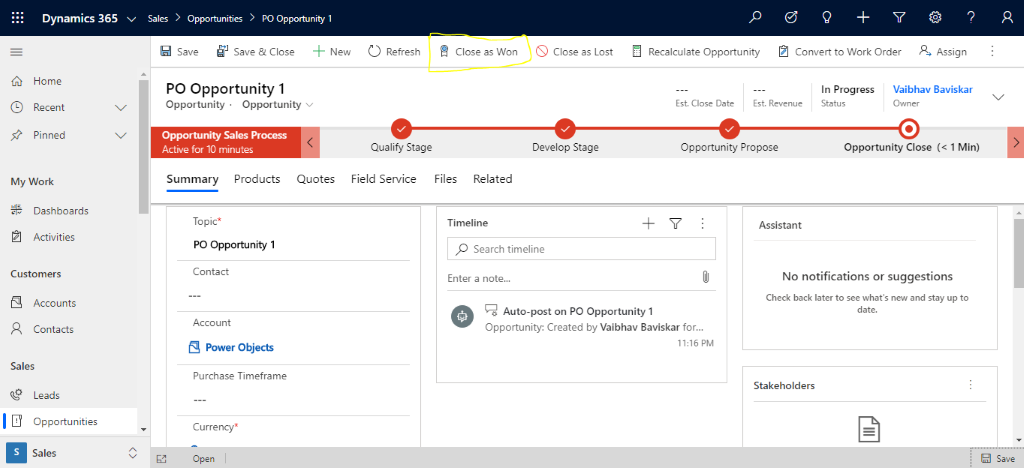
1.6 “Close as won” button showing on last BPF stage.
How to Show/Hide a Button Using the Business Process Flow Stage的更多相关文章
- jquery的hide()和show()
jquery用hide()和show()函数来控制html元素的显示和隐藏. hide()和show()都可以带参数的,hide(1000)表示隐藏所需的时间为1秒.此外还可以用slow,fast参数 ...
- Super Hide IP 3.4.7.8允许您以匿名方式进行网上冲浪、 保持隐藏您的 IP 地址
Super Hide IP 3.4.7.8 转自:http://www.0daydown.com/04/695.html Super Hide IP允许您以匿名方式进行网上冲浪. 保持隐藏您的 IP ...
- ftk学习记录(button一片)
[ 声明:版权所有所有.欢迎转载,请勿用于商业用途. 联系信箱:feixiaoxing @163.com] 前面,我们说到了label,这里能够看一下label执行的效果是怎么样的. waterma ...
- jquery-hide//一段hide代码实现异步隐藏
(本篇博客没有什么参考价值,只用于自己未来复习.) 说白了就是通过“父亲”实现异步 代码: <!DOCTYPE html> <html> <head> <sc ...
- java:JQuery(声明,JQ和JS对象的区别,prop,attr,addClass,offset,trigger,dblclick和change事件,hide,show,toggle,slideUp,slideDown,slideToggle,三种选择器,标签的获取,三张图片的放大与缩小)
1.JQuery: jQuery是一个快速.简洁的JavaScript框架,是继Prototype之后又一个优秀的JavaScript代码库(或JavaScript框架).jQuery设计 的宗旨是“ ...
- 十分钟玩转 jQuery、实例大全
一.简介 定义 jQuery创始人是美国John Resig,是优秀的Javascript框架: jQuery是一个轻量级.快速简洁的javaScript库.源码戳这 jQuery对象 jQuery产 ...
- webParts与Web部件
web部件是ASP.NET WebForm里面的服务器控件,它涵盖的内容比较多,鉴于这种状况的话鄙人不打算深究下去了,只是局限于了解web.config配置里面的配置内容则可. 那么也得稍微说说啥是W ...
- 前端之jquery
前端之jquery 本节内容 jquery简介 选择器和筛选器 操作元素 示例 1. jquery简介 1 jquery是什么 jQuery由美国人John Resig创建,至今已吸引了来自世界各地的 ...
- 【jquery】基础知识
jquery简介 1 jquery是什么 jquery由美国人John Resig创建,至今已吸引了来自世界各地的众多 javascript高手加入其team. jQuery是继prototype之后 ...
- 第五篇:在SOUI中使用XML布局属性指引(pos, offset, pos2type)
窗口布局的概念 每一个UI都是由大量的界面元素构成的,在Windows编程,这些界面元素的最小单位通常称之为控件. 布局就是这些控件在主界面上的大小及相对位置. 传统的布局一般使用一个4个绝对坐标来定 ...
随机推荐
- RestTemplate 连接池最大链接数
原文链接:https://www.cnblogs.com/x-x-736880382/p/11591906.html 以前我们项目都是基于Apache HttpClient 连接池进行web 接口调用 ...
- Vue非父子組件(爺孫關係)通信Provide&&Inject
通常,当我们需要从父组件向子组件传递数据时,我们使用 props.想象一下这样的结构:有一些深度嵌套的组件,而深层的子组件只需要父组件的部分内容.在这种情况下,如果仍然将 prop 沿着组件链逐级传递 ...
- 87、linux root 密码忘记了
子账户登录,然后重置即可
- 手机端 replaceAll没有执行吗
let item = _styleArr[i].replace(' ','').split(':'): 不知道为什么,好像replaceAll没有执行,后来改成replace好了.
- 35.Linux 性能监控常用命令
内存 top CPU yum install -y sysstat mpstat 网络 netstat //参数说明 //-n:拒绝显示别卖,能显示数字的全部转化数字 //-l:仅列出Listen(监 ...
- Centos 升级到指定内核
1. 准备阶段 下载安装包到进行升级服务器 wget -c https://acs-ecp.oss-cn-hangzhou.aliyuncs.com/rpm/kernel-4.19.1-rpm.tar ...
- BFS板子题
#include <iostream> #include <string> #include <queue> using namespace std; int n, ...
- Flink 同时按照计数和时间触发窗口计算
自定义trigger 继承 抽象类 Trigger<T, TimeWindow> 主要实现 Trigger类的四个方法(onElement.onEventTime.onProcessin ...
- Web Uploader上传文件
Web Uploader是百度提供的. 1:下载:http://fex.baidu.com/webuploader/(官方下载/示例) 2:使用Web Uploader文件上传需要引入三种资源:JS, ...
- Echart 使用
查看前端面试题小程序 大量面试题和答案,请微信查看 // var list = [1,1,54,5,5,85,8,8,5,5,8,8,85,8,8,5,5,85,88,85,8,88,8,8,8,8, ...