
【Qt】QOpenGLWidget展示蒙版效果
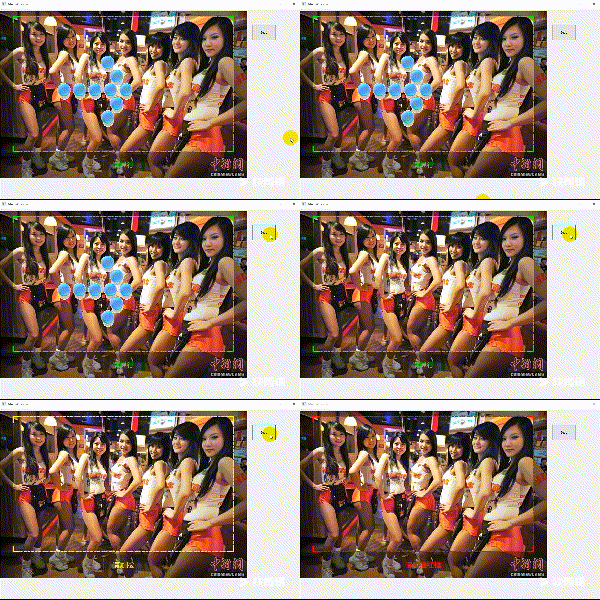
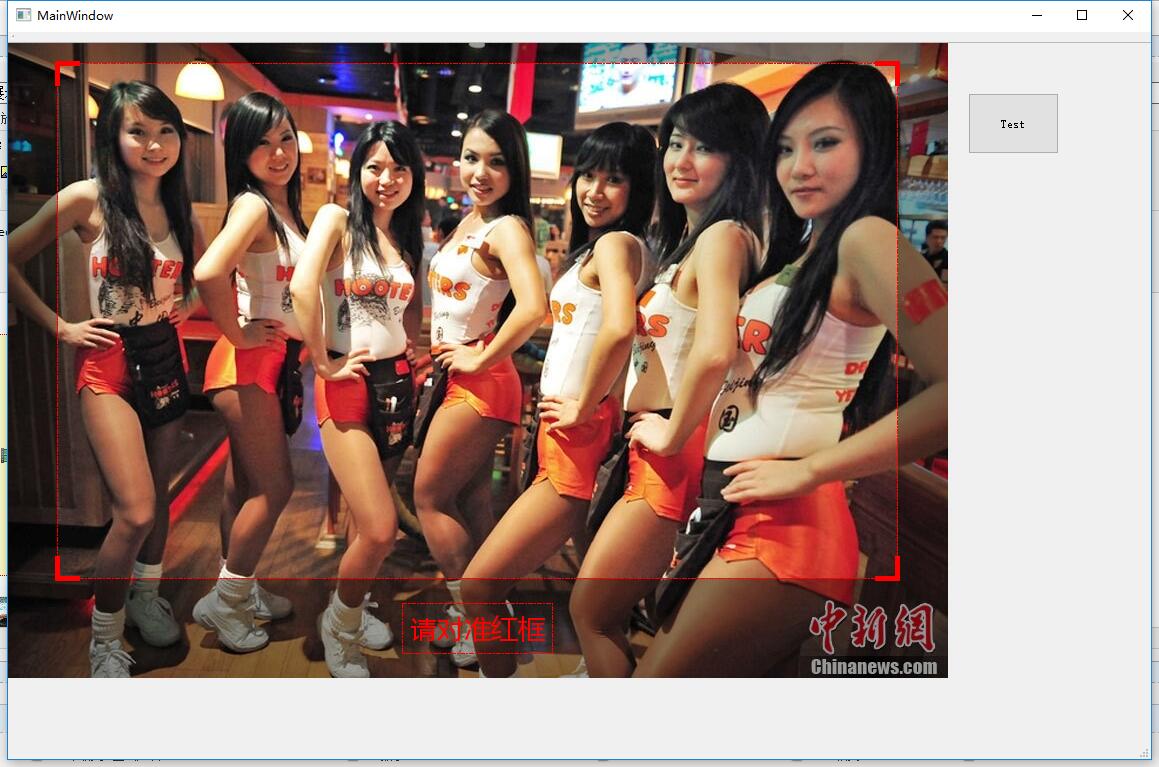
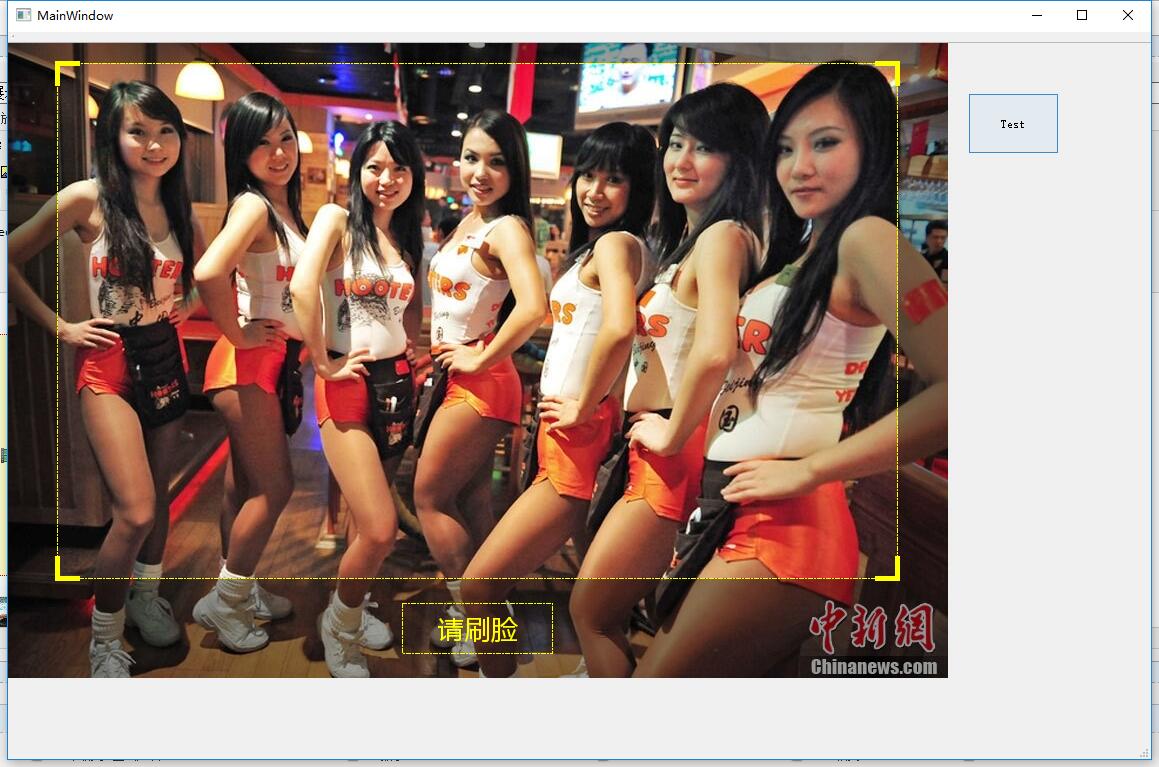
关键代码是派生QOpenGLWidget,覆写paintEvent函数
QPainter p;

    p.begin(this);

    p.drawImage(QPoint(, ), m_Img);

    QLinearGradient grad(, , rect().width(), rect().height());

           {

                   QGradientStops gs;

                   gs << QGradientStop(0.0, QColor(,,,))

                           << QGradientStop(0.5, QColor(,,,))

                           << QGradientStop(1.0, QColor(,,,));

                   grad.setStops(gs);

           }

    //定义顶部蒙版高度

     int m_topHeight = ;

     //定义双侧蒙版宽度

     int m_sideWidth = ;

     //定义底部蒙版高度

     int m_bottomHeight = ;

     //线条长度

     int iLineLen = ;

     //底部文字框的宽高

     int iTxtHeight = ;

     int iTxtWidth = ;

   //填充周围蒙版

   //顶部

   p.fillRect(, , rect().width(), m_topHeight, grad);

   //底部

   p.fillRect(, rect().height() - m_bottomHeight, rect().width(), m_bottomHeight, grad);

   //左侧

   p.fillRect(, m_topHeight, m_sideWidth, rect().height() - m_topHeight - m_bottomHeight, grad);

   //右侧

   p.fillRect(rect().width() - m_sideWidth,  m_topHeight, m_sideWidth, rect().height() - m_topHeight - m_bottomHeight, grad);

   QPen pen;

   pen.setStyle(Qt::DashDotLine);

    pen.setWidth();

    if(m_status == )

    {

        pen.setBrush(Qt::green);

    }

    else if(m_status == )

    {

        pen.setBrush(Qt::yellow);

    }

    else if(m_status == )

    {

        pen.setBrush(Qt::red);

    }

    pen.setCapStyle(Qt::RoundCap);

    pen.setJoinStyle(Qt::RoundJoin);

    p.setPen(pen);

    //绘制中间高亮区域矩形

    //矩形宽高

    int iWith =rect().width()-m_sideWidth*;

    int iHeight = rect().height() -m_topHeight - m_bottomHeight;

    p.drawRect(m_sideWidth, m_topHeight, iWith,iHeight);

    QPen pen2;

    pen2.setWidth();

    if(m_status == )

    {

        pen2.setBrush(Qt::green);

    }

    else if(m_status == )

    {

        pen2.setBrush(Qt::yellow);

    }

    else if(m_status == )

    {

        pen2.setBrush(Qt::red);

    }

    p.setPen(pen2);

    //画四角的线条

    //左上横线

    p.drawLine(m_sideWidth,m_topHeight,m_sideWidth +iLineLen, m_topHeight);

    //左上竖线

    p.drawLine(m_sideWidth,m_topHeight+iLineLen,m_sideWidth,m_topHeight);

    //右上横线

    p.drawLine(rect().width() - m_sideWidth - iLineLen,m_topHeight, rect().width() - m_sideWidth,m_topHeight);

    //右上竖线

    p.drawLine(rect().width() - m_sideWidth,m_topHeight, rect().width() - m_sideWidth, m_topHeight + iLineLen);

    //右下竖线

    p.drawLine(rect().width() - m_sideWidth,rect().height()-m_bottomHeight,rect().width() - m_sideWidth,rect().height()-m_bottomHeight - iLineLen);

    //右下横线

    p.drawLine(rect().width() - m_sideWidth,rect().height()-m_bottomHeight, rect().width() - m_sideWidth - iLineLen,rect().height()-m_bottomHeight);

    //左下横线

    p.drawLine(m_sideWidth,rect().height()-m_bottomHeight,m_sideWidth+iLineLen, rect().height()-m_bottomHeight);

    //左下竖线

    p.drawLine(m_sideWidth,rect().height()-m_bottomHeight, m_sideWidth,rect().height()-m_bottomHeight -iLineLen);

    //绘制底部提示消息

    QString strMsg = "";

    if(m_status == )

    {

        strMsg=QStringLiteral("请通行");

    }

    else if(m_status == )

    {

        strMsg=QStringLiteral("请刷脸");

    }

    else if(m_status == )

    {

        strMsg=QStringLiteral("请对准红框");

    }

    p.setPen(pen);

    p.drawRect(rect().width()/ - iTxtWidth/, rect().height()-m_bottomHeight + (m_bottomHeight/-iTxtHeight/), iTxtWidth, iTxtHeight );

    QRect txtRect;

    txtRect.setX(rect().width()/ - iTxtWidth/);

    txtRect.setY(rect().height()-m_bottomHeight + (m_bottomHeight/-iTxtHeight/));

    txtRect.setWidth(iTxtWidth);

    txtRect.setHeight(iTxtHeight);

    p.setPen(pen2);

    QFont font;

    font.setFamily("Microsoft YaHei");

    // 大小

    font.setPointSize();

    // 使用字体

    p.setFont(font);

    p.drawText(txtRect, Qt::AlignCenter , strMsg);

    p.end();
使用QMoive播放Gif的代码
 m_movie =new QMovie("F:/TestProject/QMoveTest/timg.gif");

    m_timer =new QTimer(this);
 ui->lblMove->setVisible(true);

        ui->lblMove->setMovie(m_movie);

        m_movie->start();

        //m_timer->start(3000);

        QTimer::singleShot(, this, SLOT(StopMovie()));
void MainWindow::StopMovie()

{

    m_movie->stop();

    ui->lblMove->setVisible(false);

}
最终效果:
 +
+

【Qt】QOpenGLWidget展示蒙版效果的更多相关文章
- css遮罩蒙版效果 分栏效果
mask遮罩蒙版效果 来看一下效果图: 这是两张原图: 遮罩层图像 注意,白色区域为透明状态 要展示的图像 使用mask之后产生的效果图 首先来解释一下遮罩.蒙版.和PS中的蒙版.Flash中 ...
- jQuery图片旋转展示收缩效果
<!DOCTYPE html PUBLIC "-//W3C//DTD XHTML 1.0 Transitional//EN" "http://www.w3.org/ ...
- CorelDRAW 实现蒙版效果的方法
CorelDRAW能够实现很多意想不到的小效果,其中包括了位图图像软件的处理功能,蒙版效果就是其中的一项.作为矢量图形处理软件,从理论上讲它并不具备蒙板技术,然而只是我们平常没有用到而已,利用图框精确 ...
- 浅谈css蒙版效果
我们进网站浏览时经常看到当鼠标悬浮在图片上或者某一个地方时,会出现一层朦胧现象覆盖着悬浮位置,简单的理解为“蒙版效果”.下面简单列举实现过程: HTML: CSS:
- 浅谈图片蒙版效果-webkit-mask
会用PS的童鞋一定知道“蒙版”的概念,它可以在图片上实现一定的遮罩效果,当然这里我们不介绍ps里的蒙版,而是介绍利用CSS3的新属性-webkit-mask来实现网页中的图片遮罩效果. 大家对-web ...
- QT窗口渐现效果,窗口震动效果,鼠标移动窗口
//窗口渐现效果void MainWindow::closeWindowAnimation() //关闭窗口效果 { QPropertyAnimation *animation = new QProp ...
- Qt实现悬浮窗效果
当鼠标移动到头像控件时,显示悬浮窗,当鼠标离开时,悬浮窗隐藏. 1.控件选择 悬浮窗可以从QDialog派生,并将窗口的属性设置为无边框 this->setWindowFlags(this- ...
- Qt实现半透明遮罩效果
本文索引: 需求 原理 实现遮罩控件 遮罩的使用 需求 我们在显示一些模态对话框的时候,往往需要将对话框的背景颜色调暗以达到突出当前对话框的效果,例如: 对话框的父窗口除了标题栏以外的部分都变暗了,在 ...
- 后端数据中含有html标签和css样式,前端如何转译展示样式效果。
后端含有html标签和css样式的数据: domain="<span style='color:red'>www.baidu.com</span>" (vu ...
随机推荐
- react native 第一次下载app的欢迎页+每次启动app的启动页设计
欢迎各位同学加入: React-Native群:397885169 大前端群:544587175 大神超多,热情无私帮助解决各种问题. 我想我写的这篇博文可以帮助到很多人,接下来要分享的东西,对app ...
- 常用内置方法之:__str__,__repr__
class Test(object): def __init__(self): pass def __str__(self): return "test" test = Test( ...
- tomcat catalina.out日志切割(logrotate)
简单说明: 1,因为tomcat日志会一直往catalina.out里面输出,所以回到值catalina.out非常大,占用磁盘空间 2,日志非常大,查看日志就需要很长时间. 3,据说catalina ...
- percona pt toolkit 总结
##=====================================================##pt-osc之工作流程:1.检查更改表是否有主键或唯一索引,是否有触发器2.检查修改表 ...
- 通用视图-分开处理GET、POST请求
1.编辑urls.py: url(r'^vmmgmt-vms/$', views.vmmgmt,{'model':models.hvvms,'GET': views.vmmgmt_get_view,' ...
- 跨平台开发 -- C# 使用 C/C++ 生成的动态链接库
操作环境:Visual Studio 2017 如何实现 使用 C# 进行嵌入式开发? .NET Core 虽然实现了跨平台,但是不可能处处使用 C# 开发,就好像没人使用SQL开发安卓APP,每种语 ...
- div中文本水平居中,垂直居中
div: text-align=center; hight=100px; line-hight=100px;(行高需要和高度设置成一样)
- leetcode 121 买卖股票的最佳时机
题目 给定一个数组,它的第 i 个元素是一支给定股票第 i 天的价格. 如果你最多只允许完成一笔交易(即买入和卖出一支股票),设计一个算法来计算你所能获取的最大利润. 注意你不能在买入股票前卖出股票. ...
- python第三十二课——栈
栈:满足特点 --> 先进后出,类似于我们生活中的子弹夹 [注意] 对于栈结构而言:python中没有为其封装特定的函数,我们可以使用list(列表)来模拟栈的特点 使用list对象来模拟栈结构 ...
- vagrant up下载box慢的解决办法
即在运行vagrant up时得到其的下载路径,如: https://vagrantcloud.com/ubuntu/boxes/xenial64/versions/20190101.0.0/prov ...