
SVN 报错“Previous operation has not finished; run 'cleanup' if it was interrupted” 原因及解决方案
今天遇到的问题 svn无论是执行checkout,commit,update的时候提示需要cleap up,但 svn执行clean up命令时报错“Previous operation has not finished; run 'cleanup' if it was interrupted”。无论你到那个父层次的目录执行“clean up “,都是报一样的错。执行其他命令的时候,提示要cleanup。看来是进入死循环了。
可能是频繁做了一些改名,文件打开的时候更新或者提交操作,导致svn罢工了。这个也该算是svn的bug吧。类似的情况,其实之前也碰到过。之前都是图省事,把整个svn checkout的主目录都删掉,重新checkout来解决的。但是随着项目的深入开展,要更新的文件越来越多。这个问题迟早要解决的,试试看吧。问题的关键看来需要找到死锁的地方,解锁才行。网上查了下资料。Svn的operation是存放在“work queue’“里的。而“work queue’是在内嵌数据库wc.db的work_queue表中的。看看work_queue表中放了些什么,再做处理。
解决方法:清空svn的队列
1. 内嵌数据库一般是用sqlite进行轻量级管理的。(https://www.sqlite.org/index.html 传送门 ps:下载这一款 sqlite-shell-win32-x86: sqlite3.exe,window下二进制的)
2. 找到你项目的.svn文件,查看是否存在wc.db
3. 为了方便命令行执行,将sqlite3.exe放到svn 项目的主目录下,和.svn目录同级下。
找到本地存放svn项目的目录,将sqlite3.exe复制到该项目根目录下(与.svn目录同级)
可能.svn在项目中这个文件被隐藏了,直接复制进svn项目即可。
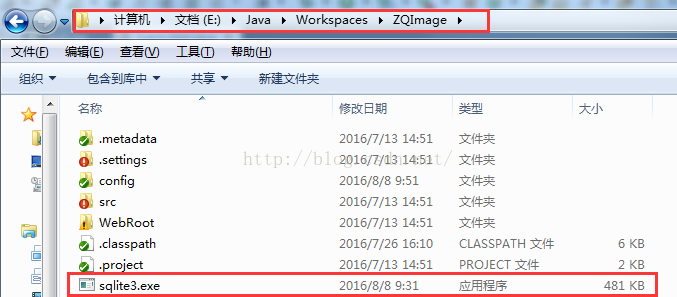

4. 启动cmd执行sqlite3 .svn/wc.db "select * from work_queue" 可能会看到很多记录

5. 执行 sqlite3 .svn/wc.db "delete from work_queue". 把队列清空。

6. 执行 sqlite3 .svn/wc.db "select * from work_queue". 确认一下是否已经清空队列,发现已经没有记录显示,说明已经清空了。
7. 最后再试一下,看是否可以 clean up了。果然成功了。
其实导致这个原因主要是cvn内部的队列算是一个bug吧。
SVN 报错“Previous operation has not finished; run 'cleanup' if it was interrupted” 原因及解决方案的更多相关文章
- 与资源库同步时,我的svn报错 Previous operation has not finished; run 'cleanup' if it was interrupted
解决办法:选择你的项目,右键,小组(Team),刷新或清理(Refresh or Clean)即可.
- svn报错Previous operation has not finished; run 'cleanup' if it was interrupted
- svn提交报错Previous operation has not finished; run 'cleanup' if it was interrupted
从SVN上拉下来Document文档(word和excel),在本地修改后,准备通过TortoiseSVN提交,发现报错. Error: Previous operation has not fini ...
- SVN 操作报错 “Previous operation has not finished; run 'cleanup' if it was interrupted“
今天在 通过 SVN 合并代码的时候报了如下的错误 ”Previous operation has not finished; run 'cleanup' if it was interrupted“ ...
- svn执行clean up 操作时报错 "Previous operation has not finished; run 'cleanup' if it was interrupted"解决如下!
今天在项目中更新的时候,突然间爆了一个svn的这个错误,当时提示我去clean up操作,结果我执行clean up操作时候,还是报错,后来坚持出来,是因为ios项目中的一个图标出了问题,使svn进入 ...
- (转)svn执行clean up命令时报错“Previous operation has not finished; run 'cleanup' if it was interrupted”
今天碰到了个郁闷的问题,svn执行clean up命令时报错“Previous operation has not finished; run 'cleanup' if it was interrup ...
- SVN异常,Previous operation has not finished; run 'cleanup' if it was interrupted
SVN在提交.更新.cleanup时报错:Problem running logsvn: Failed to run the WC DB work queue associated with 'D:\ ...
- Eclipse 使用svn时出现 “Previous operation has not finished; run 'cleanup' if it was interrupted“问题
在执行svn操作的时候出现了下面的问题 commit -m "" E:/eclipse/workplace/BRobotAPP/blockly/googleDemo/blockly ...
- 在Eclipse中无法链接到svn,出现Previous operation has not finished; run 'cleanup' if it was interrupted异常
由于使用了clean或是clean up导致和svn断开链接 1.下载一个sqlite3.exe 2.将sqlite3.exe放到本项目的.svn同级目录下(.svn默认是隐藏,让.svn文件夹显示查 ...
随机推荐
- 自动化工具gulp搭建环境(详解)
src:读取文件和文件夹 dest:生成文件(写文件) watch:监控文件 task:定制任务 pipe:以流的方式处理文件 bower的安装和使 ...
- list 列表 和一些操作方法
1. 什么是列表 定义: 能装对象的对象 在python中使用[]来描述列表, 内部元素用逗号隔开. 对数据类型没有要求 列表存在索引和切片. 和字符串是一样的. 2. 相关的增删改查操作(重点) 添 ...
- Java网络通信 TCP网络,ServerSocket类
package rom; import java.io.BufferedReader; import java.io.IOException; import java.io.InputStreamRe ...
- python中logging模块的一些简单用法
用Python写代码的时候,在想看的地方写个print xx 就能在控制台上显示打印信息,这样子就能知道它是什么了,但是当我需要看大量的地方或者在一个文件中查看的时候,这时候print就不大方便了,所 ...
- Javascript学习笔记5 - 滑动Slides
开始之前:http://docs.jquery.com/ 是jQuery文档的网站, https://jsfiddle.net/是js的在线验证工具 在html中,有这几个标签: javascript ...
- 4.HTML+CSS制作个月亮
效果地址:https://codepen.io/flyingliao/pen/LaRmJr?editors=1100 感想:还有缺陷,需后期补充.完善. HTML code: <div clas ...
- 32. 安装oracle11g时,先决条件一直失败的解决方法
解决方法:1. 在命令提示符下 net share c$=c: 补充: 如果这个命令提示错误:“发生系统错误 5,拒绝访问的时候”,那我们可以修改注册表,检查AutoShareServer和AutoS ...
- Weex与Android交互(二)
扩展Android Weex 提供了扩展机制,可以根据自己的业务进行定制自己的功能. 主要分为两类扩展: Module 扩展 非UI的特定功能.例如sendHttp.openURL 等. Compon ...
- scrapy执行流程
def _next_request_from_scheduler(self, spider): fetch一个request,调用http11 handler,client的agent,返回的是def ...
- canal 配置
参考:https://www.2cto.com/database/201609/547661.html Spring配置 spring配置的原理是将整个配置抽象为两部分: xxxx-instance. ...