
使用JFlex生成词法分析器 1:安装配置
环境:Windows 10
STEP 1: 下载 JFlex 文件,我选择的是 jflex-1.7.0.zip。下载完成后解压到想安装的位置。
文件结构如下(假设解压目录为 C:\):
C:\jflex-1.7.0\

        +--bin\                        (start scripts)

        +--doc\                        (FAQ and manual)

        +--examples\

            +--byaccj\                 (calculator example for BYacc/J)

            +--cup-maven\              (calculator example for cup and maven)

            +--interpreter\            (interpreter example for cup)

            +--java\                   (Java lexer specification)

            +--simple-maven\           (example scanner built with maven)

            +--standalone-maven\       (a simple standalone scanner,

                                        built with maven)

            +--zero-reader\            (Readers that return 0 characters)

        +--lib\                        (precompiled classes)

        +--src\

            +--main\

                +--config\             (PMD source analyzer configuration)

                +--cup\                (JFlex parser spec)

                +--java\

                    +--jflex\          (source code of JFlex)

                        +--anttask\    (source code of JFlex Ant Task)

                        +--gui\        (source code of JFlex UI classes)

                        +--unicode\    (source code for Unicode properties)

                +--jflex\              (JFlex scanner spec)

                +--resources\          (messages and default skeleton file)

            +--test\                   (unit tests)
STEP 2:修改 jflex.bat
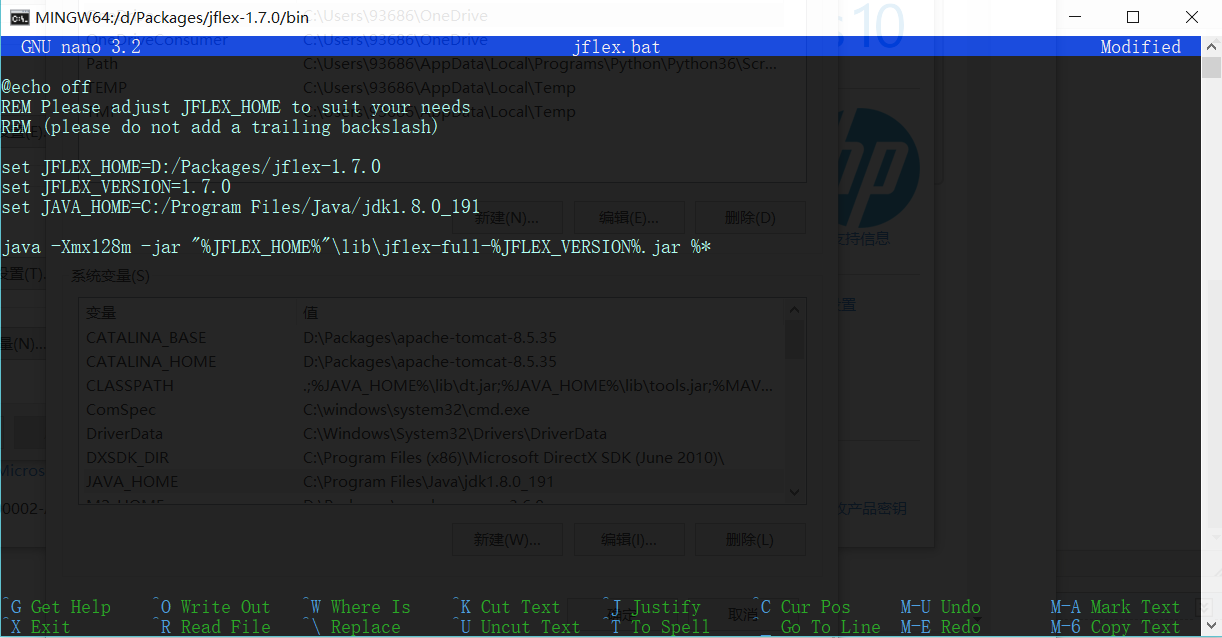
1)进入 jflex解压目录/jflex-1.7.0/bin,打开jflex.bat
2)修改两个环境变量:
JAVA_HOME :Java JDK 的安装路径
JFLEX_HOME :JFlex 的安装路径
**由于直接打开 jflex.bat 会闪退,我是在 gitbash 中用 nano 编辑的。
STEP 3:将 jflex解压目录/jflex-1.7.0/bin 加入系统环境变量 Path
STEP 4:运行 jflex 检查是否配置成功(依旧用的是 gitbash)
文档说,命令格式为jflex <options> <inputfiles> (如果不在命令行输入文件名,jflex会有一个弹出一个输入文件名的窗口)
这里是所有选项的说明:
-d <directory> 在指定目录<directory>生成文件
--encoding <name> 使用<name>格式的编码读入此法规范并书写 java 文件
--skel <file> 使用外部骨架<file>
--nomin 在扫描生成时跳过 DFA 最小化的步骤
--jflex 执行 JLex 解释规范
--dot 为 NFA, DFA, minimised DFA 生成 Graphviz dot 文件
--dump 显示 NFA, initial DFA, minimised DFA 的转换表
--legacydot 元字符 dot (.) 匹配 [^\n] 而非 [^\n\r\u000B\u000C\u0085\u2028\u2029]
--verbose or -v 显示生成进度消息(默认开启)
--quiet or -q 只显示错误信息
--warn-unused 警告未使用的宏(在 verbose 模式中默认开启,quiet 模式中默认关闭)
--no-warn-unused 不警告未使用的宏
--time 显示代码生成进度的时间信息
--version 打印版本信息
--info 打印系统与 jdk 信息
--unicodever <ver> 打印所有 Unicode 版本<ver>支持的属性
--help or -h 打印帮助信息
按照习俗,跑跑看 jflex --version:

GOOD JOB!
接下来运行一个手册提供的简单例子
这段 lexical specitication 描述了 Java 语言的部分规则,从手册复制下来的时候每行会多出四个空格,要手动去掉。保存在 test.flex 文件中。
%%

%class Lexer

%unicode

%cup

%line

%column

%{

  StringBuffer string = new StringBuffer();

  private Symbol symbol(int type) {

    return new Symbol(type, yyline, yycolumn);

  }

  private Symbol symbol(int type, Object value) {

    return new Symbol(type, yyline, yycolumn, value);

  }

%}

LineTerminator = \r|\n|\r\n

InputCharacter = [^\r\n]

WhiteSpace     = {LineTerminator} | [ \t\f]

/* comments */

Comment = {TraditionalComment} | {EndOfLineComment} | {DocumentationComment}

TraditionalComment   = "/*" [^*] ~"*/" | "/*" "*"+ "/"

// Comment can be the last line of the file, without line terminator.

EndOfLineComment     = "//" {InputCharacter}* {LineTerminator}?

DocumentationComment = "/**" {CommentContent} "*"+ "/"

CommentContent       = ( [^*] | \*+ [^/*] )*

Identifier = [:jletter:] [:jletterdigit:]*

DecIntegerLiteral = 0 | [1-9][0-9]*

%state STRING

%%

/* keywords */

<YYINITIAL> "abstract"           { return symbol(sym.ABSTRACT); }

<YYINITIAL> "boolean"            { return symbol(sym.BOOLEAN); }

<YYINITIAL> "break"              { return symbol(sym.BREAK); }

<YYINITIAL> {

  /* identifiers */

  {Identifier}                   { return symbol(sym.IDENTIFIER); }

  /* literals */

  {DecIntegerLiteral}            { return symbol(sym.INTEGER_LITERAL); }

  \"                             { string.setLength(0); yybegin(STRING); }

  /* operators */

  "="                            { return symbol(sym.EQ); }

  "=="                           { return symbol(sym.EQEQ); }

  "+"                            { return symbol(sym.PLUS); }

  /* comments */

  {Comment}                      { /* ignore */ }

  /* whitespace */

  {WhiteSpace}                   { /* ignore */ }

}

<STRING> {

  \"                             { yybegin(YYINITIAL);

                                   return symbol(sym.STRING_LITERAL,

                                   string.toString()); }

  [^\n\r\"\\]+                   { string.append( yytext() ); }

  \\t                            { string.append('\t'); }

  \\n                            { string.append('\n'); }

  \\r                            { string.append('\r'); }

  \\\"                           { string.append('\"'); }

  \\                             { string.append('\\'); }

}

/* error fallback */

[^]                              { throw new Error("Illegal character <"+

                                                    yytext()+">"); }
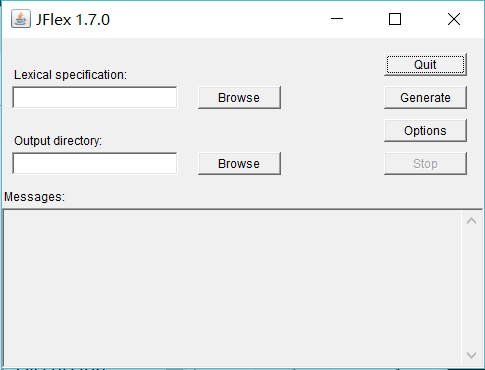
执行命令 jflex ,会弹出如下窗口,选择文件和目录,点击 Generate 即可生成 scanner,是一个叫 Lexer.java 的文件。
参考:http://www.jflex.de/manual.html#content(官方文档)
使用JFlex生成词法分析器 1:安装配置的更多相关文章
- macOS 安装配置yaf框架 生成yaf项目
macOS 安装配置yaf框架 Yaf只支持PHP5.2及以上的版本. 并支持最新的PHP5.3.3 Yaf需要SPL的支持. SPL在PHP5中是默认启用的扩展模块 Yaf需要PCRE的支持. PC ...
- 画图工具Graphviz安装配置
Graphviz (英文:Graph Visualization Software的缩写)是一个由AT&T实验室启动的开源工具包,用于绘制DOT语言脚本描述的图形.它也提供了供其它软件使用的库 ...
- Hive on Spark安装配置详解(都是坑啊)
个人主页:http://www.linbingdong.com 简书地址:http://www.jianshu.com/p/a7f75b868568 简介 本文主要记录如何安装配置Hive on Sp ...
- centos 6 安装配置openvpn
下载地址:http://swupdate.openvpn.org/community/releases/http://www.oberhumer.com/opensource/lzo/download ...
- redis的安装配置
主要讲下redis的安装配置,以及以服务的方式启动redis 1.下载最新版本的redis-3.0.7 到http://redis.io/download中下载最新版的redis-3.0.7 下载后 ...
- Django基础之安装配置
安装配置 一 MVC和MTV模式 著名的MVC模式:所谓MVC就是把web应用分为模型(M),控制器(C),视图(V)三层:他们之间以一种插件似的,松耦合的方式连接在一起. 模型负责业务对象与数据库的 ...
- Nexus安装配置
一.下载最新版本的nexus 1.下载地址:http://www.sonatype.org/nexus/go 2.官网如果下载不了,就找个zip下载,我下载的是:nexus-2.10.0-02-bun ...
- CentOS 7.0安装配置Vsftp服务器
一.配置防火墙,开启FTP服务器需要的端口 CentOS 7.0默认使用的是firewall作为防火墙,这里改为iptables防火墙. 1.关闭firewall: systemctl stop fi ...
- centos 系统下安装FastDFS+nginx+fastdfs-nginx-module安装配置
前言: 以前的项目上传的文件都是保存到本地或者是局域网内的共享文件夹下,由于数据量,服务器的负载均衡(分机的某些图片无法访问的问题处理)等因素的情况下,就想到用fastdfs来文件管理,花了几天时间硬 ...
随机推荐
- Android CheckBox修改大小、边框颜色,以及自定义CheckBox;
CheckBox修改大小: android:scaleX="0.8" android:scaleY="0.8" CheckBox修改边框颜色,注意不是背景色: ...
- requests https 错误
HTTPS请求进行SSL验证或忽略SSL验证才能请求成功,忽略方式为 verify=False
- zabbix3.x添加华为(93069306)网络设备详解
转载自:https://www.cnblogs.com/yinzhengjie/p/6768006.html 前言: 欢迎加入:高级运维工程师之路 598432640 相信大家在看我的文章之前,也看过 ...
- 魔力Python--斐波那契数列(全)
1. 斐波那契数列应用广泛,对此数列的更好理解有助于我们算法的更进一步,并降低程序的时间复杂度,提高运行效率. 2. 斐波那契数列的应用(4种): 2.1 排列组合----经典例子:爬楼梯 " ...
- Javascript 使用 async 声明符和 await 操作符进行异步操作
async function 声明用于定义一个返回 AsyncFunction 对象的异步函数 await 操作符用于等待一个Promise 对象.它只能在异步函数 async function 中 ...
- JetBrains 产品线破解方法
参考: 1.https://www.jianshu.com/p/f404994e2843 2.https://xclient.info/s/intellij-idea.html#versions 3. ...
- Hadoop Mapreduce的shuffle过程详解
1.map task读取数据时默认调用TextInputFormat的成员RecoreReader,RecoreReader调用自己的read()方法,进行逐行读取,返回一个key.value; 2. ...
- win7 升级Power Shell到4.0
因为用到EntityFrameworkCore ,想使用scaffold 来生成models. 提示我power Shell 2.0不支持命令,然后需要升级PS. PS win7 升级文件下载地址是 ...
- mysql 采样查询 / 间隔查询 / 跳跃查询的两种实现思路
先创建一张测试表 CREATE TABLE `test` ( `id` ) DEFAULT NULL, `) DEFAULT NULL ) ENGINE=InnoDB DEFAULT CHARSET= ...
- channel_v3.json
channel_v3.json 下载地址:https://pan.baidu.com/s/1qRgQXiYD2-6MjTb3B3mIBg 源文件地址:https://raw.githubusercon ...