
【CSS】Sticky Footer 布局
什么是 Sticky Footer 布局?
Sticky Footer 布局是一种将 footer 吸附在底部的CSS布局。
footer 可以是任意的元素,该布局会形成一种当内容不足,footer 会定位在视口的最低部,当内容充足,footer 会紧跟在内容后面的效果。
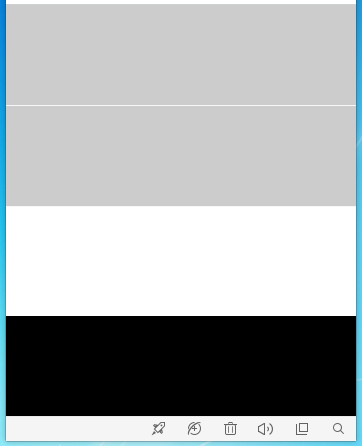
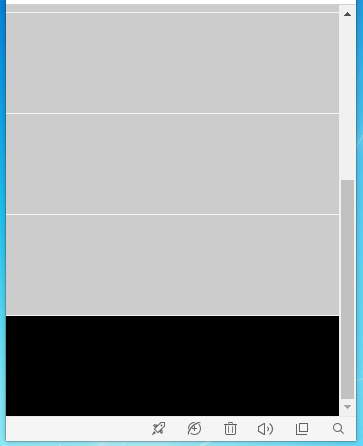
position实现 效果1
<!DOCTYPE html>

<html>

<head>

    <meta charset="UTF-8">

    <title>Sticky Footer 布局</title>

    <style>

        * {

            margin: 0;

            padding: 0;

        }

        html, body {

            height: 100%;

        }

        .wrapper {

            position: relative;

            /*border-box: 为元素指定的任何 padding 和 border 都将在已设定的宽度和高度内进行绘制

            这里的作用是浏览器视口被当成了 border ,如果不设置该属性则无法将 footer 置于浏览器视口的底部*/

            box-sizing: border-box;

            /*这里的作用是将 .wrapper 的高度撑满整个浏览器的视口,当内容不足的时候,也能保证 .wrapper 的高度是浏览器视口的高度*/

            min-height: 100%;

            /*这里的作用是为 .footer 预留空间,防止 .wrapper 的内容被 .footer 遮盖到,值是 .footer 的高度*/

            padding-bottom: 100px;

        }

        .content ul {

            list-style: none;

        }

        .content ul li {

            height: 100px;

            background-color: #ccc;

            border-bottom: 1px solid #f6f6f6;

        }

        .footer {

            position: absolute;

            bottom: 0;

            width: 100%;

            height: 100px;

            background-color: #000;

        }

    </style>

</head>

<body>

    <div class="wrapper">

        <div class="content">

            <ul>

                <li></li>

            </ul>

        </div>

        <div class="footer"></div>

    </div>

</body>

</html>
position实现 效果2
<!DOCTYPE html>

<html>

<head>

    <meta charset="UTF-8">

    <title>Sticky Footer 布局</title>

    <style>

        * {

            margin: 0;

            padding: 0;

        }

        html, body {

            height: 100%;

        }

        .wrapper {

            /*border-box: 为元素指定的任何 padding 和 border 都将在已设定的宽度和高度内进行绘制

            这里的作用是浏览器视口被当成了 border ,如果不设置该属性则无法将 footer 置于浏览器视口的底部*/

            box-sizing: border-box;

            /*这里的作用是将 .wrapper 的高度撑满整个浏览器的视口,当内容不足的时候,也能保证 .wrapper 的高度是浏览器视口的高度*/

            min-height: 100%;

            /*这里的作用是为 .footer 预留空间,防止 .wrapper 的内容被 .footer 遮盖到,值是 .footer 的高度*/

            padding-bottom: 100px;

        }

        .content ul {

            list-style: none;

        }

        .content ul li {

            height: 100px;

            background-color: #ccc;

            border-bottom: 1px solid #f6f6f6;

        }

        .footer {

            position: fixed;

            bottom: 0;

            width: 100%;

            height: 100px;

            background-color: #000;

        }

    </style>

</head>

<body>

    <div class="wrapper">

        <div class="content">

            <ul>

                <li></li>

            </ul>

        </div>

        <div class="footer"></div>

    </div>

</body>

</html>
flex实现 效果1
<!DOCTYPE html>

<html>

<head>

    <meta charset="UTF-8">

    <title>Sticky Footer 布局</title>

    <style>

        * {

            margin: 0;

            padding: 0;

        }

        html, body {

            height: 100%;

        }

        .wrapper {

            /*使用 flex 布局 子元素列排布*/

            display: flex;

            flex-direction: column;

            /*这里的作用是将 .wrapper 的高度撑满整个浏览器的视口,当内容不足的时候,也能保证 .wrapper 的高度是浏览器视口的高度*/

            min-height: 100%;

        }

        .content {

            /*因为父元素使用了 flex 布局,这里设置使 .content 的高度是 .wrapper 的高度减去 .footer 的高度*/

            flex: 1;

        }

        .content ul {

            list-style: none;

        }

        .content ul li {

            height: 100px;

            background-color: #ccc;

            border-bottom: 1px solid #f6f6f6;

        }

        .footer {

            height: 100px;

            background-color: #000;

        }

    </style>

</head>

<body>

    <div class="wrapper">

        <div class="content">

            <ul>

                <li></li>

            </ul>

        </div>

        <div class="footer"></div>

    </div>

</body>

</html>
flex实现 效果2
<!DOCTYPE html>

<html>

<head>

    <meta charset="UTF-8">

    <title>Sticky Footer 布局</title>

    <style>

        * {

            margin: 0;

            padding: 0;

        }

        html, body {

            height: 100%;

        }

        .wrapper {

            /*使用 flex 布局 子元素列排布*/

            display: flex;

            flex-direction: column;

            /*这里的作用是将 .wrapper 的高度撑满整个浏览器的视口,当内容不足的时候,也能保证 .wrapper 的高度是浏览器视口的高度*/

            min-height: 100%;

        }

        .content {

            /*因为父元素使用了 flex 布局,这里设置使 .content 的高度是 .wrapper 的高度减去 .footer 的高度*/

            flex: 1;

        }

        .content ul {

            list-style: none;

        }

        .content ul li {

            height: 100px;

            background-color: #ccc;

            border-bottom: 1px solid #f6f6f6;

        }

        .footer {

            position: fixed;

            bottom: 0;

            width: 100%;

            height: 100px;

            background-color: #000;

        }

    </style>

</head>

<body>

    <div class="wrapper">

        <div class="content">

            <ul>

                <li></li>

            </ul>

        </div>

        <div class="footer"></div>

    </div>

</body>

</html>
calc实现 效果1
<!DOCTYPE html>

<html>

<head>

    <meta charset="UTF-8">

    <title>Sticky Footer 布局</title>

    <style>

        * {

            margin: 0;

            padding: 0;

        }

        html, body {

            height: 100%;

        }

        .wrapper {

            /*使用 calc 需要显示的设置 height ,如果使用 min-height 则会是跟随的效果*/

            min-height: 100%;

        }

        .content {

            /*min-height 是CSS的计算函数*/

            min-height: calc(100% - 100px);

        }

        .content ul {

            list-style: none;

        }

        .content ul li {

            height: 100px;

            background-color: #ccc;

            border-bottom: 1px solid #f6f6f6;

        }

        .footer {

            height: 100px;

            background-color: #000;

        }

    </style>

</head>

<body>

    <div class="wrapper">

        <div class="content">

            <ul>

                <li></li>

            </ul>

        </div>

        <div class="footer"></div>

    </div>

</body>

</html>
calc实现 效果2
<!DOCTYPE html>

<html>

<head>

    <meta charset="UTF-8">

    <title>Sticky Footer 布局</title>

    <style>

        * {

            margin: 0;

            padding: 0;

        }

        html, body {

            height: 100%;

        }

        .wrapper {

            height: 100%;

        }

        .content {

            /*min-height 是CSS的计算函数*/

            min-height: calc(100% - 100px);

        }

        .content ul {

            list-style: none;

        }

        .content ul li {

            height: 100px;

            background-color: #ccc;

            border-bottom: 1px solid #f6f6f6;

        }

        .footer {

            position: fixed;

            bottom: 0;

            width: 100%;

            height: 100px;

            background-color: #000;

        }

    </style>

</head>

<body>

    <div class="wrapper">

        <div class="content">

            <ul>

                <li></li>

            </ul>

        </div>

        <div class="footer"></div>

    </div>

</body>

</html>
【CSS】Sticky Footer 布局的更多相关文章
- css sticky footer 布局 手机端
什么是css sticky footer 布局? 通常在手机端写页面 会遇到如下情况 页面长度很短不足以撑起一屏,此时希望页脚在页面的底部 而当页面超过一屏时候,页脚会在文章的底部 ,网上有许多办法, ...
- css sticky footer 布局
方法一:footer 上用负的 margin-top 在内容外面需要额外包一层元素(wrap)来让它产生对应的 padding-bottom.是为了防止负 margin 导致 footer 覆盖任何实 ...
- css sticky footer布局
Sticky footers设计是最古老和最常见的效果之一,大多数人都曾经经历过.它可以概括如下:如果页面内容不够长的时候,页脚块粘贴在视窗底部:如果内容足够长时,页脚块会被内容向下推送.套路为:内容 ...
- 【css技能提升】完美的 Sticky Footer 布局
在总结之前所做的项目时,遇到过下面这种情况. 在主体内容不足够多或者未完全加载出来之前,就会导致出现左边的这种情况,原因是因为没有足够的垂直空间使得页脚推到浏览器窗口最底部.但是,我们期望的效果是页脚 ...
- CSS Sticky Footer
----CSS Sticky Footer 当正文内容很少时,底部位于窗口最下面.当改变窗口高度时,不会出现重叠问题. ----另一个解决方法是使用:flexBox布局 http://www.w3c ...
- 两种最常用的Sticky footer布局方式
Sticky footer布局是什么? 我们所见到的大部分网站页面,都会把一个页面分为头部区块.内容区块和页脚区块,当头部区块和内容区块内容较少时,页脚能固定在屏幕的底部,而非随着文档流排布.当页面内 ...
- 前端经典布局:Sticky footer 布局
什么是Sticky footer布局?前端开发中大部分网站,都会把一个页面分为头部区块.内容区块.页脚区块,这也是比较.往往底部都要求能固定在屏幕的底部,而非随着文档流排布.要实现的样式可以概括如下: ...
- CSS Sticky Footer: 完美的CSS绝对底部
CSS的简单在于它易学,CSS的困难在于寻找更好的解决方案.在CSS的世界里,似乎没有完美这种说法.所以,现在介绍的CSS绝对底部,只是目前个人见过的方案中比较完美的吧. 先说我们为什么会使用到这个C ...
- sticky footer布局,定位底部footer
其作用就是当内容区域比较少时,让footer也能正常定位到底部,以前我们使用js来达到这种效果,其实用css也是完全可以的 <!DOCTYPE html> <html lang=&q ...
随机推荐
- Pathon学习笔记1
1.解释型语言和编译型语言 编译型:需要一个翻译的程序——编译器(Compiler)对源代码进行转化,变成可执行代码,称为编译(Compile).大的复杂的程序还需要链接程序(Linker)来链接各个 ...
- mysql表关联
mysql的表关联: left join(左联接) 返回包括左表中的所有记录和右表中联结字段相等的记录 right join(右联接) 返回包括右表中的所有记录和左表中联结字段相等的记录 inner ...
- LinuxMint 下 B站 番 blv 缓存 转 mp4
参考https://www.littleqiu.net/archives/886 (不过我使用绝对路径,ffmpeg报错,相对路径没问题) 一.安装ffmpge sudo apt-get instal ...
- uva-507
题意:连续序列和最大,直接枚举..... 代码跑了2.4s.QAQ #include <string> #include<iostream> #include<map&g ...
- LeetCode 206. Reverse Linked List倒置链表 C++
Reverse a singly linked list. Example: Input: 1->2->3->4->5->NULL Output: 5->4-> ...
- Maven 错误 :The POM for com.xxx:jar:0.0.1-SNAPSHOT is invalid, transitive dependencies (if any) will not be available
一个大的maven 项目,结构是一个根pom,下面几个小的module,包括了appservice-darc,appservice-entity等,其中appservice-darc 依赖了 apps ...
- python———day01
一.变量命名规则: 1,要有描述性: 2,变量名只能以 下划线,数字,字母组成,不可以有特殊符号和空格: 3,不能以中文为变量名(规范): 4,不能以数字开头: 5,保留字符(即关键字:如print ...
- directive
var myModule = angular.module(...); myModule.directive('directiveName', function factory(injectables ...
- python 反射 hasattr getattr
class BlackMedium: feature='Ugly' def __init__(self,name,addr): self.name=name ...
- ORM版学员管理系统 3
老师信息管理 思考 三种方式创建多对多外键方式及其优缺点. 通过外键创建 class Class(models.Model): id = models.AutoField(primary_key=Tr ...