
cartographer安装--Ubuntu14.04--indigo
0.安装所有依赖项
sudo apt-get install -y google-mock libboost-all-dev libeigen3-dev libgflags-dev libgoogle-glog-dev liblua5.2-dev libprotobuf-dev libsuitesparse-dev libwebp-dev ninja-build protobuf-compiler python-sphinx ros-indigo-tf2-eigen libatlas-base-dev libsuitesparse-dev liblapack-dev
1.首先安装ceres solver,选择的版本是1.11,路径随意
1. git clone https://github.com/hitcm/ceres-solver-1.11.0.git
2. cd ceres-solver-1.11.0/build
3. cmake ..
4 . make
5. sudo make install
2.然后安装 cartographer,路径随意
1. git clone https://github.com/hitcm/cartographer.git
2 . cd cartographer/build
3. cmake ..
4 . make
5. sudo make install
3.安装cartographer_ros。
mkdir ~/catkin_ws/src
cd ~/catkin_ws/src
git clone https://github.com/hitcm/cartographer_ros.git
然后到catkin_ws下面运行catkin_make即可:
cd ..
catkin_make
(=。=,如果编译过程出错internal compiler error: Killed,请看此链接https://blog.csdn.net/qq_29573053/article/details/69665996)
4.数据下载测试
2d数据,大概500M,用迅雷下载
https://storage.googleapis.com/cartographer-public-data/bags/backpack_2d/cartographer_paper_deutsches_museum.bag
3d数据,8G左右,同样用迅雷下载
https://storage.googleapis.com/cartographer-public-data/bags/backpack_3d/cartographer_3d_deutsches_museum.bag
有同学反映上面链接失效了,请用下面的即可。
https://storage.googleapis.com/cartographer-public-data/bags/backpack_3d/b3-2016-04-05-14-14-00.bag
然后运行launch文件即可。
roslaunch cartographer_ros demo_backpack_2d.launch bag_filename:=${HOME}/Downloads/cartographer_paper_deutsches_museum.bag
roslaunch cartographer_ros demo_backpack_3d.launch bag_filename:=${HOME}/Downloads/cartographer_3d_deutsches_museum.bag
刚开始使用ROS的同学运行下面两句是无法工作的,可能出现的错误如下。
[demo_backpack_2d.launch] is neither a launch file in package [cartographer_ros] nor is [cartographer_ros] a launch file name
The traceback for the exception was written to the log file
这种错误的主要原因是ros的catkin_ws配置问题,可以运行rospack profile试试。
实在不行还有如下所示的两种解决方法。推荐第二种。
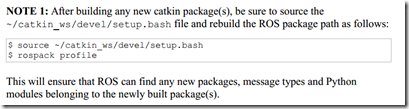
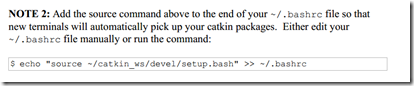
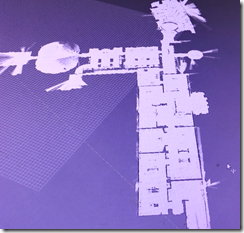
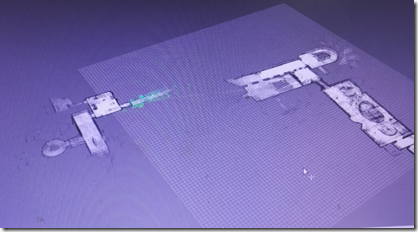
最终结果如下图,左侧为2d,右侧为3d。
Good luck!关于代码的原理解析,接下来的文章可能会详细探讨。
cartographer安装--Ubuntu14.04--indigo的更多相关文章
- Ubuntu14.04(indigo)实现RGBDSLAMv2(数据集和实时Kinect)
Ubuntu14.04(indigo)实现RGBDSLAMv2(数据集和实时Kinect v2) 一.在.bag数据集上跑RGBDSLAMv2 RGBDSLAMv2指的是Felix Endres大神在 ...
- win8.1硬盘安装ubuntu14.04双系统
在网上找了很多方法都失败了,原因是大多数方法都是用mbr方式安装的,如grub4dos,easybcd.以至于连自己都怀疑win8能不能用硬盘安装,差点就去买个u盘来安装了,就在打算放弃的时候在ubu ...
- windows7下硬盘安装ubuntu14.04
windows7 ubuntu1404双系统 准备软件 安装步骤 step 1 step 2 step 3 step 4 windows7 + ubuntu14.04双系统 准备软件 1)grub4d ...
- Win7下通过easyBCD引导安装Ubuntu14.04
Ubuntu14.04作为目前最新版本的ubuntu系统,相信很多人都想在自己的电脑上安装一下,然而系统的安装方法各式各样,u盘法.grub引导法等等,这里我将介绍在win7系统下用easyBCD软件 ...
- VirtualBox安装ubuntu14.04和文件共享
因为机器的VMware使用很卡,占用更多的内存,所以我想,以取代VirtualBox.已安装ubuntu14.04使用与VMware在相同的. VirtualBox下载链接:https://www.v ...
- Windows8.1硬盘安装Ubuntu14.04双系统参考教程和多硬盘的注意事项[画画]
硬盘安装.无需光盘.U盘:Win8.1为主,Ubuntu14.04为辅,可将Windows或Ubuntu设置为开机默认启动项.在Ubuntu下可查看.操作Windows系统下的文件:适用于安装和14. ...
- 虚拟机安装Ubuntu14.04打开FireFox提示Server not found
虚拟机安装Ubuntu14.04打开FireFox提示Server not found 我采用VMware安装ubuntu14.04的,VMware的网络是配置采用NAT模式(用于共享主机的IP地址) ...
- Linux,在不使用U盘的情况下使用wubi.exe程序在Win7上安装ubuntu-14.04.3版系统
本文介绍如何在不使用U盘的情况下使用wubi.exe程序在Win7上安装ubuntu-14.04.3版系统. 花了一天的时间终于安装上了Ubuntu14.04,过程坎坷,是血泪史,开始报“cannot ...
- VirtualBox安装Ubuntu14.04
创建虚拟机 点击 新建(N) 设置虚拟机的名称,类型与版本,如下图所示: 分配虚拟机的内存大小,受PC实际内存影响,暂时设置为2G,如下图所示: 分配虚拟机的硬盘大小,默认即可,如下图所示: 分配虚拟 ...
- Windows 8.1 硬盘安装 Ubuntu14.04 双系统参考教程及注意事项
硬盘安装,无需光盘.U盘:Win8.1为主,Ubuntu14.04为辅,可将Windows或Ubuntu设置为开机默认启动项:在Ubuntu下可查看.操作Windows系统下的文件:适用于安装和14. ...
随机推荐
- Centos上执行Shell的四种方式
注意:我这里说的shell脚本是Bash Shell,其他类型的shell脚本不保证有效 1,方式一:进入shell文件所在目录 ./my.sh执行 ./my.sh ./的意思是说在当前的工作目录下执 ...
- VS2013密钥(所有版本)
Visual Studio Ultimate 2013 KEY(密钥):BWG7X-J98B3-W34RT-33B3R-JVYW9 Visual Studio Premium 2013 KEY(密钥) ...
- gerrit 使用教程(一)
原文地址:https://www.jianshu.com/p/b77fd16894b6 1, Gerrit是什么? Gerrit实际上一个Git服务器,它为在其服务器上托管的Git仓库提供一系列权限控 ...
- iOS 常用小功能 总结
常用小功能 iOS中的很多小功能都是非常简单的,几行代码就搞定了,比如打电话.打开网址.发邮件.发短信等 打电话 方法一(不被采用): 拨号之前会弹框询问用户是否拨号,拨完后能自动回到原应用 NSUR ...
- Apache+php+mysql环境配置
Apache+PHP+MySQL环境搭建 标题格式 正文格式 阶段性完成格式 正文中强调格式 ————————————————————————————— 前语:本文是从我写过的doc文档迁移过来的,由 ...
- Python: 合并多个字典
现在有多个字典或者映射,想将它们从逻辑上合并为一个单一的映射后执行某些操作,比如查找值或者检查某些键是否存在. eg1: a = {'x': 1, 'z': 3 }b = {'y': 2, 'z': ...
- PLSQL入门:cursor传参,loop fetch使用,if使用,单引号字符表示
1.cursor传入参数 定义:cursor [cursor变量名称]([参数名称] [参数类型]) IS [SQL语句,可以使用传入参数] 例子: cursor moTypeNames(dom ...
- Linux服务器---基础设置
Centos分辨率 virtualbox里新安装的Centos 7 的分辨率默认的应该是800*600. 如果是‘最小化安装’的Centos7 进入的就是命令模式 .如果安装的是带有GUI的 ...
- PowerDesigner逆向操作(从mysql5.0生成数据库的物理模型),把Comment写到name中,pdm文件导出为word
PowerDesigner逆向操作(从mysql5.0生成数据库的物理模型) 环境:powderdesigner12.5:mysql5.0步骤:1. 为指定的数据库配置mysql的ODBC数据源先下载 ...
- 2018 Java线程热门面试题,你知道多少?
面试,难还是不难?取决于面试者的底蕴(气场+技能).心态和认知及沟通技巧.面试其实可以理解为一场聊天和谈判,在这过程中有心理.思想上的碰撞和博弈.其实你只需要搞清楚一个逻辑:“面试官为什么会这样问?他 ...