
用pthon来写个跳板机
用pthon来写个跳板机
1、需求
程序一:
1、后台管理
- 堡垒机上创建用户和密码(堡垒机root封装的类,UserProfile表)
- .bashrc
/usr/bin/python3 /data/bastion.py
exit
2、后台管理
- 服务器上创建用户和密码 或 公钥上传
- 服务器账号 -> 人 关联
程序二:
3、用户登录
- ssh 堡垒机用户名@堡垒机IP
- 获取当前用户 os.environ[‘USER‘]
- 获取当前用户的主机列表
- 获取选中的主机下的所有用户
- 选择任何一个用户
2、实现思路
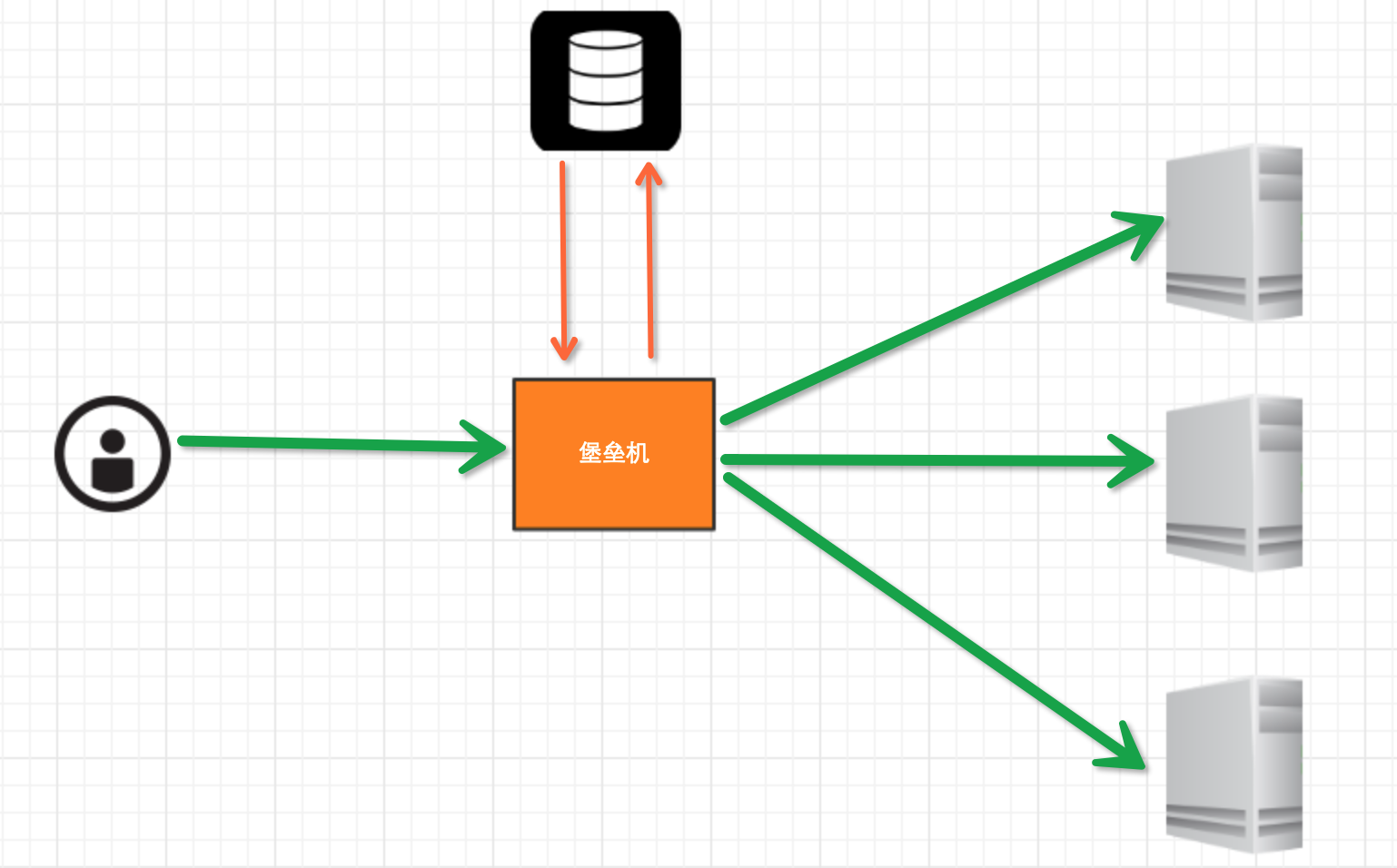
堡垒机执行流程:
- 管理员为用户在服务器上创建账号(将公钥放置服务器,或者使用用户名密码)
- 用户登陆堡垒机,输入堡垒机用户名密码,现实当前用户管理的服务器列表
- 用户选择服务器,并自动登陆
- 执行操作并同时将用户操作记录
注:配置.brashrc实现ssh登陆后自动执行脚本,如:/usr/bin/python /home/wupeiqi/menu.py
那么需要用到的点:
- 1、使用 ORM/Schema Type/SQL Expression Language/Engine/ConnectionPooling/Dialect 所有组件对数据进行操作。根据类创建对象,对象转换成SQL,执行SQL。
- 2、paramiko模块,基于SSH用于连接远程服务器并执行相关操作。
具体实现流程:
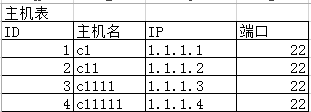
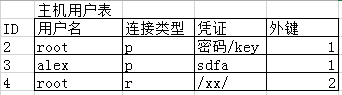
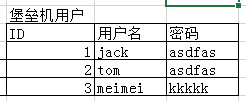
- 设计表机构
- 创建表结构
- 利用paramiko模块去实现跳板机底层的ssh连接并执行相关操作
- 将底层的连接封装成跳板机用户对指定主机组和用户的操作并记录日志
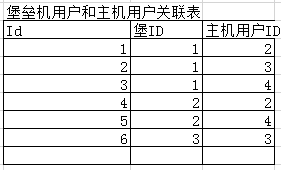
3、表结构设计

 1 #!/usr/bin/env python

 2 # -*- coding:utf-8 -*-

 3

 4 from sqlalchemy import create_engine, and_, or_, func, Table

 5 from sqlalchemy.ext.declarative import declarative_base

 6 from sqlalchemy import Column, Integer, String, ForeignKey, UniqueConstraint, DateTime

 7 from sqlalchemy.orm import sessionmaker, relationship

 8

 9 Base = declarative_base()  # 生成一个SqlORM 基类

10

11

12 class Host(Base):

13     __tablename__ = ‘host‘

14     id = Column(Integer, primary_key=True, autoincrement=True)

15     hostname = Column(String(64), unique=True, nullable=False)

16     ip_addr = Column(String(128), unique=True, nullable=False)

17     port = Column(Integer, default=22)

18

19

20 class HostUser(Base):

21     __tablename__ = ‘host_user‘

22     id = Column(Integer, primary_key=True, autoincrement=True)

23     username = Column(String(64), unique=True, nullable=False)

24     AuthTypes = [

25         (‘p‘, ‘SSH/Password‘),

26         (‘r‘, ‘SSH/KEY‘),

27     ]

28     auth_type = Column(String(16))

29     cert = Column(String(255))

30

31     host_id = Column(Integer, ForeignKey(‘host.id‘))

32

33     __table_args__ = (

34         UniqueConstraint(‘host_id‘, ‘username‘, name=‘_host_username_uc‘),

35     )

36

37

38 class Group(Base):

39     __tablename__ = ‘group‘

40     id = Column(Integer, primary_key=True, autoincrement=True)

41     name = Column(String(64), unique=True, nullable=False)

42

43

44 class UserProfile(Base):

45     __tablename__ = ‘user_profile‘

46     id = Column(Integer, primary_key=True, autoincrement=True)

47     username = Column(String(64), unique=True, nullable=False)

48     password = Column(String(255), nullable=False)

49

50

51 class Group2UserProfile(Base):

52     __tablename__ = ‘group_2_user_profile‘

53     id = Column(Integer, primary_key=True, autoincrement=True)

54     user_profile_id = Column(Integer, ForeignKey(‘user_profile.id‘))

55     group_id = Column(Integer, ForeignKey(‘group.id‘))

56     __table_args__ = (

57         UniqueConstraint(‘user_profile_id‘, ‘group_id‘, name=‘ux_user_group‘),

58     )

59

60

61 class Group2HostUser(Base):

62     __tablename__ = ‘group_2_host_user‘

63     id = Column(Integer, primary_key=True, autoincrement=True)

64     host_user_id = Column(Integer, ForeignKey(‘host_user.id‘))

65     group_id = Column(Integer, ForeignKey(‘group.id‘))

66     __table_args__ = (

67         UniqueConstraint(‘group_id‘, ‘host_user_id‘, name=‘ux_group_host_user‘),

68     )

69

70

71 class UserProfile2HostUser(Base):

72     __tablename__ = ‘user_profile_2_host_user‘

73     id = Column(Integer, primary_key=True, autoincrement=True)

74     host_user_id = Column(Integer, ForeignKey(‘host_user.id‘))

75     user_profile_id = Column(Integer, ForeignKey(‘user_profile.id‘))

76     __table_args__ = (

77         UniqueConstraint(‘user_profile_id‘, ‘host_user_id‘, name=‘ux_user_host_user‘),

78     )

79

80

81 class AuditLog(Base):

82     __tablename__ = ‘audit_log‘

83     id = Column(Integer, primary_key=True, autoincrement=True)

84

85     action_choices2 = [

86         (u‘cmd‘, u‘CMD‘),

87         (u‘login‘, u‘Login‘),

88         (u‘logout‘, u‘Logout‘),

89     ]

90     action_type = Column(String(16))

91     cmd = Column(String(255))

92     date = Column(DateTime)

93     user_profile_id = Column(Integer, ForeignKey(‘user_profile.id‘))

94     host_user_id = Column(Integer, ForeignKey(‘host_user.id‘))

95

96 表结构示例
表结构设计
用pthon来写个跳板机的更多相关文章
- 那就用pthon来写个跳板机吧
1.需求 程序一: 1.后台管理 - 堡垒机上创建用户和密码(堡垒机root封装的类,UserProfile表) - .bashrc /usr/bin/python3 /data/bastion.py ...
- Shell跳板机sshstack
笔者Q:972581034 交流群:605799367.有任何疑问可与笔者或加群交流 源码地址: https://github.com/sshstack/sshstack 为什么要写shell跳板机? ...
- shell开源跳板机sshstack
笔者Q:972581034 交流群:605799367.有任何疑问可与笔者或加群交流 源码地址: https://github.com/sshstack/sshstack 为什么要写shell跳板机? ...
- linux跳板机开发之trap信号机应用
场景1:公司新招聘了一个配置管理员,他的工作是负责将公司开发人员写的新代码依次分发到办公室测试环境.IDC测试环境和正式线上环境.因此公司需要开发一个程序,当配置管理员登录服务器,只能进入分发的管理界 ...
- Shell实现跳板机,为什么用跳板机
整理自:http://blog.chinaunix.net/uid-22101889-id-3167454.html 注意:请谨慎使用,到现在为止,使用了,我还没找到改回去的方法. 1. 问题 ...
- jmeter连接配置带跳板机(SSH)的mysql服务器
jmeter连接配置mysql服务器时,如果数据库服务器没有通过ssh连接,则只需要配置相应的jdbc参数就可以了,即请求域名或ip地址:3306,如果数据库服务器是通过SSH连接的,那需要通过中间远 ...
- 用meterpreter实现跳板机
meterpreter跳板机 背景:渗透测试者A拿到了B主机的控制权,但没有拿到ssh密码(不能打ssh隧道).现需横向移动渗透内网主机C,为了避免动作过大不便直接在B上对C进行渗透,其中C不能出 ...
- CentOS 7 搭建Jumpserver跳板机(堡垒机)
跳板机概述: 跳板机就是一台服务器,开发或运维人员在维护过程中首先要统一登录到这台服务器,然后再登录到目标设备进行维护和操作 跳板机缺点:没有实现对运维人员操作行为的控制和审计,使用跳板机的过程中还是 ...
- Jumpserver跳板机的搭建和部署
1.需要搭云yum仓库wget -O /etc/yum.repos.d/CentOS-Base.repo http://mirrors.aliyun.com/repo/Centos-6.repo 2. ...
随机推荐
- 4-4 集成测试练习,和测试基础知识(guide)。
Guide指南 18章应用测试指南(简单学习了一下.) (中文版--主要是为了先理解,之前看过英文版受语言影响,怕理解有偏差.) Minitest::Test是ActiveSupport::TestC ...
- linux安装mysqlclient报错
错误信息 Collecting mysqlclient Using cached mysqlclient-1.3.12.tar.gz Complete output from command pyth ...
- git在eclipse中的配置 转载
git在eclipse中的配置 转载 一_安装EGIT插件 http://download.eclipse.org/egit/updates/ 或者使用Eclipse Marketplace,搜索EG ...
- Tomcat类加载器破坏双亲委派
转载:https://blog.csdn.net/qq_38182963/article/details/78660779 http://www.cnblogs.com/aspirant/p/8991 ...
- java并发带返回结果的批量任务执行(CompletionService:Executor + BlockingQueue)
转载:http://www.it165.net/pro/html/201405/14551.html 一般情况下,我们使用Runnable作为基本的任务表示形式,但是Runnable是一种有很大局限的 ...
- vue2.0对不同数据类型的显示
- 亿图图示与visio结合使用
亿图图示与visio结合使用 Model 图例 思维导图 Camp Awards 思维导图 思维导图 Englilsh camp activity plan 项目管理 Auto WBS 商务 错误 ...
- PHP:第一章——PHP中常量和预定义常量
<?php /*****************************************************/ //1.常量的定义 //常量:声明一次后长期不变的量,以字母或下划线开 ...
- jsoupa-解析遍历一个HTML
解析个遍历一个HTML文档 String html ="<html><head><title>First parse</title></ ...
- 利用express.js连接mongodb数据库
var MongoClient = require('mongodb').MongoClient; var DB_CONN_STR = "mongodb://localhost:27017/ ...