
hostapd作为radius服务器
使用hostapd作为radius服务器,用于企业wifi加密认证。
参考链接:
http://www.cnblogs.com/claruarius/p/5902141.html
去网上下载hostapd 源码,本文使用的是hostapd-2.4。操作系统ubuntu16.04。
1,tar -xvzf hostapd-2.4.tar.gz

2,cd hostapd-2.4/hostapd

3,cp defconfig .config

4,open options in .config

#CONFIG_DRIVER_NL80211=y

CONFIG_DRIVER_NONE=y

CONFIG_EAP_SIM=y

CONFIG_EAP_AKA=y

CONFIG_EAP_AKA_PRIME=y

CONFIG_EAP_PAX=y

CONFIG_EAP_PSK=y

CONFIG_EAP_PWD=y

CONFIG_EAP_SAKE=y

CONFIG_EAP_GPSK=y

CONFIG_EAP_GPSK_SHA256=y

CONFIG_EAP_FAST=y

CONFIG_RADIUS_SERVER=y

5,make

6,sudo make install

**************

if use debian 9, just run "apt install hostapd"

7,modify hostapd.conf

Interface=eno1

driver=none

eap_server=1

eap_user_file=/etc/hostapd.eap_user

ca_cert=/usr/local/etc/raddb/certs/cas.pem

server_cert=/usr/local/etc/raddb/certs/server.pem

private_key=/usr/local/etc/raddb/certs/server.key

private_key_passwd=whatever

dh_file=/usr/local/etc/raddb/certs/dh

pac_opaque_encr_key=000102030405060708090a0b0c0d0e0f

eap_fast_a_id=101112131415161718191a1b1c1d1e1f

eap_fast_a_id_info=test server

eap_fast_prov=3

pac_key_lifetime=604800

pac_key_refresh_time=86400

radius_server_clients=/etc/hostapd.radius_clients

radius_server_auth_port=1812

radius_server_acct_port=1813

Interface=eno1,这个需要根据情况进行更改。Ubuntu16.04 中已经不存在eth0,eth1

等接口,有线网卡的名称已经更改为eno1。使用ifconfig 命令可以查看有线网卡的设备名

称。

上面如果没有/usr/local/etc/raddb/certs/目录,需要自己创建这个目录,并把相应的文件

放到对应的目录中。可以使用自己的文件放到对应的目录中,我们是买了WFA的证书。

或者server.pem, server.key, cas.pem可以复用hostapd文件夹下的同名文件,即拷贝过去配置好相对路径就好。

8,sudo cp hostapd.eap_user /etc/

9,modify /etc/hostapd.eap_user

Delete all default user, add:

"testing" FAST,PEAP,TTLS,TLS

"testiing1" FAST,PEAP,TTLS,TLS

"test" FAST,PEAP,TTLS,TLS

"Barney Rubble" FAST,PEAP,TTLS,TLS

"testing" MSCHAPV2,GTC,MD5,TTLS-PAP,TTLS-CHAP,TTLS-MSCHAP,TTLSMSCHAPV2

"password" [2]

"test" MSCHAPV2,GTC,MD5,TTLS-PAP,TTLS-CHAP,TTLS-MSCHAP,TTLSMSCHAPV2

"test" [2]

这个文件可以使用hostapd_new_install.zip 压缩包中的同名文件。也可以使用hostapd压缩包中默认的文件。

10,sudo cp hostapd.radius_clients /etc/

11,modify /etc/hostapd.radius_clients

Delete all default client, add: (secret is test)

0.0.0.0/0 test

这个“test”是登陆的密码,在设置RADIUS 服务器的时候,share secret 要设置成一

样,后面会提到。

12, generate dh file

openssl dhparam -out dh 1024

mv dh /usr/local/etc/raddb/certs/

13, sudo hostapd -dd hostapd.conf
运行结果
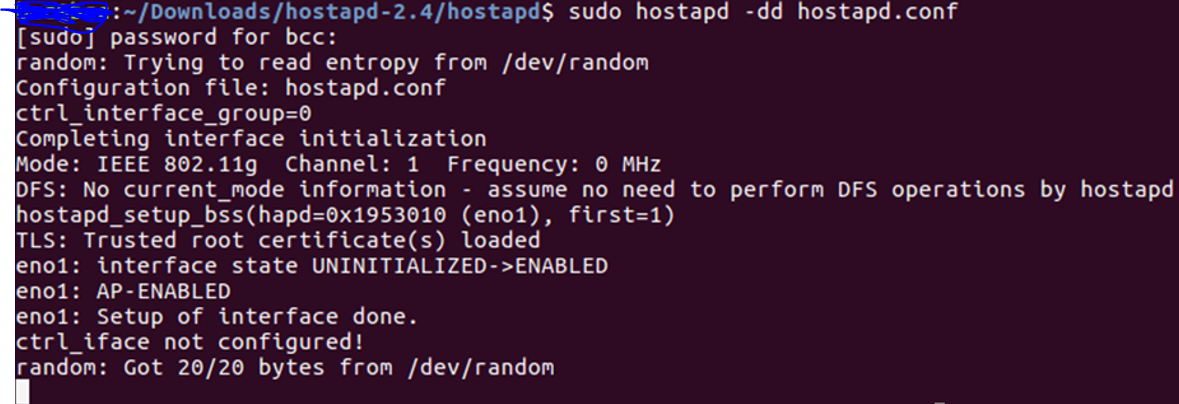
至此,hostapd作为Radius服务器运行完成。
添加PWD认证方法:
在/etc/hostapd.eap_user,# Phase 1 User下面添加
"testpwd" PWD "test"
第一个是ID,第二个是password.
Tony Liu
2017-12-13
hostapd作为radius服务器的更多相关文章
- [EAP]将hostapd作为radius服务器搭建EAP认证环境
文章主要由以下几部分组成: 0.概念理解: WPA/WPA2,EAP,IEEE, 802.11i, WiFi联盟, 802.1x 1.编译hostapd 2.配置hostapd的conf文件 3.外接 ...
- CentOS7用hostapd做radius服务器为WiFi提供802.1X企业认证
CentOS7用hostapd做radius服务器为WiFi提供802.1X企业认证 来源: https://www.cnblogs.com/osnosn/p/10593297.html 来自osno ...
- radius服务器搭建
yum install -y unzip gcc-c++ cd /opt unzip release-stable.zip mv ToughRADIUS-release-stable toughrad ...
- Linux上构建一个RADIUS服务器详解
作为一名网络管理员,您需要为您所需管理的每个网络设备存放用于管理的用户信息.但是网络设备通常只支持有限的用户管理功能.学习如何使用Linux上的一个外部RADIUS服务器来验证用户,具体来说是通过一个 ...
- windows server 搭建radius服务器
使用ISA 2004搭建PPTP/L2TP 服务器后,VPN账号是在radius服务器上的,使用window server 2003搭建radius服务器,需要添加组件->internet验证服 ...
- [原创]CentOS下Radius服务器搭建
一. 实现环境: 1.系统:CentOS release 6.6 (Final) 2.需要软件包: 1) freeradius-2.1.12-6.e16.x86_64 freeradius-m ...
- Windows 2008 Server搭建Radius服务器的方法
原地址:http://service.tp-link.com.cn/detail_article_1113.html (图拷贝不过来) Windows 2008 Server搭建Radius服务器的方 ...
- 远程 RADIUS 服务器组
远程 RADIUS 服务器组 远程 RADIUS 服务器组是包含一个或多个 RADIUS 服务器的已命名的组.IAS 用作 RADIUS 请求消息的 RADIUS 代理时,必须指定远程 RADIUS ...
- Linux搭建Radius服务器
安装环境介绍 以下服务器信息为该文档安装Radius服务环境 服务器信息:CentOS7 内核版本:3.10.0-1062.el7.x86_64 安装软件版本 freeradius-utils-3.0 ...
随机推荐
- Webservice超时问题
Winform客户端调用Webservice 120秒超时.对此问题,针对服务器与客户端分别作了超时设置为300S. 1. 服务器端设置超时 在 web.config 的 system.web 里添加 ...
- Java中创建String的两种方式差异
我们知道创建一个String类型的变量一般有以下两种方法: String str1 = "abcd"; String str2 = new String("abcd&qu ...
- Beef-xss
Beef xss beef安装目录:/usr/share/beef-xss UI URL: http://IP:3000/ui/panel Hook: <script src="htt ...
- Linux服务开机自启动使用示例
本文以redis服务为例,介绍了两种服务自启动的方法service,systemctl使用示例 1.修改redis.conf,允许后台运行 daemonize no 改为 daemonize yes ...
- linux命令(48):打乱一个文本文件的所有行
如果用python读进内存再打乱的思路,如果大文件的话,就比较麻烦了 网上找到一个简单的方法,shuf: $ shuf --help 用法: shuf [选项]... [文件] 或者: shuf -e ...
- 如何让 zend studio 10 识别 Phalcon语法并且进行语法提示
让 zend studio 10 识别 Phalcon语法并且进行语法提示 https://github.com/rogerthomas84/PhalconPHPDoc 下载解压后,把里面 phalc ...
- Mac安装mtr与brow安装
Mac安装mtr与brow安装 Mac里比较好的安装mtr方式是用Homebrew 或者MacPorts,本来想安装Homebrew,但大概是GFW的问题,下载地址无法访问,因为没有全局FQ,暂时不考 ...
- Asp.Net微信支付接口之jsApiPay教程
1.微信支付JsApiPay只能在微信浏览器中使用 2.必须先申请微信支付功能 3.设置域名 4.设置支付授权目录 一定要精确到最后一级目录 5.获取APPID和AppSecret AppSecr ...
- ubuntu 解压命令
ubuntu解压命令.tar解包:tar xvf FileName.tar打包:tar cvf FileName.tar DirName(注:tar是打包,不是压缩!)———————————————. ...
- LeetCode:Sqrt(x) 解题报告
Sqrt(x) Implement int sqrt(int x). Compute and return the square root of x. SOLUTION 1: 参见:二分法总结,以及模 ...