
DCIntrospect -iOS界面调试
原文:http://www.cnblogs.com/kw-ios/p/3523525.html
有时,设计稿上的UI很漂亮,布局也整齐,但自己用代码写出来的就不行,不是这里高一点,就是那是低一点,使用DCIntrospect来查看元素信息调整布局,再也不用凭眼睛来估了。
使用方法:
Before you start make sure the DEBUG environment variable is set. DCIntrospect will not run without that set to prevent it being left in for production use.
Add the DCIntrospect class files to your project, add the QuartzCore framework if needed. To start:
[window makeKeyAndDisplay]

// always call after makeKeyAndDisplay.

#if TARGET_IPHONE_SIMULATOR

    [[DCIntrospect sharedIntrospector] start];

#endif
The #if to target the simulator is not required but is a good idea to further prevent leaving it on in production code.
Once setup, simply push the space bar to invoke the introspect or then start clicking on views to get info. You can also tap and drag around the interface.
1、将DCIntrospect拖到工程中,添加QuartzCore framework;
2、在didFinishLaunchingWithOptions方法中,
//#if TARGET_IPHONE_SIMULATOR //可加可不加

[[DCIntrospect sharedIntrospector] start];

//#endif

OK,按下空格,点哪哪就有UI位置信息了(如果不好使,重启xcode试一试)
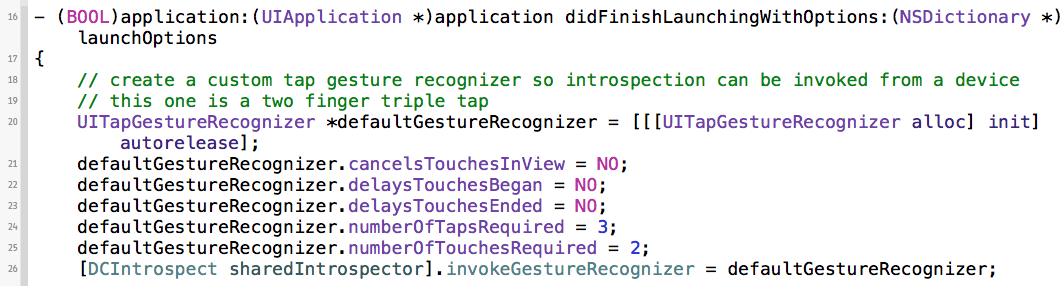
在真机上使用DCIntrospect,github上说的很清楚:
It can also be invoked via an app-wide `UIGestureRecognizer` if it is to be used on the device.
快捷键使用:http://blog.csdn.net/moniface/article/details/28860371
DCIntrospect -iOS界面调试的更多相关文章
- IOS界面调试神器DCIntrospect
对于使用代码来写UI的同志,使用DCIntrospect来查看元素信息调整布局,再也不用凭眼睛来估了,先来看看截图 DCIntrospect是github上的开源项目:下载源码 大概介绍下用法: DC ...
- iOS 界面调试利器Reveal
Reveal下载地址:http://revealapp.com/ ,目前要收费了,而且还不便宜,好东西都这样嘛~ 针对越狱设备和非越狱设备可以采取不同的方法,一种是在工程项目中加入Reveal.fra ...
- iOS高效调试
写代码难免出现bug. 储备些调试技能绝对能够提高你的工作效率,让bug无所遁形.下面就和大家分享一些我在工作中常用的iOS调试小技能. 1. 打印 最简单,基础的调试方法就是打印日志了.贴出两段封装 ...
- iOS各种调试技巧豪华套餐
转载自http://www.cnblogs.com/daiweilai/p/4421340.html 目录 前言 逼优鸡 知己知彼 百战不殆 抽刀断Bug 普通操作 全局断点(Global Break ...
- iOS界面开发
[转载] iOS界面开发 发布于:2014-07-29 11:49阅读数:13399 iOS 8 和 OS X 10.10 中一个被强调了多次的主题就是大一统,Apple 希望通过 Hand-off ...
- iOS界面调试工具 Reveal-备用
Reveal是一个iOS程序界面调试工具.使用Reveal,我们可以在iOS开发时动态地查看和修改应用程序的界面. 对于动态或复杂的交互界面,手写UI是不可避免的.通过Reveal,我们可以方便地调试 ...
- iOS 界面开发
iOS 自动布局 iOS 界面 之 EALayout 无需反复编译,可视化实时界面,告别Storyboard AutoLayout Xib等等烦人的工具 iOS应用国际化教程(2014版) iOS开发 ...
- iOS 程序调试、测试方案
1. iOS 之 界面调试 2. iOS 之 调试.解决BUG 3. iOS 程序测试.程序优化.提交前检测
- IOS各种调试
IOS各种调试技巧豪华套餐 目录 前言逼优鸡知己知彼 百战不殆抽刀断Bug 普通操作 全局断点(Global BreakPoint) 条件断点(Condational Breakpoints)打印 ...
随机推荐
- pip安装使用详解(转)
pip类似RedHat里面的yum,安装Python包非常方便.本节详细介绍pip的安装.以及使用方法. 1.pip下载安装 1.1 pip下载 1 # wget "https://py ...
- Azure 带宽
Azure带宽与Azure Blob云存储 http://www.cnblogs.com/threestone/p/4497625.html
- echarts-案例
关系图 http://echarts.baidu.com/echarts2/doc/example/force1.html http://www.cnblogs.com/spring_wang/p/4 ...
- 【USACO 3.2】Sweet Butter(最短路)
题意 一个联通图里给定若干个点,求他们到某点距离之和的最小值. 题解 枚举到的某点,然后优先队列优化的dijkstra求最短路,把给定的点到其的最短路加起来,更新最小值.复杂度是\(O(NElogE) ...
- Python Pandas分组聚合
Pycharm 鼠标移动到函数上,CTRL+Q可以快速查看文档,CTR+P可以看基本的参数. apply(),applymap()和map() apply()和applymap()是DataFrame ...
- Error Domain=NSURLErrorDomain Code=-999 “The operation couldn’t be completed.
转:http://www.wangzhengdong.com/blog/error-domainnsurlerrordomain-code-999-the-operation-couldnt-be-c ...
- HTML5 之 FileReader(图片上传)
1.FileReader接口的方法 FileReader接口有4个方法,其中3个用来读取文件,另一个用来中断读取.无论读取成功或失败,方法并不会返回读取结果,这一结果存储在result属性中. Fil ...
- word中表格加粗某一行
选中表格后选择线条粗细. 然后重新绘制一遍就行了.
- awk命令速查
awk与sed.grep一样都是为了加工数据流而做成的文本加工过滤器命令.awk会事先把输入的数据根据字段单位进行分割.在没有制定分割单位的情况下,以输入数据中的空格或Tab为分隔符.与sed相比,它 ...
- Yii2.0 对的一些简单的操作
1: 此方法返回 ['name' => 'daxia'] 的所有数据: User::find()->where(['name' => 'daxia'])->all(); 2: ...