
spring security使用hibernate进行查询数据库验证
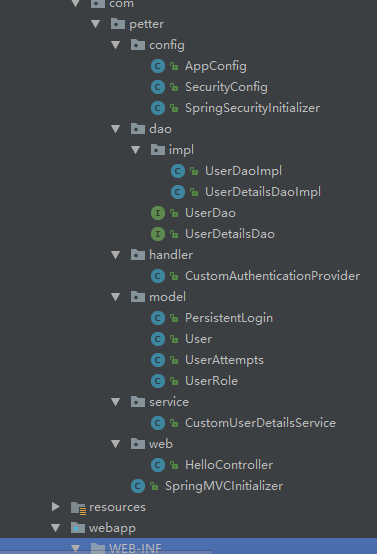
<project xmlns="http://maven.apache.org/POM/4.0.0" xmlns:xsi="http://www.w3.org/2001/XMLSchema-instance"

  xsi:schemaLocation="http://maven.apache.org/POM/4.0.0 http://maven.apache.org/maven-v4_0_0.xsd">

  <modelVersion>4.0.0</modelVersion>

  <groupId>com.petter</groupId>

  <artifactId>security-hibernate-annotation</artifactId>

  <packaging>war</packaging>

  <version>1.0-SNAPSHOT</version>

  <name>security-hibernate-annotation Maven Webapp</name>

  <url>http://maven.apache.org</url>

  <properties>

    <project.build.sourceEncoding>UTF-8</project.build.sourceEncoding>

    <project.reporting.outputEncoding>UTF-8</project.reporting.outputEncoding>

    <java.version>1.8</java.version>

    <spring.version>4.3.5.RELEASE</spring.version>

    <spring.security.version>4.2.1.RELEASE</spring.security.version>

    <mysql.connector.version>5.1.40</mysql.connector.version>

    <dbcp.version>2.1.1</dbcp.version>

      <hibernate.version>5.2.9.Final</hibernate.version>

  </properties>

  <dependencies>

    <!-- database pool -->

    <dependency>

      <groupId>org.apache.commons</groupId>

      <artifactId>commons-dbcp2</artifactId>

      <version>${dbcp.version}</version>

    </dependency>

      <!-- Hibernate ORM -->

      <dependency>

          <groupId>org.hibernate</groupId>

          <artifactId>hibernate-core</artifactId>

          <version>${hibernate.version}</version>

      </dependency>

    <dependency>

      <groupId>org.springframework</groupId>

      <artifactId>spring-core</artifactId>

      <version>${spring.version}</version>

    </dependency>

    <dependency>

      <groupId>org.springframework</groupId>

      <artifactId>spring-web</artifactId>

      <version>${spring.version}</version>

    </dependency>

    <dependency>

      <groupId>org.springframework</groupId>

      <artifactId>spring-webmvc</artifactId>

      <version>${spring.version}</version>

    </dependency>

      <!-- ORM integration, e.g Hibernate -->

      <dependency>

          <groupId>org.springframework</groupId>

          <artifactId>spring-orm</artifactId>

          <version>${spring.version}</version>

      </dependency>

      <!-- Spring + aspects -->

      <dependency>

          <groupId>org.springframework</groupId>

          <artifactId>spring-aspects</artifactId>

          <version>${spring.version}</version>

      </dependency>

    <dependency>

      <groupId>org.thymeleaf</groupId>

      <artifactId>thymeleaf-spring4</artifactId>

      <version>3.0.3.RELEASE</version>

    </dependency>

    <!-- Spring Security -->

    <dependency>

      <groupId>org.springframework.security</groupId>

      <artifactId>spring-security-web</artifactId>

      <version>${spring.security.version}</version>

    </dependency>

    <dependency>

      <groupId>org.springframework.security</groupId>

      <artifactId>spring-security-config</artifactId>

      <version>${spring.security.version}</version>

    </dependency>

    <!-- 用于thymeleaf中使用security的标签 -->

    <dependency>

      <groupId>org.thymeleaf.extras</groupId>

      <artifactId>thymeleaf-extras-springsecurity4</artifactId>

      <version>3.0.2.RELEASE</version>

    </dependency>

    <!-- mysql -->

    <dependency>

      <groupId>mysql</groupId>

      <artifactId>mysql-connector-java</artifactId>

      <version>${mysql.connector.version}</version>

    </dependency>

  </dependencies>

  <build>

    <plugins>

      <plugin>

        <groupId>org.apache.maven.plugins</groupId>

        <artifactId>maven-compiler-plugin</artifactId>

        <version>3.3</version>

        <configuration>

          <source>1.8</source>

          <target>1.8</target>

          <encoding>utf8</encoding>

        </configuration>

      </plugin>

    </plugins>

  </build>

</project>
一、由于使用hibernate,我们使用jpa自己生成数据库表,具体是
package com.petter.model;

import javax.persistence.*;

import java.util.Date;

/**

 * @author hongxf

 * @since 2017-04-17 14:42

 */

@Entity

@Table(name = "persistent_logins")

public class PersistentLogin {

    private String series;

    private String username;

    private String token;

    private Date lastUsed;

    @Id

    @Column(name = "series")

    public String getSeries() {

        return series;

    }

    public void setSeries(String series) {

        this.series = series;

    }

    @Column(name = "username", nullable = false)

    public String getUsername() {

        return username;

    }

    public void setUsername(String username) {

        this.username = username;

    }

    @Column(name = "token", nullable = false)

    public String getToken() {

        return token;

    }

    public void setToken(String token) {

        this.token = token;

    }

    @Temporal(TemporalType.TIMESTAMP)

    @Column(name = "last_used", nullable = false)

    public Date getLastUsed() {

        return lastUsed;

    }

    public void setLastUsed(Date lastUsed) {

        this.lastUsed = lastUsed;

    }

}
2、用户类User对应表users
package com.petter.model;

import javax.persistence.*;

import java.util.HashSet;

import java.util.Set;

/**

 * @author hongxf

 * @since 2017-04-17 10:29

 */

@Entity

@Table(name = "users")

public class User {

    private String username;

    private String password;

    private boolean enabled;

    private boolean accountNonExpired;

    private boolean accountNonLocked;

    private boolean credentialsNonExpired;

    private Set<UserRole> userRole = new HashSet<>();

    @Id

    @Column(name = "username", unique = true, nullable = false, length = 45)

    public String getUsername() {

        return username;

    }

    public void setUsername(String username) {

        this.username = username;

    }

    @Column(name = "password", nullable = false, length = 60)

    public String getPassword() {

        return password;

    }

    public void setPassword(String password) {

        this.password = password;

    }

    @Column(name = "enable", nullable = false)

    public boolean isEnabled() {

        return enabled;

    }

    public void setEnabled(boolean enabled) {

        this.enabled = enabled;

    }

    @Column(name = "accountNonExpired", nullable = false)

    public boolean isAccountNonExpired() {

        return accountNonExpired;

    }

    public void setAccountNonExpired(boolean accountNonExpired) {

        this.accountNonExpired = accountNonExpired;

    }

    @Column(name = "accountNonLocked", nullable = false)

    public boolean isAccountNonLocked() {

        return accountNonLocked;

    }

    public void setAccountNonLocked(boolean accountNonLocked) {

        this.accountNonLocked = accountNonLocked;

    }

    @Column(name = "credentialsNonExpired", nullable = false)

    public boolean isCredentialsNonExpired() {

        return credentialsNonExpired;

    }

    public void setCredentialsNonExpired(boolean credentialsNonExpired) {

        this.credentialsNonExpired = credentialsNonExpired;

    }

    @OneToMany(fetch = FetchType.EAGER, mappedBy = "user")

    public Set<UserRole> getUserRole() {

        return userRole;

    }

    public void setUserRole(Set<UserRole> userRole) {

        this.userRole = userRole;

    }

}
3、用户权限表user_roles对应类UserRole
package com.petter.model;

import javax.persistence.*;

/**

 * @author hongxf

 * @since 2017-04-17 10:32

 */

@Entity

@Table(name = "user_roles", uniqueConstraints = @UniqueConstraint(columnNames = {"role", "username"}))

public class UserRole {

    private Integer userRoleId;

    private User user;

    private String role;

    @Id

    @GeneratedValue(strategy = GenerationType.IDENTITY)

    @Column(name = "user_role_id")

    public Integer getUserRoleId() {

        return userRoleId;

    }

    public void setUserRoleId(Integer userRoleId) {

        this.userRoleId = userRoleId;

    }

    @ManyToOne(fetch = FetchType.LAZY)

    @JoinColumn(name = "username", nullable = false)

    public User getUser() {

        return user;

    }

    public void setUser(User user) {

        this.user = user;

    }

    @Column(name = "role", nullable = false, length = 45)

    public String getRole() {

        return role;

    }

    public void setRole(String role) {

        this.role = role;

    }

}
4、用于保存登录失败尝试次数的UserAttempts
package com.petter.model;

import javax.persistence.*;

import java.util.Date;

/**

 * @author hongxf

 * @since 2017-03-20 10:50

 */

@Entity

@Table(name = "user_attempts")

public class UserAttempts {

    private int id;

    private String username;

    private int attempts;

    private Date lastModified;

    @Id

    @GeneratedValue(strategy = GenerationType.IDENTITY)

    @Column(name = "id")

    public int getId() {

        return id;

    }

    public void setId(int id) {

        this.id = id;

    }

    @Column(name = "username")

    public String getUsername() {

        return username;

    }

    public void setUsername(String username) {

        this.username = username;

    }

    @Column(name = "attempts")

    public int getAttempts() {

        return attempts;

    }

    public void setAttempts(int attempts) {

        this.attempts = attempts;

    }

    @Temporal(TemporalType.TIMESTAMP)

    @Column(name = "lastModified")

    public Date getLastModified() {

        return lastModified;

    }

    public void setLastModified(Date lastModified) {

        this.lastModified = lastModified;

    }

}
二、配置hibernate,在AppConfig类中添加hibernate的配置
package com.petter.config;

import org.apache.commons.dbcp2.BasicDataSource;

import org.hibernate.SessionFactory;

import org.springframework.context.annotation.Bean;

import org.springframework.context.annotation.ComponentScan;

import org.springframework.context.annotation.Configuration;

import org.springframework.context.annotation.Import;

import org.springframework.orm.hibernate5.HibernateTransactionManager;

import org.springframework.orm.hibernate5.LocalSessionFactoryBuilder;

import org.springframework.transaction.annotation.EnableTransactionManagement;

import org.springframework.web.servlet.config.annotation.EnableWebMvc;

import org.thymeleaf.extras.springsecurity4.dialect.SpringSecurityDialect;

import org.thymeleaf.spring4.SpringTemplateEngine;

import org.thymeleaf.spring4.templateresolver.SpringResourceTemplateResolver;

import org.thymeleaf.spring4.view.ThymeleafViewResolver;

import org.thymeleaf.templatemode.TemplateMode;

import java.util.Properties;

/**

 * 相当于

 * @author hongxf

 * @since 2017-03-08 10:11

 */

@EnableWebMvc

@Configuration

@ComponentScan({"com.petter.*"})

@EnableTransactionManagement

@Import({SecurityConfig.class})

public class AppConfig  {

    @Bean

    public SessionFactory sessionFactory() {

        LocalSessionFactoryBuilder builder = new LocalSessionFactoryBuilder(dataSource());

        builder.scanPackages("com.petter.model")

                .addProperties(getHibernateProperties());

        return builder.buildSessionFactory();

    }

    private Properties getHibernateProperties() {

        Properties prop = new Properties();

        prop.put("hibernate.format_sql", "true");

        prop.put("hibernate.show_sql", "true");

        prop.put("hibernate.hbm2ddl.auto", "update");

        prop.put("hibernate.dialect", "org.hibernate.dialect.MySQL5Dialect");

        return prop;

    }

    @Bean(name = "dataSource")

    public BasicDataSource dataSource() {

        BasicDataSource ds = new BasicDataSource();

        ds.setDriverClassName("com.mysql.jdbc.Driver");

        ds.setUrl("jdbc:mysql://192.168.11.81:3306/security_learning_3");

        ds.setUsername("petter");

        ds.setPassword("petter");

        return ds;

    }

    @Bean

    public HibernateTransactionManager txManager() {

        return new HibernateTransactionManager(sessionFactory());

    }

    @Bean

    public SpringResourceTemplateResolver springResourceTemplateResolver() {

        SpringResourceTemplateResolver springResourceTemplateResolver = new SpringResourceTemplateResolver();

        springResourceTemplateResolver.setPrefix("/WEB-INF/pages/");

        springResourceTemplateResolver.setSuffix(".html");

        springResourceTemplateResolver.setTemplateMode(TemplateMode.HTML);

        springResourceTemplateResolver.setCacheable(false);

        springResourceTemplateResolver.setCharacterEncoding("UTF-8");

        return springResourceTemplateResolver;

    }

    @Bean

    public SpringTemplateEngine springTemplateEngine() {

        SpringTemplateEngine springTemplateEngine = new SpringTemplateEngine();

        springTemplateEngine.setTemplateResolver(springResourceTemplateResolver());

        springTemplateEngine.addDialect(new SpringSecurityDialect());

        return springTemplateEngine;

    }

    @Bean

    public ThymeleafViewResolver thymeleafViewResolver() {

        ThymeleafViewResolver thymeleafViewResolver = new ThymeleafViewResolver();

        thymeleafViewResolver.setTemplateEngine(springTemplateEngine());

        thymeleafViewResolver.setCharacterEncoding("UTF-8");

        return thymeleafViewResolver;

    }

}
注意这里添加了事务注解@EnableTransactionManagement,否则运行会报无事务错误,并且需要在具体的repository中添加@Transactional注解
package com.petter.dao;

import com.petter.model.User;

/**

 * @author hongxf

 * @since 2017-04-17 10:41

 */

public interface UserDao {

    User findByUserName(String username);

}
2、实现接口UserDao
package com.petter.dao.impl;

import com.petter.dao.UserDao;

import com.petter.model.User;

import org.hibernate.SessionFactory;

import org.springframework.stereotype.Repository;

import org.springframework.transaction.annotation.Transactional;

import javax.annotation.Resource;

import java.util.ArrayList;

import java.util.List;

/**

 * @author hongxf

 * @since 2017-04-17 10:42

 */

@Repository

public class UserDaoImpl implements UserDao {

    @Resource

    private SessionFactory sessionFactory;

    @SuppressWarnings("unchecked")

    @Transactional(readOnly = true)

    @Override

    public User findByUserName(String username) {

        List<User> users = sessionFactory.getCurrentSession()

                .createQuery("from User where username = ?")

                .setParameter(0, username)

                .list();

        if (users.size() > 0) {

            return users.get(0);

        } else {

            return null;

        }

    }

}
四、实现自定义UserDetailsService
package com.petter.service;

import com.petter.dao.UserDao;

import com.petter.model.User;

import com.petter.model.UserRole;

import org.springframework.security.core.GrantedAuthority;

import org.springframework.security.core.authority.SimpleGrantedAuthority;

import org.springframework.security.core.userdetails.UserDetails;

import org.springframework.security.core.userdetails.UserDetailsService;

import org.springframework.security.core.userdetails.UsernameNotFoundException;

import org.springframework.stereotype.Service;

import javax.annotation.Resource;

import java.util.ArrayList;

import java.util.HashSet;

import java.util.List;

import java.util.Set;

/**

 * security的验证过程会调用指定的UserDetailsService

 * 自定义的UserDetailsService查询数据库得到自己User后

 * 组装org.springframework.security.core.userdetails.User返回

 * @author hongxf

 * @since 2017-04-17 10:45

 */

@Service("userDetailsService")

public class CustomUserDetailsService implements UserDetailsService {

    @Resource

    private UserDao userDao;

    @Override

    public UserDetails loadUserByUsername(String username) throws UsernameNotFoundException {

        User user = userDao.findByUserName(username);

        if (user == null) {

            throw new UsernameNotFoundException("该用户不存在:" + username);

        }

        List<GrantedAuthority> authorities =  buildUserAuthority(user.getUserRole());

        return buildUserForAuthentication(user, authorities);

    }

    // 把自定义的User转换成org.springframework.security.core.userdetails.User

    private org.springframework.security.core.userdetails.User buildUserForAuthentication(

            User user,

            List<GrantedAuthority> authorities) {

        return new org.springframework.security.core.userdetails.User(user.getUsername(), user.getPassword(),

                user.isEnabled(), user.isAccountNonExpired(), user.isCredentialsNonExpired(), user.isAccountNonLocked(), authorities);

    }

    private List<GrantedAuthority> buildUserAuthority(Set<UserRole> userRoles) {

        Set<GrantedAuthority> setAuths = new HashSet<>();

        // Build user's authorities

        for (UserRole userRole : userRoles) {

            setAuths.add(new SimpleGrantedAuthority(userRole.getRole()));

        }

        return new ArrayList<>(setAuths);

    }

}
五、修改SecurityConfig配置
package com.petter.config;

import com.petter.handler.CustomAuthenticationProvider;

import com.petter.service.CustomUserDetailsService;

import org.springframework.beans.factory.annotation.Autowired;

import org.springframework.beans.factory.annotation.Qualifier;

import org.springframework.context.annotation.Bean;

import org.springframework.context.annotation.Configuration;

import org.springframework.security.config.annotation.authentication.builders.AuthenticationManagerBuilder;

import org.springframework.security.config.annotation.web.builders.HttpSecurity;

import org.springframework.security.config.annotation.web.configuration.EnableWebSecurity;

import org.springframework.security.config.annotation.web.configuration.WebSecurityConfigurerAdapter;

import org.springframework.security.core.userdetails.UserDetailsService;

import org.springframework.security.crypto.bcrypt.BCryptPasswordEncoder;

import org.springframework.security.crypto.password.PasswordEncoder;

import org.springframework.security.web.authentication.SavedRequestAwareAuthenticationSuccessHandler;

import org.springframework.security.web.authentication.rememberme.JdbcTokenRepositoryImpl;

import org.springframework.security.web.authentication.rememberme.PersistentTokenRepository;

import javax.annotation.Resource;

import javax.sql.DataSource;

/**

 * 相当于spring-security.xml中的配置

 * @author hongxf

 * @since 2017-03-08 9:30

 */

@Configuration

@EnableWebSecurity

public class SecurityConfig extends WebSecurityConfigurerAdapter {

    @Resource

    private DataSource dataSource;

    @Resource

    private CustomAuthenticationProvider authenticationProvider;

    @Resource

    private CustomUserDetailsService userDetailsService;

    @Bean

    public PasswordEncoder passwordEncoder(){

        return new BCryptPasswordEncoder();

    }

    @Override

    protected void configure(AuthenticationManagerBuilder auth) throws Exception {

        //authenticationProvider.setPasswordEncoder(passwordEncoder());

        //auth.authenticationProvider(authenticationProvider);

        auth.userDetailsService(userDetailsService).passwordEncoder(passwordEncoder());

    }

    /**

     * 配置权限要求

     * 采用注解方式,默认开启csrf

     * @param http

     * @throws Exception

     */

    @Override

    protected void configure(HttpSecurity http) throws Exception {

        http.authorizeRequests()

                .antMatchers("/admin/**").hasRole("ADMIN")

                .antMatchers("/dba/**").hasAnyRole("ADMIN", "DBA")

            .and()

                .formLogin().successHandler(savedRequestAwareAuthenticationSuccessHandler())

                .loginPage("/login") //指定自定义登录页

                .failureUrl("/login?error") //登录失败的跳转路径

                .loginProcessingUrl("/auth/login_check") //指定了登录的form表单提交的路径,需与表单的action值保存一致,默认是login

                .usernameParameter("user-name").passwordParameter("pwd")

            .and()

                .logout().logoutSuccessUrl("/login?logout")

            .and()

                .exceptionHandling().accessDeniedPage("/403")

            .and()

                .csrf()

            .and()

                //.rememberMe().rememberMeParameter("remember-me") //其实默认就是remember-me,这里可以指定更换

                //.tokenValiditySeconds(1209600)

                //.key("hongxf");

                .rememberMe().tokenRepository(persistentTokenRepository())

                .tokenValiditySeconds(1209600);

    }

    //如果采用持久化 token 的方法则需要指定保存token的方法

    @Bean

    public PersistentTokenRepository persistentTokenRepository() {

        JdbcTokenRepositoryImpl db = new JdbcTokenRepositoryImpl();

        db.setDataSource(dataSource);

        return db;

    }

    //使用remember-me必须指定UserDetailsService

    @Override

    protected UserDetailsService userDetailsService() {

        return userDetailsService;

    }

    /**

     * 这里是登录成功以后的处理逻辑

     * 设置目标地址参数为targetUrl

     * /auth/login_check?targetUrl=/admin/update

     * 这个地址就会被解析跳转到/admin/update,否则就是默认页面

     *

     * 本示例中访问update页面时候会判断用户是手动登录还是remember-me登录的

     * 如果是remember-me登录的则会跳转到登录页面进行手动登录再跳转

     * @return

     */

    @Bean

    public SavedRequestAwareAuthenticationSuccessHandler savedRequestAwareAuthenticationSuccessHandler() {

        SavedRequestAwareAuthenticationSuccessHandler auth = new SavedRequestAwareAuthenticationSuccessHandler();

        auth.setTargetUrlParameter("targetUrl");

        return auth;

    }

}
至此进行测试完全没有问题,但是此处的配置没有实现多次登录失败锁定用户的功能,因为这里没有指定自定义的AuthenticationProvider,使用的是默认的AuthenticationProvider的实现类DaoAuthenticationProvider。
package com.petter.handler;

import com.petter.dao.UserDetailsDao;

import com.petter.model.UserAttempts;

import org.springframework.beans.factory.annotation.Autowired;

import org.springframework.beans.factory.annotation.Qualifier;

import org.springframework.security.authentication.BadCredentialsException;

import org.springframework.security.authentication.LockedException;

import org.springframework.security.authentication.dao.DaoAuthenticationProvider;

import org.springframework.security.core.Authentication;

import org.springframework.security.core.AuthenticationException;

import org.springframework.security.core.userdetails.UserDetailsService;

import org.springframework.stereotype.Component;

import javax.annotation.Resource;

import java.util.Date;

/**

 * 自定义验证程序,可以在这里进行其他附属操作,具体验证程序仍然调用上层接口即可

 * @author hongxf

 * @since 2017-03-20 14:28

 */

@Component("authenticationProvider")

public class CustomAuthenticationProvider extends DaoAuthenticationProvider {

    @Resource

    private UserDetailsDao userDetailsDao;

    @Autowired

    @Qualifier("userDetailsService")

    @Override

    public void setUserDetailsService(UserDetailsService userDetailsService) {

        super.setUserDetailsService(userDetailsService);

    }

    @Override

    public Authentication authenticate(Authentication authentication) throws AuthenticationException {

        try {

            //调用上层验证逻辑

            Authentication auth = super.authenticate(authentication);

            //如果验证通过登录成功则重置尝试次数, 否则抛出异常

            userDetailsDao.resetFailAttempts(authentication.getName());

            return auth;

        } catch (BadCredentialsException e) {

            //如果验证不通过,则更新尝试次数,当超过次数以后抛出账号锁定异常

            userDetailsDao.updateFailAttempts(authentication.getName());

            throw e;

        } catch (LockedException e){

            //该用户已经被锁定,则进入这个异常

            String error;

            UserAttempts userAttempts =

                    userDetailsDao.getUserAttempts(authentication.getName());

            if(userAttempts != null){

                Date lastAttempts = userAttempts.getLastModified();

                error = "用户已经被锁定,用户名 : "

                        + authentication.getName() + "最后尝试登陆时间 : " + lastAttempts;

            }else{

                error = e.getMessage();

            }

            throw new LockedException(error);

        }

    }

}
相应的使用hibernate修改之前的UserDetailsDao接口的实现方法
package com.petter.dao.impl;

import com.petter.dao.UserDetailsDao;

import com.petter.model.UserAttempts;

import org.hibernate.SessionFactory;

import org.springframework.dao.EmptyResultDataAccessException;

import org.springframework.jdbc.core.support.JdbcDaoSupport;

import org.springframework.security.authentication.LockedException;

import org.springframework.stereotype.Repository;

import org.springframework.transaction.annotation.Transactional;

import javax.annotation.PostConstruct;

import javax.annotation.Resource;

import javax.sql.DataSource;

import java.util.Date;

import java.util.List;

/**

 * @author hongxf

 * @since 2017-03-20 10:54

 */

@Repository

public class UserDetailsDaoImpl implements UserDetailsDao {

    @Resource

    private SessionFactory sessionFactory;

    private static final int MAX_ATTEMPTS = 3;

    @Transactional

    @Override

    public void updateFailAttempts(String username) {

        UserAttempts userAttempts = getUserAttempts(username);

        if (userAttempts == null) {

            if (isUserExists(username)) { //如果存在这个用户

                // 如果之前没有记录,添加一条

                userAttempts = new UserAttempts();

                userAttempts.setUsername(username);

                userAttempts.setAttempts(1);

                userAttempts.setLastModified(new Date());

                sessionFactory.getCurrentSession().save(userAttempts);

            }

        } else {

            if (isUserExists(username)) {

                userAttempts.setAttempts(userAttempts.getAttempts() + 1);

                userAttempts.setLastModified(new Date());

                sessionFactory.getCurrentSession().update(userAttempts);

                sessionFactory.getCurrentSession().flush();

            }

            if (userAttempts.getAttempts() >= MAX_ATTEMPTS) {

                // 大于尝试次数则锁定

                sessionFactory.getCurrentSession()

                        .createQuery("update User u set u.accountNonLocked =:accountNonLocked where u.username =:username")

                        .setParameter("accountNonLocked", false)

                        .setParameter("username", username)

                        .executeUpdate();

                // 并且抛出账号锁定异常

                throw new LockedException("用户账号已被锁定,请联系管理员解锁");

            }

        }

    }

    @SuppressWarnings("unchecked")

    @Transactional(readOnly = true)

    @Override

    public UserAttempts getUserAttempts(String username) {

        List<UserAttempts> list = sessionFactory.getCurrentSession()

                .createQuery("from UserAttempts where username =:username")

                .setParameter("username", username)

                .list();

        if (list.size() > 0) {

            return list.get(0);

        } else {

            return null;

        }

    }

    @Transactional

    @Override

    public void resetFailAttempts(String username) {

        sessionFactory.getCurrentSession()

                .createQuery("update UserAttempts ua set ua.attempts = 0, ua.lastModified = null where ua.username =:username")

                .setParameter("username", username)

                .executeUpdate();

    }

    /**

     * 判断用户是否存在

     * @param username

     * @return

     */

    private boolean isUserExists(String username) {

        boolean result = false;

        Long count = (Long) sessionFactory.getCurrentSession()

                .createQuery("select count(*) from User u where u.username =:username")

                .setParameter("username", username)

                .iterate().next();

        if (count > 0) {

            result = true;

        }

        return result;

    }

}
当然最后还要修改下SecurityConfig配置
@Override

    protected void configure(AuthenticationManagerBuilder auth) throws Exception {

        authenticationProvider.setPasswordEncoder(passwordEncoder());

        auth.authenticationProvider(authenticationProvider);

        //auth.userDetailsService(userDetailsService).passwordEncoder(passwordEncoder());

    }
指定自定义的authenticationProvider
spring security使用hibernate进行查询数据库验证的更多相关文章
- Spring Security教程(二):自定义数据库查询
Spring Security教程(二):自定义数据库查询 Spring Security自带的默认数据库存储用户和权限的数据,但是Spring Security默认提供的表结构太过简单了,其实就 ...
- Spring Security教程(二):通过数据库获得用户权限信息
上一篇博客中,Spring Security教程(一):初识Spring Security,我把用户信息和权限信息放到了xml文件中,这是为了演示如何使用最小的配置就可以使用Spring Securi ...
- 【Spring Security】三、自定义数据库实现对用户信息和权限信息的管理
一 自定义表结构 这里还是用的mysql数据库,所以pom.xml文件都不用修改.这里只要新建三张表即可,user表.role表.user_role表.其中user用户表,role角色表为保存用户权限 ...
- Spring Security OAuth2之resource_id配置与验证
一.resource_id的作用 Spring Security OAuth2 架构上分为Authorization Server认证服务器和Resource Server资源服务器.我们可以为每一个 ...
- Spring Security框架下Restful Token的验证方案
项目使用Restful的规范,权限内容的访问,考虑使用Token验证的权限解决方案. 验证方案(简要概括): 首先,用户需要登陆,成功登陆后返回一个Token串: 然后用户访问有权限的内容时需要上传T ...
- spring security使用数据库资源
国内对权限系统的基本要求是将用户权限和被保护资源都放在数据库里进行管理,在这点上Spring Security并没有给出官方的解决方案,为此我们需要对Spring Security进行扩展.. 数据库 ...
- 【Spring】关于Boot应用中集成Spring Security你必须了解的那些事
Spring Security Spring Security是Spring社区的一个顶级项目,也是Spring Boot官方推荐使用的Security框架.除了常规的Authentication和A ...
- Spring Security(二十七):Part II. Architecture and Implementation
Once you are familiar with setting up and running some namespace-configuration based applications, y ...
- Spring Security(二十):6.2.3 Form and Basic Login Options
You might be wondering where the login form came from when you were prompted to log in, since we mad ...
随机推荐
- Java Something
Java静态代码检查工具 FindBugs FindBugs is a defect detection tool for Java that uses static analysis to look ...
- call to unavailable function system not available on ios 解决方案
编译时报错:call to unavailable function system not available on iOS 原因:iOS11已经将system删除 解决方案:system(comma ...
- [MongoDB]学习笔记--User管理
1. 创建一个超级用户 use admin db.createUser( { user: "adminUserName", pwd: "userPassword" ...
- SPOJ OPTM - Optimal Marks
OPTM - Optimal Marks no tags You are given an undirected graph G(V, E). Each vertex has a mark whic ...
- git 分回滚后无法合并代码问题
git reset & git revert 区别: 1. git revert是用一次新的commit来回滚之前的commit,git reset是直接删除指定的commit. 2. 在回滚 ...
- * 和 ?在 shell 命令行中与在正则表达式中的区别
Linux 正则表达式 你有没有想过,在 shell 命令行中的 *,?和正则表达式中的*,?是否一样? 自打好多年前接触 DOS,就知道了* 和?这两个通配符(Wildcard),象 dir *.* ...
- [hihoCoder] 拓扑排序·一
The hints of the problem has given detailed information to implement the topological sorting algorit ...
- CodeForces 157B Trace
B. Trace time limit per test 2 seconds memory limit per test 256 megabytes input standard input outp ...
- Oracle重做日志REDO
什么是重做? 重做日志包含所有数据产生的历史改变记录. 重做日志目的是保证数据的安全,如果数据因特殊原因没有写到磁盘上,可以通过重做日志来恢复. 重做日志文件通常用于 恢复(实例恢复和介质恢复) 日志 ...
- python 里面的单下划线与双下划线的区别(私有和保护)
Python 用下划线作为变量前缀和后缀指定特殊变量. _xxx 不能用'from moduleimport *'导入 __xxx__ 系统定义名字 __xxx 类中的私有变量名 核心风格:避免用下划 ...