
HIVE理论学习笔记
概述
参加了新的公司新的工作新的环境之后,本人必须学习更多的知识,所以稳固之前的知识和学习新的知识是重中之重,新的公司把hadoop大部分的组件都进行了架构源码深度改造,所以使用过程确实遇到一些麻烦,而写这篇随笔的目的就是记录之前学习的知识,并且作为学习新的架构的基础。就是本文说的hive组件。
HIVE架构
hive是建立在hadoop之上数据仓库基础架构,它提供了一系列的工具,可以用来进行数据提取转化加载ETL,这是一种可以存储、查询和分析存储在hadoop中的大规模数据机制。hive定义了简单的类SQL语言,称为QL,允许熟悉SQL的用户查询数据。hive就是SQL解析引擎,将sql转换Map/Reducer job 然后在hadoop中执行,hive表就是hdfs目录,按表名把文件夹分开。如果是分区表,则分区值是子文件夹,可以直接在Map/Reduce job使用这些数据。hive把sql语句转换成MR任务之后,采取批处理的方式对数据进行提取,转换,加载的工具。同时,这个语言也允许熟悉MapReduce开发者的自定义的mapper和reducer来处理内建的mapper和reducer无法完成的复杂的分析工作。见下图:
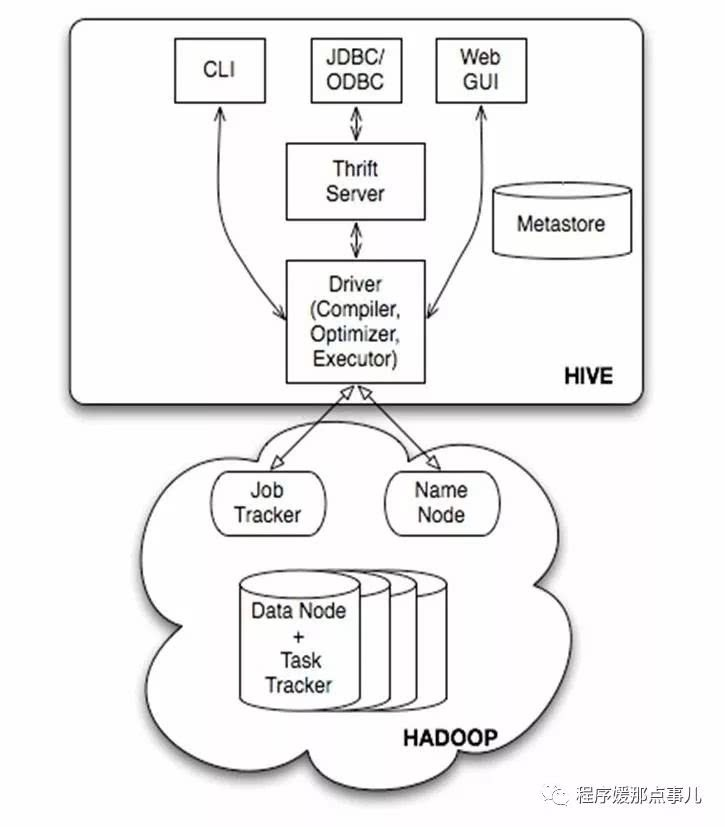
见上图:hive的体系分为以下几个部分:
1,用户接口主要有三个:CLI,Client和WUI,其中最常见的是CLI,cli启动的时候会同时启动一个hive副本。client是hive的客户端,用户连接到hive server。在启动client模式的时候,需要指出hive server所在节点,并且在该节点启动hive server。WUI是通过浏览器访问Hive。
2,Hive将元数据存储在数据库表中,如mysql、derby。hive中的元数据包括表的名字,表的列和分区及其属性,表的属性(是否为外部表等),表的数据所在目录等。
3,解释器、编译器、优化器完成HQL查询语句从词法分析,语法分析,编译,优化以及查询计划的生成。生成的查询计划存储在hdfs中,并在随后有mapreduce调用执行。
4,hive的数据存储在hdfs中,大部分的查询,计算由mapreduce完成(包含* 的查询,不会生成mapreduce任务)。
在看一个详细的架构图:
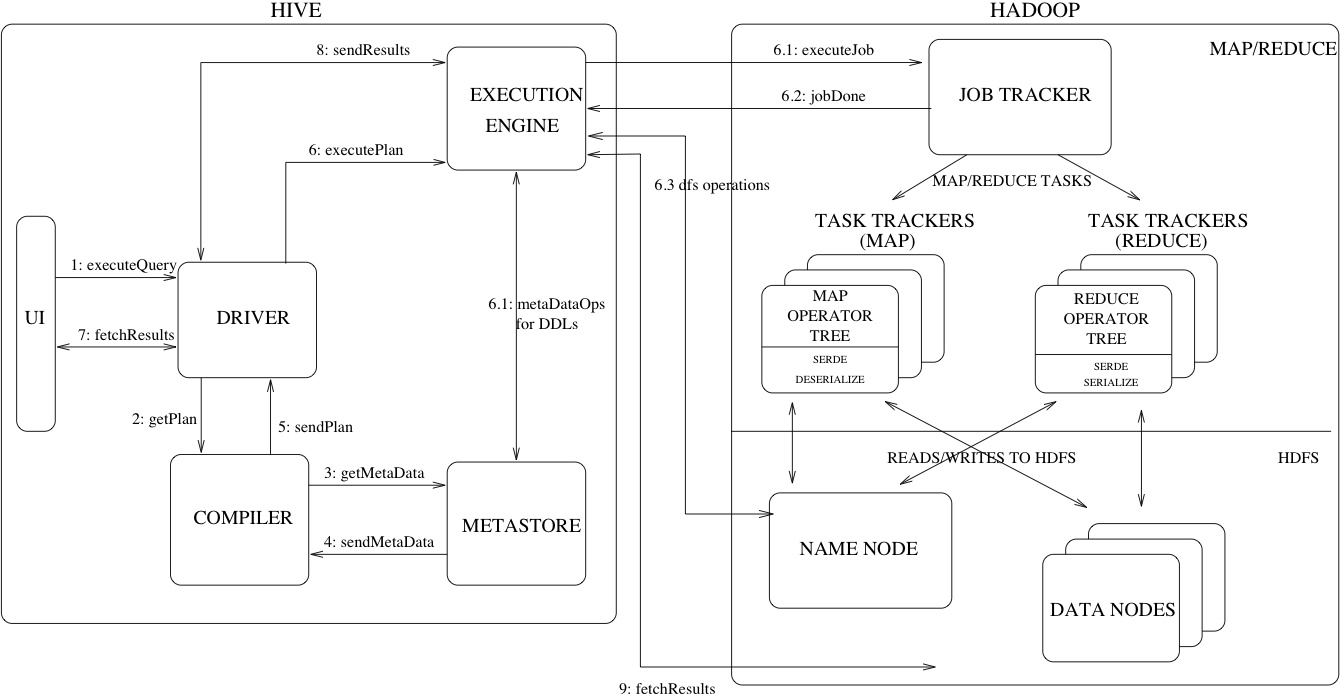
简单来说hive就是一个查询引擎,接收到一个sql,而后面做的事情就是上面描述的,下面说明一下:
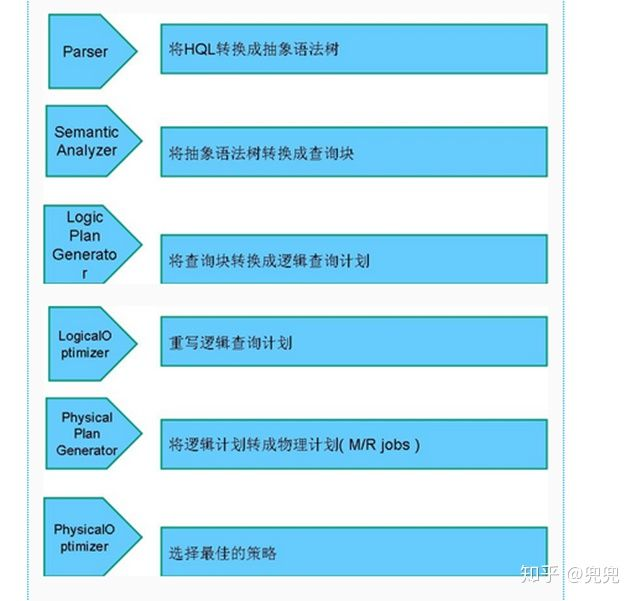
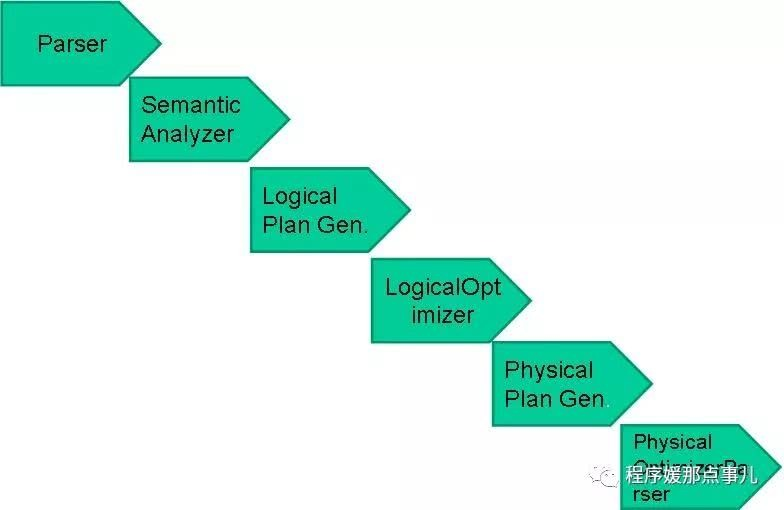
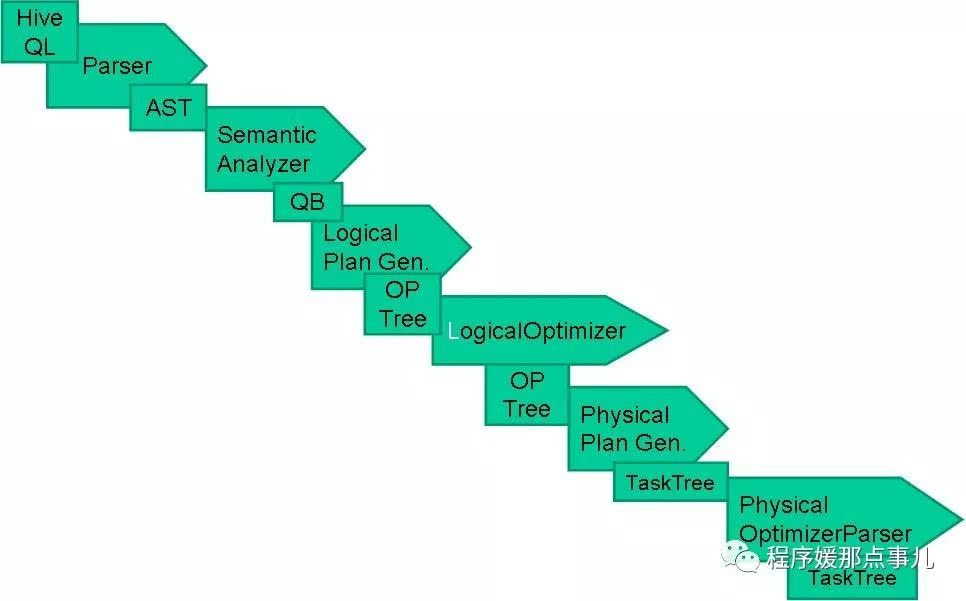
词法分析/语法分析:使用antlr将SQL语句解析成抽象语法树(AST)。
语义分析:从Megastore获取模式信息,验证SQL语句中队表名,列名,以及数据类型的检查和隐士转换。以及hive提供的函数和用户自定义的函数(UDF/UAF)。
逻辑计划生成:生成逻辑计划--算子树。
逻辑计划优化:队算子树进行优化,包括列剪枝,分区剪枝,谓词下推等。
物理计划生成:将逻辑计划生成包含由MapReduce任务组成的DAG的物理计划。
物理计划执行:将DAG发送到hadoop集群进行执行。
最后把查询结果返回
hive的三种运行模式:内嵌模式,本地模式,远程模式。
创建表时:
解析用户提交的Hive语句-->对其进行解析-->分解为表、字段、分区等Hive对象。根据解析到的信息构建对应的表、字段、分区等对象,从SEQUENCE_TABLE中获取构建对象的最新的ID,与构建对象信息(名称、类型等等)一同通过DAO方法写入元数据库的表中,成功后将SEQUENCE_TABLE中对应的最新ID+5.实际上常见的RDBMS都是通过这种方法进行组织的,其系统表中和Hive元数据一样显示了这些ID信息。通过这些元数据可以很容易的读取到数据。
hive编译器:
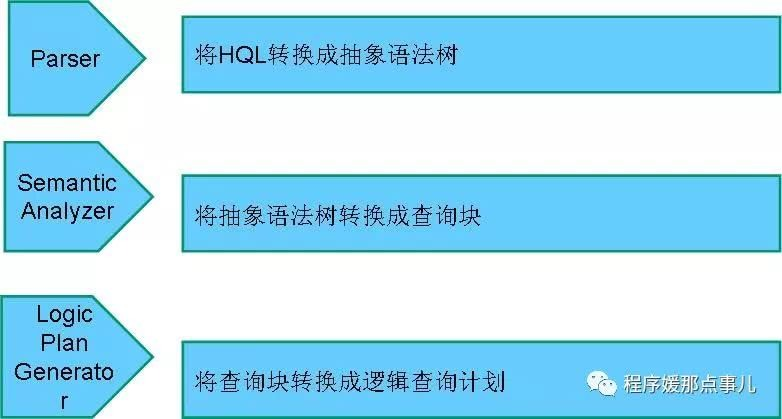
hive编译流程:
HIVE元数据存储
存储模式
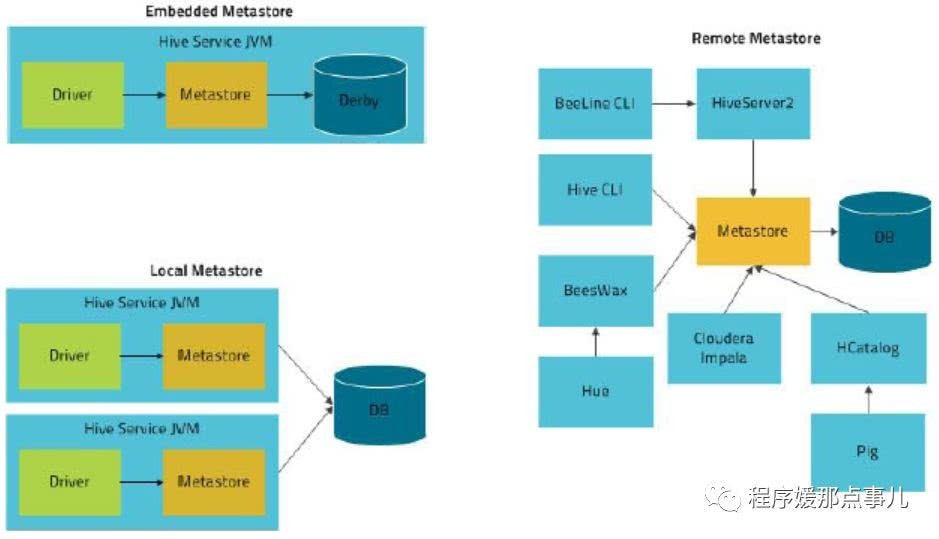
hive将元数据存储在RDBMS中,有三种模式可以连接到数据库:
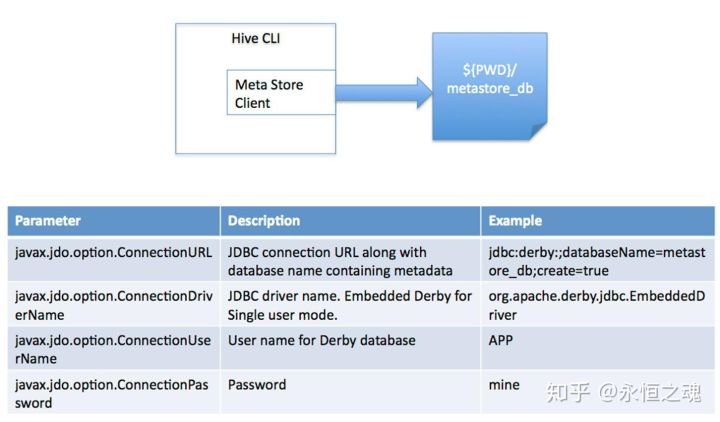
1,单用户模式:此模式连接到一个In-memory的数据库derby,一般用于Unit Test。
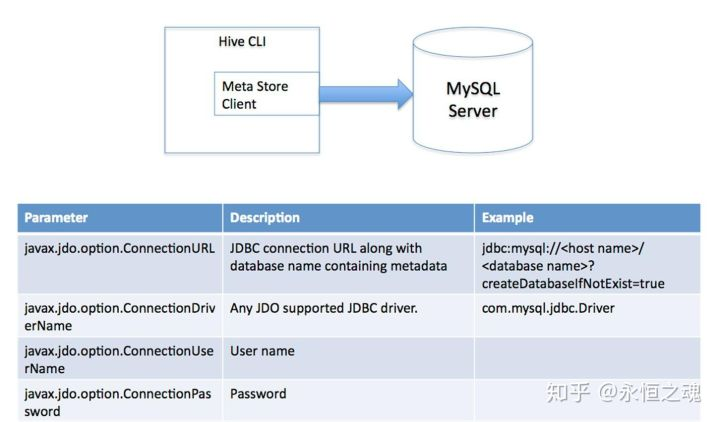
2,多用户模式:通过网络连接到一个数据库中,是经常使用到的模式。
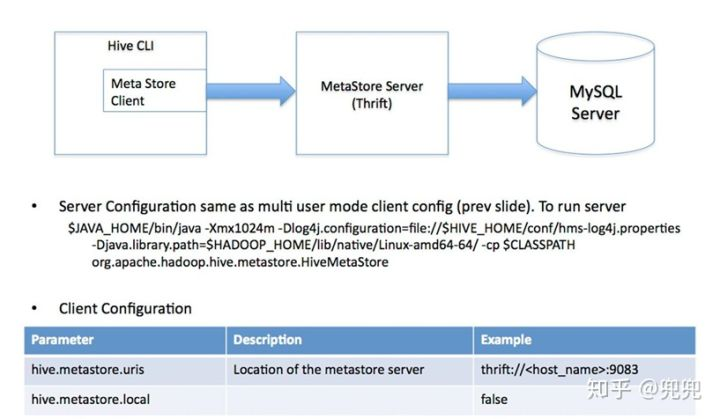
3,远程服务器模式: 用于非java客户端访问元数据库,在服务端启动MetaStoreServer,客户端利用Thrift协议通过MetaStoreServer访问元数据库。
对于数据存储,Hive没有专门的数据存储格式,也没有为数据建立索引,用户可以非常自由的组织Hive中的表,只需要在创建表的时候告诉Hive数据中的列分隔符和行分隔符,Hive就可以解析数据。Hive中所有的数据都存储在HDFS中,存储结构主要包括数据库、文件、表和视图。Hive中包含以下数据模型:Table内部表,External Table外部表,Partition分区,Bucket桶。Hive默认可以直接加载文本文件,还支持sequence file 、RCFile。
总结
元数据存储优化
大部分公司我相信元数据都是存在了mysql中,但是随着业务的增长,mysql内已经出现单表数据量,两千多万的情况,当用户出现在MetaStore密集操作的情况,往往会出现缓慢甚至超时的现象,极大的影响了任务的稳定性,所以优化hive的元数据趋势势在必行。
在去年,我们做过数据治理,Hive 表生命周期管理,定期去删除元数据,期望能够减少 MySQL 的数据量,缓解元数据库的压力。但是经过实践,发现该方案有以下缺点:
数据的增长远比删除的要快,治标不治本;
在删除超大分区表(分区数上百万)的分区时,会对 MySQL 造成一定的压力,只能单线程去做,否则会影响其他正常的 Hive 查询,效率极其低下;
在知乎,元信息删除是伴随数据一起删除的(删除 HDFS 过期数据,节约成本),Hive 的用户可能存在建表不规范的情况,将分区路径挂错,导致误删数据。
因此,我们需要寻找新的技术方案来解决这个问题。
已有方案:
主要有两种方案可以选择:
1,对mysql进行分库分表处理,将一台的mysql的压力分摊到mysql集群;
2,对hive metastore进行federation,采用多套hive metastore+mysql的架构,在metastore前方设置代理,按照一定的规则,对请求进行分发。
但是上面方案有缺陷:
1,对 MySQL 进行分库分表,首先面临的直接问题就是需要修改 Metastore 操作 MySQL 的接口,涉及到大量高风险的改动,后续对 Hive 的升级也会更加复杂;,
2,对 Hive Metastore 进行 Federation,尽管不需要对 Metastore 进行任何改动,但是需要额外维护一套路由组件,并且对路由规则的设置需要仔细考虑,切分现有的 MySQL 存储到不同的 MySQL 上,并且可能存在切分不均匀,导致各个子集群的负载不均衡的情况;
3,我们每天都会同步一份 MySQL 的数据到 Hive,用作数据治理,生命周期管理等,同步是利用内部的数据同步平台,如果采用上面两种方案,数据同步平台也需要对同步逻辑做额外的处理
知乎的方案:
其实问题主要在于,当数据量增加时,MySQL 受限于单机性能,很难有较好的表现,而将单台 MySQL 扩展为集群,复杂度将会呈几何倍上升。如果能够找到一款兼容 MySQL 协议的分布式数据库,就能完美解决这个问题。因此,我们选择了 TiDB。
TiDB 是 PingCAP 开源的分布式 NewSQL 数据库,它支持水平弹性扩展、ACID 事务、标准 SQL、MySQL 语法和 MySQL 协议,具有数据强一致的高可用特性,是一个不仅适合 OLTP 场景还适 OLAP 场景的混合数据库。
HIVE索引分区和分桶
索引:
Hive支持索引,但是Hive的索引与关系型数据库中的索引并不相同,比如,Hive不支持主键或者外键。Hive索引可以建立在表中的某些列上,以提升一些操作的效率,例如减少MapReduce任务中需要读取的数据块的数量。为什么要创建索引?Hive的索引目的是提高Hive表指定列的查询速度。没有索引时,类似'WHERE tab1.col1 = 10' 的查询,Hive会加载整张表或分区,然后处理所有的rows,但是如果在字段col1上面存在索引时,那么只会加载和处理文件的一部分。与其他传统数据库一样,增加索引在提升查询速度时,会消耗额外资源去创建索引表和需要更多的磁盘空间存储索引。
分区:
为了对表进行合理的管理以及提高查询效率,Hive可以将表组织成“分区”。
分区是表的部分列的集合,可以为频繁使用的数据建立分区,这样查找分区中的数据时就不需要扫描全表,这对于提高查找效率很有帮助。
分区是一种根据“分区列”(partition column)的值对表进行粗略划分的机制。Hive中每个分区对应着表很多的子目录,将所有的数据按照分区列放入到不同的子目录中去。
为什么要分区?庞大的数据集可能需要耗费大量的时间去处理。在许多场景下,可以通过分区的方法减少每一次扫描总数据量,这种做法可以显著地改善性能。
数据会依照单个或多个列进行分区,通常按照时间、地域或者是商业维度进行分区。为了达到性能表现的一致性,对不同列的划分应该让数据尽可能均匀分布。最好的情况下,分区的划分条件总是能够对应where语句的部分查询条件。
Hive的分区使用HDFS的子目录功能实现。每一个子目录包含了分区对应的列名和每一列的值。但是由于HDFS并不支持大量的子目录,这也给分区的使用带来了限制。我们有必要对表中的分区数量进行预估,从而避免因为分区数量过大带来一系列问题。
Hive查询通常使用分区的列作为查询条件。这样的做法可以指定MapReduce任务在HDFS中指定的子目录下完成扫描的工作。HDFS的文件目录结构可以像索引一样高效利用。
分桶:
桶是通过对指定列进行哈希计算来实现的,通过哈希值将一个列名下的数据切分为一组桶,并使每个桶对应于该列名下的一个存储文件。
为什么要分桶?在分区数量过于庞大以至于可能导致文件系统崩溃时,我们就需要使用分桶来解决问题了。分区中的数据可以被进一步拆分成桶,不同于分区对列直接进行拆分,桶往往使用列的哈希值对数据打散,并分发到各个不同的桶中从而完成数据的分桶过程。hive使用对分桶所用的值进行hash,并用hash结果除以桶的个数做取余运算的方式来分桶,保证了每个桶中都有数据,但每个桶中的数据条数不一定相等。哈希函数的选择依赖于桶操作所针对的列的数据类型。除了数据采样,桶操作也可以用来实现高效的Map端连接操作。在数据量足够大的情况下,分桶比分区,更高的查询效率。
总结:
索引和分区最大的区别就是索引不分割数据库,分区分割数据库。
索引其实就是拿额外的存储空间换查询时间,但分区已经将整个大数据库按照分区列拆分成多个小数据库了。
分区和分桶最大的区别就是分桶随机分割数据库,分区是非随机分割数据库。因为分桶是按照列的哈希函数进行分割的,相对比较平均;而分区是按照列的值来进行分割的,容易造成数据倾斜。
其次两者的另一个区别就是分桶是对应不同的文件(细粒度),分区是对应不同的文件夹(粗粒度)。
普通表(外部表、内部表)、分区表这三个都是对应HDFS上的目录,桶表对应是目录里的文件。
HIVE基础命令
建表语句:
1  CREATE [EXTERNAL] TABLE [IF NOT EXISTS] table_name

2  [(col_name data_type [COMMENT col_comment], ...)]

3  [COMMENT table_comment]

4  [PARTITIONED BY(col_name data_type [COMMENT col_comment], ...)]

5  [CLUSTERED BY (col_name, col_name, ...)

6  [SORTED BY(col_name [ASC|DESC], ...)] INTO num_buckets BUCKETS]

7  [ROW FORMAT row_format]

8  [STORED AS file_format]

9  [LOCATION hdfs_path]
参数说明:
CREATE TABLE创建一个指定名字的表。如果相同名字的表已经存在,则抛出异常;用户可以用 IF NOT EXISTS 选项来忽略这个异常。EXTERNAL关键字可以让用户创建一个外部表,默认是内部表。外部表在建表的必须同时指定一个指向实际数据的路径(LOCATION),Hive 创建内部表时,会将数据移动到数据仓库指向的路径;若创建外部表,仅记录数据所在的路径,不对数据的位置做任何改变。在删除表的时候,内部表的元数据和数据会被一起删除,而外部表只删除元数据,不删除数据。COMMENT是给表字段或者表内容添加注释说明的。PARTITIONED BY给表做分区,决定了表是否是分区表。CLUSTERED BY对于每一个表(table)或者分区, Hive 可以进一步组织成桶,也就是说桶是更为细粒度的数据范围划分,Hive采用对列值哈希,然后除以桶的个数求余的方式决定该条记录存放在哪个桶当中。ROW FORMAT DELIMITED FIELDS TERMINATED BY ',', 这里指定表存储中列的分隔符,默认是 \001,这里指定的是逗号分隔符,还可以指定其他列的分隔符。STORED AS SEQUENCEFILE|TEXTFILE|RCFILE,如果文件数据是纯文本,可以使用 STORED AS TEXTFILE,如果数据需要压缩,使用 STORED AS SEQUENCEFILE。LOCATION定义 hive 表的数据在 hdfs 上的存储路径,一般管理表(内部表不不要自定义),但是如果定义的是外部表,则需要直接指定一个路径。
基本DDL
 1 // 查看数据库

 2 show databases;

 3

 4 // 使用数据库

 5 use srm;

 6

 7 // 显示所有的函数

 8 show functions;

 9

10 // 查看函数用法

11 describe function substr;

12

13 // 查看当前数据库下

14 show tables;

15

16 // 查看表结构

17 desc invoice_lines;

18

19 // 查看某个表的分区情况

20 show partitions invoice_lines;

21

22 // 创建表

23 CREATE TABLE IF NOT EXISTS srm.invoice_lines_temp2(

24 SOURCE_SYS_KEY string comment '' ,

25 LEGAL_COMPANY string comment '' ,

26 VENDOR_NAME string comment '' ,

27 INVOICE_UNIT_PRICE double comment '' ,

28 PREPAY_UNAPPLIED double comment '' ,

29 GR_NON_VALUATED string comment ''

30 )partitioned by(jobid string) ROW FORMAT DELIMITED FIELDS TERMINATED BY ',';

31 // LOCATION 用于指定表的数据文件路径

32 # LOCATION 'hdfs://cdh5/tmp/invoice/';

33

34 // 根据某张表,创建一张机构一样的表

35 create table invoice_lines_temp2 like invoice_lines;

36

37 // 创建外部表

38 CREATE EXTERNAL TABLE tinvoice_lines(id STRING, name STRING) ROW FORMAT DELIMITED FIELDS TERMINATED BY ',' LOCATION '/data/test/test_table';

39

40 // 删除表,如果是外部表,只会删除元数据(表结构),不会删除外部文件中

41 drop table invoice_lines;

42

43 // 删除表的某个分区

44 alter table srm.invoice_lines_temp2 drop partition(jobid='JOBID');

45

46 // 删除外部表数据文件以及目录

47 DFS -rm -r /data/test/test_table;

48

49 // 更新表

50 ALTER TABLE invoice_lines RENAME TO invoice_lines2;

51 ALTER TABLE invoice_lines ADD COLUMNS (new_col2 INT COMMENT '内容');

52

53 // 清空表,比delete快很多,在mysql中会连索引记录都清空。delete会记录日志,truncate 不会记录日志?

54 truncate table invoice_lines;

55

56 // 删除记录

57 delete from invoice [where xxx = yyy]
内部表和外部表的区别:
Hive 创建内部表时,会将数据移动到数据仓库指向的路径;
Hive 创建外部表,仅记录数据所在的路径, 不对数据的位置做任何改变;
在删除表的时候,内部表的元数据和数据会被一起删除, 而外部表只删除元数据,不删除数据。这样外部表相对来说更加安全些,数据组织也更加灵活,方便共享源数据。
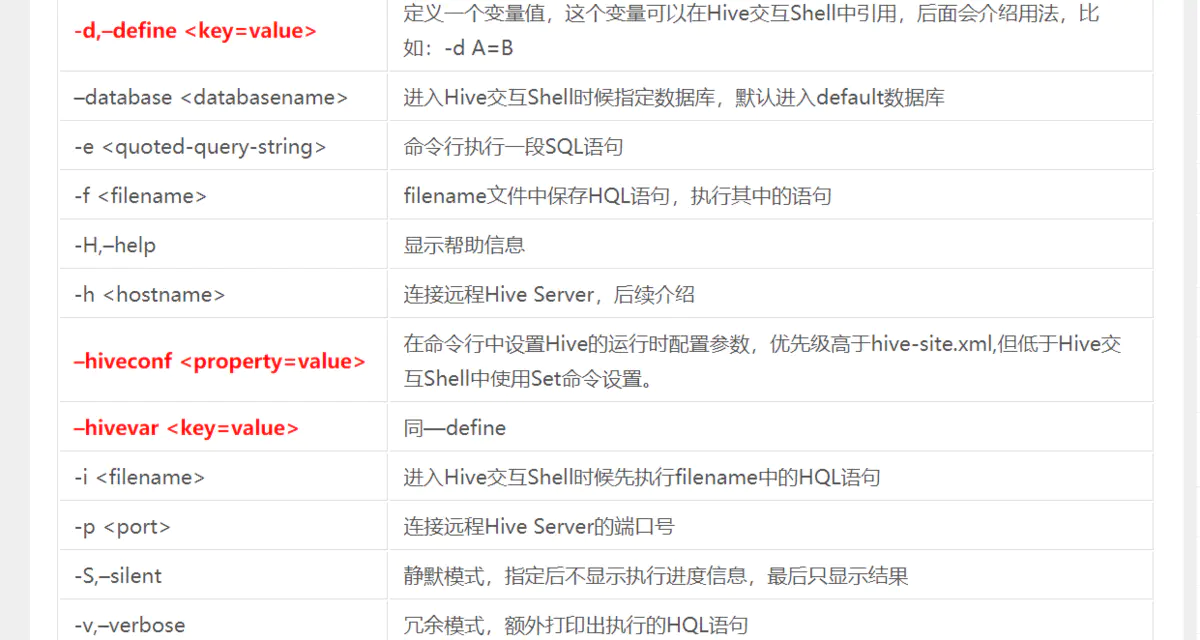
cli基本参数
和数据导入相关:
在load data时,如果加载的文件在HDFS上,此文件会被移动到表路径中;
在load data时,如果加载的文件在本地,此文件会被复制到HDFS的表路径中;
在load data时,会为每一个待导入的文件,启动一个MR任务进行导入;
 1 -----------------------------------------有关于数据导入------------------------------------------

 2

 3 // 导入本地文件数据到Hive表

 4 load data local inpath '/apps/data/test1.txt'  into table invoice_lines;

 5

 6 // 导入HDFS文件数据到Hive表

 7 load data inpath '/hdfs/app/data/test.txt'  into table invoice_lines;

 8

 9 // 从别的表中查询出相应的数据并导入到Hive表中,注意列数目一定要相同

10 insert into table invoice_lines select * from invoice_lines_temp2;

11 // 导入到指定分区表,注意列数目一定要相同

12 insert into table invoice_lines partition(jobid='106') select xx1,xx2,xx3 from invoice_lines_temp2 where jobid='106';

13 // 导入到指定分区表,采用动态分区的方式,注意列数目一定要相同

14 insert into table invoice_lines partition(jobid) select * from invoice_lines_temp2;

15 // Hive还支持多表插入,即把FROM 写到前面

16 FROM invoice insert into table invoice_temp1 select xx,xx2 insert into table invoice_temp2 select xx4,xx6;

17

18 // 项目上用到的一些写法

19 INSERT OVERWRITE TABLE srm.invoice_lines_temp2 PARTITION(jobid) SELECT sour_t.* FROM srm.invoice_lines_temp2 sour_t WHERE jobid = '106';

20 INSERT INTO TABLE srm.invoice_lines SELECT * FROM srm.invoice_lines_temp2 WHERE jobid = '106';

21 INSERT OVERWRITE TABLE srm.invoice_lines_temp2 PARTITION(jobid) SELECT * FROM srm.invoice_lines_temp2 WHERE jobid='106' AND 1 = 1;

22 INSERT OVERWRITE TABLE srm.invoice_lines_temp2 PARTITION(jobid)

23 SELECT temp.* FROM srm.invoice_lines_temp2 temp JOIN

24 (

25 SELECT

26     source_sys_key,

27     legal_company,

28     count( DISTINCT concat_ws( '', concat( invoice_line_type ), concat( invoice_head_id ) ) )

29 FROM

30     srm.invoice_lines_temp2

31 WHERE jobid = '106'

32 GROUP BY

33     source_sys_key,

34     legal_company

35 HAVING

36     count( DISTINCT concat_ws( '', concat( invoice_line_type ), concat( invoice_head_id ) ) ) = 1

37 ) t0 ON (temp.source_sys_key = t0.source_sys_key AND temp.legal_company = t0.legal_company )

38 where temp.jobid = '106';

39

40 // 在创建表的时候通过从别的表中查询出相应的记录并插入到所创建的表中

41 create table invoice_temp1 AS select xx1,xx2,xx3 from invoice;

42

43 -----------------------------------------有关于数据导入------------------------------------------

44

45

46 // 删除表中数据,但要保持表的结构定义

47 dfs -rmr /user/hive/warehouse/srm/invoice_lines;

48

49 // 创建外部表

50 CREATE EXTERNAL TABLE tinvoice_lines(id STRING, name STRING) ROW FORMAT DELIMITED FIELDS TERMINATED BY ',' LOCATION '/data/test/test_table';

51 // 导入数据到表中(文件会被移动到仓库目录/data/test/test_table)

52 load data inpath '/test_tmp_data.txt' INTO TABLE tinvoice_lines;

53

54 hive -e "load data local inpath '${SOURCE_PATH}/${SourceFileNameNochar}' overwrite into table srm.invoice_lines_temp1 partition(jobid='${JOBID}');"
sqoop导入导出
 1 // 测试数据库连接

 2 sqoop eval --connect jdbc:mysql://192.168.180.11/angel --username root--password root

 3

 4 // MySQL导入到Hive

 5 sqoop import --connect jdbc:mysql://localhost:3306/test --username root --password 123456 --table person -m 1 --hive-import

 6

 7 // 导出该某Hive表所有数据到MySQL

 8 sqoop export --connect jdbc:mysql://192.168.11.172:16408/ztsrm  --username srm --password handhand  --table invoice_lines  --export-dir /apps/hive/warehouse/srm.db/invoice_lines_temp2/jobid=106 --input-fields-terminated-by ','  --input-null-string "\\\\N" --input-null-non-string "\\\\N"

 9

10 // 导出该某Hive表指定分区数据到MySQL

11 sqoop export --connect jdbc:mysql://192.168.11.172:16408/ztsrm  --username srm --password handhand  --table invoice_lines  --export-dir /apps/hive/warehouse/srm.db/invoice_lines_temp2 --input-fields-terminated-by ','  --input-null-string "\\\\N" --input-null-non-string "\\\\N"
INTO 和 OVERWRITE
insert into 与 insert overwrite 都可以向hive表中插入数据,但是insert into直接追加到表中数据的尾部,而insert overwrite会重写数据,既先进行删除,再写入。如果存在分区的情况,insert overwrite会只重写当前分区数据。
创建hive脚本python
 1 import  pymysql

 2 import codecs

 3

 4

 5 def getSingleSQL(table,schema = 'srm',ispartition = False):

 6     # table =  为表名,mysql, hive表名一致

 7     # schema = 为hive中的库名

 8     # ispartition : 是否分区默认为分区

 9

10     create_head = 'CREATE TABLE IF NOT EXISTS {0}.{1}('.format(schema,table) + '\n'

11     create_tail = 'ROW FORMAT DELIMITED FIELDS TERMINATED BY \',\' ; \n\n'

12     connection=pymysql.connect(host='192.168.11.172', port=16408, user='srm', password='handhand', db='srm', charset='utf8')

13     try:

14         with connection.cursor(cursor=pymysql.cursors.DictCursor) as cursor:

15             sql='SHOW FULL FIELDS FROM  {0}'.format(table)

16             cursor.execute(sql)

17             try:

18                 for row in cursor:

19                     if 'bigint' in row['Type']:

20                         row['Type'] = "bigint"

21                     elif 'int' in row['Type'] or 'tinyint' in row['Type'] or 'smallint' in row['Type'] or 'mediumint' in row['Type'] or 'integer' in row['Type']:

22                         row['Type'] = "int"

23                     elif 'double' in row['Type'] or 'float' in row['Type'] or 'decimal' in row['Type']:

24                         row['Type'] = "double"

25                     else:

26                         row['Type'] = "string"

27                     create_head += row['Field'] + ' '+ row['Type'] +' comment \'' + row['Comment'] + '\' ,\n'

28             except:

29                 print('程序异常!')

30     finally:

31         connection.close()

32     singleSQL = create_head[:-2] + '\n' + ')'+ create_tail

33     return singleSQL

34

35

36

37 def getTotalSQL():

38     connection=pymysql.connect(host='192.168.11.172', port=16408, user='srm', password='handhand', db='srm', charset='utf8')

39     try:

40         with connection.cursor(cursor=pymysql.cursors.DictCursor) as cursor:

41             sql='SELECT TABLE_NAME FROM INFORMATION_SCHEMA.TABLES WHERE TABLE_SCHEMA=\'SRM\' AND TABLE_TYPE=\'BASE TABLE\' '

42             cursor.execute(sql)

43             try:

44                 for row in cursor:

45                     print(row)

46                     tableName = row['TABLE_NAME']

47                     singleSQL = getSingleSQL(tableName)

48                     f = open('create_hive_table.sql', 'a', encoding='utf-8')

49                     f.write(singleSQL)

50             except:

51                 print('程序异常了哦!')

52     finally:

53         connection.close()

54

55 getTotalSQL()
HIVE重要的知识点
谓词下推:
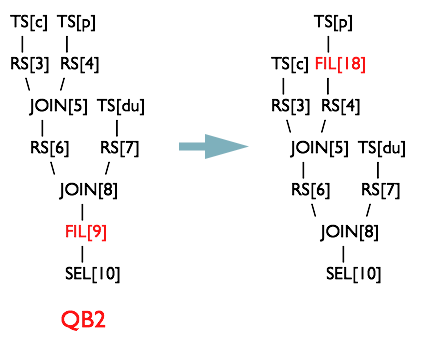
就是将SQL语句中的where谓词逻辑都尽可能提前执行,减少下游处理的数据量。Hive中有谓词下推优化的配置项hive.optimize.ppd,默认值true,与它对应的逻辑优化器是PredicatePushDown。该优化器就是将OperatorTree中的FilterOperator向上提,见下图。
group by
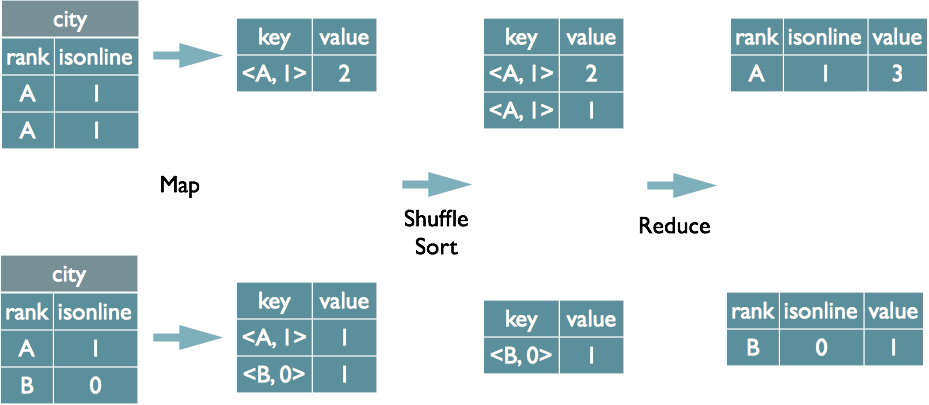
(1) map端预聚合
group by时,如果先起一个combiner在map端做部分预聚合,可以有效减少shuffle数据量。预聚合的配置项是hive.map.aggr,默认值true。通过hive.groupby.mapaggr.checkinterval参数也可以设置map端预聚合的行数阈值,超过该值就会分拆job,默认值100000。
(2) 倾斜均衡配置项
group by时如果某些key对应的数据量过大,就会发生数据倾斜。配置均衡数据倾斜的配置项hive.groupby.skewindata=true。
其实现方法是在group by时启动两个MR job。第一个job会将map端数据随机输入reducer,每个reducer做部分聚合,相同的key就会分布在不同的reducer中。第二个job再将前面预处理过的数据按key聚合并输出结果,这样就起到了均衡的效果。
join
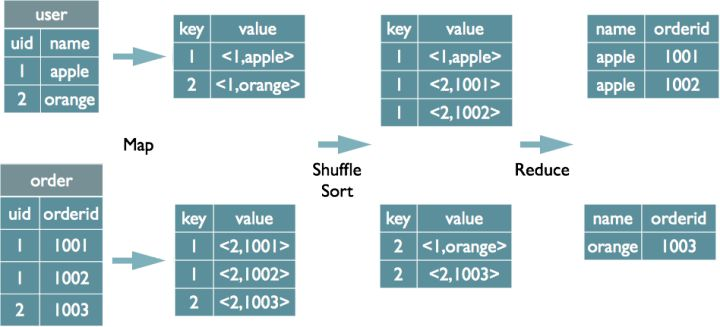
1、多表join时key相同
如果多表的join时候用的key相同,只会启动一个MR job来处理。
2、利用map join
Map join特别适合大小表join的情况。Hive会将大小表在map端直接完成join过程,避免shuffle过程和reduce端计算,大大的提高效率。
map join,配置hive.auto.convert.join=true。还有一些参数用来控制map join的行为,比如hive.mapjoin.smalltable.filesize,当小表大小小于该值就会启用map join,默认值25000000(25MB)。还有hive.mapjoin.cache.numrows,表示缓存小表的多少行数据到内存,默认值25000。
3、倾斜均衡配置项
配置hive.optimize.skewjoin=true
如果开启了,在join过程中Hive会将计数超过阈值hive.skewjoin.key(默认100000)的倾斜key对应的行临时写进文件中,然后再启动另一个job做mapjoin生成结果。通过hive.skewjoin.mapjoin.map.tasks参数还可以控制第二个job的mapper数量,默认10000。
4、优化sql处理join的数据倾斜
(1) 空值或者无意义值
若不需要空值数据,就提前写where语句过滤掉。需要保留的话,将空值key用随机方式打散
(2) 单独处理数据倾斜key
这其实是上面处理空值方法的拓展,不过倾斜的key变成了有意义的。我们可以将它们抽样出来,对应的行单独存入临时表中,然后打上一个较小的随机数前缀(比如0~9),最后再进行聚合。SQL语句与上面的相仿
(3) 不同数据类型
举个例子,假如我们有一旧一新两张日历记录表,旧表的记录类型字段是(event_type int),新表的是(event_type string)。为了兼容旧版记录,新表的event_type也会以字符串形式存储旧版的值,比如'17'。当这两张表join时,经常要耗费很长时间。其原因就是如果不转换类型,计算key的hash值时默认是以int型做的,这就导致所有“真正的”string型key都分配到一个reducer上。
(4) 小表过大
小表会大到无法直接使用map join的地步,而使用普通join又有数据分布不均的问题。这时就要充分利用大表的限制条件,削减小表的数据量,再使用map join解决。代价就是需要进行两次join。
问题:Hive中Beeline提交的SQL查询同Hive客户端提交的SQL查询处理流程有何异同?
据我所知,Beeline是通过JDBC向Thrift-Server提交查询请求。Hive客户端是通过自己的Driver来提交。
1、hive客户端是在本地做sql的编译,然后将hql翻译成mr任务提交到hadoop。而beeline实际上是对SQLLine的封装,实际上是调用hiveserver2来进行查询的。
2、从权限控制角度来讲,目前hive的权限控制有两种,一种是基于对应hdfs操作权限的控制机制,一种是符合SQL规范的控制机制,前者适合于提供给RD的权限控制(可以防止别人误删你的表),后者适合于提供给hive的BI用户的权限控制(可以控制到表或字段可见级别)。后者更细致,更符合数据仓库的权限控制。但是后者只能用在beeline方式下,不能用在命令行中。
3、hive推荐使用beeline。
HIVE十大特点
1.分区表:
Hive分区是提高较大表的查询性能的有效方法。分区允许您将数据存储在表位置下的单独子目录中。它极大地帮助了在分区键上查询的查询。虽然分区键的选择始终是一个敏感的决定,但它应该始终是一个低基数属性,例如,如果您的数据与时间维度相关联,那么date可能是一个好的分区键。同样,如果数据与位置(如国家或州)相关联,则最好使用国家/州等分层分区。
2.使数据去标准化:
规范化是一个标准流程,用于使用某些规则对数据表建模,以处理数据和异常的冗余。简单来说,如果规范化数据集,最终会创建多个关系表,这些表可以在运行时连接以生成结果。连接是昂贵且难以执行的操作,并且是性能问题的常见原因之一。因此,避免高度规范化的表结构是一个好主意,因为它们需要连接查询来获得所需的指标。
3.压缩映射/减少输出(压缩MAP/减少REDUCE):
压缩技术显着减少了中间数据量,从而减少了MAP和REDUCE之间的数据传输量。所有这些通常都发生在网络上也就是利用hiveserver2链接Hive服务器的时候。压缩可以单独应用于mapper和reducer输出。请记住,gzip压缩文件不可拆分。这意味着应该谨慎应用。压缩文件大小不应大于几百兆字节(推文)。否则可能导致工作失衡。压缩编解码器的其他选项可能是snappy,lzo,bzip等。
对于map输出压缩,将mapred.compress.map.output设置为true
对于job输出压缩,将mapred.output.compress设置为true
4.映射连接:
如果连接另一侧的表足够小以适应内存,则映射连接非常有效。Hive支持一个参数hive.auto.convert.join,当它设置为“true”时,Hive会尝试自动映射连接。使用此参数时,请确保在Hive环境中启用了自动转换。
5.分桶:
Hive的分桶可以大大提高存储和查询的性能。Hive中的分桶根据个桶上key值的散列结果将数据分配到不同的桶中。如果进程发生在相同的键上,它还会减少连接过程中的I / O扫描。
此外,每次在将数据写入分桶表之前确保已经设置了分桶参数(SET hive.enforce.bucketing = true;)这非常重要。要在表操作中利用bucketing,我们应该设置hive.optimize.bucketmapjoin = true。此设置提示Hive在MAP阶段加入期间执行桶级操作。它还减少了扫描周期以查找特定的key值,因为存储确保key存在于某个存储桶中。
6.输入格式选择:
输入格式在Hive性能中起着关键作用。例如,输入格式的文本类型JSON对于数据量非常高的大型生产系统来说不是一个好的选择。这些类型的可读格式实际上占用了大量空间并且有一些解析开销(例如JSON解析)。为解决这些问题,Hive提供了RCFile,ORC等列式输入格式。柱状格式允许您通过允许单独访问每个列来减少分析查询中的读取操作。还有其他一些二进制格式,如Avro,序列文件,Thrift和ProtoBuf,它们在各种用例中也很有用。
7.并行执行:
Hadoop可以并行执行MapReduce作业,在Hive上执行的几个查询会自动使用这种并行性。但是,单个复杂的Hive查询通常会转换为默认执行的许多MapReduce作业。但是,一些查询的MapReduce阶段通常不是相互依赖的,可以并行执行。然后,他们可以利用群集上的备用容量并提高群集利用率,同时减少总体查询执行时间。Hive中用于更改此行为的配置仅仅是切换单个标志SET hive.exec.parallel = true。
8.矢量化:
Vectorization允许Hive一起处理一批行,而不是一次处理一行。每个批次都包含一个列向量,它通常是一个基本类型的数组。对整个列向量执行操作,这改进了指令管道和高速缓存使用。要启用矢量化,请将此配置参数设置为SET hive.vectorized.execution.enabled = true。
9.单元测试:
简单来说,单元测试可以确定代码中最小的可测试部分是否与您期望的完全一致。单元测试提供了一些好处,即尽早检测问题,更容易更改和重构代码,作为一种解释代码如何工作的文档形式,仅举几例。
在Hive中,您可以对UDF,SerDes,流式脚本,Hive查询等进行单元测试。在很大程度上,可以通过运行快速本地单元测试来验证整个HiveQL查询的正确性,而无需触及Hadoop集群。因为在本地模式下执行HiveQL查询需要几秒钟,相比之下,如果它在Hadoop模式下运行,则分钟,小时或天数肯定会节省大量的开发时间。
有几种工具可以帮助您测试Hive查询。其中一些你可能想看看HiveRunner,Hive_test和Beetest。
10.抽样:
采样允许用户获取数据集的子集并对其进行分析,而无需分析整个数据集。如果使用代表性样本,则查询可以返回有意义的结果,并且可以更快地完成并消耗更少的计算资源。
Hive提供了一个内置的TABLESAMPLE子句,允许您对表进行采样。TABLESAMPLE可以在不同的粒度级别进行采样 - 它只能返回桶的子集(桶采样)或HDFS块(块采样),或者只返回每个输入拆分的前N个记录。或者,您可以实现自己的UDF,根据您的采样算法过滤掉记录。
HIVE窗口函数
窗口函数是用于分析用的一类函数,要理解窗口函数要先从聚合函数说起。 大家都知道聚合函数是将某列中多行的值合并为一行,比如sum、count等。 而窗口函数则可以在本行内做运算,得到多行的结果,即每一行对应一行的值。 通用的窗口函数可以用下面的语法来概括:
Function() Over (Partition By Column1,Column2,Order By Column3)
窗口函数又分为以下三类: 聚合型窗口函数 分析型窗口函数 * 取值型窗口函数
接下来我们将通过几个实际的例子来介绍下窗口函数
准备数据
CREATE TABLE user_match_temp (

user_name string,

opponent string,

result int,

create_time timestamp);

INSERT INTO TABLE user_match_temp values

('vpspringcloud','vpspringboot',1,'2019-07-18 23:19:00'),

('vpspringboot','vpspringcloud',0,'2019-07-18 23:19:00'),

('vpspringcloud','vpspringdata',0,'2019-07-18 23:20:00'),

('vpspringdata','vpspringcloud',1,'2019-07-18 23:20:00'),

('vpspringcloud','vpspringroo',1,'2019-07-19 22:19:00'),

('vpspringroo','vpspringcloud',0,'2019-07-19 22:19:00'),

('vpspringdata','vpspringboot',0,'2019-07-19 23:19:00'),

('vpspringboot','vpspringdata',1,'2019-07-19 23:19:00');
数据包含4列,分别为 user_name,opponent,result,create_time。 我们将基于这些数据来介绍下窗口函数的一些使用场景。
聚合性窗口函数
聚合型即SUM(), MIN(),MAX(),AVG(),COUNT()这些常见的聚合函数。 聚合函数配合窗口函数使用可以使计算更加灵活,例如以下场景: * 至今累计分数:
hive> SELECT *, SUM(result) OVER (PARTITION BY user_name ORDER BY create_time) AS result_sums

hive> FROM user_match_temp;

+----------------+----------------+---------+------------------------+--------------+--+

|   user_name    |    opponent    | result  |      create_time       | result_sums  |

+----------------+----------------+---------+------------------------+--------------+--+

| vpspringdata   | vpspringcloud  | 1       | 2019-07-18 23:20:00.0  | 1            |

| vpspringdata   | vpspringboot   | 0       | 2019-07-19 23:19:00.0  | 1            |

| vpspringdata   | vpspringcloud  | 1       | 2019-07-21 23:20:00.0  | 2            |

| vpspringdata   | vpspringboot   | 0       | 2019-07-23 23:19:00.0  | 2            |

| vpspringcloud  | vpspringboot   | 1       | 2019-07-18 23:19:00.0  | 1            |

| vpspringcloud  | vpspringdata   | 0       | 2019-07-18 23:20:00.0  | 1            |

| vpspringcloud  | vpspringroo    | 1       | 2019-07-19 22:19:00.0  | 2            |

| vpspringcloud  | vpspringboot   | 1       | 2019-07-20 23:19:00.0  | 3            |

| vpspringcloud  | vpspringdata   | 0       | 2019-07-21 23:20:00.0  | 3            |

| vpspringcloud  | vpspringroo    | 1       | 2019-07-22 22:19:00.0  | 4            |

| vpspringroo    | vpspringcloud  | 0       | 2019-07-19 22:19:00.0  | 0            |

| vpspringroo    | vpspringcloud  | 0       | 2019-07-22 22:19:00.0  | 0            |

| vpspringboot   | vpspringcloud  | 0       | 2019-07-18 23:19:00.0  | 0            |

| vpspringboot   | vpspringdata   | 1       | 2019-07-19 23:19:00.0  | 1            |

| vpspringboot   | vpspringcloud  | 0       | 2019-07-20 23:19:00.0  | 1            |

| vpspringboot   | vpspringdata   | 1       | 2019-07-23 23:19:00.0  | 2            |

+----------------+----------------+---------+------------------------+--------------+--+
之前3场平均胜场
hive> SELECT *,avg(result) over (partition by user_name order by create_time rows between 3 preceding and current row) as recently_wins

hive> From user_match_temp;

+----------------+----------------+---------+------------------------+---------------------+--+

|   user_name    |    opponent    | result  |      create_time       |    recently_wins    |

+----------------+----------------+---------+------------------------+---------------------+--+

| vpspringdata   | vpspringcloud  | 1       | 2019-07-18 23:20:00.0  | 1.0                 |

| vpspringdata   | vpspringboot   | 0       | 2019-07-19 23:19:00.0  | 0.5                 |

| vpspringdata   | vpspringcloud  | 1       | 2019-07-21 23:20:00.0  | 0.6666666666666666  |

| vpspringdata   | vpspringboot   | 0       | 2019-07-23 23:19:00.0  | 0.5                 |

| vpspringcloud  | vpspringboot   | 1       | 2019-07-18 23:19:00.0  | 1.0                 |

| vpspringcloud  | vpspringdata   | 0       | 2019-07-18 23:20:00.0  | 0.5                 |

| vpspringcloud  | vpspringroo    | 1       | 2019-07-19 22:19:00.0  | 0.6666666666666666  |

| vpspringcloud  | vpspringboot   | 1       | 2019-07-20 23:19:00.0  | 0.75                |

| vpspringcloud  | vpspringdata   | 0       | 2019-07-21 23:20:00.0  | 0.5                 |

| vpspringcloud  | vpspringroo    | 1       | 2019-07-22 22:19:00.0  | 0.75                |

| vpspringroo    | vpspringcloud  | 0       | 2019-07-19 22:19:00.0  | 0.0                 |

| vpspringroo    | vpspringcloud  | 0       | 2019-07-22 22:19:00.0  | 0.0                 |

| vpspringboot   | vpspringcloud  | 0       | 2019-07-18 23:19:00.0  | 0.0                 |

| vpspringboot   | vpspringdata   | 1       | 2019-07-19 23:19:00.0  | 0.5                 |

| vpspringboot   | vpspringcloud  | 0       | 2019-07-20 23:19:00.0  | 0.3333333333333333  |

| vpspringboot   | vpspringdata   | 1       | 2019-07-23 23:19:00.0  | 0.5                 |

+----------------+----------------+---------+------------------------+---------------------+--+
我们通过rows between 即可定义窗口的范围,这里我们定义了窗口的范围为之前3行到该行。
累计遇到的对手数量 需要注意的是count(distinct xxx)在窗口函数里是不允许使用的,不过我们也可以用size(collect_set() over(partition by order by))来替代实现我们的需求。
hive> SELECT *,size(collect_set(opponent) over (partition by user_name order by create_time)) as recently_wins

hive> From user_match_temp;

+----------------+----------------+---------+------------------------+------------------+--+

|   user_name    |    opponent    | result  |      create_time       | opponent_counts  |

+----------------+----------------+---------+------------------------+------------------+--+

| vpspringdata   | vpspringcloud  | 1       | 2019-07-18 23:20:00.0  | 1                |

| vpspringdata   | vpspringboot   | 0       | 2019-07-19 23:19:00.0  | 2                |

| vpspringdata   | vpspringcloud  | 1       | 2019-07-21 23:20:00.0  | 2                |

| vpspringdata   | vpspringboot   | 0       | 2019-07-23 23:19:00.0  | 2                |

| vpspringcloud  | vpspringboot   | 1       | 2019-07-18 23:19:00.0  | 1                |

| vpspringcloud  | vpspringdata   | 0       | 2019-07-18 23:20:00.0  | 2                |

| vpspringcloud  | vpspringroo    | 1       | 2019-07-19 22:19:00.0  | 3                |

| vpspringcloud  | vpspringboot   | 1       | 2019-07-20 23:19:00.0  | 3                |

| vpspringcloud  | vpspringdata   | 0       | 2019-07-21 23:20:00.0  | 3                |

| vpspringcloud  | vpspringroo    | 1       | 2019-07-22 22:19:00.0  | 3                |

| vpspringroo    | vpspringcloud  | 0       | 2019-07-19 22:19:00.0  | 1                |

| vpspringroo    | vpspringcloud  | 0       | 2019-07-22 22:19:00.0  | 1                |

| vpspringboot   | vpspringcloud  | 0       | 2019-07-18 23:19:00.0  | 1                |

| vpspringboot   | vpspringdata   | 1       | 2019-07-19 23:19:00.0  | 2                |

| vpspringboot   | vpspringcloud  | 0       | 2019-07-20 23:19:00.0  | 2                |

| vpspringboot   | vpspringdata   | 1       | 2019-07-23 23:19:00.0  | 2                |

+----------------+----------------+---------+------------------------+------------------+--+
collect_set()也是一个聚合函数,作用是将多行聚合进一行的某个set内,再用size()统计集合内的元素个数,即可实现我们的需求。
分析型窗口函数
分析型即RANk(),ROW_NUMBER(),DENSE_RANK()等常见的排序用的窗口函数,不过他们也是有区别的。
hive> SELECT *,

hive> rank() over (order by create_time) as user_rank,

hive> row_number() over (order by create_time) as user_row_number,

hive> dense_rank() over (order by create_time) as user_dense_rank

hive> FROM user_match_temp;

+----------------+----------------+---------+------------------------+------------+------------------+------------------+--+

|   user_name    |    opponent    | result  |      create_time       | user_rank  | user_row_number  | user_dense_rank  |

+----------------+----------------+---------+------------------------+------------+------------------+------------------+--+

| vpspringcloud  | vpspringboot   | 1       | 2019-07-18 23:19:00.0  | 1          | 1                | 1                |

| vpspringboot   | vpspringcloud  | 0       | 2019-07-18 23:19:00.0  | 1          | 2                | 1                |

| vpspringcloud  | vpspringdata   | 0       | 2019-07-18 23:20:00.0  | 3          | 3                | 2                |

| vpspringdata   | vpspringcloud  | 1       | 2019-07-18 23:20:00.0  | 3          | 4                | 2                |

| vpspringroo    | vpspringcloud  | 0       | 2019-07-19 22:19:00.0  | 5          | 5                | 3                |

| vpspringcloud  | vpspringroo    | 1       | 2019-07-19 22:19:00.0  | 5          | 6                | 3                |

| vpspringdata   | vpspringboot   | 0       | 2019-07-19 23:19:00.0  | 7          | 7                | 4                |

| vpspringboot   | vpspringdata   | 1       | 2019-07-19 23:19:00.0  | 7          | 8                | 4                |

| vpspringcloud  | vpspringboot   | 1       | 2019-07-20 23:19:00.0  | 9          | 9                | 5                |

| vpspringboot   | vpspringcloud  | 0       | 2019-07-20 23:19:00.0  | 9          | 10               | 5                |

| vpspringcloud  | vpspringdata   | 0       | 2019-07-21 23:20:00.0  | 11         | 11               | 6                |

| vpspringdata   | vpspringcloud  | 1       | 2019-07-21 23:20:00.0  | 11         | 12               | 6                |

| vpspringcloud  | vpspringroo    | 1       | 2019-07-22 22:19:00.0  | 13         | 13               | 7                |

| vpspringroo    | vpspringcloud  | 0       | 2019-07-22 22:19:00.0  | 13         | 14               | 7                |

| vpspringdata   | vpspringboot   | 0       | 2019-07-23 23:19:00.0  | 15         | 15               | 8                |

| vpspringboot   | vpspringdata   | 1       | 2019-07-23 23:19:00.0  | 15         | 16               | 8                |

+----------------+----------------+---------+------------------------+------------+------------------+------------------+--+
如上所示: row_number函数:生成连续的序号(相同元素序号相同); rank函数:如两元素排序相同则序号相同,并且会跳过下一个序号; * rank函数:如两元素排序相同则序号相同,不会跳过下一个序号;
除了这三个排序用的函数,还有 CUME_DIST函数 :小于等于当前值的行在所有行中的占比 PERCENT_RANK() :小于当前值的行在所有行中的占比 * NTILE() :如果把数据按行数分为n份,那么该行所属的份数是第几份 这三种窗口函数 效果如下:
hive2> SELECT *,

hive2> CUME_DIST() over (order by create_time) as user_CUME_DIST,

hive2> PERCENT_RANK() over (order by create_time) as user_PERCENT_RANK,

hive2> NTILE(3) over (order by create_time) as user_NTILE

hive2> FROM user_match_temp;

+----------------+----------------+---------+------------------------+-----------------+----------------------+-------------+--+

|   user_name    |    opponent    | result  |      create_time       | user_CUME_DIST  |  user_PERCENT_RANK   | user_NTILE  |

+----------------+----------------+---------+------------------------+-----------------+----------------------+-------------+--+

| vpspringcloud  | vpspringboot   | 1       | 2019-07-18 23:19:00.0  | 0.125           | 0.0                  | 1           |

| vpspringboot   | vpspringcloud  | 0       | 2019-07-18 23:19:00.0  | 0.125           | 0.0                  | 1           |

| vpspringcloud  | vpspringdata   | 0       | 2019-07-18 23:20:00.0  | 0.25            | 0.13333333333333333  | 1           |

| vpspringdata   | vpspringcloud  | 1       | 2019-07-18 23:20:00.0  | 0.25            | 0.13333333333333333  | 1           |

| vpspringcloud  | vpspringroo    | 1       | 2019-07-19 22:19:00.0  | 0.375           | 0.26666666666666666  | 1           |

| vpspringroo    | vpspringcloud  | 0       | 2019-07-19 22:19:00.0  | 0.375           | 0.26666666666666666  | 1           |

| vpspringdata   | vpspringboot   | 0       | 2019-07-19 23:19:00.0  | 0.5             | 0.4                  | 2           |

| vpspringboot   | vpspringdata   | 1       | 2019-07-19 23:19:00.0  | 0.5             | 0.4                  | 2           |

| vpspringcloud  | vpspringboot   | 1       | 2019-07-20 23:19:00.0  | 0.625           | 0.5333333333333333   | 2           |

| vpspringboot   | vpspringcloud  | 0       | 2019-07-20 23:19:00.0  | 0.625           | 0.5333333333333333   | 2           |

| vpspringcloud  | vpspringdata   | 0       | 2019-07-21 23:20:00.0  | 0.75            | 0.6666666666666666   | 2           |

| vpspringdata   | vpspringcloud  | 1       | 2019-07-21 23:20:00.0  | 0.75            | 0.6666666666666666   | 3           |

| vpspringcloud  | vpspringroo    | 1       | 2019-07-22 22:19:00.0  | 0.875           | 0.8                  | 3           |

| vpspringroo    | vpspringcloud  | 0       | 2019-07-22 22:19:00.0  | 0.875           | 0.8                  | 3           |

| vpspringdata   | vpspringboot   | 0       | 2019-07-23 23:19:00.0  | 1.0             | 0.9333333333333333   | 3           |

| vpspringboot   | vpspringdata   | 1       | 2019-07-23 23:19:00.0  | 1.0             | 0.9333333333333333   | 3           |

+----------------+----------------+---------+------------------------+-----------------+----------------------+-------------+--+
取值型窗口函数
这几个函数可以通过字面意思记得,LAG是迟滞的意思,也就是对某一列进行往后错行;LEAD是LAG的反义词,也就是对某一列进行提前几行;FIRST_VALUE是对该列到目前为止的首个值,而LAST_VALUE是到目前行为止的最后一个值。
LAG()和LEAD() 可以带3个参数,第一个是返回的值,第二个是前置或者后置的行数,第三个是默认值。
下一个对手,上一个对手,最近3局的第一个对手及最后一个对手,如下:
hive> SELECT *,

hive>     lag(opponent,1)

hive>         over (partition by user_name order by create_time) as lag_opponent,

hive>     lead(opponent,1) over

hive>         (partition by user_name order by create_time) as lead_opponent,

hive>     first_value(opponent) over (partition by user_name order by create_time rows hive>         between 3 preceding and 3 following) as first_opponent,

hive>     last_value(opponent) over (partition by user_name order by create_time rows hive>         between 3 preceding and 3 following) as last_opponent

hive> From user_match_temp;

+----------------+----------------+---------+------------------------+----------------+----------------+-----------------+----------------+--+

|   user_name    |    opponent    | result  |      create_time       |  lag_opponent  | lead_opponent  | first_opponent  | last_opponent  |

+----------------+----------------+---------+------------------------+----------------+----------------+-----------------+----------------+--+

| vpspringdata   | vpspringcloud  | 1       | 2019-07-18 23:20:00.0  | NULL           | vpspringboot   | vpspringcloud   | vpspringboot   |

| vpspringdata   | vpspringboot   | 0       | 2019-07-19 23:19:00.0  | vpspringcloud  | vpspringcloud  | vpspringcloud   | vpspringboot   |

| vpspringdata   | vpspringcloud  | 1       | 2019-07-21 23:20:00.0  | vpspringboot   | vpspringboot   | vpspringcloud   | vpspringboot   |

| vpspringdata   | vpspringboot   | 0       | 2019-07-23 23:19:00.0  | vpspringcloud  | NULL           | vpspringcloud   | vpspringboot   |

| vpspringcloud  | vpspringboot   | 1       | 2019-07-18 23:19:00.0  | NULL           | vpspringdata   | vpspringboot    | vpspringboot   |

| vpspringcloud  | vpspringdata   | 0       | 2019-07-18 23:20:00.0  | vpspringboot   | vpspringroo    | vpspringboot    | vpspringdata   |

| vpspringcloud  | vpspringroo    | 1       | 2019-07-19 22:19:00.0  | vpspringdata   | vpspringboot   | vpspringboot    | vpspringroo    |

| vpspringcloud  | vpspringboot   | 1       | 2019-07-20 23:19:00.0  | vpspringroo    | vpspringdata   | vpspringboot    | vpspringroo    |

| vpspringcloud  | vpspringdata   | 0       | 2019-07-21 23:20:00.0  | vpspringboot   | vpspringroo    | vpspringdata    | vpspringroo    |

| vpspringcloud  | vpspringroo    | 1       | 2019-07-22 22:19:00.0  | vpspringdata   | NULL           | vpspringroo     | vpspringroo    |

| vpspringroo    | vpspringcloud  | 0       | 2019-07-19 22:19:00.0  | NULL           | vpspringcloud  | vpspringcloud   | vpspringcloud  |

| vpspringroo    | vpspringcloud  | 0       | 2019-07-22 22:19:00.0  | vpspringcloud  | NULL           | vpspringcloud   | vpspringcloud  |

| vpspringboot   | vpspringcloud  | 0       | 2019-07-18 23:19:00.0  | NULL           | vpspringdata   | vpspringcloud   | vpspringdata   |

| vpspringboot   | vpspringdata   | 1       | 2019-07-19 23:19:00.0  | vpspringcloud  | vpspringcloud  | vpspringcloud   | vpspringdata   |

| vpspringboot   | vpspringcloud  | 0       | 2019-07-20 23:19:00.0  | vpspringdata   | vpspringdata   | vpspringcloud   | vpspringdata   |

| vpspringboot   | vpspringdata   | 1       | 2019-07-23 23:19:00.0  | vpspringcloud  | NULL           | vpspringcloud   | vpspringdata   |

+----------------+----------------+---------+------------------------+----------------+----------------+-----------------+----------------+--+
HIVE常用函数
函数比较多在这里就说一些常用的:
日期函数
1、UNIX时间戳转日期函数: from_unixtime ***
语法: from_unixtime(bigint unixtime[, string format])
返回值: string
说明: 转化UNIX时间戳(从1970-01-01 00:00:00 UTC到指定时间的秒数)到当前时区的时间格式
hive> select from_unixtime(1323308943,'yyyyMMdd') from tableName;
20111208
2、获取当前UNIX时间戳函数: unix_timestamp ***
语法: unix_timestamp()
返回值: bigint
说明: 获得当前时区的UNIX时间戳
hive> select unix_timestamp() from tableName;
1323309615
3、日期转UNIX时间戳函数: unix_timestamp ***
语法: unix_timestamp(string date)
返回值: bigint
说明: 转换格式为"yyyy-MM-dd HH:mm:ss"的日期到UNIX时间戳。如果转化失败,则返回0。
hive> select unix_timestamp('2011-12-07 13:01:03') from tableName;
1323234063
4、指定格式日期转UNIX时间戳函数: unix_timestamp ***
语法: unix_timestamp(string date, string pattern)
返回值: bigint
说明: 转换pattern格式的日期到UNIX时间戳。如果转化失败,则返回0。
hive> select unix_timestamp('20111207 13:01:03','yyyyMMdd HH:mm:ss') from tableName;
1323234063
5、日期时间转日期函数: to_date ***
语法: to_date(string timestamp)
返回值: string
说明: 返回日期时间字段中的日期部分。
hive> select to_date('2011-12-08 10:03:01') from tableName;
2011-12-08
6、日期转年函数: year ***
语法: year(string date)
返回值: int
说明: 返回日期中的年。
hive> select year('2011-12-08 10:03:01') from tableName;
2011
hive> select year('2012-12-08') from tableName;
2012
7、日期转月函数: month ***
语法: month (string date)
返回值: int
说明: 返回日期中的月份。
hive> select month('2011-12-08 10:03:01') from tableName;
12
hive> select month('2011-08-08') from tableName;
8
8、日期转天函数: day ****
语法: day (string date)
返回值: int
说明: 返回日期中的天。
hive> select day('2011-12-08 10:03:01') from tableName;
8
hive> select day('2011-12-24') from tableName;
24
9、日期转小时函数: hour ***
语法: hour (string date)
返回值: int
说明: 返回日期中的小时。
hive> select hour('2011-12-08 10:03:01') from tableName;
10
10、日期转分钟函数: minute
语法: minute (string date)
返回值: int
说明: 返回日期中的分钟。
hive> select minute('2011-12-08 10:03:01') from tableName;
3
11、日期转秒函数: second
语法: second (string date)
返回值: int
说明: 返回日期中的秒。
hive> select second('2011-12-08 10:03:01') from tableName;
1
12、日期转周函数: weekofyear
语法: weekofyear (string date)
返回值: int
说明: 返回日期在当前的周数。
hive> select weekofyear('2011-12-08 10:03:01') from tableName;
49
13、日期比较函数: datediff ***
语法: datediff(string enddate, string startdate)
返回值: int
说明: 返回结束日期减去开始日期的天数。
hive> select datediff('2012-12-08','2012-05-09') from tableName;
213
14、日期增加函数: date_add ***
语法: date_add(string startdate, int days)
返回值: string
说明: 返回开始日期startdate增加days天后的日期。
hive> select date_add('2012-12-08',10) from tableName;
2012-12-18
15、日期减少函数: date_sub ***
语法: date_sub (string startdate, int days)
返回值: string
说明: 返回开始日期startdate减少days天后的日期。
hive> select date_sub('2012-12-08',10) from tableName;
2012-11-28
条件函数
1、If函数: if ***
语法: if(boolean testCondition, T valueTrue, T valueFalseOrNull)
返回值: T
说明: 当条件testCondition为TRUE时,返回valueTrue;否则返回valueFalseOrNull
hive> select if(1=2,100,200) from tableName;
200
hive> select if(1=1,100,200) from tableName;
100
2、非空查找函数: COALESCE
语法: COALESCE(T v1, T v2, …)
返回值: T
说明: 返回参数中的第一个非空值;如果所有值都为NULL,那么返回NULL
hive> select COALESCE(null,'100','50') from tableName;
100
3、条件判断函数:CASE ***
语法: CASE a WHEN b THEN c [WHEN d THEN e]* [ELSE f] END
返回值: T
说明:如果a等于b,那么返回c;如果a等于d,那么返回e;否则返回f
hive> Select case 100 when 50 then 'tom' when 100 then 'mary' else 'tim' end from tableName;
mary
hive> Select case 200 when 50 then 'tom' when 100 then 'mary' else 'tim' end from tableName;
tim
4、条件判断函数:CASE ****
语法: CASE WHEN a THEN b [WHEN c THEN d]* [ELSE e] END
返回值: T
说明:如果a为TRUE,则返回b;如果c为TRUE,则返回d;否则返回e
hive> select case when 1=2 then 'tom' when 2=2 then 'mary' else 'tim' end from tableName;
mary
hive> select case when 1=1 then 'tom' when 2=2 then 'mary' else 'tim' end from tableName;
tom
字符串函数
1、字符串长度函数:length
语法: length(string A)
返回值: int
说明:返回字符串A的长度
hive> select length('abcedfg') from tableName;
7
2、字符串反转函数:reverse
语法: reverse(string A)
返回值: string
说明:返回字符串A的反转结果
hive> select reverse('abcedfg') from tableName;
gfdecba
3、字符串连接函数:concat ***
语法: concat(string A, string B…)
返回值: string
说明:返回输入字符串连接后的结果,支持任意个输入字符串
hive> select concat('abc','def','gh') from tableName;
abcdefgh
4、带分隔符字符串连接函数:concat_ws ***
语法: concat_ws(string SEP, string A, string B…)
返回值: string
说明:返回输入字符串连接后的结果,SEP表示各个字符串间的分隔符
hive> select concat_ws(',','abc','def','gh')from tableName;
abc,def,gh
5、字符串截取函数:substr,substring ****
语法: substr(string A, int start),substring(string A, int start)
返回值: string
说明:返回字符串A从start位置到结尾的字符串
hive> select substr('abcde',3) from tableName;
cde
hive> select substring('abcde',3) from tableName;
cde
hive> select substr('abcde',-1) from tableName; (和ORACLE相同)
e
6、字符串截取函数:substr,substring ****
语法: substr(string A, int start, int len),substring(string A, int start, int len)
返回值: string
说明:返回字符串A从start位置开始,长度为len的字符串
hive> select substr('abcde',3,2) from tableName;
cd
hive> select substring('abcde',3,2) from tableName;
cd
hive>select substring('abcde',-2,2) from tableName;
de
7、字符串转大写函数:upper,ucase ****
语法: upper(string A) ucase(string A)
返回值: string
说明:返回字符串A的大写格式
hive> select upper('abSEd') from tableName;
ABSED
hive> select ucase('abSEd') from tableName;
ABSED
8、字符串转小写函数:lower,lcase ***
语法: lower(string A) lcase(string A)
返回值: string
说明:返回字符串A的小写格式
hive> select lower('abSEd') from tableName;
absed
hive> select lcase('abSEd') from tableName;
absed
9、去空格函数:trim ***
语法: trim(string A)
返回值: string
说明:去除字符串两边的空格
hive> select trim(' abc ') from tableName;
abc
10、左边去空格函数:ltrim
语法: ltrim(string A)
返回值: string
说明:去除字符串左边的空格
hive> select ltrim(' abc ') from tableName;
abc
11、右边去空格函数:rtrim
语法: rtrim(string A)
返回值: string
说明:去除字符串右边的空格
hive> select rtrim(' abc ') from tableName;
abc
12、正则表达式替换函数:regexp_replace
语法: regexp_replace(string A, string B, string C)
返回值: string
说明:将字符串A中的符合java正则表达式B的部分替换为C。注意,在有些情况下要使用转义字符,类似oracle中的regexp_replace函数。
hive> select regexp_replace('foobar', 'oo|ar', '') from tableName;
fb
13、正则表达式解析函数:regexp_extract
语法: regexp_extract(string subject, string pattern, int index)
返回值: string
说明:将字符串subject按照pattern正则表达式的规则拆分,返回index指定的字符。
hive> select regexp_extract('foothebar', 'foo(.*?)(bar)', 1) from tableName;
the
hive> select regexp_extract('foothebar', 'foo(.*?)(bar)', 2) from tableName;
bar
hive> select regexp_extract('foothebar', 'foo(.*?)(bar)', 0) from tableName;
foothebar
strong>注意,在有些情况下要使用转义字符,下面的等号要用双竖线转义,这是java正则表达式的规则。
select data_field,
regexp_extract(data_field,'.*?bgStart\\=([^&]+)',1) as aaa,
regexp_extract(data_field,'.*?contentLoaded_headStart\\=([^&]+)',1) as bbb,
regexp_extract(data_field,'.*?AppLoad2Req\\=([^&]+)',1) as ccc
from pt_nginx_loginlog_st
where pt = '2012-03-26' limit 2;
14、URL解析函数:parse_url ****
语法: parse_url(string urlString, string partToExtract [, string keyToExtract])
返回值: string
说明:返回URL中指定的部分。partToExtract的有效值为:HOST, PATH, QUERY, REF, PROTOCOL, AUTHORITY, FILE, and USERINFO.
hive> select parse_url
('https://www.tableName.com/path1/p.php?k1=v1&k2=v2#Ref1', 'HOST')
from tableName;
http://www.tableName.com
hive> select parse_url
('https://www.tableName.com/path1/p.php?k1=v1&k2=v2#Ref1', 'QUERY', 'k1')
from tableName;
v1
15、json解析函数:get_json_object ****
语法: get_json_object(string json_string, string path)
返回值: string
说明:解析json的字符串json_string,返回path指定的内容。如果输入的json字符串无效,那么返回NULL。
hive> select get_json_object('{"store":{"fruit":\[{"weight":8,"type":"apple"},{"weight":9,"type":"pear"}], "bicycle":{"price":19.95,"color":"red"} },"email":"amy@only_for_json_udf_test.net","owner":"amy"}','$.owner') from tableName;
16、空格字符串函数:space
语法: space(int n)
返回值: string
说明:返回长度为n的字符串
hive> select space(10) from tableName;
hive> select length(space(10)) from tableName;
10
17、重复字符串函数:repeat ***
语法: repeat(string str, int n)
返回值: string
说明:返回重复n次后的str字符串
hive> select repeat('abc',5) from tableName;
abcabcabcabcabc
18、首字符ascii函数:ascii
语法: ascii(string str)
返回值: int
说明:返回字符串str第一个字符的ascii码
hive> select ascii('abcde') from tableName;
97
19、左补足函数:lpad
语法: lpad(string str, int len, string pad)
返回值: string
说明:将str进行用pad进行左补足到len位
hive> select lpad('abc',10,'td') from tableName;
tdtdtdtabc
注意:与GP,ORACLE不同,pad 不能默认
20、右补足函数:rpad
语法: rpad(string str, int len, string pad)
返回值: string
说明:将str进行用pad进行右补足到len位
hive> select rpad('abc',10,'td') from tableName;
abctdtdtdt
21、分割字符串函数: split ****
语法: split(string str, string pat)
返回值: array
说明: 按照pat字符串分割str,会返回分割后的字符串数组
hive> select split('abtcdtef','t') from tableName;
["ab","cd","ef"]
22、集合查找函数: find_in_set
语法: find_in_set(string str, string strList)
返回值: int
说明: 返回str在strlist第一次出现的位置,strlist是用逗号分割的字符串。如果没有找该str字符,则返回0
hive> select find_in_set('ab','ef,ab,de') from tableName;
2
hive> select find_in_set('at','ef,ab,de') from tableName;
0
集合统计函数
1、个数统计函数: count ***
语法: count(*), count(expr), count(DISTINCT expr[, expr_.])
返回值: int
说明: count(*)统计检索出的行的个数,包括NULL值的行;count(expr)返回指定字段的非空值的个数;count(DISTINCT expr[, expr_.])返回指定字段的不同的非空值的个数
hive> select count(*) from tableName;
20
hive> select count(distinct t) from tableName;
10
2、总和统计函数: sum ***
语法: sum(col), sum(DISTINCT col)
返回值: double
说明: sum(col)统计结果集中col的相加的结果;sum(DISTINCT col)统计结果中col不同值相加的结果
hive> select sum(t) from tableName;
100
hive> select sum(distinct t) from tableName;
70
3、平均值统计函数: avg ***
语法: avg(col), avg(DISTINCT col)
返回值: double
说明: avg(col)统计结果集中col的平均值;avg(DISTINCT col)统计结果中col不同值相加的平均值
hive> select avg(t) from tableName;
50
hive> select avg (distinct t) from tableName;
30
4、最小值统计函数: min ***
语法: min(col)
返回值: double
说明: 统计结果集中col字段的最小值
hive> select min(t) from tableName;
20
5、最大值统计函数: max ***
语法: maxcol)
返回值: double
说明: 统计结果集中col字段的最大值
hive> select max(t) from tableName;
120
6、非空集合总体变量函数: var_pop
语法: var_pop(col)
返回值: double
说明: 统计结果集中col非空集合的总体变量(忽略null)
7、非空集合样本变量函数: var_samp
语法: var_samp (col)
返回值: double
说明: 统计结果集中col非空集合的样本变量(忽略null)
8、总体标准偏离函数: stddev_pop
语法: stddev_pop(col)
返回值: double
说明: 该函数计算总体标准偏离,并返回总体变量的平方根,其返回值与VAR_POP函数的平方根相同
9、样本标准偏离函数: stddev_samp
语法: stddev_samp (col)
返回值: double
说明: 该函数计算样本标准偏离
10.中位数函数: percentile
语法: percentile(BIGINT col, p)
返回值: double
说明: 求准确的第pth个百分位数,p必须介于0和1之间,但是col字段目前只支持整数,不支持浮点数类型
11、中位数函数: percentile
语法: percentile(BIGINT col, array(p1 [, p2]…))
返回值: array<double>
说明: 功能和上述类似,之后后面可以输入多个百分位数,返回类型也为array<double>,其中为对应的百分位数。
select percentile(score,<0.2,0.4>) from tableName; 取0.2,0.4位置的数据
12、近似中位数函数: percentile_approx
语法: percentile_approx(DOUBLE col, p [, B])
返回值: double
说明: 求近似的第pth个百分位数,p必须介于0和1之间,返回类型为double,但是col字段支持浮点类型。参数B控制内存消耗的近似精度,B越大,结果的准确度越高。默认为10,000。当col字段中的distinct值的个数小于B时,结果为准确的百分位数
13、近似中位数函数: percentile_approx
语法: percentile_approx(DOUBLE col, array(p1 [, p2]…) [, B])
返回值: array<double>
说明: 功能和上述类似,之后后面可以输入多个百分位数,返回类型也为array<double>,其中为对应的百分位数。
14、直方图: histogram_numeric
语法: histogram_numeric(col, b)
返回值: array<struct {‘x’,‘y’}>
说明: 以b为基准计算col的直方图信息。
hive> select histogram_numeric(100,5) from tableName;
[{"x":100.0,"y":1.0}]
复合类型构建操作
1、Map类型构建: map ****
语法: map (key1, value1, key2, value2, …)
说明:根据输入的key和value对构建map类型
hive> Create table mapTable as select map('100','tom','200','mary') as t from tableName;
hive> describe mapTable;
t map<string ,string>
hive> select t from tableName;
{"100":"tom","200":"mary"}
2、Struct类型构建: struct
语法: struct(val1, val2, val3, …)
说明:根据输入的参数构建结构体struct类型
hive> create table struct_table as select struct('tom','mary','tim') as t from tableName;
hive> describe struct_table;
t struct<col1:string ,col2:string,col3:string>
hive> select t from tableName;
{"col1":"tom","col2":"mary","col3":"tim"}
3、array类型构建: array
语法: array(val1, val2, …)
说明:根据输入的参数构建数组array类型
hive> create table arr_table as select array("tom","mary","tim") as t from tableName;
hive> describe tableName;
t array<string>
hive> select t from tableName;
["tom","mary","tim"]
复杂类型访问操作 ****
1、array类型访问: A[n]
语法: A[n]
操作类型: A为array类型,n为int类型
说明:返回数组A中的第n个变量值。数组的起始下标为0。比如,A是个值为['foo', 'bar']的数组类型,那么A[0]将返回'foo',而A[1]将返回'bar'
hive> create table arr_table2 as select array("tom","mary","tim") as t
from tableName;
hive> select t[0],t[1] from arr_table2;
tom mary tim
2、map类型访问: M[key]
语法: M[key]
操作类型: M为map类型,key为map中的key值
说明:返回map类型M中,key值为指定值的value值。比如,M是值为{'f' -> 'foo', 'b' -> 'bar', 'all' -> 'foobar'}的map类型,那么M['all']将会返回'foobar'
hive> Create table map_table2 as select map('100','tom','200','mary') as t from tableName;
hive> select t['200'],t['100'] from map_table2;
mary tom
3、struct类型访问: S.x
语法: S.x
操作类型: S为struct类型
说明:返回结构体S中的x字段。比如,对于结构体struct foobar {int foo, int bar},foobar.foo返回结构体中的foo字段
hive> create table str_table2 as select struct('tom','mary','tim') as t from tableName;
hive> describe tableName;
t struct<col1:string ,col2:string,col3:string>
hive> select t.col1,t.col3 from str_table2;
tom tim
复杂类型长度统计函数 ****
1.Map类型长度函数: size(Map<k .V>)
语法: size(Map<k .V>)
返回值: int
说明: 返回map类型的长度
hive> select size(t) from map_table2;
2.array类型长度函数: size(Array<T>)
语法: size(Array<T>)
返回值: int
说明: 返回array类型的长度
hive> select size(t) from arr_table2;
3.类型转换函数 ***
类型转换函数: cast
语法: cast(expr as <type>)
返回值: Expected "=" to follow "type"
说明: 返回转换后的数据类型
hive> select cast('1' as bigint) from tableName;
总结
感谢大神的分享:
https://zhuanlan.zhihu.com/p/102502175
https://www.zhihu.com/question/49969423
https://www.zhihu.com/question/38389095/answer/76156388
https://www.jianshu.com/p/4f60f3c923fe
https://www.jianshu.com/p/d68272609bf8
HIVE理论学习笔记的更多相关文章
- AI理论学习笔记(一):深度学习的前世今生
AI理论学习笔记(一):深度学习的前世今生 大家还记得以深度学习技术为基础的电脑程序AlphaGo吗?这是人类历史中在某种意义的第一次机器打败人类的例子,其最大的魅力就是深度学习(Deep Learn ...
- hive学习笔记之一:基本数据类型
欢迎访问我的GitHub https://github.com/zq2599/blog_demos 内容:所有原创文章分类汇总及配套源码,涉及Java.Docker.Kubernetes.DevOPS ...
- hive学习笔记之三:内部表和外部表
欢迎访问我的GitHub https://github.com/zq2599/blog_demos 内容:所有原创文章分类汇总及配套源码,涉及Java.Docker.Kubernetes.DevOPS ...
- hive学习笔记之四:分区表
欢迎访问我的GitHub https://github.com/zq2599/blog_demos 内容:所有原创文章分类汇总及配套源码,涉及Java.Docker.Kubernetes.DevOPS ...
- hive学习笔记之五:分桶
欢迎访问我的GitHub https://github.com/zq2599/blog_demos 内容:所有原创文章分类汇总及配套源码,涉及Java.Docker.Kubernetes.DevOPS ...
- hive学习笔记之六:HiveQL基础
欢迎访问我的GitHub https://github.com/zq2599/blog_demos 内容:所有原创文章分类汇总及配套源码,涉及Java.Docker.Kubernetes.DevOPS ...
- hive学习笔记之七:内置函数
欢迎访问我的GitHub https://github.com/zq2599/blog_demos 内容:所有原创文章分类汇总及配套源码,涉及Java.Docker.Kubernetes.DevOPS ...
- hive学习笔记之九:基础UDF
欢迎访问我的GitHub https://github.com/zq2599/blog_demos 内容:所有原创文章分类汇总及配套源码,涉及Java.Docker.Kubernetes.DevOPS ...
- hive学习笔记之十:用户自定义聚合函数(UDAF)
欢迎访问我的GitHub 这里分类和汇总了欣宸的全部原创(含配套源码):https://github.com/zq2599/blog_demos 本篇概览 本文是<hive学习笔记>的第十 ...
随机推荐
- [BUUCTF]REVERSE——[V&N2020 公开赛]strangeCpp
[V&N2020 公开赛]strangeCpp 附加 步骤 查壳,无壳,64位程序 64位ida载入,没有main函数,根据程序里的字符串,去查看函数 __int64 __fastcall s ...
- 删除…Remove…(Power Query 之 M 语言)
删除行(表): 删除指定行:=Table.RemoveRows( 表, 起始行数, 删除的行数) 起始行数从0开始计 删除前面N-.Skip/RemoveFirstN 删除后面N-.RemoveLas ...
- CF975A Aramic script 题解
Content 定义一个字符串的根为字符串中不同种类的字符按字典序非降序排列得到的字符串.例如 \(\texttt{aaa}\) 的词根为 \(\texttt{a}\),\(\texttt{babb} ...
- redis hash操作 list列表操作
HSET key 子key 子value 192.168.11.5:6379> HSET stu1 name 'zhangmingda'(integer) 1192.168.11.5:6379& ...
- Java 自动给方法加注释
在代码的方法中先写/**,然后按回车键,即是键盘上的Enter键 但是首先得配置一下,配置如图所示:
- libevent源码学习(13):事件主循环event_base_loop
目录开启事件主循环执行事件主循环校对时间 阻塞/非阻塞处理激活队列中的event事件主循环的退出event_base_loopexitevent_base_loopbreak开启事件主循环 ...
- svn服务器用户名密码更改后,如何更新本地用户名密码
在提交时,IDE会给出这样的提示,说明用户名密码已更改 在命令行输入 svn ls https:XXX(项目的地址),具体步骤如下图
- JAVA获取六位随机数
public static String getSixNum() { String str = "0123456789"; StringBuilder sb = new Strin ...
- 【LeetCode】面试题 17.16. 按摩师 解题报告(C++)
作者: 负雪明烛 id: fuxuemingzhu 个人博客:http://fuxuemingzhu.cn/ 目录 题目描述 题目大意 解题方法 动态规划 日期 题目地址:https://leetco ...
- 【LeetCode】311. Sparse Matrix Multiplication 解题报告 (C++)
作者: 负雪明烛 id: fuxuemingzhu 个人博客:http://fuxuemingzhu.cn/ 目录 题目描述 题目大意 解题方法 暴力 科学计算库numpy 日期 题目地址:https ...