
(5keras自带的模型之间的关系)自己动手,编写神经网络程序,解决Mnist问题,并网络化部署

from keras.applications.resnet50 import ResNet50
from keras.preprocessing import image
from keras.applications.resnet50 import preprocess_input, decode_predictions
import numpy as np
from keras.utils.data_utils import get_file
model = ResNet50(weights='imagenet')
path='1.jpg'
img_path = get_file(path,origin='http://pic.qiantucdn.com/58pic/26/23/18/58c959d01a57d_1024.jpg')
print(img_path)
img = image.load_img(img_path, target_size=(224, 224))
x = image.img_to_array(img)
x = np.expand_dims(x, axis=0)
x = preprocess_input(x)

preds = model.predict(x)
print('Predicted:', decode_predictions(preds, top=3)[0])
# Predicted: [(u'n02504013', u'Indian_elephant', 0.82658225), (u'n01871265', u'tusker', 0.1122357), (u'n02504458', u'African_elephant', 0.061040461)]

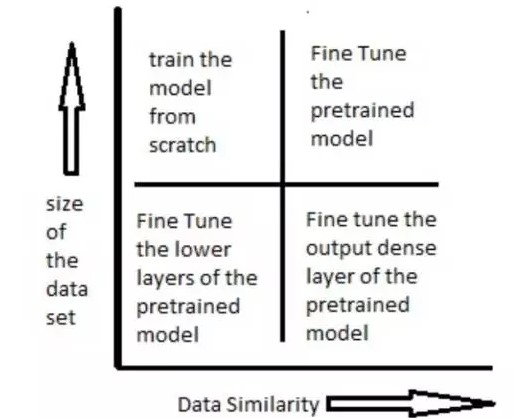
6、迁移学习
import numpy as np
from keras.datasets import mnist
import gc

from keras.models import Sequential, Model
from keras.layers import Input, Dense, Dropout, Flatten
from keras.layers.convolutional import Conv2D, MaxPooling2D
from keras.applications.vgg16 import VGG16
from keras.optimizers import SGD

import cv2
import h5py as h5py
import numpy as np
def tran_y(y):
    y_ohe = np.zeros(10)
    y_ohe[y] = 1
    return y_ohe

# 如果硬件配置较高,比如主机具备32GB以上内存,GPU具备8GB以上显存,可以适当增大这个值。VGG要求至少48像素
ishape=48
(X_train, y_train), (X_test, y_test) = mnist.load_data()

X_train = [cv2.cvtColor(cv2.resize(i, (ishape, ishape)), cv2.COLOR_GRAY2BGR) for i in X_train]
X_train = np.concatenate([arr[np.newaxis] for arr in X_train]).astype('float32')
X_train /= 255.0

X_test = [cv2.cvtColor(cv2.resize(i, (ishape, ishape)), cv2.COLOR_GRAY2BGR) for i in X_test]
X_test = np.concatenate([arr[np.newaxis] for arr in X_test]).astype('float32')
X_test /= 255.0

y_train_ohe = np.array([tran_y(y_train[i]) for i in range(len(y_train))])
y_test_ohe = np.array([tran_y(y_test[i]) for i in range(len(y_test))])
y_train_ohe = y_train_ohe.astype('float32')
y_test_ohe = y_test_ohe.astype('float32')

model_vgg = VGG16(include_top = False, weights = 'imagenet', input_shape = (ishape, ishape, 3))
#for i, layer in enumerate(model_vgg.layers):
#    if i<20:
for layer in model_vgg.layers:
        layer.trainable = False
model = Flatten()(model_vgg.output)
model = Dense(4096, activation='relu', name='fc1')(model)
model = Dense(4096, activation='relu', name='fc2')(model)
model = Dropout(0.5)(model)
model = Dense(10, activation = 'softmax', name='prediction')(model)
model_vgg_mnist_pretrain = Model(model_vgg.input, model, name = 'vgg16_pretrain')
model_vgg_mnist_pretrain.summary()
sgd = SGD(lr = 0.05, decay = 1e-5)
model_vgg_mnist_pretrain.compile(loss = 'categorical_crossentropy', optimizer = sgd, metrics = ['accuracy'])
model_vgg_mnist_pretrain.fit(X_train, y_train_ohe, validation_data = (X_test, y_test_ohe), epochs = 10, batch_size = 64)
#del(model_vgg_mnist_pretrain, model_vgg, model)
for i in range(100):
    gc.collect()_________________________________________________________________
from keras.datasets import mnist
import gc

from keras.models import Sequential, Model
from keras.layers import Input, Dense, Dropout, Flatten
from keras.layers.convolutional import Conv2D, MaxPooling2D
from keras.applications.vgg16 import VGG16
from keras.optimizers import SGD
import matplotlib.pyplot as plt
import os

import cv2
import h5py as h5py
import numpy as np
def tran_y(y):
    y_ohe = np.zeros(10)
    y_ohe[y] = 1
    return y_ohe

# 如果硬件配置较高,比如主机具备32GB以上内存,GPU具备8GB以上显存,可以适当增大这个值。VGG要求至少48像素
ishape=48
(X_train, y_train), (X_test, y_test) = mnist.load_data()

X_train = [cv2.cvtColor(cv2.resize(i, (ishape, ishape)), cv2.COLOR_GRAY2BGR) for i in X_train]
X_train = np.concatenate([arr[np.newaxis] for arr in X_train]).astype('float32')
X_train /= 255.0

X_test = [cv2.cvtColor(cv2.resize(i, (ishape, ishape)), cv2.COLOR_GRAY2BGR) for i in X_test]
X_test = np.concatenate([arr[np.newaxis] for arr in X_test]).astype('float32')
X_test /= 255.0

y_train_ohe = np.array([tran_y(y_train[i]) for i in range(len(y_train))])
y_test_ohe = np.array([tran_y(y_test[i]) for i in range(len(y_test))])
y_train_ohe = y_train_ohe.astype('float32')
y_test_ohe = y_test_ohe.astype('float32')

model_vgg = VGG16(include_top = False, weights = 'imagenet', input_shape = (ishape, ishape, 3))
for layer in model_vgg.layers:
        layer.trainable = False
model = Flatten()(model_vgg.output)
model = Dense(4096, activation='relu', name='fc1')(model)
model = Dense(4096, activation='relu', name='fc2')(model)
model = Dropout(0.5)(model)
model = Dense(10, activation = 'softmax', name='prediction')(model)
model_vgg_mnist_pretrain = Model(model_vgg.input, model, name = 'vgg16_pretrain')
model_vgg_mnist_pretrain.summary()
sgd = SGD(lr = 0.05, decay = 1e-5)
model_vgg_mnist_pretrain.compile(loss = 'categorical_crossentropy', optimizer = sgd, metrics = ['accuracy'])
log  = model_vgg_mnist_pretrain.fit(X_train, y_train_ohe, validation_data = (X_test, y_test_ohe), epochs = 10, batch_size = 64)

score = model_vgg_mnist_pretrain.evaluate(x_test, y_test, verbose=0)
print('Test loss:', score[0])
print('Test accuracy:', score[1])

plt.figure('acc')
plt.subplot(2, 1, 1)
plt.plot(log.history['acc'],'r--',label='Training Accuracy')
plt.plot(log.history['val_acc'],'r-',label='Validation Accuracy')
plt.legend(loc='best')
plt.xlabel('Epochs')
plt.axis([0, epochs, 0.9, 1])
plt.figure('loss')
plt.subplot(2, 1, 2)
plt.plot(log.history['loss'],'b--',label='Training Loss')
plt.plot(log.history['val_loss'],'b-',label='Validation Loss')
plt.legend(loc='best')
plt.xlabel('Epochs')
plt.axis([0, epochs, 0, 1])

plt.show()
os.system("pause")



(5keras自带的模型之间的关系)自己动手,编写神经网络程序,解决Mnist问题,并网络化部署的更多相关文章
- jeecms系统使用介绍——jeecms中的内容、栏目、模型之间的关系
转载:https://blog.csdn.net/dongdong9223/article/details/76578120 jeecms是一款很不错的cms产品,之前在文章<基于Java的门户 ...
- mysql中相关,无关子查询,表与表之间的关系以及编码和乱码的解决
※MySQL中的字符编码(注意,utf8中没有'-',跟Java中不一样)SHOW VARIABLES; //查看系统变量//查询字符编码相关的系统变量SHOW VARIABLES WHERE var ...
- flask 模型之间的关系 操作注意点
在创建模型时使用 # 关联表与表 添加以下参数 lazy='dynamic' 在两个表之间使用关联字段可以再次进行操作,筛选,分页 具体操作请看 https://www.bilibili.com/ ...
- Window系统、主函数和窗体函数这三者之间的关系
理解Window系统.主窗体.窗体函数这三者之间的关系,对于编写Windows程序十分重要. 主函数和窗体函数都是由Windows系统来调用的函数.仅仅只是主函数是程序启动之后.系统首先调用的函数: ...
- atitit.基于组件的事件为基础的编程模型--服务器端控件(1)---------服务器端控件和标签之间的关系
atitit.基于组件的事件为基础的编程模型--服务器端控件(1)---------服务器端控件和标签之间的关系 1. server控件是要server了解了标签.种类型的server控件: 1 1. ...
- 举例说明EF CORE中模型之间的一对多、多对多关系的实现
该例子是我临时想出来的,不具有任何的实际意义.类图如图1所示. 图1 类代码: [Table("student")] public class Student { public i ...
- java内存模型及内存与cpu之间的关系
主内存和cpu之间的关系,因为cpu是在是处理速度太快了.所以一般cpu都有一个cpu缓存,上图的意思是主内存--->cpu缓存--->cpu寄存器--->cpu执行处理,写的时候反 ...
- 类与类之间的关系UML模型图
关联.依赖.聚合.组合.泛化.实现 类之间可能存在以下几种关系:关联(association).依赖(dependency).聚合(Aggregation,也有的称聚集).组合(Composition ...
- UML类图及类与类之间的关系
原文地址:http://www.uml.org.cn/oobject/201211231.asp 类图用于描述系统中所包含的类以及它们之间的相互关系,帮助人们简化对系统的理解,它是系统分析和设计阶段的 ...
随机推荐
- ida快捷键
跳转相关: ctrl+1 快速查看 ctrl+L 查看所有数据和函数 Ctrl+P跳转到某函数(ChooseFunction()) Ctrl+S跳转到指定节 s=segment Ctrl+x查找引用 ...
- vue打包后404,webpack配置问题
首先声明这是基于vue2.x的 1. 将其中build的配置项assetsPublicPath进行修改,改为上图-->目的是将资源文件的引入路径,改为相对地址(相对index.html) 2.h ...
- unity3d射线控制移动
看看效果图 代码: using UnityEngine; using System.Collections; public class T2 : MonoBehaviour { // Use this ...
- 一步一步学Python(3) 基础补充
最近在系统学习Python,以MOOC上面的一套Python3的课程为基础.本文主要总结一下基础部分的关键点. 1.python基本数据类型 2.python运算符 3.构建简洁高效的IDE环境 4. ...
- spring之文件上传
<%@ page language="java" contentType="text/html; charset=UTF-8" pageEncoding= ...
- cookie之三天免登录代码
LoginCookie.java 1 package com.bjsxt.cookie; import java.io.IOException; import java.net.URLDecoder; ...
- mysql 命令一套
MySQL mysql -h主机地址 -u用户名 -p用户密码 首先打开DOS窗口,然后进入目录mysql\bin,再键入命令mysql -u root -p,回车后提示你输密码.注意用户名前可以有 ...
- python基础-abstractmethod、__属性、property、setter、deleter、classmethod、staticmethod
python基础-abstractmethod.__属性.property.setter.deleter.classmethod.staticmethod
- springboot整合webSocket的使用
引入jar包 <dependency><!-- 5.引入websocket--> <groupId>org.springframework.boot</gro ...
- 【Alpha版本】冲刺阶段——Day5
[Alpha版本]冲刺阶段--Day5 阅读目录 今日进展 问题困难 明日任务 今日贡献量 站立式会议 TODOlist [今日进展] 完成登录类代码 public void LOGIN() { co ...